More
    Home Blog Page 22

    Simple Ways to Make the Best of Business Communications

    Every day you communicate with your employees, customers, and potential customers. Business Communication is so habitual that we don’t stop and consider its impact on business. Business communication involves passing information between people in and outside a company. Therefore, effective business communication between the management and employees can help achieve business goals. So, how do you make the best of business communications to improve your company’s success?

    1. Find the Right Communication Channel

    There are different communication channels you can use depending on the nature of the message. So, you need to choose a communication strategy that communicates your message clearly.

    A channel used for internal communication may not be the best for external communication with clients. For example, if you would like team communication to make a formal announcement, you can use an office email or create a company memo. On the other hand, if the message is non-formal, you can use instant messaging or phone calls.

    To choose the right communication channel, you need to consider your audience. Is it team communication, or are you looking to communicate with your customers? Good communication always begins by identifying the audience and then finding the best communication strategy.

    2. Enroll Your Team in a Business Communication Course

    Your employees interact with customers daily. Therefore, you need to ensure they have the best business communication skills to retain customers. The first step towards making the best of business communication is taking a business communication course with your team.

    Business communication
    Business communication

    The course will teach your staff the different types of business communication. Additionally, it will teach them how to use various communication tools like Slack. Thanks to the pandemic, there are many online classes that make it easy to study at a time convenient to your schedule.

    Besides, you can also sign them up for webinars and have them use online tutorials to practice their communication skills. A business communication course can also help your team members know how to use business communication tools like video conferencing, VoIP, social media apps like LinkedIn, and other comms.

    3. Use Digital Digital Signage

    In this technological era, you need to use technology to make the best of business communication. Social media presence and networking are major communication channels that both small businesses and big-sized companies can use. Indeed, technology makes it easier and more effective to compare. For instance, using an intranet within the business or social media apps enables you to communicate efficiently and quickly. Other best practices include instant messages, phone calls, and digital signage.

    Digital signage uses existing company infrastructure to offer real-time communication options. It needs minimal effort as it only needs an intranet network connection, a smart device, screen sharing, and workspace apps within the company.

    Moreover, since digital signage comes in different sizes and is easily customizable, it can be used for internal communication and external communication. Digital signage is ideal for businesses in different industries and comes in premade templates, making it effortless to pass your message. Additionally, they can be used to communicate pricing to customers or create dashboards and showcase them in project management.

    4. Pay Attention to Your Team Members

    Employee engagement is vital to every organization and is based on communication between employees and the organization. Actually, proper communication with team members leads to improved employee engagement with the right collaboration tools, which results in better business success. When there is team collaboration, the employees will handle their workflow better, increasing their individual and organizational performance. Additionally, since they will be motivated, it will increase employee retention.

    Paying attention to your employees will also ensure consistency as there will be clear instructions on what is expected from them. It will also promote two-way feedback, which encourages a culture where team members can share knowledge ideas and act on them.

    Also Read:

    5. Invest in Collaboration Tools and Communication Software

    Did you know that 86% of business owners attribute poor communication tools as a cause of business failure? Without proper collaboration tools, there will be ineffective internal communication. Unfortunately, employees cannot perform optimally with incomplete communication that forces them to piece together bits of information.

    Luckily, there are numerous collaboration tools you can invest in for better business communication. For example, Microsoft Teams offers instant messaging and ensures all members of your business remain organized. It allows cloud storage and works well on mobile devices, both Android and iOS.

    Microsoft Teams also offers versatility as it has a video call integration. Thus, you can make or join zoom calls alongside other video calls. Therefore, it is an effective communication software that every business can use.

    Takeaway

    Business communication ensures a constant flow of accurate information within and outside the company. What’s more, it ensures all team members of the company work towards a common goal while keeping clients in the loop. Use the tips above to make the best of business communications.


    How Does GPU affect FPS in Gaming?

    If you are a gamer, you probably are looking for the answer to the question – “Does GPU affect FPS?” and the fact that you are on this website reading this article, means that you are a dedicated gamer with a need for a good gaming experience.

    Getting a good frame per second (fps) rate is critical because if your PC can’t deliver a good fps in whatever software or game you’re using, you’ll most likely see slowness, crashes, and errors. However, have you ever considered that your graphics card is mostly responsible for this FPS, and that increasing the GPU can boost the FPS? Does GPU affect FPS as the only variable?

    Does GPU affect FPS while gaming or is it the CPU?

    Even though the GPU is important to get an enriching gaming experience, the CPU is equally as important. Both of them are equally important.

    It’s a race to see who can finish their share of rendering the next frame first. Game logic, boundary and collisions, AI decisions, animation for every object on the screen, and sound must all be processed by the CPU. For each pixel, the GPU must calculate geometry, texturing, lighting, shading, and everything else that goes into the image.

    When operating any software or game, the frame rate is affected by the graphics card. So even if you get an expensive CPU, you won’t be able to get high frame rates when running graphics-intensive games and software if you don’t have a strong GPU.

    Also Read:

    Synergy between GPU and CPU

    Your FPS will suffer if you have a fast CPU but a slow GPU. Same problem with a fast GPU and a sluggish CPU. You’ll need a decent GPU to get good FPS, but you’ll also need a CPU that isn’t a bottleneck for the GPU. (Of course, other portions could become bottlenecks, but that’s another issue.)

    does gpu affect fps - Installing Own GPU in PC

    This is also dependent on the game you are playing. If the FPS is determined by computations based on environmental factors rather than the presentation of content, you’ll be more reliant on the CPU. The ability to simply generate the images, on the other hand, is what binds the FPS in the average game.

    So the inherent answer to the question “Does GPU affect FPS?” is yes, the GPU does affect FPS but it is not the only one responsible for it.

    Does GPU affect FPS while Gaming?

    If you are a gamer at heart, you must understand that a graphic processing unit, or a graphic card, is your best friend. It should be a very important decision-maker in your process of choosing a computer if you are planning to primarily use it for gaming.

    If your graphic card gives you an FPS of less than 30 frames per second, you might want to consider changing it. On the other hand, an FPS rate of 60 frames per second or more will give you the best gaming experience that you will ever have. Some users have reported that the range between 40-60 frames per second helps the games run smoothly. However, the extent to which the GPU affect your FPS by the range of the graphic card that you decide to put on your PC.

    Recommended GPUs

    • AMD Vega 8 (In the Low-Range): This is an integrated graphics card found in AMD 5000 series CPUs, such as the AMD Ryzen 5700G. This is currently one of the best iGPUs available.
    • NVIDIA GTX 1060Ti (In the Mid-Range): A dedicated GPU that can be found in good gaming PCs at a reasonable price.
    • NVIDIA RTX 3080 (In the Mid-Range): NVIDIA’s flagship and most costly dedicated GPU.

    Conclusion

    So, does GPU affect FPS? It most certainly does. The graphics card you choose might have a significant impact on your gaming FPS. Getting a high-end graphics card, on the other hand, isn’t inexpensive. A high-end graphics card can cost as much as a full-fledged computer. If you’re a budget gamer, my recommendation is to at least purchase a quality low-mid range dedicated graphics card. Even so, they will be far superior to the CPU’s inbuilt graphics cards.

    What is a Headless CMS? Benefits and More

    The way content is consumed changes every day. We have shifted from computers to smartphones, smartwatches, smart homes, and several other Internet of Things in about two decades. The quick changes mean that we have to adapt and change the way we do things. One of the areas that have been affected is content management. Today, the evolution has led to the rise of a headless approach to managing web development, and the invention of headless CMS is one way to cope with the changes.

    You are probably wondering, What is Headless CMS? Don’t worry because, in the following sections, we will tell you more about the traditional and headless CMSes.

    The evolution of the traditional CMS

    Using the “headed” architecture has been the norm. These CMSes made their first appearance following the debut of the World Wide Web to allow organizations to manage their web content with considerable ease.

    What is a Headless CMS?

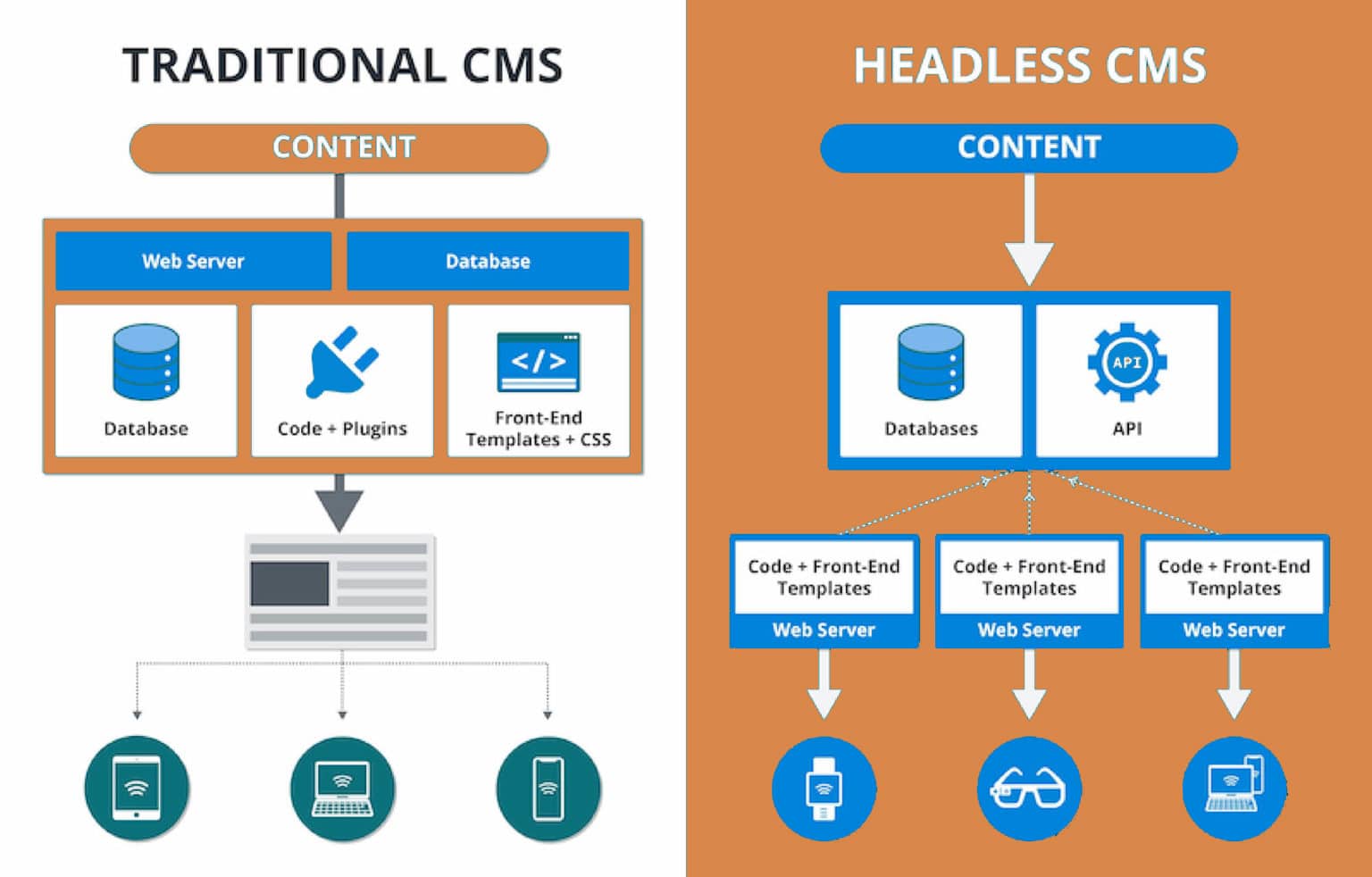
    A traditional CMS contains both a content repository (back end) and a display layer, which are connected. This CMS allows you to create and update content and store your content in a local database. The “headed” CMS has a defined and rigid way that developers use to get their content displayed and does not always play satisfactorily with adjacent information systems. In short, this is old technology, but it still works. Some organizations are still using it, but with limitations.

    A major limitation of this technology that has forced companies to seek alternatives is that it does not allow content to be reused for other types of presentation. This is a significant concern because content-dissemination options have been increasingly expanding, and organizations are focusing on content modelling. Apart from the content being displayed via a browser, it needs to be tailored to appear in other applications or other devices.

    Now, with a headless CMS from Kontent by Kentico, you will overcome this challenge.

    What is a Headless CMS?

    In simple terms, a headless CMS refers to a back-end CMS, with the content database and the front-end layer existing independently of each other. Unlike the traditional CMS, the headless CMS does not provide a presentational layer, which is likened to the head. It only has a front-end layer (likened to a body). A headless CMS acts as a repository for storing your data.

    In other words, all of your assets and content live in the headless CMS. You can then utilize an API, such as GraphQL and ESTful APIs, to distribute your structured content to any device or channel you desire – your mobile app, email marketing, website, etc.

    Also Read:

    Why would you need a headless CMS?

    You need a headless CMS because we live in an omnichannel era. The content your business creates for your website should also appear on integrations, apps, newsletters, and more channels but managing a duplicate copy of your content for several channels is a terrible nightmare. In an omnichannel environment, if your business makes an update on how it describes a given product, you should be able to make it in a centralized location and make the changes to all places it matters. This can only happen with a headless CMS. Thankfully, Kontent provides the best headless CMS for your business. Headless CMS from Kontent works as a central source of life for all your organization’s assets and content. It gives you a central place to edit, manage, update, and publish your marketing content.

    Besides allowing you to share content to several channels, there are some more reasons why you would want to utilize a headless CMS, including:

    • Enhanced developer flexibility – a headless architecture provides you with the flexibility of choosing a front-end tool of your liking
    • Better security – The separation of the back-end and front-end layers makes targeted attacks quite difficult
    • Personalized and custom experiences – The headless CMS by Kontent gives you the opportunity to customize various experiences for different channels, all from a central content source.

    Conclusion

    We have answered your question: what is headless CMS? We have also shown why you should have it for your content management. Kontent by Kentico will give you the best endless CMS solution for your business!

    5 Tips to Stay Organised as a Small Business Owner

    You are most likely working with a small team as a small business owner. Well here are 5 tips to help you stay organised as a small business owner. Perhaps you are just getting started, or perhaps you have been in the company for a long and wish to keep your staff small. You might even be running a one-person shop, where you handle everything from marketing to customer service to lease payments and inventory management.

    If you are like many small business owners, you probably work for more hours per week than you would if you worked for someone else, regardless of your business structure. And, regardless of how much you enjoy your job, you (or your friends and family) probably wish you could recapture some of that time. This dream may appear impossible unless you recruit more people.

    However, if you do not have the funds or the willingness to hire more people, this ideal may appear out of reach. But it does not have to be that way. Instead of hiring more employees, the approach ensures that every part of your company is as well-organised as possible.

    You can be more effective and productive if you are more organised. And when you can achieve more in fewer hours, you have more time on your hands to do whatever you want with.

    As a small business owner, here are some strategies for getting and staying organised.

    1. Organise your office space

    Everything in your workplace area was undoubtedly tidy when you originally put it up. But, over time, you’ll inevitably amass paperwork and all the other accoutrements that come with running a business.

    Your office may now appear to have been ravaged by a tornado. If you find yourself spending a significant amount of time looking for things in your office, it’s time to get it organised.

    Gather any documents and objects that are strewn about the room and sort through them thoroughly. Toss it if you don’t need it. If you do require it, be certain it has a permanent residence. So what if that means investing in some vintage filing cabinets or desk organisers?

    It is easier to build an orderly method for getting things done when your actual environment is clean.

    2. Manage Customer Relationships using software

    Your customer relationships are the lifeblood of your business as a small business owner. Naturally, you want every consumer to feel valued. But doing so as a small team is difficult enough — and it is far more difficult if you do not have a system in place to manage client data.

    Customer relationship management software is the best approach to keep your data organised. These systems centralise contact information and discussion notes in one place, making it easier to look up consumer information.

    You can even examine transaction details in the same spot if your CRM interfaces with your accounting software. This allows you to maintain a close eye on each customer’s account and give highly tailored service.

    When your consumers are happy, you will spend less time addressing concerns and more time on other tasks.

    Also Read:

    4. Make Your Marketing Efforts More Efficient

    Stay Organised as a Small Business Owner
    Strategy Marketing concept

    Prospective clients will not buy from your firm until they are aware of it. When you are starting a new business, it is normal to want to advertise it as much as possible.

    However, this type of “shout it from the rooftops” marketing may only last so long. You will need to build a more organised marketing strategy beyond a certain point if you want to focus on other elements of your firm.

    You want to make sure your marketing efforts will resonate with your target demographic when you are creating them.

    However, do not make educated guesses about who your target audience is and what they want to know. Instead, use the information in your CRM to create a map of your current customers’ demographics and purchasing habits.

    This data will aid in the creation of buyer personas, which will aid in the organisation of your marketing efforts.

    Your CRM can also help you streamline your email marketing efforts. Instead of exporting and uploading your QuickBooks customer list (or worse, manually sending hundreds of emails), send your CRM contacts to your email marketing programme with a single click.

    5. Keep track of your receipts for Taxes

    You are familiar with the sensation. Tax season is approaching, and you have not been keeping track of your expenses all year.

    There was never enough time to deal with those receipts as a busy small business owner; you believed you would have more time in the new year after things “calmed down.” You are busier than ever, which is excellent for your business but bad news for the approaching tax deadline. Make this the last year where you find yourself in this situation.

    Spend the last few minutes of each day, starting today, recording your expenses. Receipts should be filed or scanned into labelled folders, and a naming scheme should be devised that tells you what each document is without having to examine it.

    Staying on top of taxes and adhering to deadlines is a cornerstone of a successful small business. It ensures financial stability by avoiding costly penalties and interest charges. This discipline facilitates accurate financial planning, enabling informed business decisions and sustainable growth. Furthermore, keeping a vigilant eye on taxes encompasses not only federal obligations but also state-level responsibilities, including the crucial Texas sales tax. Being punctual in remitting these taxes demonstrates a commitment to legal compliance at both state and federal levels. Timely tax compliance fosters positive relationships with tax authorities, bolstering your business’s reputation and credibility. This proactive approach also positions your business to take full advantage of available deductions and credits, ultimately optimizing your tax liability while contributing to the financial health and sustainability of your enterprise.

    There are a lot of apps available for tracking business spending if you prefer a more digital alternative. Whatever way you use, setting aside 15 minutes every day to stay organised can save you (and your accountant) a lot of grief come tax season.

    6. Use Integrated Tools to Save Time

    Even if you have excellent software at your disposal, switching between apps takes time. Furthermore, entering data into numerous systems can result in errors that have long-term consequences. You want to automate and integrate as much of your work as possible to increase productivity and reduce errors.

    The use of stationery such as notepads and notepads can help you stay organised. There are several ways that you can benefit from the use of such stationery. You can find stationery to help you stay organised, including diaries and notepads, from Pronto Direct.

    4 Best Family Tracker Apps for iOS

    In this article we cover some of the best family tracker apps for iOS, which will help you keep track of your loved ones whenever you want to, to ensure that they are safe and sound.

    When it comes to the safety of our family, we exercise tremendous caution. Gone are the days when our parents would contact us every time they wanted to know where we were. And the day is coming when we will take a step forward and delegate caregiving to technology.

    This would not have been possible without the help of family locator apps. These days, everyone has a phone, so why not put this to good use? These family tracker apps for iOS will help you in tracking the whereabouts of your family.

    The Best Family Tracker Apps for iOS

    1. Glympse

    Price: Free

    ‎Glympse -Share your location
    ‎Glympse -Share your location
    • ‎Glympse -Share your location Screenshot
    • ‎Glympse -Share your location Screenshot
    • ‎Glympse -Share your location Screenshot
    • ‎Glympse -Share your location Screenshot
    • ‎Glympse -Share your location Screenshot

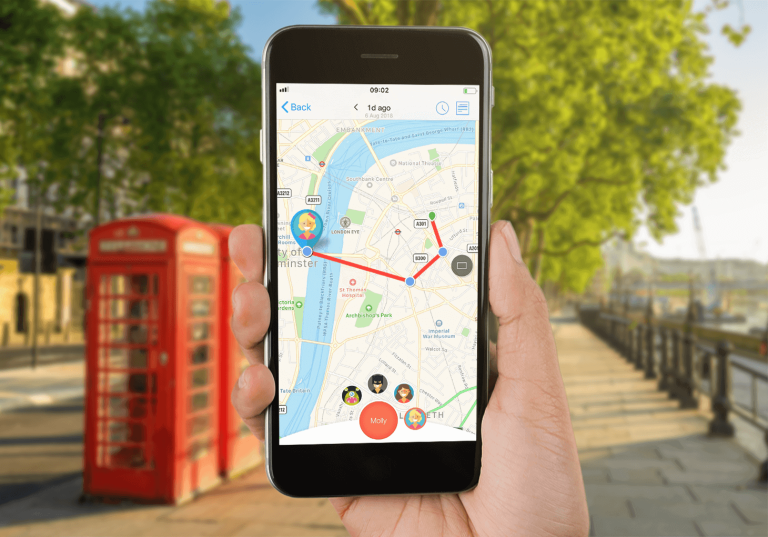
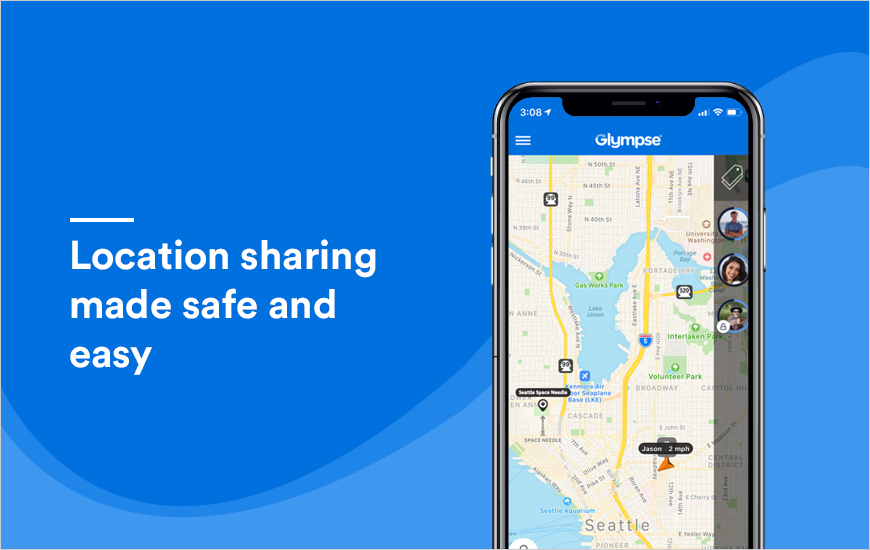
    The first app and one of the best family tracker apps for iOS is Glympse. Glympse is a quick, free, and easy method to share your current location with family, friends, and coworkers using GPS tracking on your mobile smartphone! This is a location sharing on your terms; you choose who and when to see your location!

    Features-

    • Simple: no sign-up is required
    • Secure: share your location on your terms – you are in control
    • Easy: no sign-up is required
    • Safe: your Glympse automatically expires after sharing has ended
    • Live: use a dynamic map to share your location in real-time.
    • View: Friends or family members in a Private Group or share to a Public Group
    • Open: share with anyone – no app required to view
    • Passive: operates in the background
    • Global: works anywhere if GPS and a data connection are available

    2. Life360

    Price: Free/Premium Plans

    ‎Life360: Find Family & Friends
    ‎Life360: Find Family & Friends
    Developer: Life360
    Price: Free+

    Life360 is our second pick for the best family tracker apps for iOS. With complete safety features for life at home, on the web, and on the go — all in one location for increased value and convenience — protect and connect the people who matter most. Take use of cutting-edge tools that go beyond a simple GPS phone tracker.

    Bring your family closer together with complete safety measures tailored for today’s busy lives – all in one convenient location for extra value and convenience. Smart tools and 24/7, wherever emergency support go beyond basic GPS phone tracking.

    Features of the Premium Plan:

    • SOS to send a silent alert with your location to family members, emergency contacts, and responders.
    • 24/7 Emergency dispatch that’s always on call for your entire family. Even if you can’t call for help, we will.
    • Family Safety Assist for comprehensive real-time specialist support anytime, anywhere, and in any situation.
    • Identity Theft Protection to safeguard each family member’s sensitive digital information and white-glove restoration service, including up to $1M in coverage.

    Also Read:

    3. Foursquare Swarm

    Price: Free

    The third app in the list of best family tracker apps for iOS is Foursquare Swarm. The best way to keep track of where you go is to use Swarm. You’ll never question “what was the name of that place?” again, whether it’s the new café downtown or that delicious ramen spot in Tokyo.

    Check in so you can remember anywhere with Swarm, whether you choose to be a local or are trying to explore the world. This is how easy it is to keep track of your life. Every time you check in, we’ll add a point to your own map so you can see where you’ve been. Add a photo or a comment to your check-ins to make the memories even better for your future self.

    Features –

    • Log in to swarm to see where you have been
    • Get insights into your exploration habits
    • Attach notes to remember things about the places you visit.

    4. Google Maps

    ‎Google Maps
    ‎Google Maps
    Developer: Google LLC
    Price: Free
    • ‎Google Maps Screenshot
    • ‎Google Maps Screenshot
    • ‎Google Maps Screenshot
    • ‎Google Maps Screenshot
    • ‎Google Maps Screenshot
    • ‎Google Maps Screenshot
    • ‎Google Maps Screenshot
    • ‎Google Maps Screenshot
    • ‎Google Maps Screenshot
    • ‎Google Maps Screenshot
    • ‎Google Maps Screenshot
    • ‎Google Maps Screenshot
    • ‎Google Maps Screenshot
    • ‎Google Maps Screenshot
    • ‎Google Maps Screenshot
    • ‎Google Maps Screenshot
    • ‎Google Maps Screenshot
    • ‎Google Maps Screenshot
    • ‎Google Maps Screenshot
    • ‎Google Maps Screenshot
    • ‎Google Maps Screenshot

    The last app in the collection of best family tracker apps for iOS is the good ol’ Google Maps, which comes integrated with all other Google offered apps. Google Maps will let you navigate your world more quickly and easily.

    There are almost 220 countries and territories included on the map, as well as hundreds of millions of businesses and locations. Get real-time GPS navigation, traffic, and transport information, as well as the most up-to-date information on businesses, such as grocery stores, pharmacies, and other key locations.

    Features:

    • It is available on both, mobile and web.
    • Share your real-time location with friends and family members.
    • Share your location for a duration between 1 hour to 3 days or infinitely, until off.
    • See the contact’s address on Google Maps and reach there using directions.
    • Find the estimated time of arrival and keep up with your schedule.
    • Get real-time information about buses, trains, and ride-share.
    • Plan with your group and vote in real-time.
    • View the battery of the added devices, especially if you’re tracking kids.

    Conclusion

    These are some of the best family tracker apps for iOS. Some of these require both devices to be downloaded, while others work with the web and others don’t require any software at all. Some may be confined to specific locations, while others may only be available to operators. Please let us know which family tracking software worked best for you. All of these apps are feature-rich and sturdy.

    How to Find and Remove Duplicate Photos in Windows 10 & 11

    0

    Are you running out of storage space because of duplicate photos and don’t know how to remove them? If yes, then you should look at the different ways to find and clean similar photos from Windows 10/11 mentioned in this article.

    Duplicate photos are very bad for your computer because they consume a lot of space. Because of this, you won’t be able to store games or other big files. If you don’t have enough space your computer will show an error stating “there isn’t enough space”.

    Since the original photos and the duplicates look the same, it is hard to remove them. However, with the help of Windows integrated tools and some duplicate photo finder and remover applications, you can easily delete these photos. So, continue reading this post to get knowledge about different methods to remove duplicate photos from your Windows 10/11 device.

    Common Reasons Behind Generating Duplicate Images

    As we use our PCs, the computer makes duplicate copies of the images stored in it. The most common reasons due to which this happens are:

    How To Find And Remove Duplicate Photos In Windows 10/11 Device?

    There are many reasons that can create duplicate images. However, there is always a way through which you can delete them. Below are some of the best tried and tested ways that will help you get rid of these duplicate images.

    Delete Duplicate Images Using File Explorer

    File Explorer is a Windows integrated utility that helps you to manage and access all kinds of files. This utility doesn’t have the feature to automatically point out duplicate images and delete them.

    However, there are some ways through which you can delete duplicate and similar images on your Windows PC using File Explorer. Follow the instructions given below to use this tool:

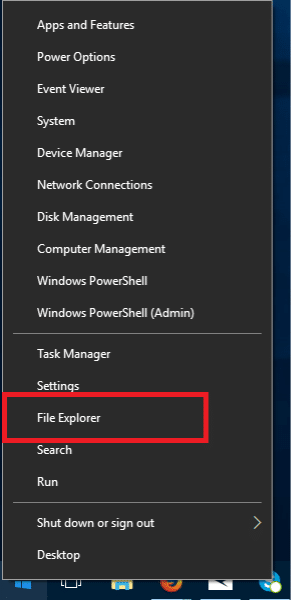
    Launch File Explorer either by searching it on the taskbar or by right-clicking on the Start button and selecting File Explorer from the options.

    • Open any folder that contains images.
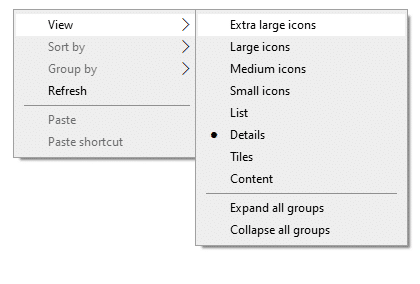
    • Right-click on empty space within the page and select View > choose Large icons (or Extra large icons)
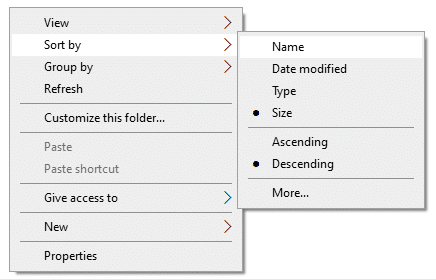
    • Again right-click on the page and select Sort By > choose Size or Name
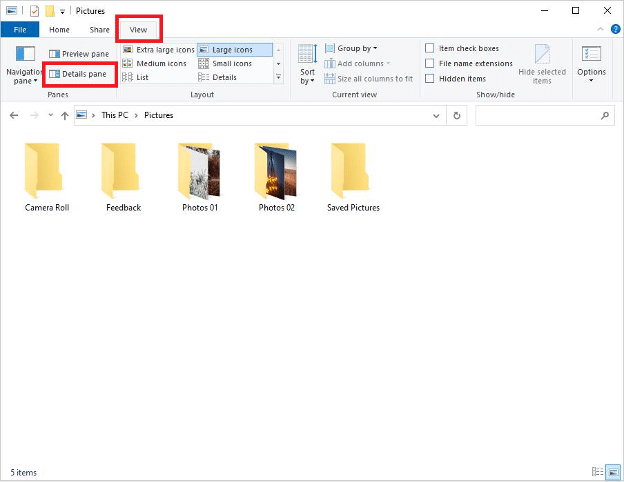
    • Click on the View tab at the top of the page. Under the View tab, click on the Details pane.
    Remove Duplicate Photos in Windows 10 and 11
    • Now, review all the photos and then select all the duplicate photos by holding the Ctrl key and clicking on each photo manually.
    • After selecting all the duplicate images, either press the Delete key or right-click on the photos and select Delete. You can also press the Shift + Delete key simultaneously to delete them permanently.

    This manual process can be very lengthy and hectic for some users. However, in this method you dont need to download any third-party software, all you are using is a Windows integrated utility.

    Also Read:

    Keep Your Windows PC Clean With Microsoft Photos App

    Microsoft photos is another Windows built-in tool that helps you to organize your photos. It has a feature called “Linked duplicates” that hides duplicate images to provide you with a smoother experience. You can turn this feature off to delete the duplicate images. To do so follow these instructions:

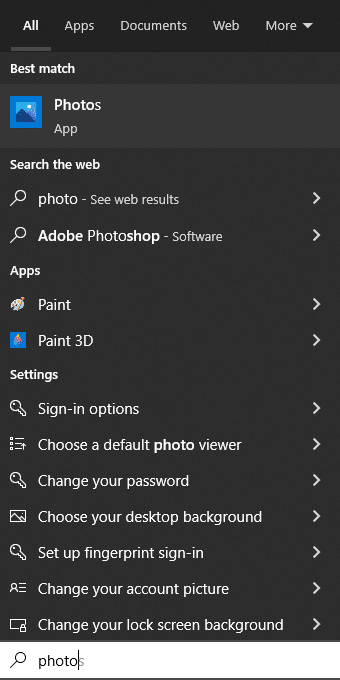
    Search Photos in the taskbar and hit the Enter key

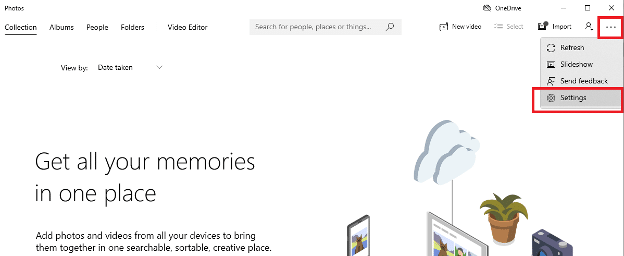
    Click on the Three-dot option at the top-right corner of the page and select the Settings option

    Remove Duplicate Photos in Windows 10 and 11

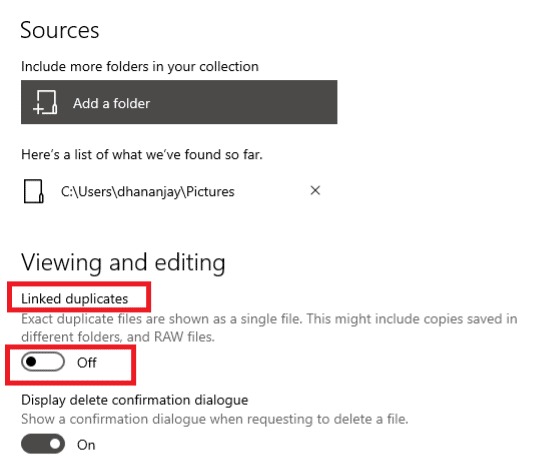
    Under “Viewing and Editing” look for the Linked duplicates option. If its toggle is ON, switch it OFF

    Return back to the Photos app’s main window

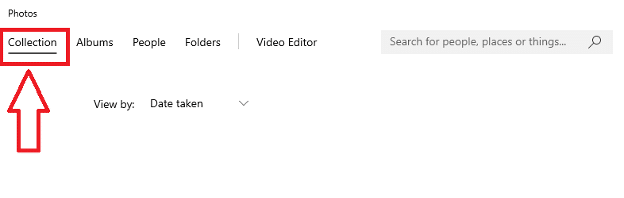
    Click on the Collection tab at the top of the page

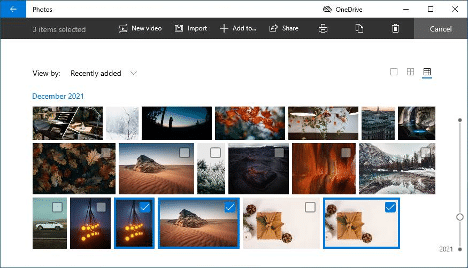
    Go through the photos manually and select the duplicate or similar ones

    After selecting, click on the Delete icon and then select the Delete button to confirm your actions

    Remove Duplicate Photos in Windows 10 and 11

    Note: Check the Recycle bin for the deleted photos. Generally, when you select a photo and click on delete it goes straight to the recycle bin. Until you clean or restore that photo it will stay there. So it’s best to check your recycle bin when the process is finished.

    Remove Duplicate Images And Other Unwanted Files Automatically

    Both the methods mentioned above can be very tedious and time-consuming especially when you have tons of photos. But you can always download a third-party application that will delete duplicate photos automatically. These duplicate photos finder programs come with various features. Such as:

    Here are some of the best duplicate photo finders and removers for Windows 10/11 devices:

    1. Quick Photo Finder
    2. Duplicate Photo Cleaner
    3. Glary Duplicate Cleaner
    4. PictureEcho
    5. Easy Duplicate Finder

    Summing Up

    We hope the different methods mentioned in this guide will help you clean duplicate photos from your Windows device. If your computer has a ROM with less storage space, you can buy an external hard drive. If you have any questions or suggestions related to this write-up share them in the comment section below.

    Instagram for Business: Expert Tips to Grow Your Audience

    The world of marketing changed drastically since the dawn of social media. Now, businesses rush to open profiles on popular social media networks such as Instagram for Business as soon as possible. This isn’t surprising since 90% of Instagram users follow at least one business.

    But it’s not enough to just have an Instagram presence and think half of the work is already done. You need to put in time and effort, but also know how to play the Instagram game. So if you are looking to discover how to make your business stand out on Instagram, you’ve come to the right place. Read our article to learn more.

    Make sure your profile stands out

    Since your profile will be the first thing your potential followers and future customers see, it has to stand out and make a great first impression. 

    When you first create your profile, you need to do the following things:

    • Write a creative bio. In the bio section, you only have 150 characters to introduce your business, so make sure you get creative. Write a short but sweet and on-brand description of your business, add contact information and a link to your site, and don’t be afraid to use emojis.
    • Have a memorable username. If you want to stand out, a memorable username is a must. But the username also needs to be optimized for discoverability, so include at least a relevant part of your business’ name in it and include a keyword if possible.
    • Choose your photo carefully. The profile picture you choose needs to represent your brand identity perfectly, be eye-catching, and promote brand recognition. For businesses, it can be a simple image that includes your logo and the company’s colors.

    Don’t be afraid to post videos

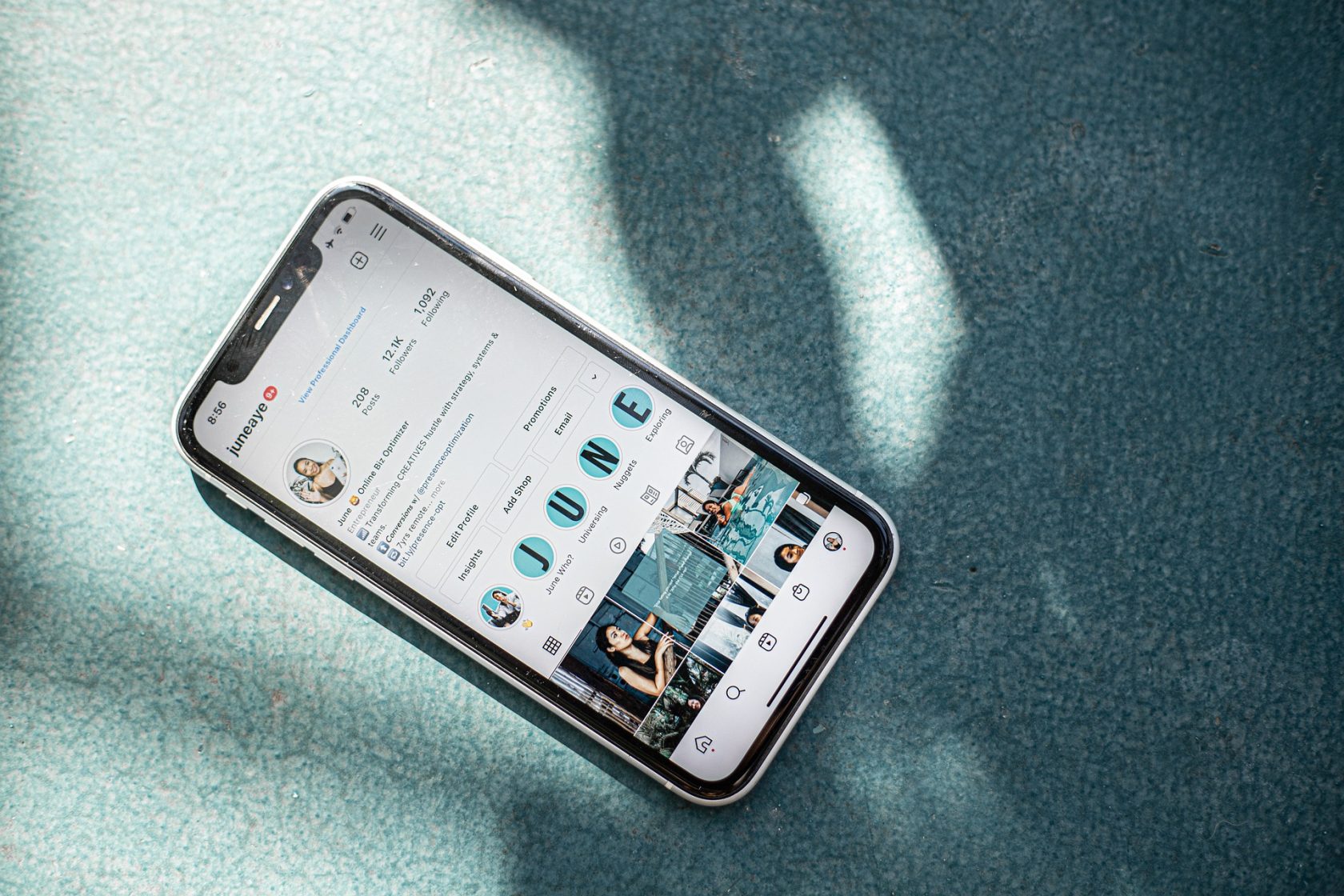
    Instagram for Business Tips to Grow Your Audience

    Instagram is all about visuals, but that doesn’t mean you just have to post photos. While you absolutely need photos on your feed, the businesses that want to stand out do so by posting other forms of media, such as videos.

    Videos are a popular tool in the marketing world and as much as 84% of people say they’ve been convinced to buy a product or service by watching a brand’s video. Videos are engaging and eye-catching, so they should always be a welcome addition to your feed.

    It’s important to say that you don’t have to go overboard with the videos and they shouldn’t be too long. Social media was made for scrolling, so keep it short and sweet – approximately 15 seconds or shorter.

    You can create a video by using Instagram features that create content that looks like moving images such as Boomerang. Or you can use a third-party app on your phone that will allow you to create animations and edit them. Technology has come a long way, use that to your advantage.

    Also Read:

    Work with influencers

    Getting noticed on Instagram can be difficult, especially if you’re just starting and don’t have many customers or followers. But if you want to get noticed instantly by thousands of people, you should consider partnering up with an Instagram influencer.

    Influencer marketing has exploded over the past few years because today’s consumers trust the recommendations they receive from people they trust and admire. If you work with an influencer whose following consists of your ideal audience, you will also be seen as a trustworthy brand.

    When choosing the ideal influencer to partner up with, you should look for someone who you can afford, who is seen as a trustworthy source of information, and who has a dedicated following. And make sure to know the things you need to check before collaborating with Instagram influencers.

    Edit your photos before posting them

    Instagram for Business Tips - Edit Your Photos

    Instagram is all about showing perfect images that inspire people. Nobody wants to see photos that show a rough side of your business. You want to present your brand in a positive light, so make sure to always edit your photos and videos before you post them.

    Instagram has a plethora of filters you can use to achieve the look you’re going for. You can adjust the brightness on the photos to make them either darker or lighter, use saturation to change the colour intensity, and contrast to accent the bright and dark areas better.

    Ideally, your photos should be taken by a professional photographer and high-quality equipment, but if you don’t have the budget for that, at least use the most out of editing.

    Final words

    Instagram is one of the world’s most popular social media networking platforms. Businesses of all sizes and niches use this platform to be noticed, grow, and earn a profit. If you know how to play the Instagram game right, you won’t have any issues growing your business soon.

    5 Best Family Tracker Apps for Android Devices

    Everyone wants to make sure that their loved ones are safe at all times. Family tracker apps for android or iOS phones can help in the same.

    It’s a never-ending conflict between giving your loved one’s independence and wanting them to be in your line of sight at all times. This is why family locator applications are so important for tracking the whereabouts of your loved ones. This is where family tracker apps for android come in.

    Everyone nowadays is always carrying a phone with them. You might wish they’d put it down more often and engage with the world around them. Why not leverage your family member’s excessive connectivity to everyone’s benefit? Android already has the ability to connect to other phones, hence it is easy to track the people you want, all you need is a family tracker app for android.

    5 Best Family Tracker Apps for Android

    1. Life360

    Life360 is meant to relieve families of everyday problems, from real-time location updates to keep everyone in the loop, to Crash Detection and 24/7 Roadside Assistance. Its features for Driving Safety, Digital Safety, Location Safety, and Personal Safety are all designed to keep members safe at all times, which is what makes it one of the best family tracker apps for android.

    Life360: Find Family & Friends
    Life360: Find Family & Friends
    Developer: Life360
    Price: Free

    Steps to Use:

    The Life360 app is very easy to use, and the instructions for the same can be found embedded in the video below:

    Life360 keeps your family safe and connected

    2. Find My Friends

    Use the Find My Friends app to share your current location with family and friends in real-time. This app, however, is not a solution for eavesdropping or hidden surveillance. When this program is running, it will display a persistent notice at all times. Only with the approval of all family members is location sharing possible. This app is a great free alternative when you need a family tracker app for android.

    Find Friends Pro
    Find Friends Pro
    Developer: synchronise
    Price: Free

    Must Read: How to Easily Track and Find Your Friends & Family Using their Mobile Phones

    3. Family Locator – GPS Tracker & Find Your Phone App

    Using Family Locator, you may remain in touch with your family members throughout the day. The family location tracker takes advantage of your phone’s built-in GPS tracker to keep track of your loved ones even when they’re far away! Only with the approval of all family members is GPS location sharing possible. This software prioritises your family’s privacy; only share your phone’s location with individuals you trust. This is one of the best free family tracker apps for android, which also offers premium plans.

    4. ZoeMeb Family Locator

    In the virtual world, children and teens who use cell phones and tablets face the same dangers as adults. However, the same technology that represents a threat can also be used to assist parents to maintain harmony by employing a programme like family tracker apps for android. The ZoeMob Family Locator is a very precise service that uses GPS technology to keep track of your family. Using an exclusive and private family map tool, you can keep track of your children’s whereabouts in a secure manner. You will have peace of mind when you are away from your loved ones.

    Zoemob Family Locator
    Zoemob Family Locator
    Developer: ZoeMob
    Price: Free

    Also Read:

    5. Glympse

    Family Tracker Apps for Android

    Glympse is a fast, free, and easy method to share your real-time location with any of your family, friends, or coworkers using GPS tracking! Send a Glympse to friends and family to let them know you’re coming. Obtain a Glympse from a colleague who is perpetually late. For your family reunion, create a Glympse group. No sign-up is required for anyone you share your Glympse with to watch it from any web-enabled device, which makes it one of the best family tracker apps for android.

    Glympse - Share GPS location
    Glympse - Share GPS location

    Conclusion

    You can’t always be with all of your family members. The family tracker apps for android phones can help you close the gap. These apps allow you to keep track of your children and ensure that they are secure. Picking the finest family locator apps for Android will still be up to you because only you know your family’s specific requirements. We hope we have helped you in keeping your family safe!

    Best Free Facebook Video Downloader Extensions for Chrome

    This article covers the list of the “Best Facebook Video Downloader Extensions for Google Chrome”. Facebook is one of the most used social media sites and Google Chrome continues to be one of the most widely used web browsers all over the world. Integration of a media downloader into chrome for facebook is what many people look for while browsing the social media website. Many users today feel out of place when they use other browsers to watch videos or scroll through search engine results. Hence, many people prefer to use Google Chrome while scrolling through Facebook.

    Best Facebook Video Downloader Extensions for Chrome

    The “Video Downloader for FB” Chrome Extension

    Price: Free

    Video Downloader For Facebook – With just one click, you may download videos in HD quality directly from Facebook. It is a user-friendly chrome extension and continues to be a good Facebook video downloader for chrome.

    Learn to download videos by watching the video below –

    .

    Steps to Use:

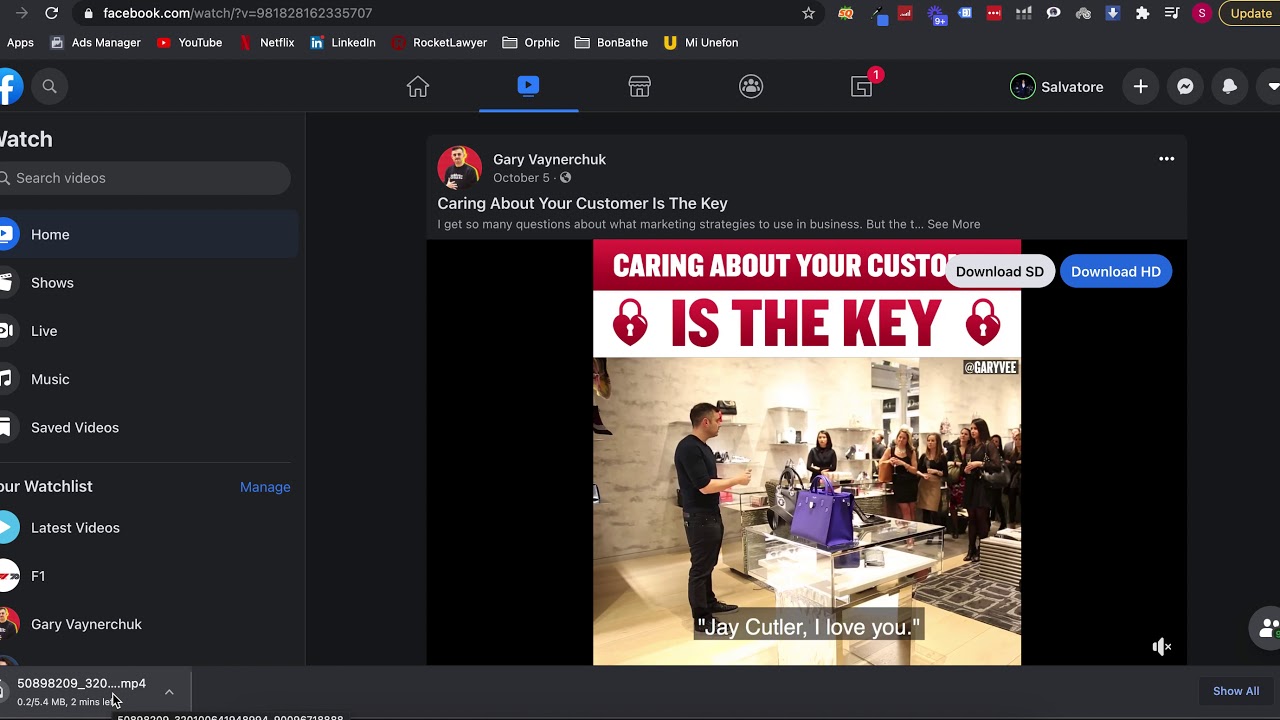
    • Once the extension is downloaded and installed go to Facebook.com on your computer.
    • Locate the video you wish to save.
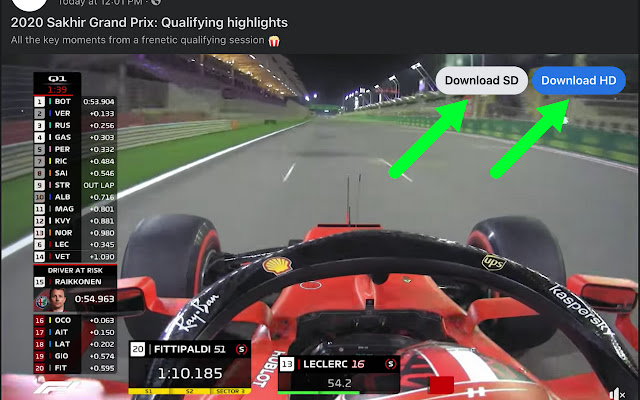
    • You will find the download button as an overlay on your video, you can click on it to start downloading the video from Facebook.
    facebook video downloader for chrome
    • If the download button does not appear after refreshing your screen, click on the extension.
    • In the right corner of each video, press the download button.
    • Save the video as an MP4 file in HD or SD quality.

    Also Read:

    FDown Video Downloader Plus

    facebook video downloader for chrome

    Price: Free

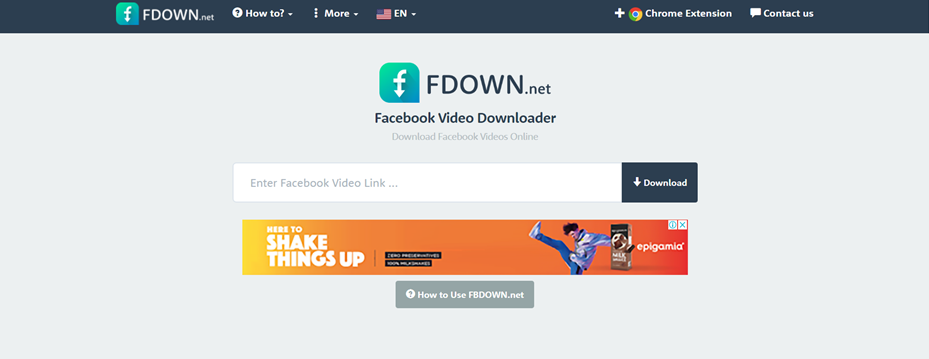
    FDown Facebook Video Downloader extension does more than only download Facebook videos, despite its name. You can get videos from all around the internet. It remains a good Facebook video downloader for Chrome. It is a reliable complement to your Chrome browser because it performs effectively. Users have a wide range of formats from which to pick. Users can also choose the video’s quality and file size while downloading it. Fdown.net’s private video download option allows you to save even private videos to your computer.

    How to Download Videos from Facebook with FBDown Video Downloader?

    • To add the extension, click the three horizontal dots on the right side of your Chrome browser.
    • The “Settings” tab should be selected. You’ll be taken to the Chrome Store as a result of this. You can use this to look for the Fdown Chrome addon.
    • Then select “Add to Chrome” from the drop-down menu.

    YouTube ByClick Downloader

    Price: Free/$19.99

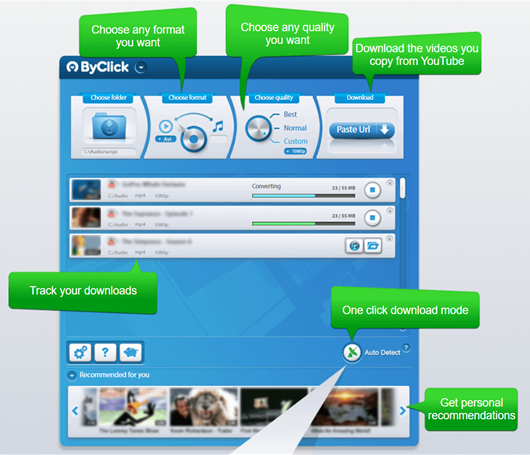
    YouTube ByClick Downloader is a simple programme that allows you to download videos from any website. It allows you to download videos in a variety of codecs, including MP3, MP4, and others. It is one of the best Facebook video downloaders for Chrome. YouTube ByClick Downloader may download videos that are more than 20 minutes long.

    Please refer to the picture below to understand how it works.

    Video Downloader Professional

    facebook video downloader for chrome

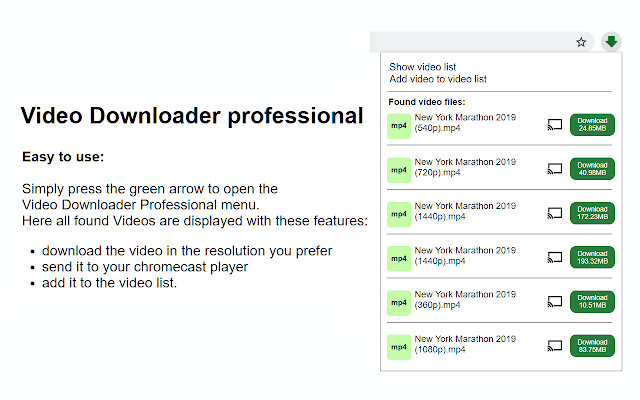
    For video downloading, Video Downloader Professional is a noteworthy chrome addon. It enables people to download a video in any format they like. It’s very effective on Facebook. Users can download the file in a number of formats and file sizes. Simply click on the extension to see the suggested file types and sizes. It has an integrated video player. It is worth adding to Chrome because it is free of advertisements. You can also download several videos at the same time. It guarantees that the quality of the downloaded file will be comparable to that of the original. It can be considered the most user-friendly Facebook video downloader for chrome on this list.

    Conclusion

    You may now download any video from Facebook using any Facebook video downloader for Chrome mentioned in the above list. Using any of the technologies listed above will provide you with near-unlimited access to any video you choose to watch for leisure. When acquiring video content assets, a word of advice is to make sure you keep compliant with any copyright issues. Happy downloading!

    Engagebay vs Hubspot vs ActiveCampaign – Pros Cons & Which is Better?

    0

    If you are looking for a CRM host, you might want to do a comparative analysis between EngageBay vs Hubspot vs ActiveCampaign and to understand which one of these will serve the interests of your business CRM campaigns and requirements. We’ll do so by discussing the features, cost, benefits, and drawbacks of each company’s CRM software – to find the answer to the question “Engagebay vs Hubspot vs ActiveCampaign – Which is better?”

    Suggested Read – ActiveCampaign vs HubSpot vs EngageBay – Which CRM tool is the Best?

    HubSpot

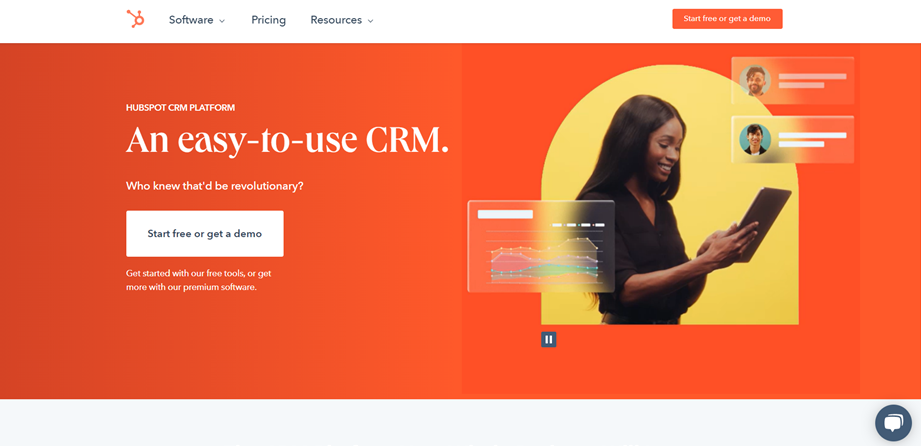
    The first CRM solution that we see in this article on Engagebay vs HubSpot vs ActiveCampaign, we first discuss Hubspot, which was founded in 2006 and has subsequently surpassed all other marketing and sales tools to claim the top spot. A CMS Hub, Service Hub, Sales Hub, Marketing Hub, and CRM are among the company’s software products.

    Pros:

    1. Widely Used and Trusted
    2. Wealth of Integrations
    3. HubSpot provides a Relationship management dashboard, lead tracking dashboard, in-progress task review dashboard, personalization as a feature of email marketing, deals are divided into two categories: current and closed deals, lead generation forms that don’t require any coding knowledge, customer support tickets that can be viewed and addressed by the appropriate members of your team, and countless other features.

    Cons:

    The price. The Professional package, which costs $800 per month, is out of reach for most firms. If you had five individuals utilising HubSpot’s Professional CRM, you’d have to spend $4,000 each month! Unless you upgrade to the Starter subscription, your HubSpot CRM capabilities are severely constrained. Even so, a Professional plan is required if you wish to create more detailed landing pages, use more than 10 analytics dashboards or more than one discussion inbox, or create more than 25 segmented lists.

    EngageBay

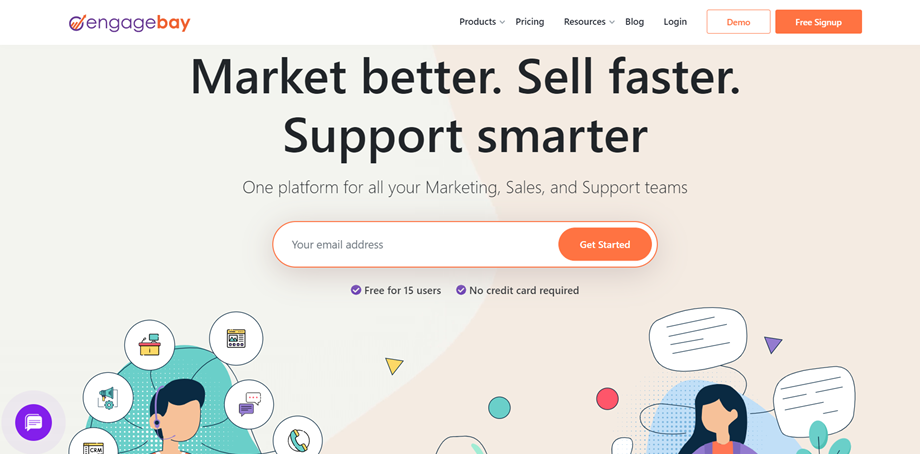
    EngageBay is a newer firm that launched in 2017 as an all-in-one sales and marketing solution for small enterprises and startups on a budget. EngageBay offers a number of solutions in its Service Bay, CRM & Sales Bay, Marketing Bay, and All-in-One Suite, making it suitable for this Engagebay vs HubSpot vs ActiveCampaign blog.

    engagebay vs hubspot vs activecampaign

    Pros:

    1. Price – EngageBay was founded in response to a desire for a less expensive alternative to HubSpot’s services. That’s why their CRM is always available for free. However, they do have The Growth plan which costs $49.99 per month per user for 50,000 contacts and 25,000 branded emails, while the Pro plan costs $79.99 per month per user for unlimited contacts and 50,000 branded emails.
    2. Features – You don’t have to compromise on functionality because you’re not paying for EngageBay’s CRM. Many of the same capabilities are accessible as part of HubSpot or ActiveCampaign’s respective CRM choices for which you’re paying upwards of $100 per month, as well as unique features only available through EngageBay.

    Cons:

    1. Very fewer options in templates where you can drag and drop in the free plan.

    ActiveCampaign

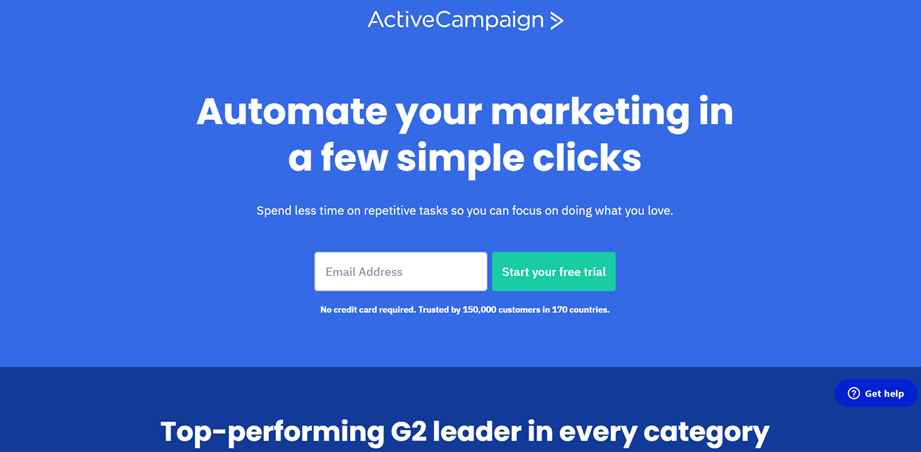
    The third company we take a look at in this Engagebay vs HubSpot vs ActiveCampaign article is ActiveCampaign. ActiveCampaign was founded in 2003. Sales automation, marketing automation, email marketing, CRM, and other services are among their offerings.

    Pros:

    1. They deliver results better than HubSpot, at lesser prices. For 500 contacts, the Lite plan is $15 a month, the Plus plan is $70 a month, the Professional plan is $159 a month, and the Enterprise plan is $279 a month. These prices go up as you keep adding contacts.

    Cons:

    1. When you pay for ActiveCampaign’s CRM, you can get win probability projections.
    2. Despite the fact that it offers capabilities for marketers and customer support representatives, ActiveCampaign’s CRM is primarily for salespeople. As a result, your organisation may find it restricting, which is undoubtedly its largest drawback.

    Conclusion

    In this blog, we draw comparisons on Engagebay vs Hubspot vs ActiveCampaign, all of which provide CRM services on a massive scale. If we look at the price and scalability along with the additional features of the three CRM software, we find that all of them are best suited for a certain type of business.

    Hence, the winner of this debate on Engagebay vs Hubspot vs ActiveCampaign is none, but all. It depends on what you want your CRM to do, and how much you are willing to pay for it.