More
    Home Blog Page 16

    What Happens If Your SSL Certificate Fails?

    Your website is your storefront, and SSL/TLS certificates are the lock and key. They work together to ensure that your website is secure and that your customers’ data is safe. But what happens if those certificates fail? This article will discuss how certificates keep your business running smoothly and how you can improve your company’s bottom line with Keyfactor certificate lifecycle management.

    What is an SSL Certificate?
    An SSL/TLS certificate is a digital certificate that uses cryptography to secure communications between a website and an internet browser. The certificate contains information about the website’s identity, the issuing authority, and the website’s public key. Certifications are necessary because they help keep your website safe. They ensure that your customers’ data is safe when they visit your website.

    Certificates use a public key infrastructure (PKI) to create a secure connection. When you visit a website, your browser will check the site’s certificate against a list of trusted certificates from third-party Certificate Authorities (CAs). If the certificate is valid and trusted, the browser will display a green lock icon and establish a secure connection with the website.

    Risks of Not Having an SSL Certificate

    If a website has a valid SSL/TLS certificate, you will see a green lock icon in your browser’s address bar. The icon means that the site uses HTTPS, the secure version of HTTP. You will see a warning message in your browser if a website doesn’t have a valid SSL/TLS certificate. This warning means that the site uses HTTP, the unsecured version of the protocol.

    If you’re not using HTTPS, your website is vulnerable to attacks. Hackers can intercept the traffic between your website and visitors’ browsers and steal sensitive data like passwords and credit card numbers. They can inject malicious code into your website, redirect visitors to another site, or impersonate your website to phish for information.

    It’s important to note that even if you’re using HTTPS, your website is still vulnerable to attacks if you’re not using a strong encryption algorithm. The most common encryption algorithms are RSA and ECC. RSA is a strong encryption algorithm, but it’s vulnerable to certain attacks. ECC is a newer algorithm that’s more resistant to attacks.

    If you’re not using HTTPS, your website will also be flagged as “not secure” by Google Chrome. This warning will appear in the address bar next to your website’s URL. Starting in July 2018, Google began rolling out a new version of Chrome that displays a “not secure” warning for all websites that are not using HTTPS.

    Causes of SSL Certificate Fails
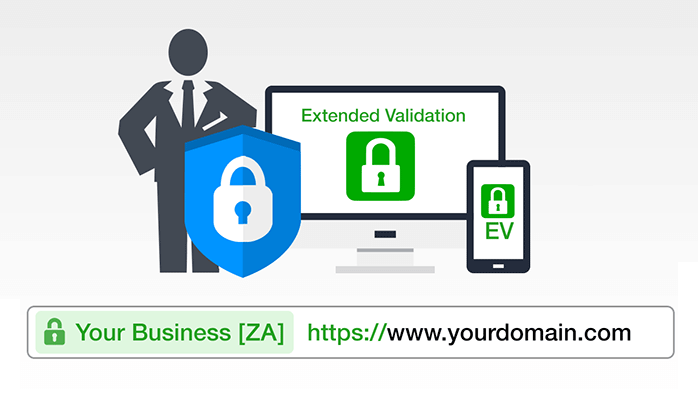
    Extended Validation EV SSL Certificate

    There are a few reasons why a certificate might fail. The most common cause is that the certificate has expired. Certificates need to be renewed yearly; if they’re not, they will eventually expire. If a website’s certificate has expired, visitors will see a warning message from their browser saying the site is not secure.

    Another reason a certificate fails is that the website’s domain name has changed. If a website’s domain name changes, the certificate will no longer match the site’s address and will need to be updated. If the certificate isn’t updated, visitors will see a warning message from their browser saying that the site is not secure.

    The last reason a certificate might fail is that the website’s server has changed. If a website’s server changes, the certificate will need to be reissued for the new server. If the certificate isn’t reissued, visitors will see a warning message from their browser saying that the site is not secure.

    Also Read:

    Consequences of SSL Certificate Fails

    Once your certification is no longer valid, a few things could happen. The first is that your website will no longer be accessible. This lack of accessibility can occur if your certificate expires or your domain name changes. If your website is no longer accessible, you will lose any traffic you would have otherwise received. You will also lose the ability to generate leads and conversions, any analytic data collected, and any revenue generated.
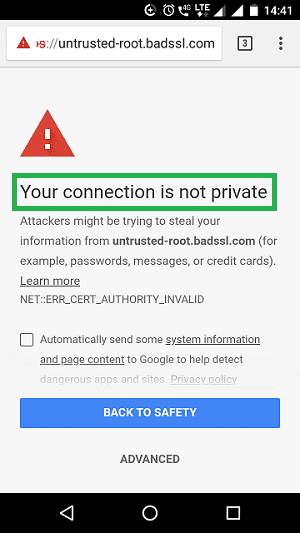
    SSL Android Error

    Another consequence of certificate failure is that your website gets marked as “not secure.” This warning will appear in the browser’s address bar, telling visitors that your website is unsafe. This warning can deter visitors from staying on your site, leading to lost traffic and revenue.

    Finally, your website could be blacklisted by Google. Google blocks websites that are not secure. The implications of being blocked are profound; not only will you lose traffic and revenue, but your website will also be inaccessible to anyone who uses Google as their primary search engine. The best way to prevent your website from being blacklisted is to ensure that your certificates are always up-to-date.

    How to Prevent SSL Certificate Failures

    The best way to prevent certificate failures is to use a software solution like Keyfactor certificate lifecycle management. Keyfactor helps businesses automate the certificate renewal process and keep track of all their certificates in one place. This makes it easy to avoid expired certificates and ensure that all certificates are up-to-date.

    In addition to using a software solution, businesses can also take some simple steps to prevent certificate failures. First, they should make sure to renew their certificates every year. Second, they should keep track of their domain names and update their certificates if the domain name changes. Finally, they should keep track of their servers and reissue their certificates if the server changes.

    Final Thoughts

    Certificate failures can have severe consequences for businesses. They can lead to lost traffic and revenue and are even blocked by Google. to prevent these failures, companies should use a software solution and take some simple steps to keep their certificates up-to-date. By following these tips, businesses can avoid the negative consequences of certificate failures and keep their website running smoothly.
    How to Set Up Facebook Ads Campaign – The Right Way

    0

    Facebook is a great online platform to promote your business and generate more sales. It has billions of active users, many of whom will be in your target audience. Learn how to set up Facebook ads campaign the right way.

    The platform began exclusively as a social media channel. However, since its advent, Facebook has developed into a marketplace thanks to the launch of its business functions. You can now create business pages and groups on Facebook to promote your products and build a loyal following.

    Facebook partnered with Shopify to enable business owners to connect their online stores to their Facebook profiles. Recently, the platform launched Facebook ads maker, which helps small businesses and eCommerce stores to sell their products more efficiently.

    Facebook Ads are another popular feature for brand owners on the platform. It enables you to target specific online users to promote your products or services, build brand awareness, or drive more traffic to your website.

    How to Set Up Facebook Ads Campaign

    Setting up your campaign properly is essential if you want it to be successful. Once you’ve created your campaign, you can use the Facebook Ads manager features to track and adjust your campaign details.

    Follow the steps below to create a great Facebook Ads strategy and successfully set up a Facebook Ads campaign.

    1. Select Your Campaign Objective

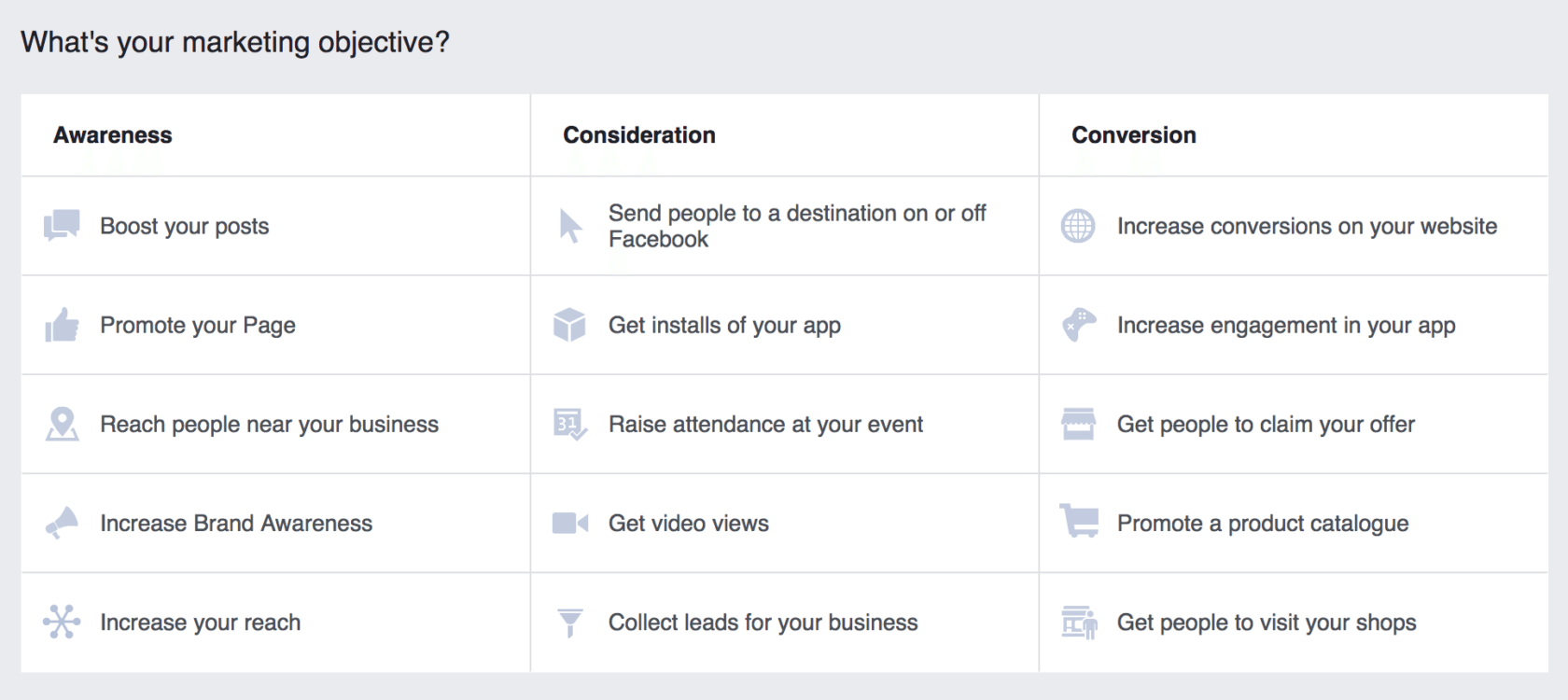
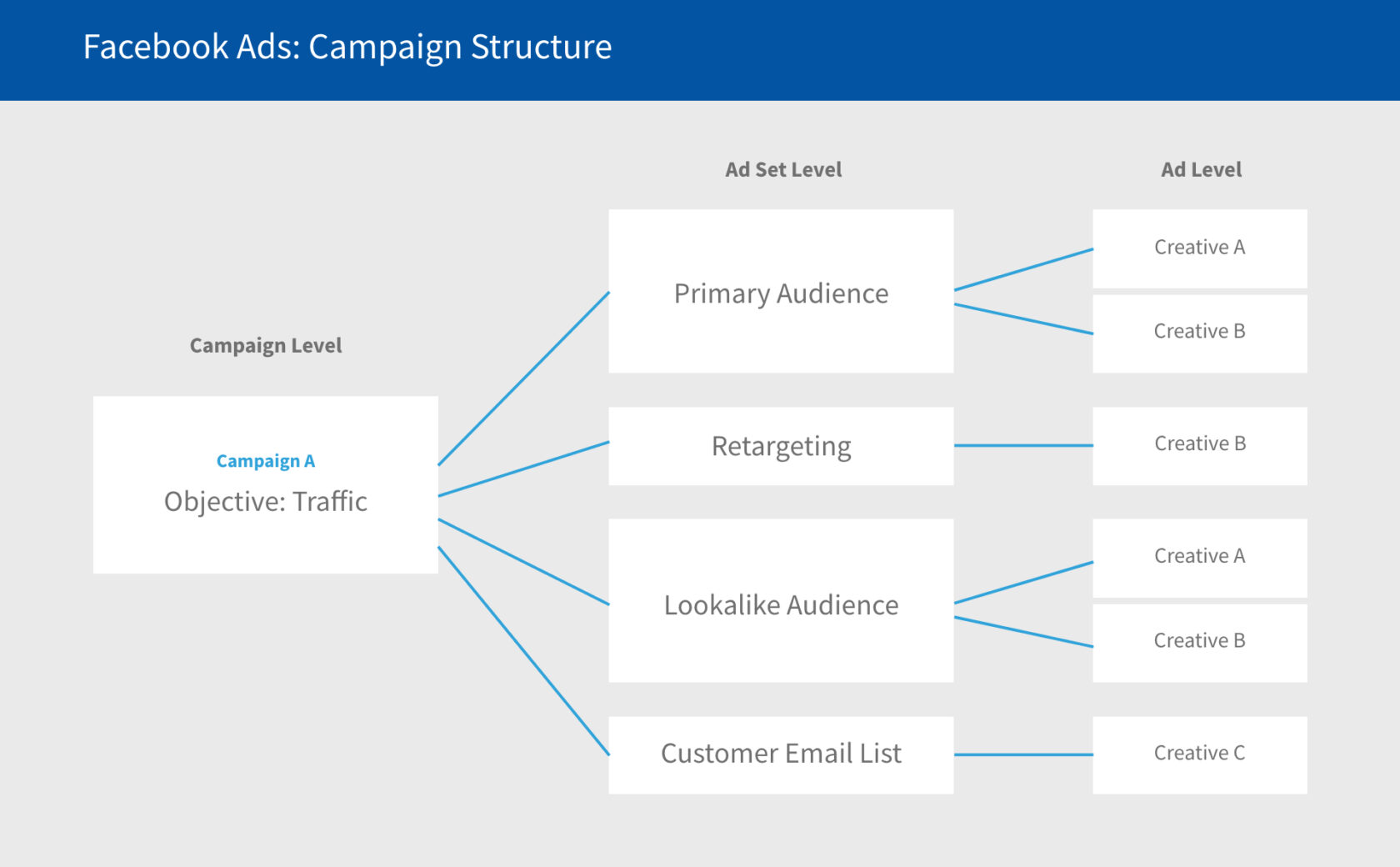
    Facebook enables you to select the overall aim or goal of your campaign. It’s vital to select the right objective because Facebook Ads use this information to optimize your campaign.

    If you’re not sure what your main objective is, Facebook Ads provides a number of options, including:

    • Boost your sales
    • Boost your video views
    • Drive traffic to your website or online store
    • Generate more leads
    • Get more conversions
    • Increase app downloads
    • Increase brand awareness
    • Increase your reach

    Also Read:

    2. Choose a Name and Set Your Budget

    Your ad campaign needs a name so that you can distinguish between different ads if you’re running several at a time. It can be as simple as ‘Drive Traffic’ or ‘Increase Customer Sales’.

    After you’ve chosen a name for your new ad, it’s time to set your budget. Facebook will ask you to input a total budget (the total amount you’re willing to spend by the end of your campaign) and your daily budget (the amount you’re happy to spend each day for the duration of your ad campaign).

    3. Determine Your Target Audience

    How to set up facebook ads campaign - the right way

    The Facebook Ads platform will then ask you to select your target audience. It’s important to get this information right so that your ads are targeting those who are the most likely to check out your website or purchase your products.

    You’ll need to include information about the location, age, gender, and interests of your audience so that Facebook can place the ads in front of the right people. You can also select where your ads are placed, such as on people’s news feeds, stories, or inboxes.

    4. Create Your Campaign

    After selecting all of the fine details of your Facebook Ads campaign, you’re now ready to create the campaign and set it to go live on a day of your choice. Facebook Ads makes it easy to adjust your budget throughout the duration of the campaign so that you don’t overspend.

    The platform also makes it easy to measure and track your metrics to determine whether your ad campaign is working effectively or whether you need to change some of the details. You can see the number of views, ad clicks, website clicks, and conversions, depending on the overarching goal of your campaign.

    Smart Design: How AI is Changing Web Design

    Since its birth, Artificial Intelligence (AI) has taken the tech world by storm. Wherever you go in the internet world, you can see its proof, as it is used on all social media platforms, and everyone is talking about it in articles and different forums. It is revolutionizing the digital world at a great pace.

    A number of industries worldwide are making full use of AI, because it enhances and improves operations and functions in the best way possible. Web design is also one of the things that AI is revolutionizing, improving, and enhancing daily.

    Plus, if you have a competent web design London agency to help you with your website needs, you are in good hands. This blog will guide you on how AI is changing web design.

    AI Integration in Web Design

    Web design software
    Web design software

    AI is working silently in various fields, including medical and healthcare, finance, education, manufacturing, and many others. But now it is making its way to web design. As we are in the digital world, every business worldwide needs a website to establish its online presence. It is good to use social media platforms for digital marketing. But having an active website is the best way to convert online traffic from search engines to potential leads because a large score of users uses search engines for their queries. A few years back, there were no website builders, and there was a need for vast coding knowledge. Still, some website builders require some coding to create a website.

    But AI is making website building easy. Now you can automatically decide on colour schemes and website layout with the help of an AI-powered website designer, TheGrid. It designs, arranges and optimizes any website according to the style preference, theme and content.

    A Virtual Helping Hand

    AI has made its place in a number of places. It is now utilized to make things easier for users.

    The RankBrain of Google is an AI program that provides users with quality and relevant search results for their queries. When it comes to website designing, Wix ADI is another AI-powered website builder that can build websites in a matter of minutes for every kind of business. With Wix, it is now easier for people to enhance their online presence with a website, even if they have no coding experience.

    You just need to put your content and relevant images and leave the formatting and designing to Wix. Even with such ease in website building, users still expect a more extensive role from AI.

    Similarly, like Wix, another website builder, Firedrop, manages and designs websites in minutes. It also does not require coding and designing your website using the usual drag-drop methods.

    Sacha is a chatbot that assists users in building their websites by asking some questions. It directly interacts with the user and asks questions regarding their website design and style preferences. Sacha is also capable of providing useful suggestions and recommendations to the users to make generate a website in accordance with the latest trends and designs for a website.

    How AI is Improving UX?

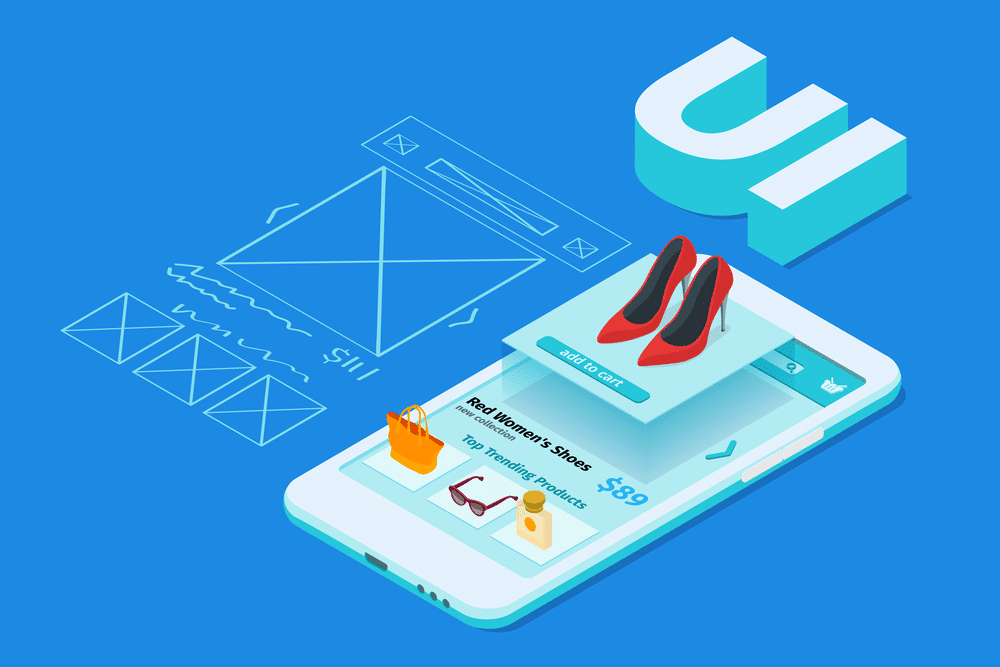
    AI is now commanding every essential aspect that is needed in the building of a website design. AI plays a key role in UX with the latest interventions in website design. AI is now enabling the users to create engaging and responsive user interfaces that tend the website visitors to stay and explore their website.

    AI has effectively changed the face of web design and is establishing many standards that are parts of human-machine interaction. The chatbot is a perfect example that is a fixture of many mobile and website applications. AI-based applications are redefining how to communicate with the audience and answer them like humans. It is replacing the pre-programmed conversational methods.

    Also Read:

    How AI is Improving UI?

    With the help of AI, the user interface is now optimized through deep learning, making it capable of making design decisions. It understands the design principles and observes the existing pages of websites.

    AI mimics thoughts and produces highly functional website designs. It can make a unique website interface by learning the user’s needs and customizing the website according to them. AI also learns customer interactions, business activities and personal experiences in order to create a responsive website design.

    Conclusion     

    AI plays an important role in website design and development. With the need for growing automation and increasing numbers of AI geniuses, we have also witnessed a notable increase in the amount of artificial intelligence we can implement at various places for human use. In web designing, AI has great potential and has greatly changed website design. Without any doubt, we can say that shortly, AI will offer an easier methodology and will provide a personalized user experience.  

    How to Restore Analysis Services Database in SQL Server Using SQL Server Management Studio

    0

    In this article, we will show you, How to Restore Analysis Services Database in SQL Server using SQL Server Management Studio for example. For this demonstration, we are using Microsoft SQL Server 2014 and AdventureWorksDW2014 Data Warehouse sample database.

    How to Restore Analysis Services Database

    • Step 1: Open your SQL Server Management Studio, and connect to your SQL Server instance where you have installed Analysis Services databases.
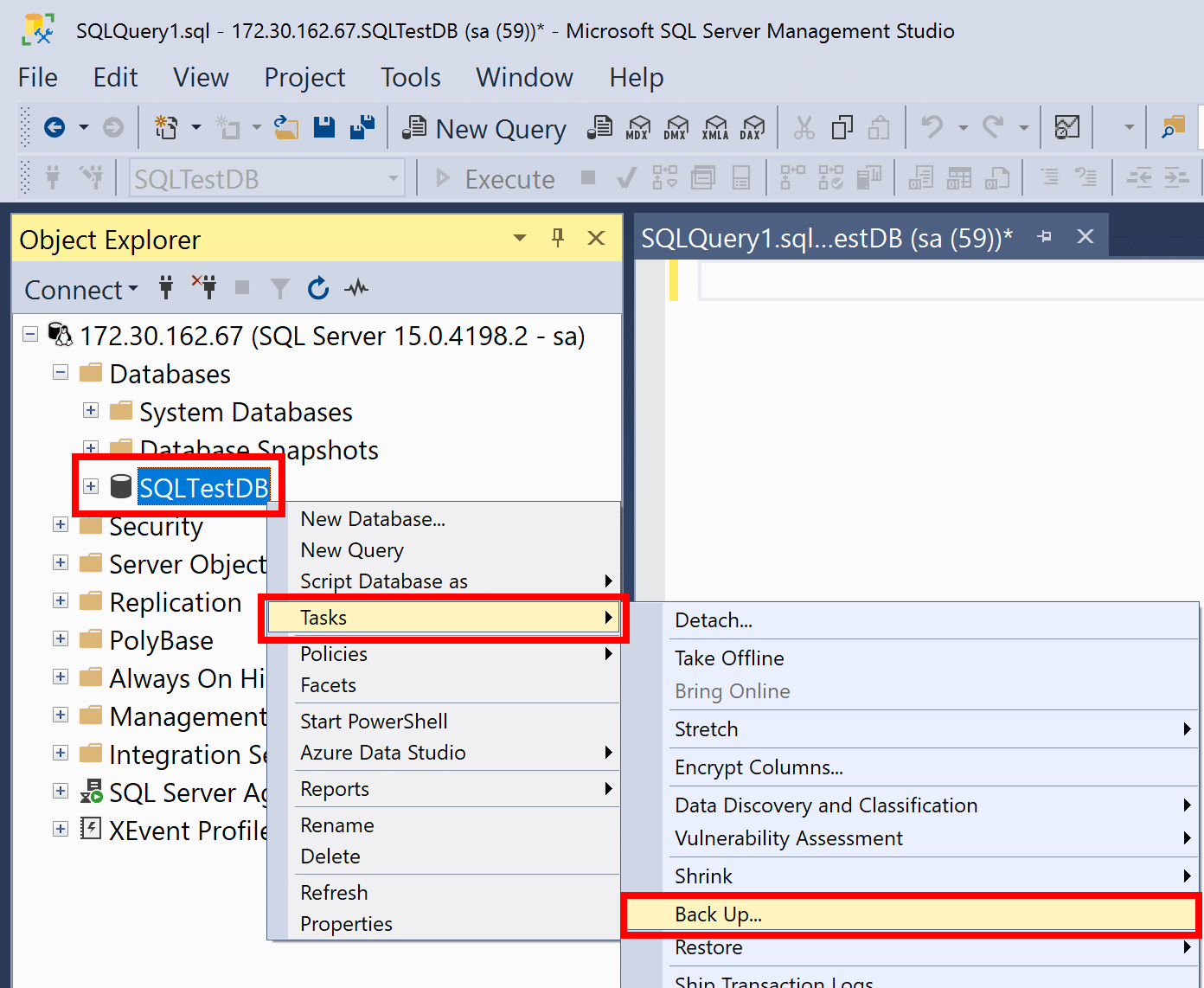
    • Step 2: Expand the Databases node, right-click on the Adventure Works DW 2012 database and select Restore from the context menu as shown below.
    • Step 3: It will open up the Restore Database Wizard window. First, click on the General page from the left side pane as shown in the below screenshot.
    • Step 4: From the Backup devices drop-down list, choose the Disk and then click on the Add button to locate the backup file as shown in the below screenshot.
    • Step 5: After selecting your backup file, click on the OK button. As we can see, the Restore Database window is populated with information regarding our selected backup file such as Database name, Backup start date, etc as shown in the below screenshot.
    • Step 6: Click on the Options page from the left side pane. From this page, you can change the default database location if required or else leave it as it is.
    • Step 7: Click on the Recovery State drop-down list and choose the RESTORE WITH RECOVERY option as shown in the below screenshot.
    • Step 8: Now, click on the OK button to restore your Analysis Services Database.

    If you need to restore an Analysis Services database in SQL Server, you can do so by using SQL Server Management Studio. In this article, we’ll show you how to restore an Analysis Services database in SQL Server using Management Studio.

    SQL Server Management Studio (SSMS) is a graphical user interface (GUI) tool that allows you to connect to, configure, manage, administer, and develop all components of SQL Server. Analysis Services databases can be restored in SQL Server Management Studio by using the Restore Database wizard.

    In this article, we will show you how to restore an Analysis Services database in SQL Server using the SQL Server Management Studio with step-by-step instructions.

    Also Read:

    Restore an Analysis Services Database in SQL Server using the GUI

    How to Restore Analysis Services Database in SQL Server Management Console

    1. In Object Explorer, connect to the instance of the SQL Server Database Engine where you want to restore the database, and then expand that instance.

    2. Expand Databases, right-click the destination database for the restore operation, and then click Restore Database.

    3. In the Restore Database dialogue box, click Files.

    4. Locate and select from which you want to restore, and then click OK.

    5. In the Restore Database dialogue box, click Options.

    6. Select Overwrite the existing database (WITH REPLACE), and then click OK.

    7. In the Restore Database dialogue box, click OK to start the restore operation.

    The wizard will display progress through the various stages of the restore operation until it is completed.

    8. Click Close to exit the wizard when finished.

    9. To verify that the database has been restored, expand Databases in Object Explorer, right-click the database, and then click Properties.

    10. In the Database Properties dialogue box, click the Options page. The status of the database should be Normal.

    11. If it is not, contact your system administrator.

    12. Click OK to close the Database Properties dialogue box.

    FAQs:

    Q: Can I restore an Analysis Services database if the SQL Server service is stopped?

    A: Yes, you can.

    Q: What is the best way to restore an Analysis Services database?

    A: The best way to restore an Analysis Services database is to use the SQL Server Management Studio GUI.

    Q: What are some of the things I need to keep in mind when restoring an Analysis Services database?

    A: When restoring an Analysis Services database, you need to make sure that the destination database does not exist. If it does exist, you will need to overwrite it. You also need to make sure that the SQL Server service is running. If it is not, you will need to start it. Finally, you need to make sure that you have enough disk space to restore the database.

    Conclusion

    In this article, we have shown you how to restore an Analysis Services database in SQL Server using the SQL Server Management Studio GUI with step-by-step instructions.

    How to Access the Dark Web Safely in 2023?

    In recent years, the dark web has become increasingly popular. It is a place where people can anonymously share information and access content that is not available on the surface web. While the dark web can be a valuable resource, it is also important to be aware of the risks associated with it. This article will provide tips on how to access the dark web safely.

    What is the Dark Web?

    The dark web is best known for its illegal activity, but there’s more to it than that. The dark web is a part of the internet that can’t be accessed with a standard browser. It’s a place where people can buy and sell illegal drugs, weapons, and other contraband. The dark web is also home to many child pornography websites.

    The dark web is accessible through special browsers like Tor or I2P. These browsers allow users to access websites that are not indexed by search engines. This means that the sites are hidden from view and can only be found if you know the address.

    The anonymity of the dark web makes it a popular place for criminals. However, there are also many legitimate uses for the dark web.

    The Benefits of the Dark Web

    When most people think of the dark web, they think of illegal activity and the dangers that come with it. However, the dark web can actually be a safe and beneficial place if you know how to use it correctly. Here are some of the advantages of the dark web:

    Anonymity

    One of the biggest advantages of the dark web is that it allows users to remain anonymous. This is because most dark websites are only accessible through special browsers that encrypt your data and hide your IP address. This makes it difficult for anyone to track your online activity or identity.

    Less Censorship

    Another advantage of the dark web is less censorship than on the regular internet. This is because government agencies and other institutions can’t track what you’re doing on the dark web.

    Information

    The dark web can be used to access information that is censored in your country. For example, you may be able to find news articles from other countries that are not available in your country due to censorship.

    The Dangers of the Dark Web

    The dark web is a dangerous place. It’s full of criminals and terrorists who use it to buy and sell drugs, weapons, and child pornography. They also use it to communicate with each other and plan attacks. If you’re not careful, you could end up in the middle of all this. Here’s how to stay safe.

    First, don’t go looking for trouble. There’s no need to visit the dark web unless you have a good reason. If you do, be sure to use a reputable VPN service that will encrypt your traffic and hide your IP address. We recommend you get the NordVPN Youtuber code to make an affordable purchase.

    Second, don’t click on any links unless you’re absolutely sure they’re safe. Many links on the dark web lead to malware or phishing sites. If you accidentally click on one of these, you could infect your computer or have your identity stolen.

    The dark web is a collection of websites that are not indexed by search engines. This means that they are hidden from view and can only be accessed using special software. These sites are often used for illegal activity, such as drug dealing and money laundering.

    The anonymity of the dark web makes it a breeding ground for scammers and criminals. If you accidentally stumble onto one of these sites, you could be at risk of having your personal information stolen or being scammed out of money.

    How to protect yourself when using the dark web

    The dark web is a place where you can find anything and everything. From illegal drugs to stolen credit card numbers, the dark web is full of dangers. But it’s also full of opportunity. If you know how to protect yourself, you can use the dark web safely.

    Also Read:

    How to Access the Dark Web Safely?

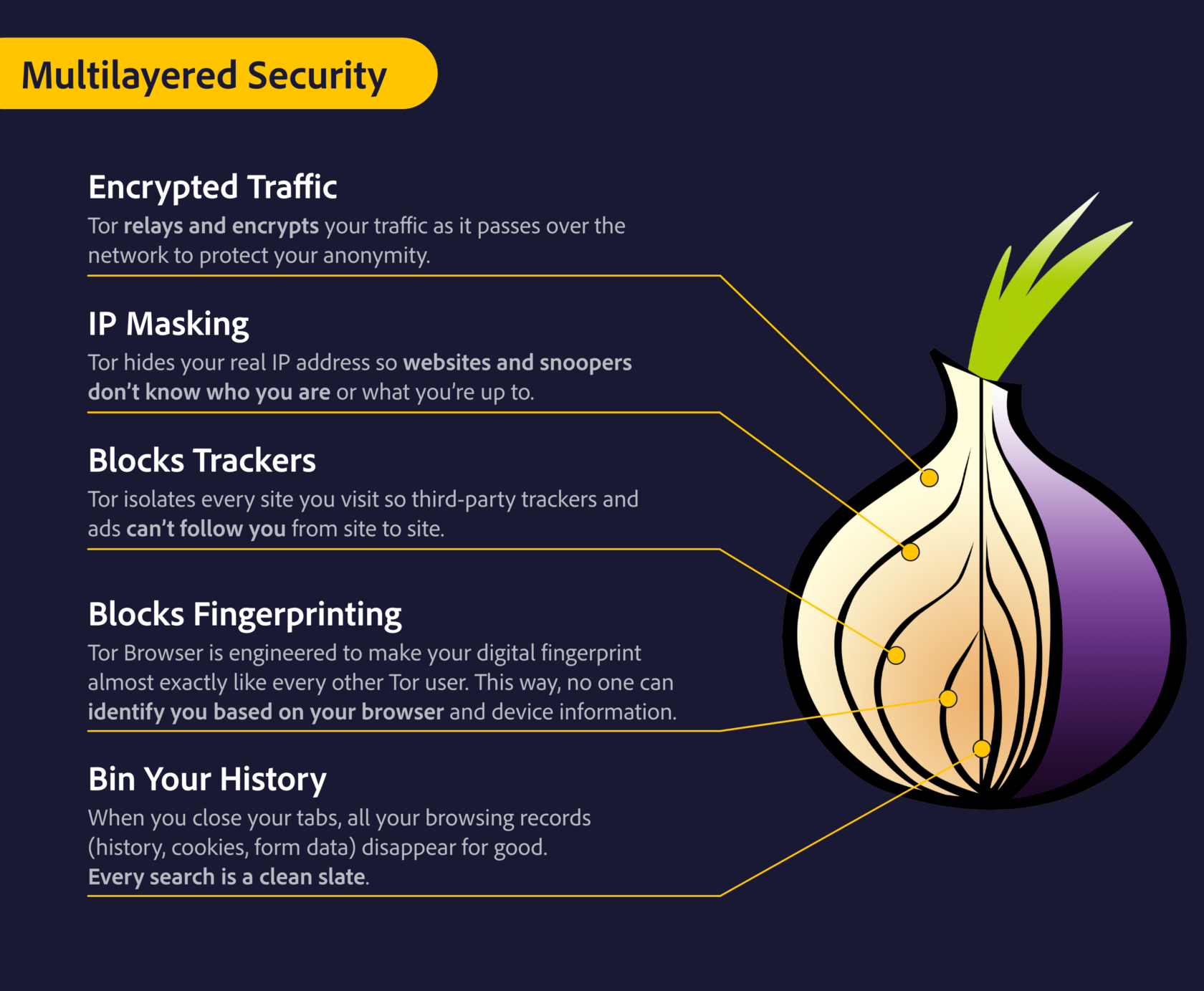
    • Use a VPN: A VPN will encrypt your traffic and hide your IP address from prying eyes. This will make it much harder for someone to track you or steal your data.
    • Use TOR: TOR is software that allows you to browse the internet anonymously. It’s perfect for use on the dark web, as it will make it very hard for anyone to track what you’re doing online.
    TOR Network Browser Security Features
    TOR Network Browser Security Features
    • Be careful what you click on: Many links on the dark web are malicious and can lead to malware or viruses being installed on your computer. Only click on links from trusted sources.
    • Don’t share personal information: The dark web is full of scammers and hackers who are looking to steal personal information such as passwords and credit card numbers. Be sure to only share information that is absolutely necessary.

    By following these tips, you can help to keep yourself safe when using the dark web.

    Tips for Staying Safe on the Dark Web

    When it comes to the dark web, safety should be your number one priority. Here are a few tips to help you stay safe:

    1. Use a reputable VPN service to access the dark web. This will help to keep your identity and location hidden.
    2. Only visit trusted websites. There are many scams and malicious websites on the dark web, so it’s important to only visit ones that you trust.
    3. Be careful what you download. Many files on the dark web contain viruses or other malicious software. Only download files from trusted sources and make sure to scan them with antivirus software before opening them.
    4. Don’t reveal personal information. If someone on the dark web asks for your personal information, don’t give it to them.

    Conclusion

    In conclusion, accessing the dark web can be safe if you take the necessary precautions. Use a VPN, Tor browser, and secure search engine, and make sure to only visit trusted sites. Remember that there is a lot of illegal activity on the dark web, so be careful what you click on and don’t do anything that could get you in trouble.

    Best Small Business SEO Tips to Grow Online

    0

    In the highly competitive market of today, it is quite challenging to stand out from the online crowd. If you invest your time and money into creating an awesome website, you should also invest money inefficient SEO strategies. These strategies aim to increase organic traffic to your website, which can in turn have higher revenue as result. SEO is essential for both small and large businesses, regardless of the field. Search engine optimization is indispensable in achieving success in today’s modern world.

    The best SEO tips for your website start with choosing the right keywords and incorporating them into your web pages. Working on backlinks is yet another great SEO strategy to employ in order to get more organic traffic and potentially increase sales. Moreover, creating meaningful and engaging content should also be your focus as well as updating it regularly. Don’t forget to fix broken links and link internally. Your website should be user-friendly and highly responsive. Additionally, you can create video content as it has proven to be quite effective.

    1. Choose the right keywords

    Keyword research
    Keyword research

    Conducting keyword research is the first step to doing proper SEO. You should start by listing words and phrases potential customers are likely to type in Google when searching for certain products or services. Try to get into the customers’ minds. Have in mind that they will most likely use slang words rather than technical words. You should aim to make a list of 20 to 50 keywords. After you’ve compiled that list, you should go to Google AdWords to check whether the keywords you came up with are used frequently when it comes to online searches. You can also use some other tools to find more keywords. For example, if you own a preschool, your keyword list can contain phrases such as best day care centre, part-time day care, preschool programs, Montessori and so on.

    2. Incorporate keywords in your webpages

    After you have finished keyword research and checked which are the ones that are most frequently used, you can focus on using those keywords. To increase organic traffic to your website, you should incorporate these keywords into your web pages. This helps your pages rank higher when customers are searching for a certain keyword. You should include keywords in URLs, meta descriptions and headings. All of these things help people reach your website when searching for a particular product or service. There are different types of keywords you can use: long-tail and short-tail keywords, product keywords, phrase match keywords, exact match keywords and so on. However, be mindful not to overstuff your website with keywords – use them to help customers and not search engines.

    3. Work on backlinks for Small Business SEO Growth

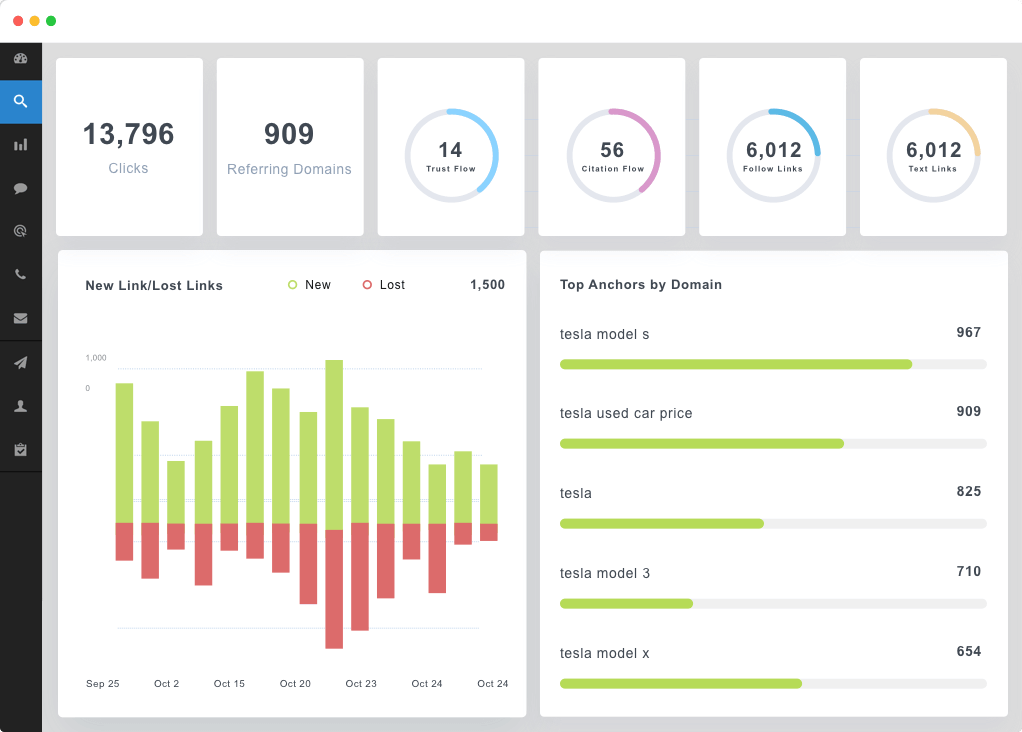
    Backlinks are an integral part of SEO. To boost your website’s ranking, you should try to earn backlinks. Backlinks refer to links pointing to your website. This is how it works: you post meaningful, useful or insightful content on your website; other credible websites link to that content, directing their website visitors to your website. External links are crucial as they boost your website authority and build trust. Google recognizes your website as a credible one if other high authority websites are pointing to it. One of the best ways to get links is through creating content. More on that in the following paragraph.

    4. Create meaningful content

    Creating content is also an important part of SEO. Content encompasses all kinds of things besides writing blog posts. You can also create infographics, eBooks, videos and other downloadable things. There are three main goals of posting and sharing content: to inform, entertain or educate. Start from yourself – whenever you’re in a doubt, or need some answers, you first go to Google and try to find them. That’s what brings potential customers to your website. They’re seeking some answers and with proper SEO, they get to your website. If you provide them with relevant, current and insightful content, they are more likely to spend more time on your website and even purchase a product or a service from you.

    Also Read:

    5. Update your content regularly

    To keep up to date with current trends, you should aim to update your content regularly. You should be familiar with the hot topics in your area and try to fill customers’ needs. Also, you need to be prompt and post often on social media as well. A great thing about writing blog posts and other types of content is that you can repurpose them for social media. You can also create brand new content suitable for social media. It can be a post that highlights your most sold product or a service everyone is satisfied with.

    6. Fix broken links and link internally

    By adding new pages to your website, and making other changes, you move some things on your website around. That can jeopardize your internal links linking to the pages you moved around. So what happens is that people, by clicking on that link get an error message instead of going to the linked page. When customers encounter a broken link, they may not want to continue browsing through your website. Hence, it’s of utmost importance to fix those broken links. You can do that by reviewing old content and checking links, fixing them along the way. When posting all kinds of content, remember to link internally. It also builds your website authority.

    7. Aim for a user-friendly and highly-responsive website

    Advantages of Web Development - Different Types of Web Design
    Advantages of Web Development – Different Types of Web Design

    Your website should be user-friendly and easy to navigate. If people are having trouble navigating your website, they will most likely give up on it. Moreover, another thing that can deter your website is slow responsiveness. Your pages should load quickly to have people stick around. When considering your website’s design, try to get into the customers’ minds.

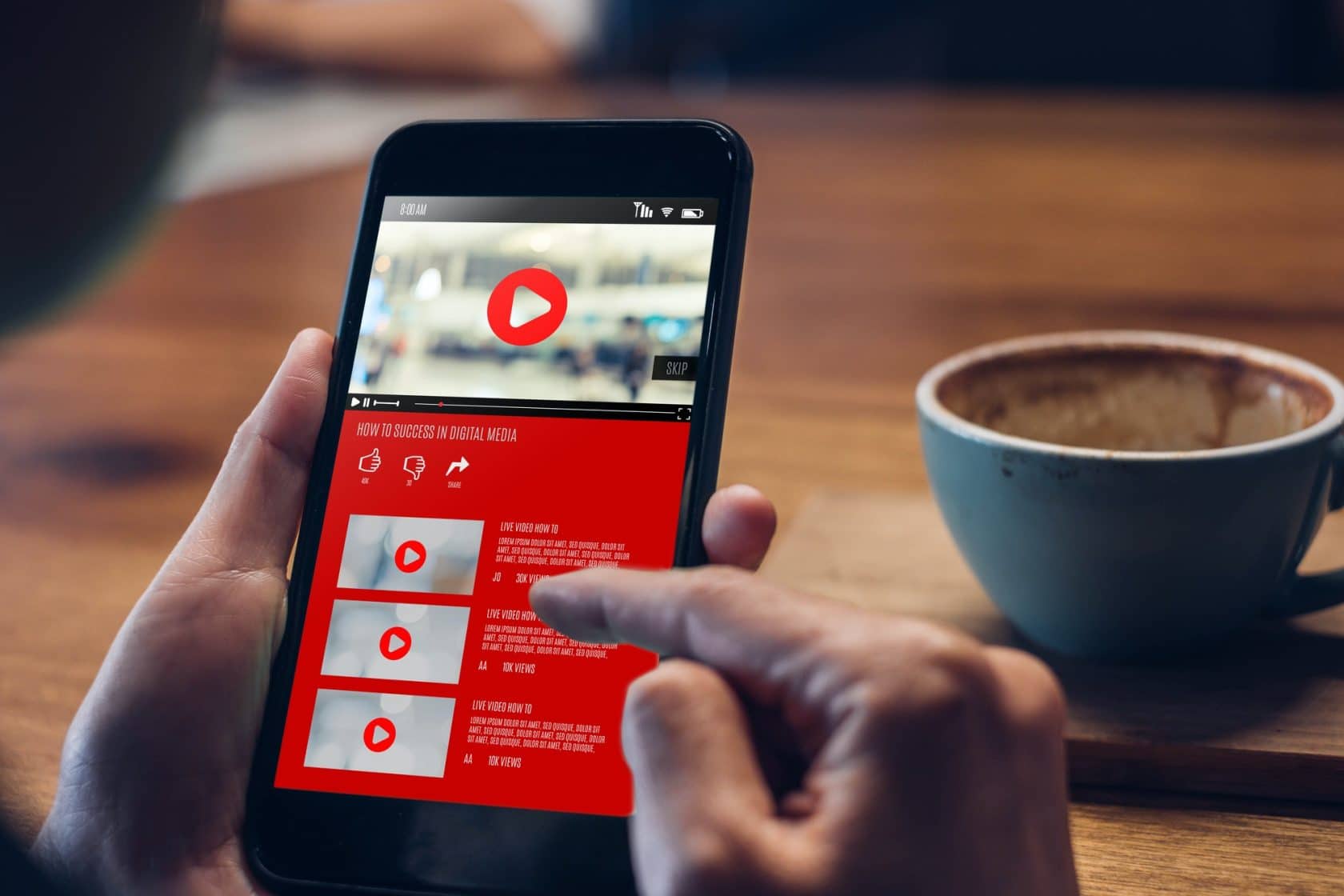
    8. Include video content

    close up woman hand holding mobile watching video online with advertising on mobile

    Video content is quite a popular form of content nowadays. It is great as it gives you plenty of options for creating amusing content. Moreover, people can see how your products look genuinely, without photoshopping them. Also, they can see how these products look on people or by being used – whatever their use might be.

    Learning more about SEO is exciting and gives you plenty of opportunities to work on improving your website, rankings and revenue. And if you’re not up for that, you can always hire a professional SEO agency that will make your business thrive.

    10 Visual Content Marketing Statistics You Must Know by 2022

    0

    Visual content marketing is the new norm in the digital marketing world, and marketers are raving all about it.

    Visuals have been found to have the deepest impression on our brains, and with images and multimedia, you can easily reach your target audience and connect with them.

    We’ll go over 10 of the most important statistics about visual content marketing to help you create an effective strategy in 2022.

    Let’s get to it.

    1. Visual content is more than 40X more likely to get shared on social media than other types of content

    Visual content is more than 4x as likely to be shared by people on social media. 

    Visual content has a much higher rate of engagement, and it has a higher shared rate as well. 

    It is said that a picture speaks a thousand words, and a video speaks ten times that amount

    According to this study from HubSpot, video can increase your brand recognition by 95%. And video marketing continues to grow in popularity as well. 

    In 2022, 85% of all consumers will have watched videos online at least once per day and 87% will use their mobile devices every day.

    2. 65% of people are visual learners

    Visual Content Marketing Statistics

    Visual learners are more likely to remember what they see, retain information, engage with the information, and apply it. 

    They also enjoy learning more than other types of learners and find it easier to process new knowledge.

    With 65 out of 100 people who prefer to learn with images, visual marketing has the potential to generate leads and convert more customers.

    Visually rich content is easier for users to digest and understand, which makes them more likely to share it with others via their own networks or in forums.

    Apart from this learning preference, the brain has been wired to retain more visual information than text. 

    3. 90% of information transmitted to the brain is visual

    If you want your marketing campaigns to be effective, then they’ll need to include some type of image or video component. Without it, there’s a chance that they won’t work as well as they could.

    Visuals activate different areas of the brain than text. While words are processed primarily on the left side of your brain (the logical side), images and visuals stimulate right-hemisphere activity (the creative side). 

    For people to respond emotionally and creatively to something you’ve created, it needs to hit them where their emotions live—on their right side.

    That’s why visual content works so well.

    4. Visuals are processed 60,000X faster in the brain than text

    Visual Content in Brain

    Visuals are processed 60,000X faster in the brain than text. The right side of your brain (the creative side) processes visuals and then sends information to the left side of your brain (the analytical side), which stores it there until you can be bothered to analyze it later.

    5. Content with relevant images gets 94% more views than content without images

    Images are essential for content marketing. They are more likely to be shared, remembered, understood, and liked. 

    They also get 94% more views than content without images.

    The more people engage with your content, the more they’ll associate with your brand.

    6. 35% of marketers say visual imagery is the most important form of content for their business

    Visual content should be at the top of your list when deciding what type of content marketing strategy you want to adopt.

    It has a higher recall rate than text-based or video content. Plus, it’s easier to produce and consume than these other forms of media. 

    7. 80% of marketers use visual assets in their social media marketing

    social media marketing

    It’s no secret that visuals can be a great way to attract attention and engage customers, build trust and brand awareness, and even build brand loyalty.

    Visual content has the ability to tell a story much more efficiently when compared with text-based content. 

    Visuals allow you to communicate more quickly and effectively what your business does in a way that’s easy for people to understand.

    8. Social video generates 1200% more shares than text and image combined

    The next time you’re considering posting something on social media, think about this: social video generates 1200% more shares than text and image combined. 

    That’s a lot of social shares. And when you’re trying to build your brand and attract new customers, that kind of engagement can make all the difference. 

    You’d be missing out on a huge opportunity to reach your audience if you aren’t including video in your social media marketing strategy. 

    9. Tweets with video attract 10x more engagement than tweets without video

    If you’ve been thinking about adding video to your tweets, we have a little secret for you: it’s worth it. The tweets with video are engaging 10x more than the ones without.

    According to Hubspot, tweets with videos receive 10x more engagement.

    10. In 2018, 78% of marketers used visuals in their blogs. In 2022, it’s expected to be 85%

    As you might imagine, marketers are taking notice of visual content. And they’re not using it on social media alone. They’re using them on their blogs too. 

    In 2018, 78% of marketers used visuals in their blogs. 

    Visual Content is key to increasing engagement

    Visual content is more likely to get shared on social media. And when people share your content, you can bet that they’ll be telling their friends about it as well. 

    The result? More traffic for your website, more customers coming through the door, and more money in the bank.

    So not only will images increase engagement with your brand or business, but they’ll also improve conversion rates too.

    Keep these statistics in mind anytime you think about creating content, and you’ll find that your engagement metrics across all channels would shoot above the roof.

    How to Optimize SEO for an Android App

    0

    If you’re developing an android app, you know the market is huge. An estimated 6 billion smartphones are used worldwide, and half of them run on android. If your app doesn’t stand out, it will be hard to find success.

    The good news is that there are many ways to optimize SEO for an android app. It includes not just your title and keywords but also strategies such as distributing press releases and using social media.

    In this article, we’ll look at some of these strategies. So, when it comes time to launch your new product or service on Google Play or iTunes App Store, everything will go smoothly.

    How to Optimize Android App SEO?

    1. Write a Good Description for Your Android App

    Writing a good description is one of the most important things you can do to optimize your app’s SEO. The description should be short and easy to read, but it must also be accurate and informative.

    The first thing you should do when writing your app’s description gives it a name that describes what kind of app it is. For example, an android app for tracking time spent on different activities. Then, add some details about what makes this particular one special.

    Describe the features or functionality that differentiate it from other apps in its category. And why people might want those features/functionalities more than others on offer today (if any).

    Finally, ensure that this all sounds appealing and provides enough information without being too long or vague. Otherwise, no one will ever read through all those words again later.

    2. Try to Increase the Number of Positive Reviews 

    Android App SEO - Get Positive CUstomer Reviews

    If you’re looking to improve your app’s SEO on Google Play Store, one of the best things you can do is to increase the number of positive reviews. This not only helps to improve your app’s ranking in search results but also helps to build trust and credibility with potential users.

    There are a few ways to increase the number of android reviews for your app. First, you can reach out to your existing users and ask them to leave a review. Second, you can offer incentives to users who leave positive reviews, such as discounts or exclusive content.

    When you next update your app, include a message asking users to leave a positive review if they enjoyed the app. Make it easy for them to do so by having a link to the app’s listing on the Play Store. You can also include this request in your app’s description on the Play Store.

    Of course, you can’t just ask for positive reviews and expect them to pour in. Your app needs to be good enough to warrant them. But if you have a quality app that users enjoy, asking for reviews is a great way to boost your app in the Google Play Store.

    Also Read:

    3. Use Keywords in Titles, Meta tags, and H1 Tags 

    Keywords are the most important thing when optimizing your android app. You need to include keywords in an android app page’s title, meta tags, and H1 tags.

    When choosing keywords for your app title tag, think about how users will search for what you offer and what they are looking for. For example, if someone searches for a dog training book on Amazon, the keyword “dog training” would be ideal because thousands of books have that exact phrase in their titles.

    If someone were looking for help with their dog biting other dogs, then maybe “dog behaviour” would work better than just “dog biting.”

    4. Focus on the Usability of Your App

    It’s essential to make sure that your app is easy to use. This is especially true if you’re building an app for a niche market, like the gaming industry or financial services. The more intuitive it is, the better chance it has of being used by people in that industry and subsequently increasing its ranking on Google.

    It’s also vital that your app is easy to navigate. If users find themselves lost after just a few minutes of playing with an application, they’ll probably stop using it altogether. Furthermore, they may abandon the area thoroughly if their experience isn’t fast enough.

    5. App Store Optimization

    ASO, or app store optimization, is a process of optimizing your app store listing. It’s essential to understand the most effective way to optimize it so that you can get the best results.

    The most important aspect of ASO will be ensuring that your app has an accurate description with all the necessary details about your product. You need to make sure that it includes:

    • Name and version number of the app (if applicable)
    • Description of what this particular app does, including any features or benefits offered by it
    •  You should also include screenshots and other relevant information like price points or minimum requirements for installation on different devices.

    6. Allocate your Resources

    The last step to optimizing your SEO is to allocate your resources. This means you need to figure out what you can do and then decide which strategies are most important for achieving your goals.

    The biggest mistake people make when optimizing their apps is spreading themselves too thin. They want everything at once. But this rarely works well in practice. Instead of trying to do everything at once (which will likely fail), focus on one or two strategies at a time and see how they pay out before moving on to something else.

    Final Thoughts

    As the number of apps in the Google Play Store continues to grow, it is becoming increasingly important for app developers to optimize their apps for search engine optimization (SEO). The good news is that you can do some simple things to improve your ranking in the store.

    Choose your keywords carefully. You need to consider what words people will use to search for your app. Once you have your keywords, you must use them throughout your app store listing. Use them in your app name, app description, and even in your app keywords.

    Another important factor is your app reviews and ratings. Encourage your users to leave reviews and give your app a high rating. The more positive reviews you have, the better your ranking will be.

    Finally, make sure you are constantly updating your app. Google Play Store favours regularly updated apps, so be sure to add new features and bug fixes regularly. By following these simple tips, you can improve your ranking in the store and get more eyes on your app.

    Best Travel Apps that Every Traveller Should Have

    0

    From finding flights and hotels to translating foreign languages, these best travel apps can help make your trip go more smoothly. This post will discuss 5 of the best travel apps and why you should use them. If you’re an avid traveller like Victoria Gerrard, a La Crosse WI travel enthusiast, then you know that having the right travel apps can make your trip much more manageable.

    Airbnb – Find A Place To Stay

    ‎Airbnb
    ‎Airbnb
    Developer: Airbnb, Inc.
    Price: Free
    • ‎Airbnb Screenshot
    • ‎Airbnb Screenshot
    • ‎Airbnb Screenshot
    • ‎Airbnb Screenshot
    • ‎Airbnb Screenshot
    • ‎Airbnb Screenshot
    • ‎Airbnb Screenshot
    • ‎Airbnb Screenshot
    • ‎Airbnb Screenshot
    • ‎Airbnb Screenshot
    • ‎Airbnb Screenshot

    Airbnb is a unique app that allows people to find accommodations while travelling. Airbnb offers a variety of benefits for both travellers and hosts. The app is easy to use and provides a wide selection of lodging options, from private rooms to entire homes. Travellers can read reviews from other users before making a reservation and communicate with their host directly through the app.

    Airbnb is a cost-effective way to travel, allowing travellers to experience their destination more authentically. For example, staying in a local home will enable travellers to immerse themselves in the culture and meet new people. Overall, Airbnb is an excellent option for those looking for alternative lodging while travelling.

    Google Maps – Navigate Your Way Around Town

    ‎Google Maps
    ‎Google Maps
    Developer: Google LLC
    Price: Free
    • ‎Google Maps Screenshot
    • ‎Google Maps Screenshot
    • ‎Google Maps Screenshot
    • ‎Google Maps Screenshot
    • ‎Google Maps Screenshot
    • ‎Google Maps Screenshot
    • ‎Google Maps Screenshot
    • ‎Google Maps Screenshot
    • ‎Google Maps Screenshot
    • ‎Google Maps Screenshot
    • ‎Google Maps Screenshot
    • ‎Google Maps Screenshot
    • ‎Google Maps Screenshot
    • ‎Google Maps Screenshot
    • ‎Google Maps Screenshot
    • ‎Google Maps Screenshot
    • ‎Google Maps Screenshot
    • ‎Google Maps Screenshot
    • ‎Google Maps Screenshot
    • ‎Google Maps Screenshot
    • ‎Google Maps Screenshot

    If you’re like most people, then you probably use Google Maps daily. However, you may not realize just how useful this app can be while travelling. Google Maps can help you get around unfamiliar cities without getting lost. The app also provides public transportation information and walking directions.

    In addition, Google Maps can be used offline, which is extremely helpful if you find yourself in an area with poor cell service.

    Overall, Google Maps is an essential app for anyone who plans on doing any amount of travelling. It’s easy to use and can help you avoid getting lost in unfamiliar places.

    Uber or Lyft – Get Around Without Renting A Car

    ‎Lyft
    ‎Lyft
    Developer: Lyft, Inc.
    Price: Free

    Renting a car is often one of the most expensive parts of travelling. Uber and Lyft offer an alternative to renting a vehicle that is both cheaper and more convenient. With these apps, you can request a ride from a nearby driver.

    The fare is typically much more affordable than what you would pay for a taxi or rental car, and you can even split the fare with other passengers.

    In addition, Uber and Lyft can be used in many major cities worldwide. This makes them an excellent option for those travelling to multiple destinations.

    TripAdvisor – Find The Best Restaurants And Attractions In Town

    ‎Tripadvisor: Plan & Book Trips
    ‎Tripadvisor: Plan & Book Trips
    • ‎Tripadvisor: Plan & Book Trips Screenshot
    • ‎Tripadvisor: Plan & Book Trips Screenshot
    • ‎Tripadvisor: Plan & Book Trips Screenshot
    • ‎Tripadvisor: Plan & Book Trips Screenshot
    • ‎Tripadvisor: Plan & Book Trips Screenshot
    • ‎Tripadvisor: Plan & Book Trips Screenshot
    • ‎Tripadvisor: Plan & Book Trips Screenshot
    • ‎Tripadvisor: Plan & Book Trips Screenshot
    • ‎Tripadvisor: Plan & Book Trips Screenshot
    • ‎Tripadvisor: Plan & Book Trips Screenshot
    • ‎Tripadvisor: Plan & Book Trips Screenshot
    • ‎Tripadvisor: Plan & Book Trips Screenshot
    • ‎Tripadvisor: Plan & Book Trips Screenshot
    • ‎Tripadvisor: Plan & Book Trips Screenshot
    • ‎Tripadvisor: Plan & Book Trips Screenshot
    • ‎Tripadvisor: Plan & Book Trips Screenshot
    • ‎Tripadvisor: Plan & Book Trips Screenshot
    • ‎Tripadvisor: Plan & Book Trips Screenshot
    • ‎Tripadvisor: Plan & Book Trips Screenshot

    Victoria Gerrard, La Crosse WI travel enthusiast, says if you’re looking for the best restaurants and attractions in town, then TripAdvisor is the app for you. TripAdvisor provides user-generated reviews for restaurants, hotels, and interests.

    The app also has a handy feature that allows you to book reservations directly.

    TripAdvisor is an essential app for anyone who wants to make the most of their trip. With its user-generated reviews, you can be sure that you’re getting accurate information about the best places to eat and visit in town.

    Also Read:

    WhatsApp – Keep In Touch With Friends And Family While You’re Away

    WhatsApp Messenger
    WhatsApp Messenger
    Developer: WhatsApp LLC
    Price: Free

    If you’re travelling abroad, then WhatsApp is a great way to keep in touch with your friends and family. WhatsApp is a messaging app that allows you to send text messages, photos, and videos. The app uses your data plan or Wi-Fi to send and receive notifications, so it’s ultimately free to use.

    WhatsApp is an essential app for anyone who plans on travelling abroad. It’s a great way to stay in touch with your loved ones without incurring additional costs.

    Other Things You Should Know About Traveling

    Now that you know about some of the best travel apps, you should keep a few other things in mind when planning your trip. First, be sure to research your destination before you go. This will help you avoid surprises and make the most of your trip.

    Second, be sure to pack light. Travelling with a lot of luggage can be highly inconvenient. Getting around is much easier if you only have a few bags. Finally, don’t forget to have fun! Travelling is a fantastic experience, so enjoy every minute of it.

    Staying Safe While Traveling

    Best Translate Apps for Travelling - Best Travel Apps

    One of the most important things to remember when travelling is safety. You can take a few simple steps to ensure you stay safe while on your trip. First, be aware of your surroundings at all times. This means keeping an eye out for pickpockets and being cautious when walking around at night.

    Second, carry a copy of your passport and other essential documents with you at all times. This will help you if you lose your passport or if it’s stolen. Finally, be sure to let someone know where you’re going and when you’ll be back. This will help them keep track of your whereabouts in case something happens.

    Final Thoughts

    Overall, these are just a few of the best travel apps you should download before your next trip. With these apps, you can find alternative lodging, get around without renting a car, find the best restaurants and attractions, and keep in touch with your friends and family. So what are you waiting for? Start planning your next adventure today!

    3 Steps to Grow Your Business Online Organically

    These 3 steps will help you boost your online presence and grow your business online organically without spending much on advertising and marketing. Read below to know more.

    Start by Making a Website

    Advantages of Web Development - Different Types of Web Design
    Advantages of Web Development – Different Types of Web Design

    A website can be a huge benefit for your brick-and-mortar business, particularly if you wish to reach a broader audience. Consumers these days go online to research products, find locations and even check hours. In addition to providing a valuable service to customers, a simple website can give your business an edge over competitors, open up new markets and make expansion easier.

    A website can help you project the right image of your business to potential customers. Additionally, it can help you gain new customers. In order to get the most out of your online presence, you should develop a plan to engage in online activities. However, it is important to consider your budget when choosing a site design and build. In the early days of the Internet, all you needed was a visually attractive site to establish a memorable online presence.

    Today, however, people surf the internet in different ways, and your online presence needs to reflect this for obvious reasons. To help you make the most of your online presence, here is one essential thing to consider: adding social media to your business will allow you to reach a wider audience and create buzz. Not only will it increase your site’s ranking in search engines, but it will also boost your web visibility.

    You should also add links to popular content on your site to keep your site fresh. In addition, creating a blog will help you add more relevance to your web visibility. Finally, adding a forum like this to your site can help you reach a wider audience and increase traffic. Having a site will help your business establish credibility and visibility.

    As mentioned earlier, 70% of potential customers will start researching a business online before they actually go in. This will make it much easier for them to visit your company and make a purchase. Having a site will increase the chances of attracting these customers. You will be able to target them with relevant content, as well as make them feel good about doing business with you.

    A site can be created in a few days or even months, depending on the complexity of the site. For instance, IIAS website design, a leading web host for small businesses, says the entire process usually takes between two and four months. A business site should include contact information, products for sale, an easy way for customers to purchase online, and a regular blog for the brand.

    A site also needs to include a mission statement, testimonials and regularly updated content. These are things that will communicate the need for your site to exist in the first place; otherwise, you cannot count on the general public to be able to find your site.

    Also Read:

    Creating Content Online to Grow Your Business

    The more content you have, the more likely your site is to show up online. This is important because your presence is all about showing up in search engines, social media sites, and video-sharing sites. Therefore, you need to strategize on where to appear online and prioritize the sites where your target customers are active.

    Creating Great Content
    High Quality Content Creation

    If you are starting a new business, you can use valuable content to capture customer information. For instance, creating an eBook or online guide requires visitor information. You can use this information to build a list of subscribers. These types of content are not based on search engine visibility but things like growing a true fan base.

    You will be able to stay in touch with your visitors long after they leave your site. After all, the human element of your company’s web visibility is what will set it apart from your competitors. In order to build strong online visibility, you need to know your competition. Research your competitors to find out where they are missing and what customers want.

    By knowing your competitors, you can create content that meets those needs and improve your business. In addition, you can develop relationships with professionals in your industry to help you improve your business’s web presence. This can help you gain a competitive edge in the market and build new customers.

    Managing your Online Presence Organically

    Online shopping website
    Online shopping website

    Managing your online visibility starts with improving your web content and site. Be sure to be as professional and polite as possible, and increase your visibility on social media sites. Also, consider asking your customers what they would like to see from your business. You can do this by polling them or reading their comments.

    Managing your online presence with a site starts with your customers. Once you have a basic web presence, you can move on to more sophisticated aspects of the internet. Building your online visibility involves being competitive. In addition to researching your competition, identify gaps and customer needs and develop content and strategies accordingly.

    It is also important to develop a relationship with other industry experts. Developing an online relationship with them can help you grow your business. You can even hire a site design agency for this purpose. Managing your online visibility with a site is a great way to connect with your customers and gain insight into their needs.

    As you can see, building strong online visibility isn’t a simple task. While it requires many tedious tactics, automating processes can make the whole process easier. Content can be scheduled to appear on your CMS and on social media platforms. You can also curate content and schedule it to go live on various channels.

    Top SEO Trends To Look For In 2022
    Top SEO Trends To Look For In 2022

    In addition to ensuring your site is optimized for search engines, you should also monitor your brand’s message and visuals. A well-designed online presence will also improve your visibility. It will help your business grow by providing more exposure to potential customers. As a result, you will be able to build a stronger brand identity and a loyal client base. This will increase your profits. A good online presence will help you gain an edge over your competitors.