More
    Home Blog Page 15

    Ecommerce Marketing Tips for New Business Owners

    You’ve finally turned your dreams of becoming a business entrepreneur into a reality. Your online store is open and ready for business, but now you need customers. Generating website traffic and converting that traffic into paying customers is essential for the success of your business, but it’s not always easy to do. Do you offer a discount? Hit the ground and hand out fliers? Research strategies or find an eCommerce and marketing agency to help?

    If you’re unsure where to start, these six eCommerce marketing tips will help you get on the right foot.

    Ecommerce Marketing Tips for Your Business Success:

    1. Start With A Plan

    A solid marketing plan is crucial before you launch your eCommerce store. A strong marketing plan should include your budget, target market, objectives, and strategies. Thoroughly researching the market before launching will save you time and money in the long run.

    Without a plan, measuring your success or ROI (return on investment) from your marketing efforts will be difficult. Take the time to research your target market, identify your ideal customer, and determine what kind of marketing strategies will work best for reaching them. New entrepreneurs should also be aware of the many free and paid marketing tools available to help them reach their target market.

    Once you have formulated a plan, follow it to stay on track with your budget,  objectives, and goals. Your plan should be a starting guide for the projects essential to your eCommerce business’s success.

    2. Make Your Website SEO Friendly

    Search Engine Optimization - SEO for Website Growth
    Search Engine Optimization – SEO for Website Growth

    One of the best ways to generate website traffic is through search engine optimization (SEO). Ensure your website and its content are optimized for Google and other search engines by using keywords throughout your site, creating informative and keyword-rich product descriptions, and including alt tags on all images.

    The quality of the content on your website plays an integral role in how your eCommerce site will rank on search engines. Content also provides valuable information to potential customers and can help build trust and credibility with your audience.

    Make sure your content is well-written, informative, and relevant to your target market. Update content regularly to ensure that it is fresh and accurate. If you’re not a strong writer, consider hiring a freelance writer or content marketing agency.

    3. Use Social Media To Your Advantage

    Social media diagram drawn on paper sheet
    Social media diagram drawn on paper sheet

    Social media is a powerful marketing tool that can help you reach a larger audience and generate website traffic. Utilize social media platforms such as Facebook, Twitter, Instagram, and Pinterest to create engaging content, advertise your products or services, and interact with potential customers.

    When using social media for eCommerce marketing, it’s. Important to post high-quality content that is relevant and engaging. For example, if you sell products related to cooking, share recipes, cooking tips, or behind-the-scenes looks at your business. Take advantage of social media features such as live videos, stories, and hashtags to reach a wider audience.

    Monitor your social media accounts regularly to respond to comments, questions, and messages. Customers appreciate when businesses take the time to interact with them on social media, so be responsive.

    4. Invest In Paid Advertising

    Paid advertising is another great way to generate website traffic and promote your eCommerce business. Many paid advertising platforms are available, such as Google AdWords, Facebook Ads, and Instagram Ads.

    When creating paid ads, target your audience using demographics such as location, age, gender, interests, and behaviours. You can also create ads that are relevant to your products or services.

    Your paid ads should direct customers to a landing page on your website where they can learn more about your product or service and make a purchase. Include a strong call-to-action (CTA) on your landing page to encourage visitors to take the next step.

    Also Read:

    5. Implement An Email Marketing Strategy

    Email Marketing - How to Generate Leads
    Email Marketing – How to Generate Leads

    Email marketing is a great way to stay in touch with your customers and promote your eCommerce business. Emails can distribute newsletters, announcements, product updates, coupons, and other special offers.

    When creating your email marketing strategy, be sure to segment your lists so that you are sending relevant information to each group of people. You should also personalize your emails as much as possible to create a connection with your readers.

    Include strong CTAs, or calls-to-action, in your emails to encourage recipients to take the desired action, such as visiting your website or making a purchase. For example, if you’re promoting a new product, include a link to the product page on your website. It is also wise to make it easy for customers to unsubscribe from your email list if they no longer want to receive communications from you.

    6. Find An Agency To Help

    If you don’t know where to start with your eCommerce marketing, or if you don’t have the time to invest in marketing your business, consider working with an agency. Many agencies specialize in eCommerce marketing and can help you create a comprehensive marketing strategy.

    To find an eCommerce and marketing agency that’s right for your company, start by asking for referrals from other businesses in your industry. You can also search online for agencies that specialize in eCommerce marketing.

    When meeting with potential agencies, ask about their experience, the services they offer, and case studies of their work. Be sure to also ask about their pricing so that you can find an agency that fits within your budget.

    Final Thoughts

    Marketing your eCommerce business doesn’t have to be complicated or expensive. Following these tips can reach a wider audience, generate website traffic, and boost sales. By adding these components to your new business plan, you’ll be on your way to a successful launch and a thriving business.


    How to Keep Your Kids Safe Online: A Comprehensive Cyber Security Guide

    We all want to keep our kids safe, but how do we do that in a cyber world? It can be tough to navigate the online waters and make sure our children are staying out of harm’s way. In this comprehensive guide, we will walk you through the steps you need to take to keep your kids safe online. From setting parental controls to talking about internet safety, we have you covered!

    Get the Parental Control Tools You Need

    One of the best ways to keep your kids safe online is to make use of parental control tools. These tools can help you monitor their activity and block inappropriate content. Many internet service providers (ISPs) offer parental controls, or you can use third-party software like Pumpic.

    Teach Your Kids About Internet Safety

    How to Keep Your Kids Safe Online - Cyber Security Guide
    How to Keep Your Kids Safe in a Cyber World- A Comprehensive Guide

    It’s important to talk to your kids about internet safety from an early age. Help them understand the importance of keeping their personal information private and not talking to strangers online. As they get older, you can discuss more complex topics like cyberbullying and online predators.

    Keep an Eye on Their Online Activity

    One of the best ways to keep your kids safe online is to monitor their activity. This can be done through parental control tools like Pumpic. With Pumpic, you can see what websites they’re visiting, what apps they’re using, and who they’re talking to online. This information can help you identify any red flags and have a more informed conversation with your kids about internet safety.

    Teach Them to be Aware of Scams

    There are a lot of scams that target kids online. They might try to get personal information like their name, address, or date of birth. They might also try to get money from them. Teach your kids to be aware of these scams and never give out personal information or money to someone they don’t know online.

    Help Them Deal With Cyberbullying

    Unfortunately, cyberbullying is a reality for many kids today. If your child is being bullied online, it’s important to talk to them about it. Help them understand that it’s not their fault and that they can come to you for help. Show them how to block and report the bully, and encourage them to tell you if it happens again.

    Also Read:

    Encourage Them to be Thoughtful About What They Share Online

    Anything that your child posts online can be seen by anyone in the world. Help them understand that once something is posted, it’s very hard to take it back. Encourage them to think carefully about what they share online and remind them that they should never share personal information or anything that could be used to hurt someone else.

    Set Limits on Screen Time

    Screen Time Usage Report iOS
    Screen Time Usage Report iOS

    Too much screen time can be bad for kids’ physical and mental health. It’s important to set limits on how much time your child spends in front of a screen and to make sure that they are balancing screen time with other activities.

    Teach Them to be Savvy Shoppers Online

    There are a lot of scams and fake deals online. Help your child understand how to spot a scam, and teach them to be careful about giving out personal information or credit card numbers. Show them how to research a deal before they buy anything, and remind them that if something seems too good to be true, it probably is.

    Must Read: 10 Cybersecurity Safety Rules For Online Shopping

    Keep the Lines of Communication Open

    The best way to keep your child safe online is to talk to them about what they’re doing. Let them know that you’re always available to answer any questions or help if they run into trouble. Encourage them to come to you if they see something online that makes them feel uncomfortable.

    Set Clear Rules and Expectations

    Sit down with your child and set some ground rules for their online activity. Decide together what sites they’re allowed to visit, what kind of information they’re allowed to share, and how much time they’re allowed to spend online. Be sure to explain why you’re setting these rules and help them understand the potential consequences of breaking them.

    Conclusion

    The internet can be a great resource for kids, but it’s important to make sure they’re using it safely. By following the tips in this guide, you can help your children stay safe online while still being able to enjoy all the benefits the internet has to offer.

    FAQs

    Q: What are some common cyber risks for kids?

    A: Some common cyber risks for kids include identity theft, online predators, cyberbullying, and exposure to inappropriate content.

    Q: How can I tell if my child is being cyberbullied?

    A: There are a few signs that may indicate your child is being cyberbullied, such as sudden changes in mood or behaviour, avoidance of social activities, withdrawal from friends or family, and declining grades. If you suspect your child is being cyberbullied, talk to them about it and encourage them to come to you if it happens again. You can also keep an eye on their social media activity and look for any red flags.

    5 Free Online Text Summarizing Tools for Academic Writing

    0

    Academic writing refers to a formal style of writing in which the writer presents a topic in an unbiased, well-structured, well-researched, and concise way. Here are 5 best free online text summarizing tools for academic writing.

    This style of writing is mostly utilized in research papers and universities. University students are expected to do all of their assignments, papers, and essays in the academic writing style.

    These students usually write 10-15 essays each semester on average. And these are not small 500–1000-word essays either. They tend to be quite large and span from three to four pages long.

    A lot of academic writing relies on research and using the works of others to prove or disprove arguments. Typically, this involves summarizing those works so that your own essay does not become too long.

    Keeping this type of use in mind, we will be looking at five, free text summarizers that can be used for academic writing.

    5 Free Online Text Summarizing Tools

    These tools were chosen based on their effectiveness at summarizing and the fact that they are free to use. Some of them have more features than others, but they are all good tools in their own right.

    1. Summarizer by Paraphraser.io

    Paraphraser.io is an online platform that provides various content optimization tools. The text summarizer is one of them.

    This is an AI-based tool that utilizes NLP (natural language processing) to understand the text and find out which sentences are the most meaningful.

    Free Online Text Summarizing Tools

    This is an extractive summarizer, which means that it uses sentences verbatim from the source to create a summary. It has quite a lot of features, considering that it is free to use. Some of them are listed below:

    • Support for eight languages
    • Support for uploading and downloading
    • Has integrations with other tools on the platform
    • Does not have an input word limit
    • Provides shortcut buttons for clearing, copying, and downloading the output
    • Does not require registration

    The summarizing capabilities of this tool are quite good. It can create proper summaries that do not have grammatical mistakes. The sentences are also connected coherently.

    A few cons of the tool are as follows:

    • Has advertisements
    • Does not have an option to change the summary length

    2. Summarizer by Monkeylearn.com

    The Summarizer by Monkeylearn.com does not come with a lot of advanced features. Nevertheless, it is still included in this list because its results are pretty good.

    This tool is also an extractive summarizer; which makes it good for summarizing texts in academic writing. Any papers or essays that are summarized using this tool will maintain their formal style.

    Free Online Text Summarizing Tools

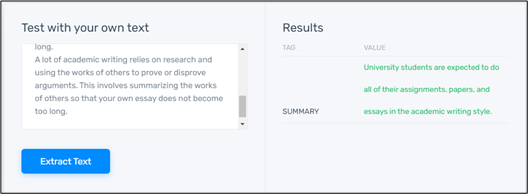
    There are no options to upload a file, so you are limited to writing or copy-pasting your content in the input section. Upon pressing the “Extract Text” button, the summary will be generated.

    The right-side box shows the summary. The text is green and can be copied directly to your clipboard. Unfortunately, there aren’t any options for downloading the results.

    The summary itself is very good. Its qualities can be listed as follows:

    • Concise (almost 80% reduction in size)
    • Accurate
    • The tool does not have any ads and it also does not require any registration prior to use.

    3. Summarizer by Summarizingtool.net

    Summarizingtool.net is an online platform that provides multiple tools for content optimization. One of the tools that they provide is the summarizer.

    The summarizing tool is completely free to use and it comes with a lot of features. You can customize the way your summary is generated by setting the summary length and by specifying the language.

    Best Free Online Text Summarizing Tools

    The features offered by this tool are:

    • Can summarize the text in eight languages.
    • Supports file uploading and downloading.
    • Has a slider for changing the length of the summary
    • Shows word count for both input and output
    • Can show summary in three different ways (as a paragraph, bullets and “best sentence”)
    • Does not require registration
    • Does not have any word limits.
    % Best Free Online Text Summarizing Tools

    The file format for uploading and downloading is DOCX, which is the default format of Microsoft Word.

    The slider has only three preset options i.e., 25%, 50% and 75%. The numbers tell how much the size will be reduced when the text is summarized.

    There is only one real downside to this tool and that is the presence of ads on the webpage. However, ads come with free tools so it’s an acceptable trade-off.

    Also Read:

    4. Summarizer by Huggingface.co

    Huggingface.co is an online platform for hosting machine learning models. A variety of creators post their models that perform some kind of specialized task. Text summarizing models are also available freely on this platform.

    Since there are many different summarizers available on this platform, we’ll just be working with a specific one. The uploader of this particular tool goes by the username of ‘razakhan’.

    The model we have chosen is quite simple. It takes some text as input and produces a summary. Unlike the other tools that we’ve looked at in this list, there are not a lot of fancy features in the summarizer by Huggingface.co. It has a plain and simple working but with good results.

    The best aspects of this tool can be summarized as follows:

    • It does not require registration
    • There are no usage limits
    • The output is accurate and correct
    • There are no ads

    Like the others, this is also an extractive summarizer, so it is suited for summarizing academic writing as it will preserve the formal style and tone of the text. Students can get a lot of use out of this tool.

    5. Summarizer by Editpad.org

    Our final tool on this list is the Summarizer by Editpad.org. Editpad is a completely free online platform that provides many different types of tools. There are different types of writing tools, calculators, and of course, content optimization tools.

    The summarizer offered by Editpad comes with some good features that make it useful for academic writers.

    Free Online Text Summarizing Tools Editpad

    The best features of this tool are as follows:

    • Multiple language support
    • Integration with other content optimization tools
    • File uploading and downloading are supported
    • Users can see the summary as bullets or as a paragraph
    • There are shortcuts for deleting and copying text
    • Does not require account creation or logging in

    As you can see from the features, it is a pretty well-rounded tool. However, it does have some missing elements. The key feature missing in this tool is the option to change the length of the summary. Another thing that may annoy users is the presence of ads.

    Overall, this is a good summarizer. Students and professors alike can utilize it to summarize pieces of academic writing.

    Conclusion

    Academic writing is a very formal method of writing. When summarizing academic articles/papers, it is essential for the writing style to remain unchanged. Extractive summaries do not change the text in any way so they are a good fit for this type of writing.

    All the tools discussed in this list are extractive summarizers. They also utilize AI and NLP to understand the context and pick out the best lines to use for a summary. They provide good results and as such, they are very helpful in summarizing academic content.

    Best Android Apps to Improve Your Writing Skills

    Writing is an essential skill for anyone if they want to have any kind of successful career. It does not matter if your job is unrelated to academia or literature, you still have to do writing in some capacity. In most businesses, this takes the form of reports and documentation of any plans or strategies. So, it is a great idea to invest in your writing skills.

    However, a lot of people don’t have enough time or money to go to special classes or get private tutoring. But they can still improve their skills in other ways. One of the most convenient methods is to use free Android apps. Many types of apps can rewrite some given text, summarize it, or even find grammatical mistakes. Simply observing the changes, the apps make, lets you improve your writing.

    In this article, we will discuss three types of apps and how you can use them to improve your skills.

    Best Android Apps to Enhance Your Writing Skills

    The types of apps listed in this article were chosen considering their benefits for learning how to write better.

    1. Article Rewriter App

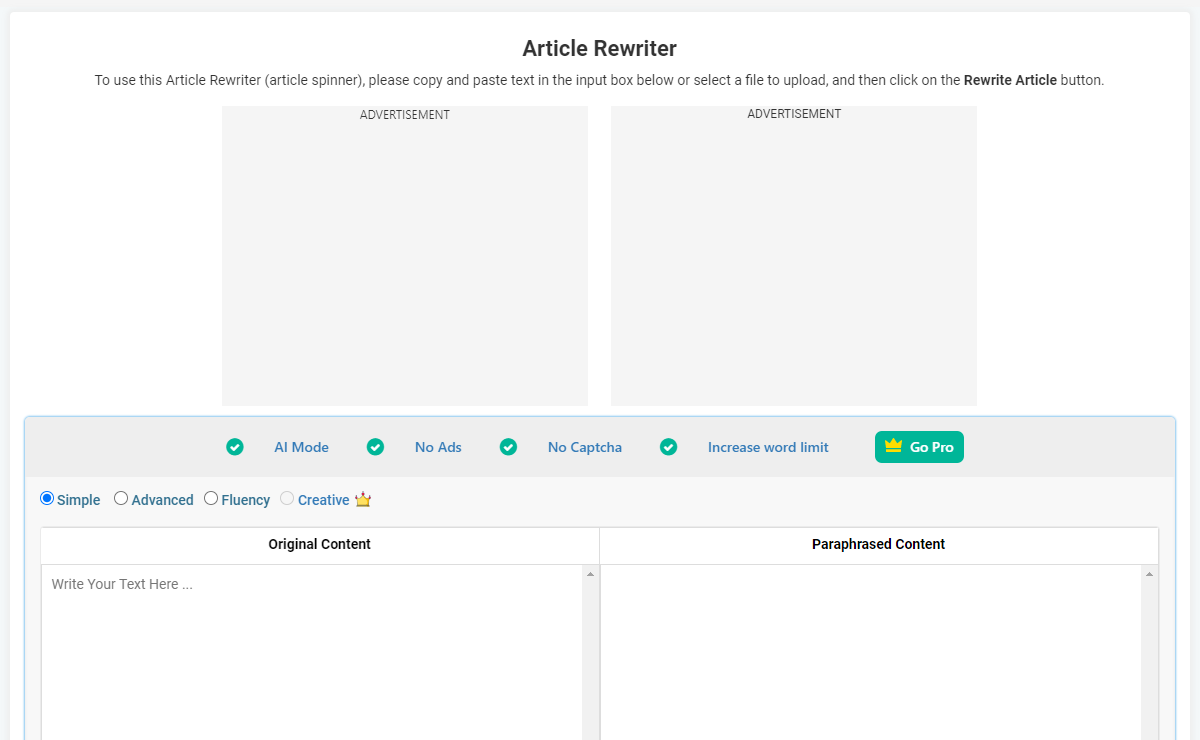
    Article rewriting is the art of using synonyms, and similar phrases, and altering the sentence structure of most of the text in an article. The result is that you get a piece that looks and sounds different from its original version, but it has the same meaning.

    There are many apps on the Android platform that can perform article rewriting. However, the best of these apps has more features than others. A good article rewriter app can rewrite the text in multiple ways.

    It allows the user to learn how to articulate the same ideas using different wording. And you also consider an online article rewriter for writing purposes.

    Most of the article rewriting apps available on the Google Play Store are free. This means that a person trying to improve their writing doesn’t have to worry about spending money.

    Article Rewriter and Spinner
    Article Rewriter and Spinner
    Developer: Prepostseo
    Price: Free

    Article rewriting apps are also known as article spinners. So, don’t be confused when you search for them. Some of the results may say article spinner, others may even say “Article Rewriter and Spinner.” They are all the same type of app, and you can use them for your learning.

    Article spinners can be considered the most important app in this list as learning how to reword things is one of the most important writing skills.

    Article Rewriter - Best Android Apps to Improve Your Writing Skills

    2. Grammar Checking App

    Grammar checkers can be considered another important app for improving writing skills. Good grammar is necessary when it comes to writing because, without it, your write-up can be very confusing.

    If the word order is wrong, the meaning of the sentence can either change to something different or it can even become nonsensical.

    For example:

    “I will eat the tomato.”

    And

    “And the tomato will eat I.”

    The first sentence is the correct version, it conveys that a person will eat a tomato. The second sentence uses the same words but in the wrong order. The meaning changed to “the tomato going to eat a person” which is not making any sense. Furthermore, “I” is wrong as well, it should have been “me”.

    Proper placement of punctuation, correct spelling, and the right word order are essential for conveying the correct message to your reader. Simply missing a comma can make a lot of difference. As you can see in the following example:

    “let’s go play grandma.”

    And

    “Let’s go play, grandma.”

    The first sentence implies that the subject wants to pretend to be a grandma, while in the second, the subject is asking their grandmother to play with them.

    By using grammar checkers on their own write-ups, people can learn about their grammar mistakes and learn to avoid them.

    Also Read:

    3. Text Summarizing Apps

    Writing is not just about verbose sentences and complicated vocabulary, it’s more about effective communication. Being able to make another person understand your ideas is the real goal of writing. Summarizing is one of the most effective techniques to achieve that.

    Summari
    Summari
    Developer: Summari
    Price: Free

    In text summarizing, you basically extract the core idea/argument of a write-up and explain it as briefly as possible. It is a great exercise to check whether your comprehension skills are up to par. That’s because only if you understand the text correctly, will you be able to extract its core point.

    Text Summary
    Text Summary
    Developer: Kreativity Apps
    Price: Free

    Summarizing apps can help people see if their version of a summary is correct or not. They can compare their work with that of the app, and in the process, they passively improve their own comprehensive writing skills.

    Conclusion

    Being able to write well is a skill that serves everyone in their day-to-day life. It can take the form of reports, presentations, and applications. Since all of these things are supposed to be read by someone else (typically a superior), it makes sense that their quality needs to be top-notch.

    People can make sure that their writing skills are adequate by using Android apps that assist in writing. These apps not only help them by improving their write-ups, but also by passively teaching them the correct ways of writing.

    How to Download Facebook Videos, Reels, and Status within Seconds

    0

    Facebook is home to tons of media content. In the past, Facebook was only used for connecting with people around the world. Not so long before, Facebook was only used for the purpose of chatting and poking friends.

    But today, this platform has changed and become much more interactive today. Today this social media platform has become a place for marketing, short-form multimedia content, and much more. 

    You can find more than thousands of videos published on Facebook related to various niches and topics. You can follow pages that post videos and short clips that are of your interest.

    Now watching multimedia content on Facebook is no biggie, but it can be difficult for a user to save videos from FB.

    Is it Possible to Save Videos from Facebook?

    Not so long before, users saved Facebook video content by recording screens on their devices with third-party apps. Downloading videos from social media platforms is difficult because of all restrictions set by these platforms as well as by copyright holders of the content.

    Today it has become possible to download videos and stories from Facebook with the help of modern tech and tools.

    Before we tell you about the best way to download FB videos, reels, and stories, we would like you to understand that you must never use downloaded content from Facebook for commercial purposes.

    This is because you can be held accountable for the breach of copyright of the owner of the video. If you want to save multimedia content from FB, then you need to restrict it to personal use only.

    In this guidepost, we are going to discuss some of the easiest and tested ways to save FB videos and reels without any hassle. Read about these ways and start saving your favorite clips from your desired pages without asking the owner.

    Top Ways to Save Videos, Reels, And Stories from Facebook Like a Pro!

    The easiest ways have been discussed below for your knowledge:

    1. Download Facebook Videos with Online Tools

    The first tried and tested way to download Facebook videos and reels is by using online tools. Using FB video downloader is the most popular method which is being used for saving multimedia content from Facebook on both small-screen and big-screen devices. 

    Online Facebook downloader tools are based online. They can be used on browsers on any device. You just need an internet connection and a credible browser to download videos from Facebook.

    The FB video downloader tools are absolutely free to use, which is a big advantage they have over other methods.

    How to Download Facebook Videos, Reels and Status

    If you are wondering how online FB downloaders work, then know that they are quite simple in their work. All you have to do is open the tool on your browser and enter the link of the video, reel, or story that you want to save in the input bar.

    Every video, reel, or story published on Facebook would have three dots options on the corner. You can obtain their URL from that list, or you can simply right-click on the video and copy its address. After getting the address, you need to paste the link.

    Press the download button on the tool after providing the link to the content. The video would be saved on your device in less than ten to twenty seconds, depending on your web connection.

    We would suggest you use the best FB downloader tool because they are free, easy to use, reliable, provide multiple quality selection features, and have no limitations.

    It is a fast and free online tool. You can download videos within a few seconds and download hundreds of clips from FB if you want to.

    Also Read:

    2. Download Facebook Videos with Desktop Applications

    Another popular and tested way to save videos from Facebook is with the help of a desktop app. There are many third-party applications that can be installed on desktops and laptop devices. One of the most popular choices you have these days is the 4K video downloader. 

    Facebook downloader applications are usually available with premium versions. These apps are quite reliable when saving lengthy videos, short reels, and stories from social media platforms. 

    To download videos from FB, you need to make sure that you have a strong web connection. The FB downloader apps do not work without a strong web connection, so you have to make sure that you check your internet connection before trying to save a clip. 

    On the downloader apps, you are going to find input options in which you have to enter the link of the content you want to save. You can copy the link address of videos and reels from their source. Paste the links in the input box and click on the download button.

    The app would find the video/reels from its source and would save it on your device in your desired quality and format. This is an easy and foolproof method that allows you to download even copyright-protected videos.

    The only con of these apps is that you need to get the paid plan when the free trial expires.

    3. Download Facebook Videos with Mobile Apps

    It is true that you can use online Facebook video downloader tools on your mobile, but you must know that it would be best to get an app if you specifically want to save short reels. Reels on Facebook specifically work on small-screen devices like mobiles and tablets.

    If you want to save videos or reels from Facebook on your mobile, then we would suggest you install a free Facebook video downloader application. You can find hundreds of downloaders for Facebook reel apps on Google Play and the App store.

    You have to go through the top choices and install the one which is free and has good reviews. The working procedure of the Facebook reels downloader app is quite simple.

    You have to paste the URL of the video link on the empty bar of the app. Some apps would automatically detect the link copied in your clipboard.

    Once the app gets the link, it will get the clip from its source and offer you different quality options in which you can save the video. The app takes a few seconds to keep the video in your local storage.

    4. How to Download Your Own Videos and Reels from Facebook?

    The methods we have explained above can help you save videos published by other people and also your own. But there is one other method in which you don’t have to take help from any third-party app or tool to save your own clips or reels.

    On the Facebook app, you can see the menu tab in the top right corner of the app. The three lines icon is the menu tab. From the menu, you are going to find the reels and video icons. Click on the icon and select it, and all the clips you have uploaded will appear before you.

    You need to click on the three dots that appear at the bottom of the screen on every clip. In these options, you can find ‘save video/reel to phone.’ You can locate the videos saved in your local drive. 

    End Words

    In this brief post, we have discussed the most common and popular ways that you can use to download videos from Facebook. Because of certain restrictions, Facebook doesn’t allow you to download clips or reels. So you need to take help from third-party tools.

    If you can afford paid options, then you should go for premium Facebook apps for desktops or mobiles. Premium applications can save all kinds of clips no matter what their length is in your desired quality.

    But if you are looking for a free option, then you should go for online Facebook video downloader tools. 

    What Your Agency Should Know About SEO for Lawyers

    When you browse through the smartphone, it is more likely that you will click the first result after the Google search. According to recent research, 22% exactly click on the first result. So if you want visibility for your law agency and high-quality leads, you should work properly with SEO. This will help the websites for lawyers to remain at least on the first page of Google search results. 

    1. On-Page SEO for The Law Firm 

    Websites for Lawyers
    Websites for Lawyers

    The On-Page SEO activities are carried out on the site. The optimizations include both back-end and front-end optimizations. The entire experience of browsing for the visitors remains smooth. The search engine aims to send visitors to websites that will provide the right information with a great browsing experience. If these activities are unable to process, you should still have a long way to go in improving the ranks on the search engine results page.

    2. Proper Keyword Research 

    Keywords are the most important component for your website to gain rank. So, you must conduct proper keyword research. The potential clients will look out for the websites through the relevant keywords only, and you must be wise in the keyword selection. You should also insert relevant keywords within the content of your website so that the search becomes easy and the ranks also get high.

    3. Improve Website Loading Speed 

    The SEO for lawyers suggests that the website loading speed should be reduced to improve the site’s performance. A slow website will frustrate visitors by spoiling their browsing experience. When the loading speed is slow, you may lose potential clients as they may bounce off your website. Most mobile users may not wait long if your site is heavy and takes time to load.

    4. Landing Pages For The Offered Services 

    Good landing pages need to be created for the law firm’s services. Separate landing pages for each service create more impact on the visitors. The services may be corporate legal or litigation-related services. You should always create a separate landing page. The site will get the ranks with as many relevant keywords as possible.

    Also Read:

    5. URL Optimization 

    URL optimization also plays an important role in performing the Law firm’s SEO activities. Though long and difficult URLs are inconvenient for visitors, you should go for customized URLs so that they become easy to understand.

    6. Proper Content Structure

    To ensure a smooth browsing experience for your visitors, you should focus on the content structure. Just like looking into the entire website, you should also look into every page to check the content structure of the pages. When header tags are used for dividing sections and subsections, it becomes easier for visitors to go through the posts.

    Conclusion 

    The websites for lawyers should have relevant keyword-rich content. It would be best if you made sure that the visitors are enjoying a smooth experience while visiting your law firm’s website. The website should also be informative with high-quality content, so potential clients do not bounce back to other sites.

    Top Languages You Need To Learn For App Development

    If you are a beginner in the app development world and want to be the best at it. Then, read this article providing the top languages that you can learn to be a successful app developer.

    App development is the complex process of making, putting into use, and designing mobile apps. The apps are either made by professional freelancers working on their own or by a team of skilled developers who work for a company.

    When making an app, there are many things to think about, such as the idea, design, size of the app, and many more. To get the best results, a skilled developer should know about all of the things in this post.

    Top 5 Languages To Become A Successful App Developer

    Even though Kotlin and Swift are the official languages for Android and iOS, Mobile App Development can also be done in many other languages. Information about these app development languages is given below to help you make a good choice.

    1. Kotlin

    Google announced in 2019 that Kotlin is the official language for making Android apps. Kotlin is a programming language that can work on more than one platform simultaneously. It can be used instead of Java when making Android apps. In 2017, it was also made an “official” second Java language. Kotlin can work with Java, and it works on the Java Virtual Machine.

    The main difference between Kotlin and Java is that Kotlin gets rid of the features like null pointer exceptions. It also gets rid of the need to put a semicolon at the end of every line. In short, Kotlin is much easier for beginners to try than Java, and it can also be used as an “entry point” for Android App Development.

    Key features:

    • Supports a straightforward and simple syntax
    • Can be used to create independent platforms or applications
    • Compatible with Java

    2. Swift

    Swift is a programming language that mobile app developers use for making and designing apps for iOS devices. It is a general-purpose, multi-paradigm, compiled programming language that was made by the tech giant Apple.

    Before this language came out, Objective C was the most popular and commonly used programming language for making iOS apps. Objective C is no longer needed because Swift is so flexible and reliable.

    Key features:

    • Compatible with objective C
    • Supports dynamic libraries
    • Efficient memory management

    Also Read:

    3. Java

    First, Java was the official language for making Android apps, and now it is also the most popular language. Opera Mini, Wikipedia, Signal, etc. are some of the top java mobile applications available on the Google Play Store. It is also the language that Google helps the most.

    Java also has a great online community where you can get help if you have any problems. But Java is hard for a beginner to learn because it has things like checked exceptions, null pointer exceptions, concurrency, constructors, etc. that are hard to understand. Because of this, a lot of companies still use this language to design and build mobile apps.

    Key features:

    • Strong memory management
    • Code portability and reusability
    • It is an object-oriented language

    4. Python

    Every single app, website, and software development project uses Python as its programming language. The programming language is becoming more and more popular, and both beginners and experts like it because it is easy to use and has a clear syntax.

    Programmers use Python in order to program the back ends of popular apps like Pinterest, Facebook, Instagram, and YouTube that we use every day. We can see how powerful Python is by looking at the apps above, which are one of the safest, fastest, and most popular apps.

    Key features:

    • It is flexible to use
    • Extensive library support
    • Free to use

    5. JavaScript

    If you want to be taken seriously as a web app developer, you need to know certain programming languages. JavaScript is at the top of the list of must-know programming languages.

    Developers need JavaScript to add unique features to their programs to work on any device or platform without any problems. Also, it is a full-stack language, which means that you can use it to build both a front-end that is interactive and looks good and a back-end that works well and is powerful.

    Key features:

    • Allows you to add rich features within the app
    • Works smoothly with other languages
    • The syntax is easy to learn and use

    Summing Up: Top Languages You Should Learn To Be A Successful Mobile App Developer

    One needs a teacher or mentor to learn how to use a programming language or work in a related field. Make sure a course is right for you before you sign up for it. For example, if you are just starting out, you should choose courses that are made for beginners and can give you a good tech stack. However, if you already know enough about programming, you can choose either the beginner or the intermediate ones.

    3 Best Paraphrasing Tools for Bloggers for Unique Content

    1

    Blogging can be a difficult task when it comes to writing a post from scratch. Bloggers need to produce quality content to keep their sites at the top of search engine results pages.

    Newbie bloggers who have just started their blogs do not have a big budget to hire professional content writers. Here they are looking for simple tricks to do it themselves and save money and time. This is where the technique of paraphrasing can be the best solution.

    Paraphrasing is the process of writing already written content in a new way.

    For this, you need to understand the concept behind an article or post and then change the structure and wording to create an original. This is the best practice if you have to write about the same article over and over again and fear being accused of plagiarism.

    Currently, online paraphrasing tools are the best and most practical solution for bloggers who are pressed for time and need to maintain the quality of their work.

    The online paraphrasing tool can help bloggers to create unique and error-free content without much effort and time.

    In this article, we will walk you through the best three paraphrasing tools for bloggers to rewrite posts to make them unique. However, before we begin, we would like to explain what the paraphrasing tools are and how they work so that you can use them to get unique results.

    What are paraphrasing tools and how can they rewrite unique content?

    A paraphrasing tool is an online program, also known as an Article Rewriter or Article Spinner, that makes content unique and free of plagiarism.

    As part of their process, they usually use advanced artificial intelligence to replace words and phrases with unique synonyms or change the structure of sentences.

    With a rephrasing tool, you can create unique, original, and error-free paraphrased content. They are also able to improve the readability, tone, and flow of the text. Using these online tools will save you a lot of time and money since you will not have to rewrite existing material yourself.

    A blogger has to create a large amount of content daily and has limited time to do so. If they write blog posts from scratch or paraphrase manually, likely, they will only write a few paragraphs or one post per day. With the online paraphrasing tool, they can rewrite existing posts in bulk without sacrificing quality.

    3 Best Paraphrasing Tools for Bloggers

    1. Paraphrasingtool.ai (Best overall)

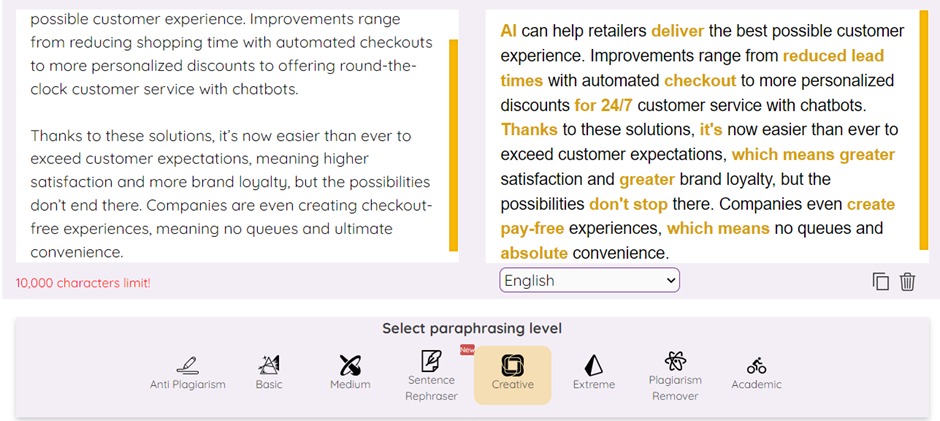
    The best free paraphrasing tool on the web, ParaphrasingTool.ai rewrites text in different ways to make it unique. It uses artificial intelligence to transform the text into unique sentences and phrases. The results are unique, plagiarism free, and human-readable.

    Best Paraphrasing Tools for Bloggers

    Different modes

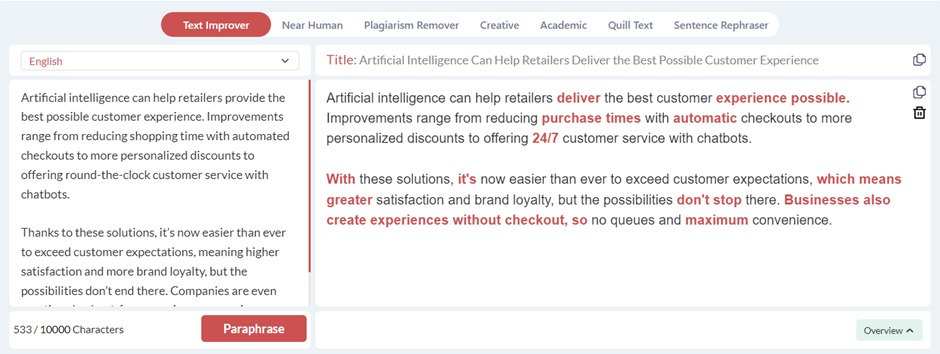
    Using this tool is simple. You can copy-paste the text from the documents and it will rewrite using its different modes. These modes are:

    • Text improver
    • Near human
    • Plagiarism remover
    • Creative
    • Academic
    • Quill text
    • Sentence rephraser

    You can use any mode according to your requirements and writing style.

    Change synonyms to edit results

    It also lets you edit your rewritten content, if necessary, by offering a drop-down list of selected words. If the results seem inappropriate to you, you can always make changes to them by changing the synonyms.

    Word count limit

     You can paraphrase up to 1000 characters in one go and 10,000 characters per submission with the upgraded premium plan.

    Multi linguality

    It works well in different languages, including English, French, Spanish, German, and more. The feature makes it an excellent tool for bloggers around the world.  Its multilingual interface allows you to rewrite any type of content in any language you want.

    Generate accurate titles

    Besides rephrasing the original text, this paraphrasing tool creates unique and relevant titles for you that you can incorporate into your posts.

    Pros

    • Rewrite any type of content without losing the original message.
    • Overall best paraphrasing tool
    • Simplify the complex terms and phrases
    • High readability feedback
    • Generate titles
    • Give a quick overview of the entire post

    Cons

    This tool only paraphrases 1000 characters at a time, so you may need to use the tool several times if you need to paraphrase content with more than 1,000 characters.

    Also Read:

    2. Paraphraser.ai (Better word count)

    Paraphraser.ai is another AI-based tool for bloggers and content writers, especially those who need to create unique content.

    With this tool, you can generate unique results within minutes and it is free of charge (a premium plan may be added in the future).

    This means that there is no login and registration required to use this tool, so you can use this tool whenever you want.

    Best Paraphrasing Tools for Bloggers

    Paraphrasing modes

    It will generate the results according to your needs as it also offers different paraphrasing modes;

    • Anti-plagiarism
    • Basic
    • Medium
    • Sentence rephraser
    • Creative
    • Extreme
    • Plagiarism remover
    • Academic

    Better word count

    This tool paraphrases 10,000 characters at a time for free, which means that you can even paraphrase your entire blog post at once.

    Easy navigation

    You can start using this tool by simply copy-pasting the text in its input field, selecting mode and language, and clicking on Paraphrase. All it takes is a few seconds and provides results on your screen.

    Pros

    • Unlimited free usage
    • Various modes ensure unique results
    • Rephrases 10,000 characters
    • Rephrases text in multiple languages

    Cons

    • Results are not editable
    • There is no option to change synonyms and phrases
    • The free paraphrasing tool can produce unique content, but the content isn’t always better than the original. Sometimes, the paraphrased content requires additional editing to be made more understandable.

    3. Sentencerephraser.com (Sentence-based feedback)

    Sentencerephraser is an easy-to-use online paraphrasing tool that rephrases content sentence by sentence.  This paraphrasing tool is one of its kind which lets you choose the style of rephrasing you want.

    Sentence based suggestions

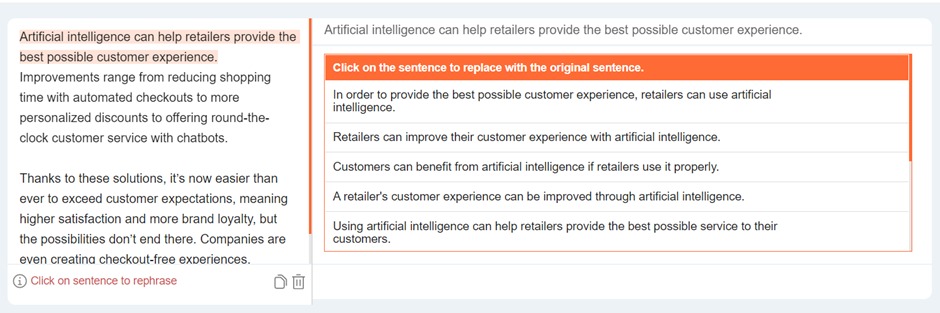
    It might take time to rewrite text, articles, and blog posts using this tool but the thing that sets it apart from others is the sentence-based suggestions it offers you to choose from.

    Give ten options for sentences

    It changes the sentences by replacing common words and phrases with more relevant ones and offers ten different alternate sentences to choose from. By using this tool, you can control your writing and take it in the direction you want.

    Exclusive interface

    Sentence rephraser is different from other paraphrasing tools due to its exclusive interface. All you have to copy-paste text and click on text sentence by sentence. It helps bloggers to remove duplicate content to make their posts more unique and original.

    Pros

    • Sentence by sentence rephrasing
    • Clear and interactive interface
    • Free usage
    • AI-powered
    • The word count is unlimited

    Cons

    It does not have any negative aspect attached to it other than that it takes time to rephrase content sentence by sentence.

    Wrap up

    Many bloggers struggle with paraphrasing, but there are a few AI options that can help them achieve their goals. These tools rewrite the original material with the correct sentence structure, making your content unique and easier to understand for a wide audience. The best thing about these tools is that they are free and do not require any credentials to access them. So, if you want to stay away from plagiarism, look no further than these three AI paraphrasing tools.

    15 Ways to Improve Your Site’s Mobile SEO

    0

    Here are the 15 Ways to Improve Your Site’s Mobile SEO:

    1. Optimize your content for mobile devices

    Make sure your site is optimized for mobile devices. This means your content should be easy to read and navigate on a small screen. Use short, concise paragraphs and headlines that are easy to scan. You may also want to consider using a responsive design, which will adjust your site’s layout to better fit mobile screens.

    2. Use relevant keywords

    improve site's mobile seo keywords

    When choosing keywords, keep in mind how people are searching on mobile devices. They are often looking for quick answers to specific questions, so choose keywords that are relevant to your business and make it easy for them to find you.

    3. Claim your business listings

    Make sure your business is listed on directories such as Google My Business, Yelp, and Foursquare. This will help people find you when they are searching for businesses like yours in their area.

    4. Optimize your website for local search

    If you want to rank in local search results, you need to optimize your website for local keywords. Include your city and state in your titles and metatags, and make sure your NAP (name, address, phone number) is up-to-date and consistent across the web.

    5. Create a mobile-friendly website

    Improve Your Mobile Responsive Website - Mobile SEO
    Cropped view of designers working with app sketches and template of mobile website at table

    As mentioned above, it’s important to have a responsive design so your website can adjust to different screen sizes. But you can also create a separate mobile-friendly website that is specifically designed for smaller screens. This can be a good option if you want to offer a different experience for mobile users or if your responsive design is not working well on small screens.

    6. Use social media

    Social media diagram drawn on paper sheet
    Social media diagram drawn on paper sheet

    Social media can be a great way to connect with potential customers and promote your business. Make sure your profiles are complete and up-to-date and post regularly to keep people engaged. You may also want to consider creating specific campaigns for social media sites like Facebook and Instagram.
    7. Use images and videos

    Images and videos are great for grabbing attention and engaging people on mobile devices. Choose images that are relevant to your business, and make sure they are properly sized for small screens. You may also want to consider creating video content, which can be a great way to connect with potential customers.

    Also Read:

    8. Use Google Analytics

    Google Analytics is a free tool that allows you to track your website’s traffic and performance. This is valuable data that can help you improve your mobile SEO.

    9. Promote your mobile site

    Make sure people know about your mobile site by promoting it on your other marketing channels, such as your website and social media profiles. You can also use paid advertising to reach potential customers on mobile devices.

    10. Use rich snippets

    Rich snippets are bits of code that allow you to add additional information to your listings in search results. This can include your business’s name, address, phone number, and more. Adding rich snippets to your listings can help improve your click-through rate and attract more customers.

    11. Use AMP pages

    AMP (Accelerated Mobile Pages) is a technology that allows you to create faster-loading pages for mobile devices. This can help improve your website’s performance and make it easier for people to find the information they need.

    12. Implement schema markup

    Schema markup is code that helps search engines understand the content on your website. This can be helpful for both your website’s SEO and for potential customers who are looking for specific information.

    13. Use Google Search Console

    SEO Consultant - Small Business SEO
    Small Business SEO

    Google Search Console is a free tool that allows you to track your website’s performance in Google search results. This is valuable data that can help you improve your mobile SEO.

    14. Monitor your progress

    Keep track of your mobile SEO progress by monitoring your website’s traffic and performance. This will allow you to see what’s working and make changes as needed.

    15. Hire an expert

    If you want help with your mobile SEO, consider hiring an experienced marketing agency or consultant. They can help you create a strategy, optimize your website, and track your progress.

    Conclusion:

    Local SEO is vital for businesses that want to rank in local search results. To optimize your website for local keywords, include your city and state in your titles and metatags, and make sure your NAP (name, address, phone number) is up-to-date and consistent across the web. You can also create a separate mobile-friendly website that is specifically designed for smaller screens. Social media can be a great way to connect with potential customers and promote your business. Make sure your profiles are complete and up-to-date and post regularly to keep people engaged.
    How Is Plagiarism Checker Essential to SEO Contents?

    0

    It is very easy to write SEO content but writing a unique one is hard. Everyone you need to write about is already online, through blog posts, YouTube, Webinars, and others. But how will you write something out of this already-made content that will come off looking original?
    This trick is a thing most writers are yet to understand. They don’t know how to restructure content uniquely. Here, I will explain why a Plagiarism checker is useful in SEO.

    Ways plagiarism checker is useful to SEO contents

    Plagiarism Checker

    Duplicating content may be an unintentional practice but that doesn’t make it offensive. The best thing is to avoid plagiarism. The following are ways plagiarism checker is useful to SEO content.

    It shows you a percentage of plagiarism

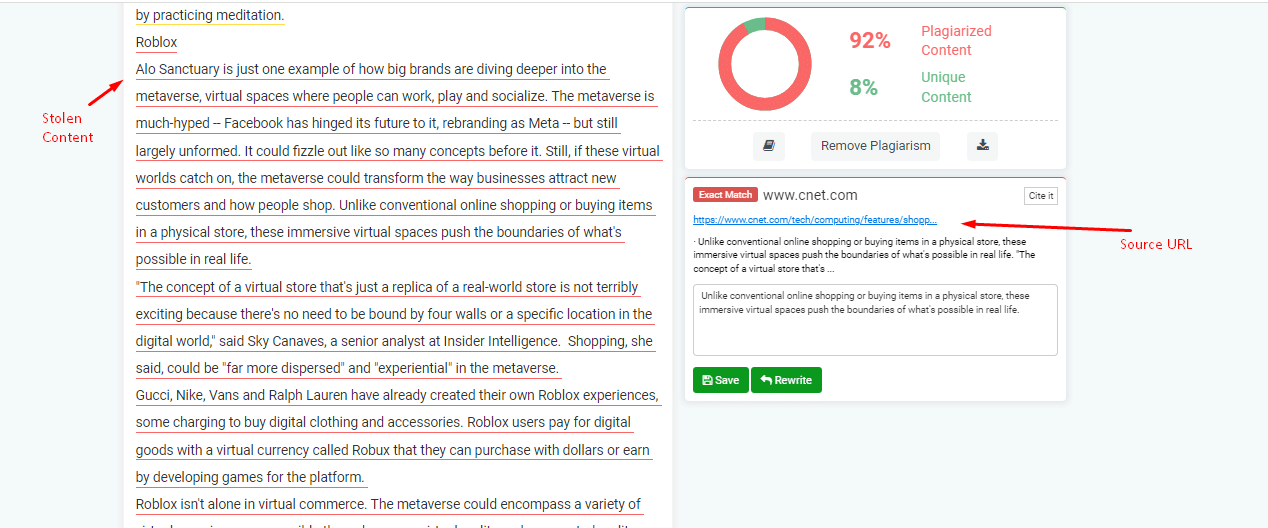
    Every plagiarism checker shows you the percentage of plagiarism detected. This percentage shows you the number of duplicate content that can be found in your content.

    It also shows the link to the original content. That way you can either rewrite or remove the duplicate content. With this, plagiarism will be removed from your content.

    It helps in detecting plagiarism without any stress

    Before plagiarism checkers became popular thing, writers who want duplicate free content always search for each sentence through Google. This process is very stressful and time-consuming.

    Now, things are easier with a plagiarism checker. All you have to do is just upload the content you feel like checking. Then click a button. Since the checkers are AI tools, they will scan through millions of pages of content without any mistakes.

    Creating original content removes doubt and increases credibility

    Creating original content is the best in SEO. It increases credibility in multiple folds. It removes doubt from the minds of your audience. The plagiarism checker not only detects plagiarism but also helps in removing it.

    It helps in getting rid of one 1% at a time

    A plagiarism checker also edits texts. When the content is uploaded to the plagiarism checker, the content can be edited on the spot. This process helps you in eliminating plagiarism while monitoring it.

    It is advised to check for plagiarism again and again. This will help in removing plagiarism from your content effectively until it reaches 100% originality.

    Also Read:

    It draws audience and search engine crawlers

    Unique content is king in the world of SEO and a plagiarism checker will help you achieve that. This original content will increase your index search engine crawlers’ results.

    This makes your content rank higher and draws more audience to your site. It also helps in generating organic traffic. This is great for SEO.

    Top plagiarism checker tools that are good for SEO

    When creating 100% original content, you need good plagiarism checker tools. You have to choose the tool that works for you. The following are plagiarism checker tools that are good for SEO:

    Grammarly

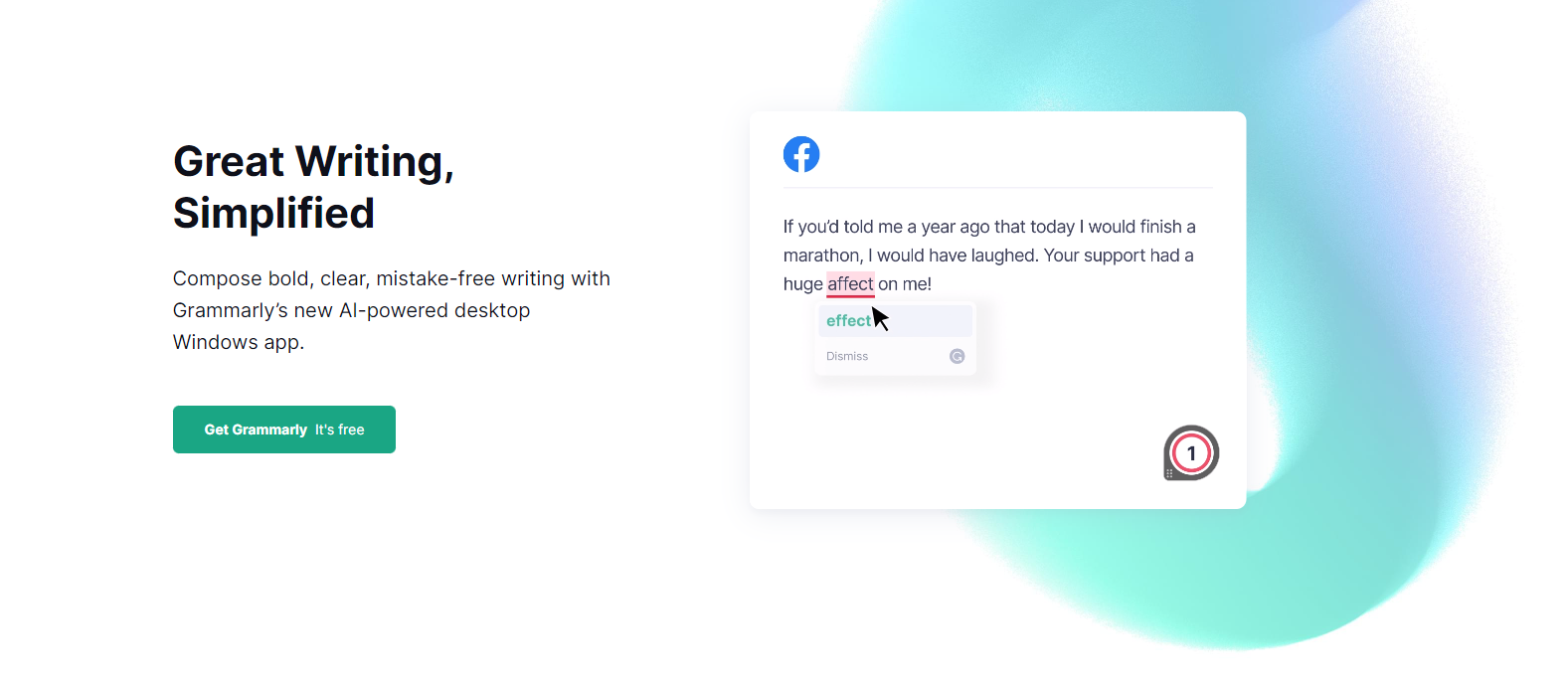
    Grammarly checks over 400+ spelling mistakes, grammar mistakes, redundancy, and incorrect use of sentence structure. It is the king of the World’s largest-used grammar checker tool.

    ProWritingAid

    ProWritingAid is one of the best online plagiarism checker tools in the market. It is best used by creative writers and authors. It’s very good for checking out duplicated content in manuscripts, novels, or literary works.

    ProWritingAid is also a writing coach. It is great for detecting grammatical errors, style issues, and likely mistakes that authors and editors can make.

    Whitesmoke

    Whitesmoke can check over millions of online web pages to check for duplicated content. It is one of the best plagiarism checkers. It is very accurate and is trusted by many. It also checks for correct grammar.

    Although it might not be as efficient and popular as Grammarly, it is a great alternative.

    Duplichecker

    Duplichecker is also one of the best plagiarism checkers for writers. As its name implies, it checks for duplicate content. The interesting fact is it is free. Duplichecker is your friend if you are into SEO.

    PlagiarismCheck.org

    PlagiarismCheck.org is an extremely useful plagiarism checker tool. It is great for reviewing content in case of plagiarism. This should be done before you publish the content.

    It helps in scanning contents with the database of writing which is updated regularly. If your uploaded content shows as unoriginal content. It means it’s plagiarized content.

    Quetext

    Quetext plagiarism checker comes in a free version. This free version is very simple to use. Here, you can paste your text on the website and scan it for duplicate content. This will scan through a million pages across a database.

    Also, QueText has an in-depth search feature. Here, your content gets checked for contextual plagiarism. With contextual plagiarism, your sentences in the essay get checked as a context of the neighbouring lines.