Horse racing was still a major event in Australia in 2021 despite recent issues with lockdowns and the like. For the most part, Australia’s horseracing events were able to take place as planned, albeit with drastically reduced spectator attendance. Here were some of the exciting horse racing events that happened in Sydney in 2021 and what the outcomes were.
The Sydney Cup
The Group 1 Sydney Cup was raced in April of 2021 at Royal Randwick Racecourse. This race, along with others, was postponed due to heavy rains in March. The prize money for this headline race was $2,000,000 for a distance of 3200 metres. The winner was Selino, ridden by jockey Ron Stewart and trained by Chris Waller. Sacramento led for most of the race and came out strong at the gates, keeping at least a length from the closest horse, Chapada, who ended up coming in last. Selino was third last for a good chunk of the race but at the last turn he got a second win and came up from the outside to take the lead ahead of Rondinella who put up a good fight to come in second followed by Miami Bound. Sacramento ended up coming in 10th. The Chosen One, who was last for most of the race, managed to come in 6th. This was a great upset and a stunningly exciting race.
The Golden Slipper
Golden Slipper betting tips may have helped with picking a winner for this race held at Rosehill Gardens Racecourse on March 27th with Stay Inside, ridden by Tommy Berry, exploding out to the front in the last 300 metres. He was listed as the second favourite, with the main favourite being Profiteer, who led early on from out the gate. He ended up finishing 7th after fading in the last 200 metres. Anamoe came in 2nd, followed by fellow Godolphin stablemate, Ingratiating. Richard and Michael Freedman are the trainers of Stay Inside and have done a fantastic job training this young horse to this success.
The Everest
The world’s richest turf horse race was won by Nature Strip in 2021, ridden by jockey James McDonald and trained by Chris Waller. Nature Strip dominated the race from the outset but was aggressively chased by Masked Crusader and Eduardo, who charged at the end but Nature Strip was able to fend them off for the win. Nature Strip is known as the highest-rating sprinter in the world and after two failed attempts at The Everest this Gelding was able to pull off the win despite fierce competition. He was equal favourite with Eduardo who, despite his last-minute charge, came in third. The race offers a grand prize of $15,000,000 and is the richest race in Australia. It is run at the Royal Randwick Racecourse every year during the Sydney Spring Carnival in October.
The Doncaster Handicap
This Group 1 one handicap race is also known as the Doncaster Mile and takes place in April at Randwick Racecourse during the Autumn Racing Carnival. The prize money for this race is $3,000,000 and is run over a distance of 1600 metres. The winner of the race in 2021 was Cascadian who came up from the centre of the group during the end straight just winning by half a head from Icebath in a stunning unexpected finish.
We are excited to see what Sydney racing brings in 2022 which promises to be another stellar year of fierce competition.
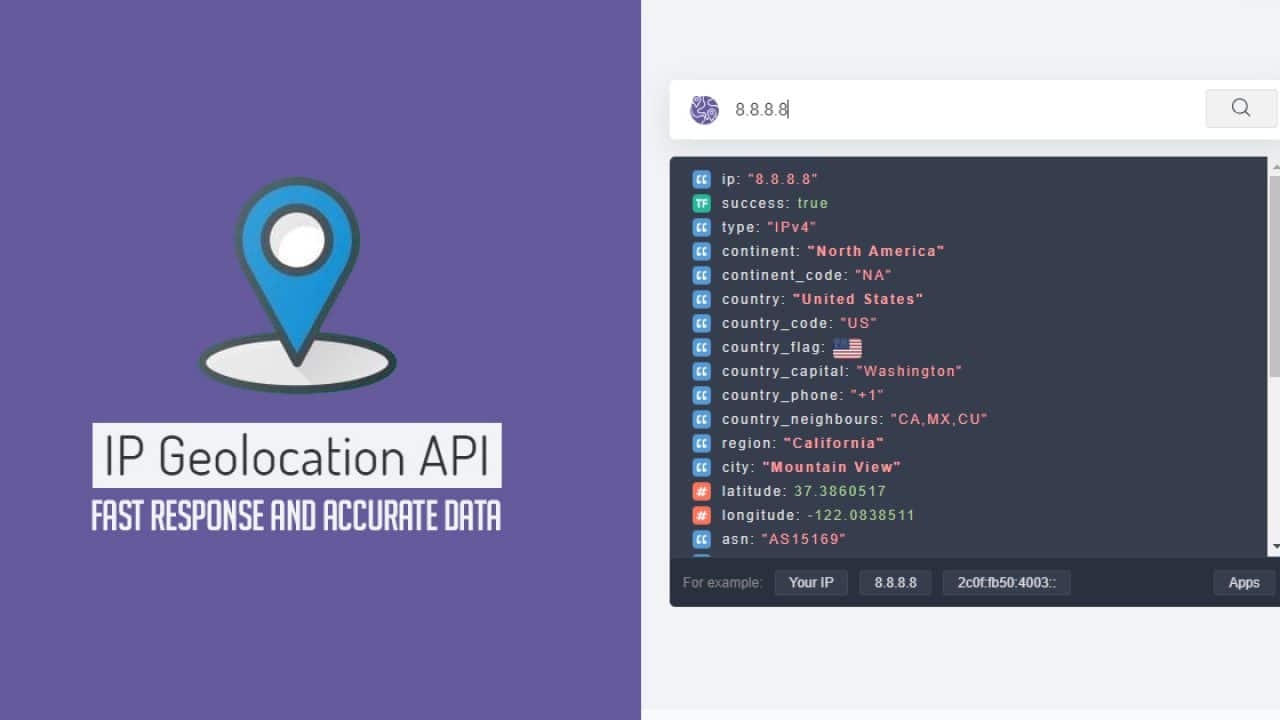
When you go to an e-commerce site and it offers to change pricing on the site to your local currency, that’s IP geolocation API at work. This article covers 6 best IP Geolocation APIs that you can choose for your ecommerce website.
An IP geolocation API uses IP lookup to compare the IP address with data supplied by the relevant ISP (Internet Service Provider) to source a physical address for the user. It may not be 100% accurate, but if, for example, the city matches that of the registered cardholder in an e-commerce context, then that may be sufficient.
This is why the capability of tools like VPNs (Virtual Private Networks) to create fake IP addresses can be a source of concern for cybersecurity. They have legitimate applications, but they’re also used by cybercriminals to try to defeat security. This is why the capability to detect these potential threats, and others, is important. Here are 6 of the best IP geolocation APIs to meet a spectrum of use cases.
Abstract’s IP geolocation API is a lightweight, low latency and easy to implement REST API. It’s able to source geolocation information in real-time including country code and flag, time zone, city, latitude/longitude, and more. All data is also encrypted using 256 bit SSL encryption. Bulk lookups can also be carried out with data in CSV format. IP addresses are periodically reallocated, so Abstract updates the database every day.
The free plan supports a maximum of 20,000 API calls per month at a maximum rate of 1 per second. There are also paid plans starting at 9 USD per month all the way to enterprise-level supporting tens of millions of API requests complete with SLAs, the geolocation data is available at all levels.
When it comes to threat data, Abstract can detect proxies, VPNs and TOR (anonymizer). These capabilities are also available at all price tiers.
ipdata.co
Using IP lookup, ipdata can scan IPv4 and IPv6 addresses to source a visitor’s location. It can source continent, country, city, and latitude/longitude. The free API key enables 1,500 daily API requests. All data and threat detection capabilities are exposed at all paid tiers.
Threat detection functionality enables this geolocation API to detect TOR, proxy, BOGON (illegitimate IP addresses). It can also compare data to known threats in the database.
ipinfo.io
This API can source location information including country, region, city, latitude/longitude, and more. It can then output this data in JSON. There’s a 7 day trial as well as a free IP geolocation plan which enables up to 50,000 API calls per month.
Threat detection can pinpoint VPN, proxies, TOR, hosting, and relay. However, this only becomes available at the second paid tier.
IP2Location Web Service
IP2Location.io is an enhanced IP geolocation API lookup tool to determine a user’s geolocation information and proxy data, such as country, region, city, latitude & longitude, ZIP code, time zone, ASN, ISP, domain, net speed, IDD code, area code, weather station data, MNC, MCC, mobile brand, elevation, usage type, address type, advertisement category, and proxy data.
You can get up to 30,000 IP Geolocation API credits/month for free, or sign up for the 7-day free trial plan to access the most comprehensive data.
In addition, every plan comes with Domain WHOIS API credits – WHOIS API domain lookup that returns comprehensive WHOIS data, such as domain assigned owner contact information, registrar information, registrant information, location, and much more. The Free package comes with 500 WHOIS API credits/per month.
Maxmind GeoIP2 Precision Services
Maxmind’s IP geolocation API can identify a user’s geographical location data including country, city, time zone, and metro code (US only). There’s a free API key supporting up to 1,000 API lookups per day. Unfortunately, data more accurate than country only becomes available at the second paid tier. However, the top ‘Insights’ tier does offer confidence levels and some population data (US only).
Maxmind’s API can detect TOR in ‘Insights’, but complete threat detection capabilities are in another product with a third product dedicated to fraud detection.
ipstack
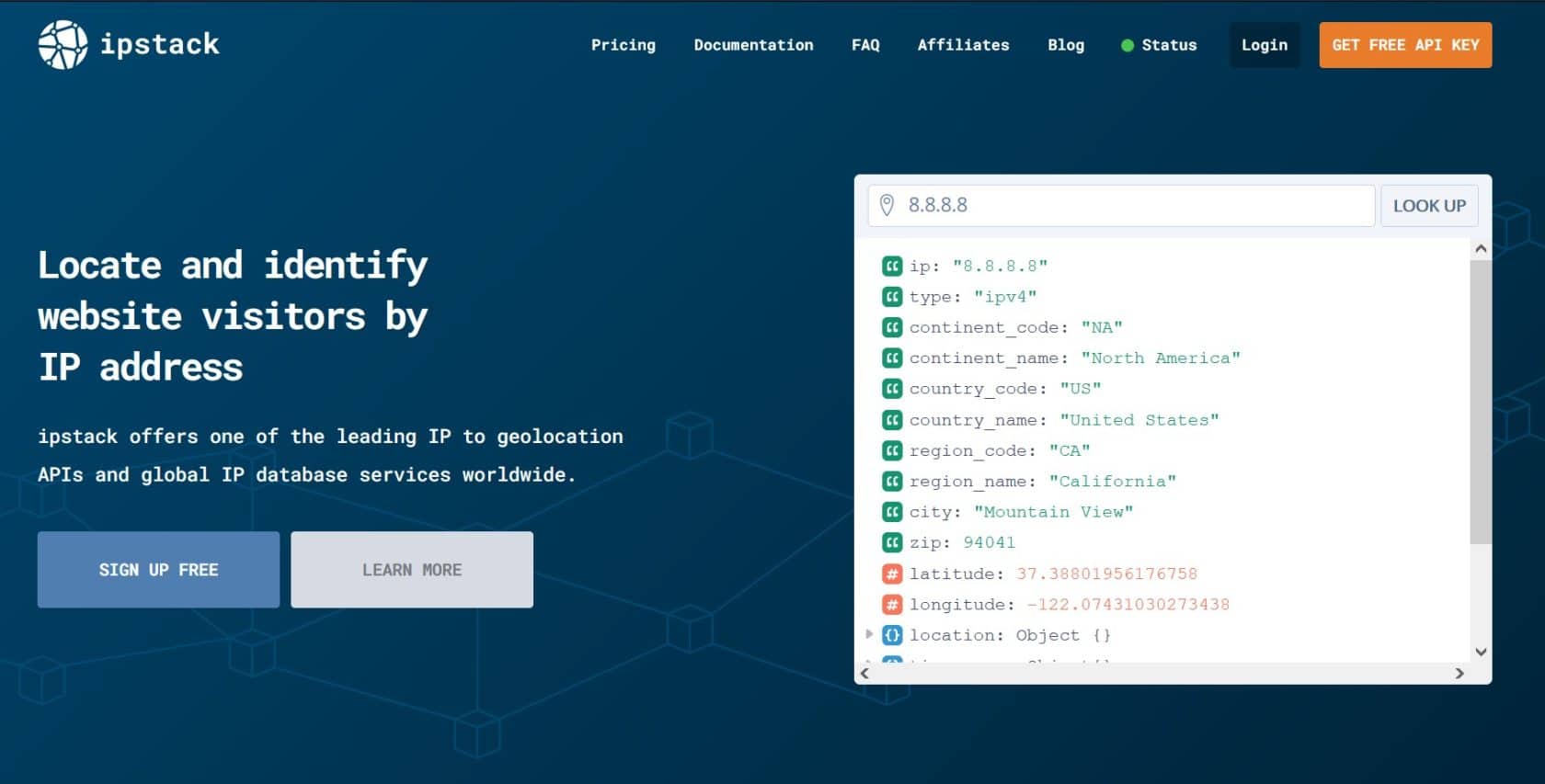
ipstack’s Geolocation API can detect a user’s location to the level of the region, city, ZIP code or postal code, and latitude/longitude. This data can be exported in JSON or XML format. The free API key is listed as supporting 100 API returns per month, but this may be an error. Paid tiers add more functionality and monthly API returns.
Threat detection capabilities only become available in the high-end ‘Professional Plus’ tier. This can detect proxies, crawlers, and TOR with the capability to match data against known in its IP geolocation database.
Summary
As you can see, a lot of the user location data that can be sourced by IP geolocation APIs is similar. So, it might seem as if any will do but don’t just pick one at random. With some API services, key location data only becomes available at higher product tiers. This risks you spending a lot of money acquiring a high-tier product with lots of API calls that you won’t use because key functionality is at that tier.
So be clear about your use cases or what you need your geolocation API to do. Ideally, you want a geolocation API that makes all geolocation information and threat detection capabilities available at all levels. Then, you need only acquire a high-tier version because you need the additional API calls or enterprise-level features such as SLAs.
Let’s learn how to unlock bootloader in OnePlus devices.
What is a Bootloader?
Bootloader is a software between the phone and the Android operating system. When a device is switched on, it triggers the bootloader and it starts the Android OS. It also contains an additional layer of security which loads the OS that passes the security check. Hence, to install any custom software, you first need to unlock the bootloader to bypass this security layer.
How to Unlock Bootloader in OnePlus Devices?
Enabling Developer Options & USB Debugging
Enable Developer Options on your smartphone. It is a generic process that is usually the same for all android smartphones.
Go to the phone Settings -> About Phone.
Find the build number of your device and tap on the build number 7 times to enable developer options.
Open Developer Options -> Find OEM Unlocking and enable it.
Now, find USB Debugging, and enable that too.
Connect your smartphone to your PC and allow USB debugging when asked on your smartphone.
Installing Minimal ADB and Fastboot Tools
Download and install Minimal ADB and Fastboot Tools here.
Extract the file and double click on the .exe file to install the tool. The process is fairly simple. We will need it to unlock the bootloader as well as flash custom recovery on an Android device.
After installation is complete, open the Terminal and navigate to the folder which contains the ADB Tools.
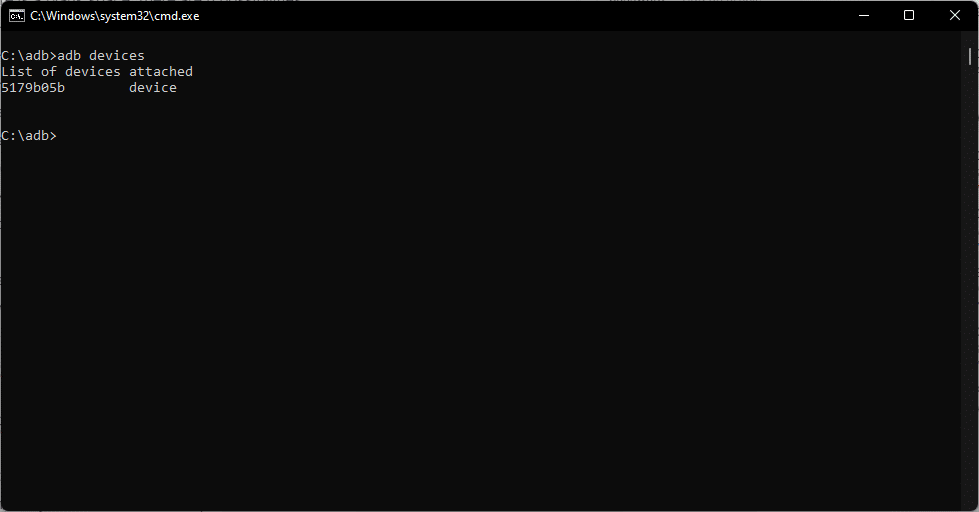
After you are in the directory, follow the set of codes:
adb devices
This should bring up a random string that indicates that the device is connected. If there is a blank space, there are four possibilities:
USB Debugging is not enabled,
Authorization issue with USB Debugging
Faulty Cable,
The cable is not connected correctly.
Check all of these and try again.
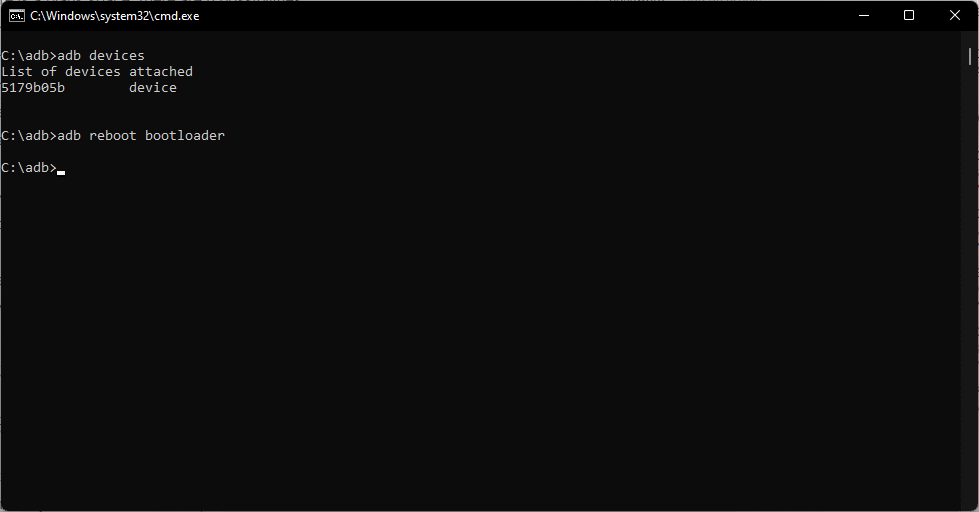
adb reboot bootloader
This launches the smartphone in Fastboot Mode. This mode enables users to make changes to the android system and to unlock the bootloader.
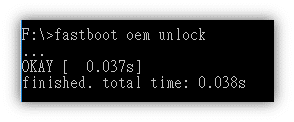
Type the following code to unlock your bootloader:
fastboot oem unlock
And you just learned how to unlock bootloader in OnePlus device. It is relatively easy to unlock the bootloader on a OnePlus device.
Installing Custom Recovery
After you have learned how to unlock bootloader in OnePlus, you need to download and install a custom recovery on your smartphone if you want to root or install a custom ROM on your device.
TWRP is one of the most popular choices for a custom recovery for an Android device. Check the list of supported OnePlus devices here and download the .img file for your respective device from the TWRP Website.
Rename the file as recovery and place it in the folder with ADB and Fastboot tools.
Open the Terminal on your PC and navigate to the adb folder. Now type in the following commands:
fastboot flash recovery recovery.img
This will flash the custom recovery on your OnePlus device. Now you can easily root your OnePlus device via Magisk.
Check out these articles for your respective Android version:
Link building strategy is one of the best ways to draw people back to your website and increase your rankings in most search engines: yet many companies that are new to the idea don’t understand it.
Link building services are more than just posting articles about your company: these are the top ways they’ll help your business if you incorporate them.
One of the top things that affect your search engine rankings is how often your company is linked back to. The more you’re linked or mentioned in conversations and content online, the most trustworthy and noteworthy your company will seem.
Over time, building up a collection of articles, blog posts, and content that leads back to your site will ensure that your brand stands out against competitors and your company becomes one of the top ones in common search results.
Seem More Valid to Industry Connections
No company can thrive alone. Industry connections give you the chance to expand what type of products you carry, who sells them for you, and even how you get them manufactured. In addition, incorporating a link building strategy allows you to build relationships with other businesses, which may lead to them linking back to your company when they bring up information pertinent to what you offer.
Reach Far More Potential Leads
The more links your content has across the internet, the more possible clicks you have. This means far more readers who are excited to learn about whatever your company offers and far more purchases.
This is not only because of how widespread your company can become but also because of your business appearing higher up in search engines. This is because most people who use search engines don’t go to a second page for information; they scan the first page and pick a site from one of the first ten that appear.
Ensure that your brand is one of these.
Make People Remember Your Brand
Band-Aid is so internationally famous that its branding has made it the only thing most people call adhesive bandages now. This is brand awareness on an international scale. For your company, especially if it’s smaller or local, you should try and set a name for yourself. Please make it so that the moment someone thinks about a specific topic, they immediately think about your brand.
This can take a lot of time to do, so it’s a good idea to try and put a lot of work into getting your brand’s name out there as much as possible, so you get more purchases.
Increase Reviews and Site Traffic
The higher ranked and more purchased from your company is, the more people will want to share their personal stories about getting to know your company. As long as your product is good, there’s nothing to worry about. Answer all negative reviews carefully, and offer help if anyone seems to have a problem. Although this can be stressful to deal with, customers seeing that you own an issue and correct it will cheer your company on.
Developing a solid professional network may assist your business in a variety of ways, from obtaining input from accomplished entrepreneurs to unlocking opportunities that were previously closed — it’s something you’d be working on all the time. This article covers how to grow your business with networking and communications.
“It isn’t what you know, it’s about who you know,” you’ve probably heard before, right? Well, you might think it is absolutely unessential, but it actually matters in the sense of your business. The proper connections may lead to incredible possibilities, so here are some suggestions to help you expand your networking opportunities for your business. Let’s get to it!
You must ensure that others are aware of what you are doing; or else, no one will know. Emails, social networking sites, and in-person meetings are all good ways to stay in touch with your business relationships.
Maintaining contact keeps you on their radar, which may lead to them mentioning you to their acquaintances. Merely because you maintained your presence obviously, you could get a simple “Oh, I really know someone you can call.” Which, not to state the obvious, is quite essential to growing your business.
Participate in Online and Offline Networking Activities
Every sector offers conventions and trade exhibitions where people may meet and network. Local meet-ups and organizations often provide monthly events that are excellent for expanding your network. You should attend these events and network with other businesses.
If you are attending the exhibition, set up a presentable booth and get good exhibition banners but most importantly, don’t just stick to your booth, explore other businesses’ booths and create a connection. At the moment it might not be helpful, but that connection might materialize later to something more substantial to your business.
Moreover, it helps if you focus on marketing your most essential and recent projects and products. You can choose to exhibit your snap capper machine and demonstrate its functionalities, as well as why it is a good investment. You may not get purchases that day, but might as well end up with investors willing to boost your business and that’s amazing, right?
Many individuals overlook the fact that there are numerous networking possibilities available online. LinkedIn groups are fantastic, and Twitter conversations are getting increasingly popular.
Spend Time Where the Individuals You Want to Interact with Are
This is true both online and offline; as previously noted, LinkedIn groups and Twitter conversations are excellent venues to meet new people. Engage and announce yourself if you wish to interact with a target segment online.
Offline, this might be a favourite lunch place or an after-work happy hour bar. Make it a habit to visit the areas where the individuals you wish to connect with may be located. Make new relationships by being nice and sociable.
Now, if you feel that you are terrible with communication, you can improve slowly with time. All you need to do is find topics you can discuss with your target group that you are comfortable with and easy to talk to with others. You can also get a friend who is good with communication to accompany you, it’ll be helpful for when you are growing into the people.
Don’t only Receive; Contribute as well
When connecting, don’t make it all about you; instead, share your expertise and skills and volunteer to assist when you identify a need. When you help others, it frequently comes back to you tenfold. When you help someone, they are more likely to come back or return the favour.
Being a connection can also assist your protracted networking since it reinforces your network by linking two individuals you know who will aid from understanding one another. The major point: don’t be selfish; instead, consider how you may help everybody you meet.
Listen Intently
When connecting, don’t try to prominent the discussion by talking about yourself; rather, pay attention to what others have to say. For starters, individuals naturally enjoy talking about themselves, so demonstrating that you are truly engrossed in whatever they have to say can assist to strengthen that bond.
You may also discover particular issues someone is facing by listening, and if you can assist in any way or provide a suggestion, it will deepen the connection.
Consistently Keep Long-term Partnerships in Mind
Making a rapport and trading business cards is a good start, but business transactions are made via long-term partnerships. Focus on establishing abiding relationships that benefit both parties. Make a concerted effort to turn all of your professional contacts into a two-way street.
After You’ve Made Contact with Someone, Follow Up With Them
Make careful to maintain contact with everyone you meet. If you have a couple of business cards, take a couple of minutes the next morning to send an email expressing your gratitude for the opportunity to meet them. This is also a good opportunity to remind them that they should contact you if you can ever assist them in any manner.
Also, if you say you’ll do something, follow through. Nothing is more frustrating than failing to follow through on a promise you made to someone.
The Bottom Line
Networking is great for not only your business but for you as well. It opens up opportunities for you as well in the future, which not only expands your network but makes your operations quite smooth.
SEO has become the buzzword for the modern business world and an essential component for businesses’ survival. While most entrepreneurs are aware of its significance and pay special attention to the content, they neglect image optimization, this article covers how you can optimize images for SEO.
Many are under the impression that attractive and relevant pictures are sufficient and can turn an audience into customers. Contrary to their belief, image SEO is a vast term and comprises several elements.
Modern customers are generally impatient, and when a website takes more than two seconds to load, they switch to alternatives. Heavy images slow down the web pages, consequently driving the customers away.
Moreover, many websites have irrelevant file names, unrelated and unclear images that make the customer drift away. Therefore, to retain customers and attract new ones, websites must pay attention to SEO image optimization.
In this post, we will discuss the essential tips to optimize images for SEO
Adding Alt text in an efficient way of improving SEO rankings.
Alt text, which is short for alternative text, describes the content of the image file in case the image fails to load. It is also very helpful for visually impaired users. Users can view the Alt text in the cached text version, and it benefits them as well as search engines.
However, you need to be careful while integrating Alt text and must not begin with phrases like “image of”, “picture of” or “photo of”. It should simply describe the image briefly.
Take the example of the following image:
Example of a good alt text: orange tabby kitten on grass
Example of a poor alt text: picture of a orange tabby kitten running on grass
You must ensure that the Alt text should also be relevant to the content and pictures. It must be precise, and adding keywords to it can further improve your rankings.
2. Choose Unique Images
A unique and powerful image can be worth more than a thousand words. Internet users get exposed to hundreds of photos a day, but only a unique one leaves an impact on their minds. Readers like content that is unique, engaging and one-of-a-kind. Similarly, unique images also benefit websites’ SEO and garner more attention.
You can utilize relevant images from various stock image sites. But you should try to pick ones that are unique and not overutilized. You can check how often an image has been used with the help of google images.
3. Understand your Images
Images attract an audience; however, they must be of the correct format, size, and dimensions.
JPEG images are more SEO-friendly than PNG images, as the former uses a lossy compression algorithm. In contrast, PNG images use a lossless algorithm. JPEG is usually a better choice for the web as the size of the pictures is smaller. However, PNG makes graphics with letters look better and more pronounced.
While integrating images in the content, your goal should be to reduce the size of an image as much as possible but without compromising on quality. Marketers must scrutinize the photographs and choose the right size and format.
4. Choose Relevant Images
Your audience is intelligent and can easily determine that the images are irrelevant. Even if they fail to pinpoint the irrelevancy, unrelated images can perplex them. As a result, marketers cannot provoke them to take the desired action.
Vertical images often seem haphazard on websites. In comparison, horizontal pictures appear well-placed. Photos should appear organized and must fit the outline of the website. Moreover, you must ensure that the images align with the text. Aesthetically pleasing pictures may catch the attention for a short while, but they will not serve the purpose if photos do not relate to the content. You should ensure that images are shot inappropriate lighting, are not oddly cropped, and have high resolution.
5. Steer Clear of Copyright
Another critical aspect to consider is to ensure that there is no copyright conflict.
As per the law, you can get sued for using a copyrighted image. Regardless of the result of the case, the court’s trial can be exhausting and tarnish your reputation. DMCA (Digital Millennium Copyright Act), can issue a penalty if they find a copyrighted image on your website.
If you are unable to produce new photographs, you can use various websites for free images. For instance, Pixabay and Pexels have a vast collection of pictures. You can easily find one relevant to your content, integrate them and steer clear of copyright.
6. Write Customized Names for Photographs
Integrating keywords may be an old practice of enhancing SEO, but it still is relevant. While renaming images is not an essential aspect, it is helpful for SEO. File names alert search engine crawlers to the image, and incorporating keywords in them improves SEO value.
Supposedly, you upload the below picture of a pair of shoes.
You can rename it as ‘shoe,’ or ‘footwear,’ but it will not help your SEO. Renaming it to ‘comfortable-men’s-sneakers‘ will help search engines better understand the image.
7. Devise an Image Sitemap
Search engines can obtain more information about the pictures on websites through sitemaps.
Sitemaps have all the information regarding pages on your website; however, exclusive image sitemaps will give more information to search engines. Once you have devised a sitemap, you can add your images’ information to it.
8. Make Pictures Mobile-friendly
Most users prefer using mobile for internet surfing and consider opening a laptop or desktop a hurdle. Aside from better user engagement, mobile responsive images also give you improved rankings. Unresponsive images either give errors on mobile or slow down the page while loading, affecting the website’s SEO.
Mobile-friendly images mean that pictures scale with the size of the site. Users can view clear and high-resolution images from mobile devices and have similar experiences from laptops or desktops.
Conclusion
Optimizing content for high ranking on search engines is not a new thing anymore. A vast majority is aware of its benefits; however, image optimization for SEO is still an ignored area. With proper image optimization, marketers can boost their web pages’ ranking and garner relevant audiences, resulting in more business.
Image optimization may seem time-consuming initially, but it becomes a piece of cake once you get the hang of it. Try the tips mentioned earlier and see your website jumping higher in SEO rankings.
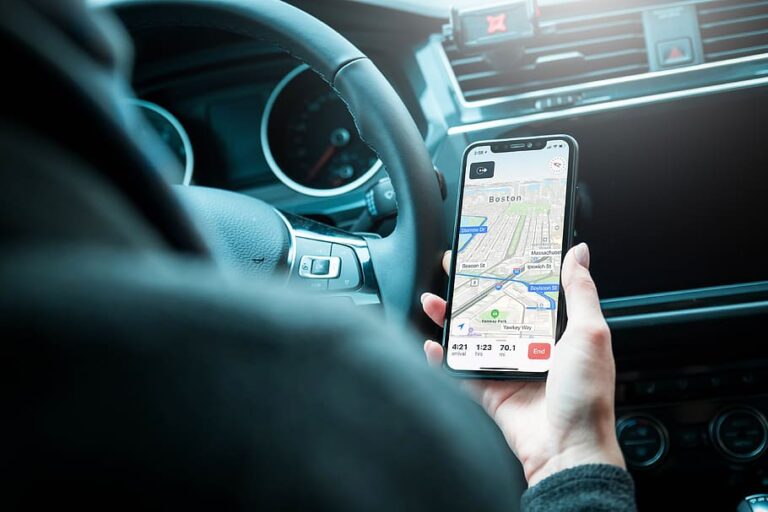
There’s nothing better than a satellite device for easy navigation around the area and getting to the most exciting places. Unfortunately, it costs money, and car rental companies charge $10 to $15 per day. So, GPS Navigation App is a great solution both in terms of functionality and price. You need to install it on your smartphone.
Where to rent a Jeep Wrangler near me? This is a popular Google request among those who like to travel by car in the United States. Indeed, driving a rental car along America’s scenic highways is the best way to spend both a short weekend and an extended vacation. The USA has many sights to see – the main thing is to find them.
If you are going on a road trip and looking for a reliable mapping service, consider one of the following apps:
Top 10 Best GPS Apps for Android Device
BackCountry Navigator
This service is an excellent solution for car travelers and hikers. Its main advantage is access to a significant number of offline topographic maps. Thus, it’s the perfect solution if you are traveling on country roads away from big cities. The user can also remember favourite places on the maps and leave marks, view various routes, choose different maps, and much more. The app will cost you $19.99, but that’s not a high price to pay for the benefits you get. Before you spend money on this application, decide exactly if you need it. For this, download the free trial version.
According to many travelers, HERE WeGo is the main competitor to Google Maps. With this navigation app, you can feel confident wherever you go. It works in any destination globally, but first, you need to download the required offline maps. The application has a straightforward yet attractive interface. Depending on the location, it can show information about roads, or about public transport. By the way, it’s completely free and allows you to save your favorite places or modify existing maps.
Anyone who often travels in a rental car in unfamiliar terrain will undoubtedly appreciate this application. MapFactor is a reasonably simple GPS navigation program, which uses data from the OpenStreetMap service. So, it’s free to use, except for some available maps at an additional cost. As a customer, you get access to offline maps with subsequent monthly updates. The application has good functionality, including voice prompts, 2D and 3D modes, night and day modes, and much more.
This application has undergone many changes over the years. Fortunately, it’s still the reliable helper it was in the good old days. It uses turn-by-turn navigation, can display real-time information about the traffic situation, navigate the way taking into account traffic jams, and display the cheapest gas stations. Its functionality is still on par with Google Maps, and it’s not as effective in recommending as GasBuddy. However, MapQuest is very effective for those looking for a reliable navigation application with many useful options.
It’s among the most effective services for road trips, with a ton of useful features available. Each customer can use turn-by-turn navigation, view information about roads and various establishments along the way. Google Maps is an entirely free application that also allows you to use offline maps. And if you download Google Street View, you can get a closer look at your destination before you arrive.
This is another excellent free GPS navigation app. It guides you wherever you go, lets you use offline maps, and downloads maps from the OpenStreetMap service. The functionality of the app is extensive, so that it will be helpful all over the world. As with other services, you can mark your favourite places, check traffic conditions, and much more. Users sometimes report some bugs in its operation, but this doesn’t affect the overall impression of the app. Maps.me will bring you high quality and fast navigation – the main thing is not to forget to download the necessary maps in advance!
The developers of Polaris Navigation tried to combine the complete set of features in one application, and they succeeded. Its undoubted advantage is access to Google Maps, OpenStreetMaps, MapQuest Maps, and Cycle Route Maps. You must select the service you want to use. Each customer can create their route and use a unique waypoint navigation control system. Turn-by-turn navigation is also available. What’s more, the app has additional features for those who like hiking, camping, fishing, and other outdoor activities.
Sygic is a top-rated product with over 50 million downloads. Like other apps, Sygic allows you to use offline maps, but it gets all the data from the TomTom service. Sygic provides a standard set of features as well as the ability to view speed limit information. Access to additional features is paid for, but you only have to pay once to get an unlimited subscription.
The Scout GPS app has been around for quite some time but has recently been updated. The developers have transformed it, changing the name (formerly called TeleNav), icon, and interface. The application is reliable and has all the necessary features. Among other things, it can automatically inform your friends about your approximate arrival time, as well as send a request for help. This is what makes it unique and more like a social network.
Although Waze is a Google development, it has its unique functionality. One of them is real-time traffic information updates. The user can check the speed limit, police points, find cheaper gas stations, share his location with friends, and find other necessary information. Waze is entirely free and will suit those looking for a unique mapping app.
Have you wanted to start but have been wondering how to start a blog? According to statistics, every 60 seconds we send 16 million messages to WhatsApp, post 46,200 photos to Instagram and try to find the right person 990,000 times on Tinder. So, people are constantly exchanging and looking for information.
Yes, modern technology has made access to information fast and easy. Today you can find cheap car hire Edinburgh for your trip. You no longer need to go to the car hire office. Smart search robots will help you compare all the offers and choose the best car hire deal. This tells us once again that information rules the world. And if we don’t find the information we need, we begin to create it ourselves. Starting a blog is the first step towards this.
A blog is a great way to share information or tell about yourself. If you want to create your own blog, the following web tools will come in handy…
It’s a flexible platform that is perfect for both beginners and professionals. You can create and design a simple blog in a few simple steps. The WordPress directory has many easily customizable themes to suit all tastes. And if you know the basics of web programming, you can change the design and functionality of your blog with almost no restrictions.
The platform offers your blog:
Free registration and creation;
Content optimization;
unique design with over 54 thousand plugins;
advertising options;
easy media management;
creating a mobile version;
variety of themes on the platform.
importing data from other platforms.
WordPress offers pricing plans for a variety of purposes. For a blog, the cost is $8 per month. This option gives you a free domain, online support, 6GB disk space, free themes, and no ads.
SilverStripe
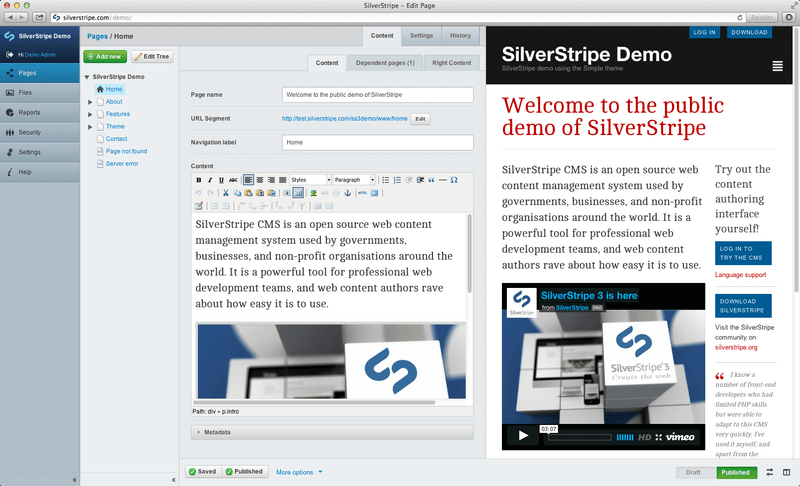
It’s pretty easy for SilverStripe to make a blog. SilverStripe is a free CMS that comes with post preview and templates. The platform also provides tutorials for beginners and has a huge user community. In a matter of minutes, you can create both a blog and a forum.
SilverStripe’s pros:
open source;
image editor;
simple search engine;
SEO support;
the ability to modify the admin panel;
lots of widgets, modules, and themes.
Drupal
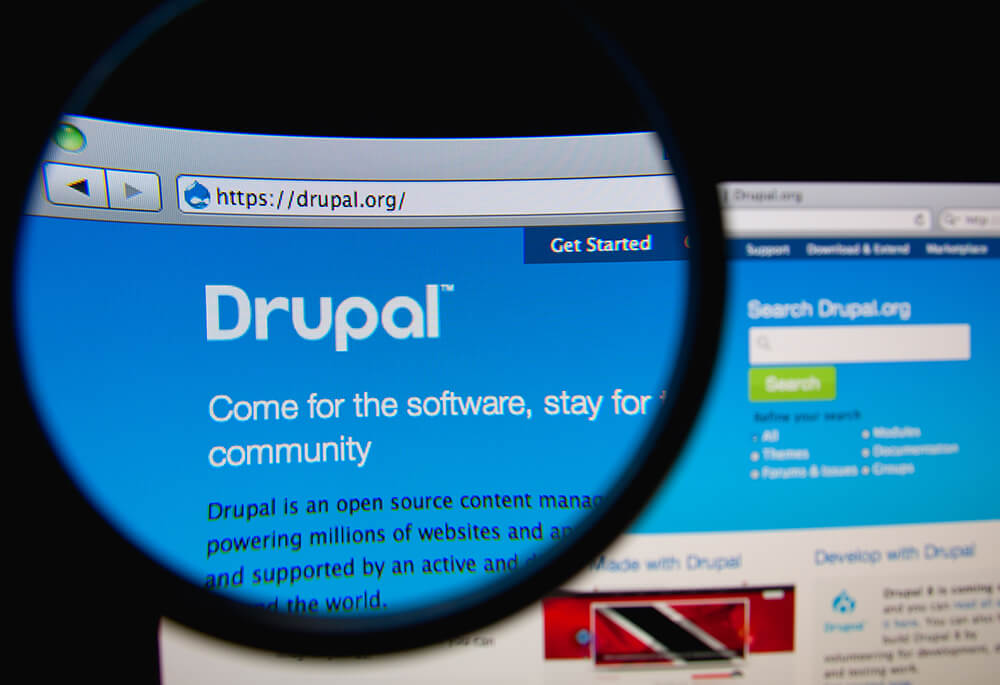
Drupal is a perfect CMS for creating a blog. The platform helps to develop a website of any complexity. This makes it an ideal option for experienced developers. However, it’s also easy to understand for beginners. Creating a blog with Drupal is very easy. You register, choose a template, and customize it using an advanced visual editor.
Drupal provides the following features for your future blog:
many modules to choose from (polls, forum, etc.);
ability to manage large amounts of data;
lots of extensions;
excellent organization of blog materials;
high security;
wide community and great support.
You will need hosting to create your blog, but luckily you can choose one directly from Drupal. The system itself is absolutely free of charge.
Ghost
The Ghost system is perfect for those who are going to blog professionally. It was created specifically for blogs, but not for websites like previous CMSs. Ghost will allow you to create a modern blog with many benefits and a first-class design.
What does Ghost have to offer?
Hosting services;
Easy customization;
Open-source engine;
Simple interface with minimalistic design;
Customization for social networks;
Free commercial use;
Preview in the text editor.
Ghost offers a 14-day trial period for free. After that, the platform offers several options for a monthly subscription: from $29 for Standard to $199 for Business.
Tilda
An effective and stylish blog powered by Tilda has everything to become popular. This service is great for beginners. It allows you to perfectly present the material to readers, even without knowledge of design and programming. Ready-made templates will help you create a unique resource.
Tilda has the following benefits:
more than 450 blog blocks;
many tools, for example, to create a subscription form;
video covers, galleries, and other ways to organize your content;
high-quality typography;
Zero Block editor;
Search engine optimization and adaptability.
You can create 1 blog for free on Tilda. However, it’s better to buy a Personal ($10/month) or Business ($20/month) subscription, which provides much more options.
Blogger
Blogger is a special platform from Google designed specifically for blogging. It’s simple and suitable for novice users. Although it’s absolutely free, the site will allow you to make money on a blog thanks to Google Adsense. You can also get a domain for free or use your own.
Blogger Pros:
customizable templates;
Google Analytics tools;
templates with ready-made designs;
great community.
Medium
A blogging platform from the Twitter creators is designed specifically for writers. Plus, it’s completely free of charge. You only need to use your own domain name. As for the popularity, more than 60 million readers visit the platform per month.
Working with Medium is intuitive and offers the following features:
service for tracking statistics;
topic rubricator;
convenient article editor;
video embedding and import;
possibility of joint blogging.
The platforms offer different blogging opportunities, so you need to keep in mind the purpose of your blog. If you want to make money on blogging, it’s better to choose paid and ad-tailored sites. They have a rich set of options, ready-made templates, widgets, and other materials for professional work.
Android phones have dominated the smartphone industry for a long time now. This is because of the sheer amount of Android phones in the market. Android has been the main operating system for the vast majority of the smartphone market. The biggest competitor to Android is the IOS operating system. People in the market for smartphones have a lot of variables to consider. The display, camera, and design are a few of the factors that people look at when purchasing a smartphone. Another factor that is considered is the software experience.
Android has a lot to offer in terms of accessibility and entertainment. From a greater catalogue of apps to more user access. People in the market for android phones have to conduct a lot of research. Most Android phones are unique in nature and usually, a custom skin is present on top of Android. Most manufacturers prefer to have a curated software experience added on to Android. To put it simply, Android offers a host of benefits to its consumers. Be this in the software experience or the value to money. Below are several of these benefits summarised.
The Benefits of Purchasing an Android Phone
1: More Phone Choice
One of the biggest benefits of being in the market for Android phones is choice. There are significantly more Android phones available than any other type of phone. This is great for consumers as it offers them more choice.
Having more choices means that consumers can choose between expensive and budget options. Many companies choose to make Android phones at every price range. This is so their market share increases and consumers buy more of their phones. For the consumer, this means that they can choose a phone in their budget. They won’t have to spend extra or settle for less as there is a large catalogue.
2: More Value
Android phones are known to provide better value for your money. The market is widely saturated and there are phones of all types and budgets. This promotes a highly competitive atmosphere in this industry.
What this means for consumers is that companies will try to fit in as much as they can in the budget. The goal will be to fit a faster processor, better display, and camera in a lower price bracket. This is so the smartphone in question is better priced than its competitors. This practice is present in all brackets of the market.
3: More Processing Power
Android phones are known to operate faster than the alternatives. This is because of faster processors and significant random access memory. Companies actively advertise their processing power as a selling point too. What this means for consumers is that processing power is a goal in the mind of businesses.
This translates to many real-world benefits for consumers too. Running high-quality games, opening multiple applications, or transferring files shouldn’t be an issue. For example, having many tabs open in a browser should be executed with ease. Websites such as Logospack which offers Wholesale baby food pouches can also be run with ease despite having many images. In the past, running websites with images on them required a lot of processing power. For the Android phones of today that have proven not to be an issue.
4: More Camera Features
The camera is an aspect that needs to be refined and feature-rich. Many premium phones offer a great camera. Yet, that is expected for the premium price attached to those phones. Budget Android phones are known to also have cameras that are feature-rich.
The cameras present in budget phones were questionable a few years back. The newer modern budget phones of today house high-quality cameras too. These cameras are fitted with sensors and offer many features. These features include ultra-wide photo angles or a portrait mode. In terms of videos, slow motion capabilities and a time-lapse option are often available.
5: More Freedom
One of the biggest reasons why Android is loved by many is for the freedom it offers. Freedom in terms of software control and third-party applications. While this may be considered a drawback in terms of loss of privacy, many consider it worth it. This is because a larger catalogue of third-party applications is possible. Applications outside of the dedicated store can also be downloaded at the owner’s risk.
Many love Android for the software control it offers too. Users skilled at designing software can code their way into different User Interface designs. These can be more accessible or more optimized depending on the coding. This type of control is only offered by Android and is the reason for the large market share.
6: More Accessory Options
When purchasing Android phones, a significant catalogue of accessories is also to be expected. This can be in terms of phone skins, headphones, watches, and others too. The higher market share indicates that the market for accessories will also be a large one.
This is especially beneficial in terms of dedicated earphones and watches. Many companies design their own accessories to go with their products. Yet, almost all the accessories available on the market are compatible with any Android phone.
Conclusion
Diving deep into the Android World takes a lot of time. The Android industry is rich in products, software, and even accessories. This means that there is bound to be something for everyone in this big market. It is recommended to take your time and research which phone is best for you. Others may design phones around better airflow to promote processing power. We hope you take your time and choose the phone best for you.
There are numerous tips and tricks that you could follow that may aid you or rather guide you towards having a great or up-to-date internet connection. The facility of a smooth running and high-speed internet is one that many individuals who live in the United States have access to. Below we have given information regarding different or numerous ways through which you could speed up your internet service connection.
Tips to Speed up your Internet
MANAGE YOUR DATA LIMIT
Data limitation is one of the major causes of poor internet connection. However, ISPs don’t post their bandwidth limitation but they can severely disturb your internet connection. You can control the amount of data you use per month by Data Cap limit and it can range from hundred megabytes to hundreds of gigabytes. If you exceed your data limit your internet will noticeably slow down.
GIVE A BREAK TO YOUR ROUTER
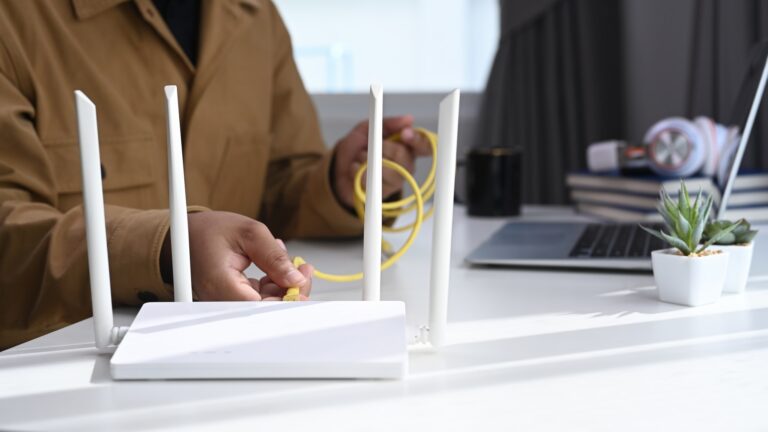
For a better and fast internet connection, you need to reset your router or give rest to it at least once a month. If the still face the problem you might need to reset it every day. Your modem must be connected to your router and if not you need to reset that too. By turning on and off the modem ISP connection is stimulated and it’s all about ISP.
RELOCATE THE ROUTER
The router must be placed near your house and if not you immediately need to do it. It may be one of the reasons why your internet connection is weak as WIFI signals are not caught by the router. You need to relocate your router to a place at the centre of your house especially to a place where you spend most of your time.
ADVERTISEMENT
Advertisements are displayed almost everywhere on any link or content source. Wherever you go online you will encounter countess advertisements, GIFs, images, and auto-played movies. almost every content source. If you don’t bother with this advertisement just so you know they can affect your internet connection as it can greatly deteriorate your internet connection and a simple solution to that, is you simply block them. For blocking these ads, you can install an Ad-blocking plugin.
CONSULT YOUR INTERNET SERVICE PROVIDER
Even if you have a single internet service provider in your area there is a lot of chances that he is offering many internet packages. For instance, you are not happy with your current speed you can ask him for a better speed and we understand that you might not want to pay more money for that but that’s the only option. So immediately call your service provider and ask them for a better internet package. You can also search online for better comparable plans
Spectrum Internet customers need not worry about this, as they have access to the 24/7 available Spectrum Customer Service. All they need to do is to pick up the phone and dial the número de teléfono de spectrum i.e. Spectrum Customer Service helpline and they would be able to get assistance from the 24/7 available Spectrum representative.
SWITCH TO A BETTER SERVICE PROVIDER
If all the above mention methods don’t work that the only problem is with your internet service provider. A simple solution is that you might have to switch to better internet service. You may first talk to them but if the sluggish internet continues then that’s the only choice. Since most of the regions only have a few ISPS so it is better if you research a little bit about the internet packages available at lower pricing.
CONCLUSION
Having a fast internet connection is essential in this era since our life revolves around it. There are many ways by which you can speed up your internet connection other than the above-mentioned method for instance you can install an antivirus, you can use a streamlined browser, you can also install an application to remove the “catches data.