More
    Home Blog Page 168

    How to Install Webmin in Raspberry Pi running Raspbian Jessie

    What is Webmin?

    If you have ever involved in Web Hosting field then you might have heard about CPanel, CPanel is a full featured easy to use most popular Web Control Panel for web Administrators, so you might be thinking why are we using Webmin instead of CPanel, well that’s because Webmin is absolutely free and Open Source and on the other hand Cpanel costs about $400 for a standard license. in short, Webmin is a web-based interface for system administration for Unix. Using any modern web browser, you can setup user accounts, Apache, DNS, file sharing and much more. Webmin removes the need to manually edit Unix configuration files like /etc/passwd, and lets you manage a system from the console or remotely.


    How to install Webmin on Raspberry Pi?

    Requirements:

    • Raspberry Pi Running with an OS (We are using Raspbian Jessie for this tutorial)
    • Connection to the Internet on your Pi
    • SSH Access


    Video tutorial:


    Installation:

    Step 1: Boot up your Raspberry Pi and use SSH to connect to it.

    Step 2: Make sure your pi is up to date with the latest version. Use the below commands to do so.

    sudo su
    sudo apt-get update
    sudo apt-get upgrade


    Step 3: Next install the necessary packages that are required by webmin, these are Apache Server, MySQL Server, PHP, Samba File Server, Bind9 DNS Server etc.

    sudo apt-get -y install apache2 apache2-suexec-custom libnet-ssleay-perl libauthen-pam-perl libio-pty-perl apt-show-versions samba bind9 webalizer locate mysql-server


    Step 4: Wait till the installation of above items complete, you can check you Apache installation by opening hostname or IP address of your Pi in your browser, it will display default Apache Server page. Now we will create a directory in Raspberry Pi for downloading the Webmin Debian installation package.

    cd
    
    mkdir installed-packages
    
    cd installed-packages


    Step 5: Now download the latest version of Webmin using the wget command, Update the version number of Webmin with the latest one, you can find the latest version number on Webmin’s official website. Look on the top let side after the menu for the latest version and update it in the below line of code in place of webmin_1.840_all.deb.

    wget http://prdownloads.sourceforge.net/webadmin/webmin_1.840_all.deb
    
    
    dpkg -i webmin_1.840_all.deb


    Step 6: Wait till the installation completes. It will display the Webmin Panel URL in your terminal windows. You access you Webmin panel by opening https://IP-Address-of-your-Pi:10000. Make sure the port 10000 is allowed by your router or as Webmin uses this port to listen to the browser requests.


    That’s it, you will be able to access Webmin Panel from your browser, use the same id and password that you used for ssh to login into Webmin panel.


    Optional: Change default public_html directory for your Webmin Virtual Servers:

    sudo nano /etc/apache2/suexec/www-data


    Change the first line from /var/www to /home to change your default public_html directory to /home.


    a2enmod suexec
    
    a2enmod actions
    
    service apache2 restart


    If you face any problem then comment below and don’t forget to subscribe to our mailing list for more tutorials like this.


    Want to do more with your Raspberry Pi? Here are some of our tutorials to get you started with.


    15 Useful CSS Snippets Every Web Designer Should Have

    Every website consists of a markup language called HTML (Hyper Text Markup Language) that describes the contents on the page and CSS (Cascading Style Sheets) that represents how the content should be displayed in browsers and other user agents.

    The current version of CSS which is CSS3 is already out extending the features of CSS2.1 to help developers and designers creating complex style editing without markup language, complex scripting or any extra images.

    With so many ideas and trends out in the industry, it is difficult for website designers and developers to cope with feasible solutions using extra HTML codes, but thanks to CSS that such complex ideas are made possible through which one can implement new styles to the website and give it an attractive look. There are a huge number of CSS snippets out there that every website designer should have in his / her bag. Let us take a look at best of 15 CSS snippets that every website designer should have


    1. Registration & Login card UI forms

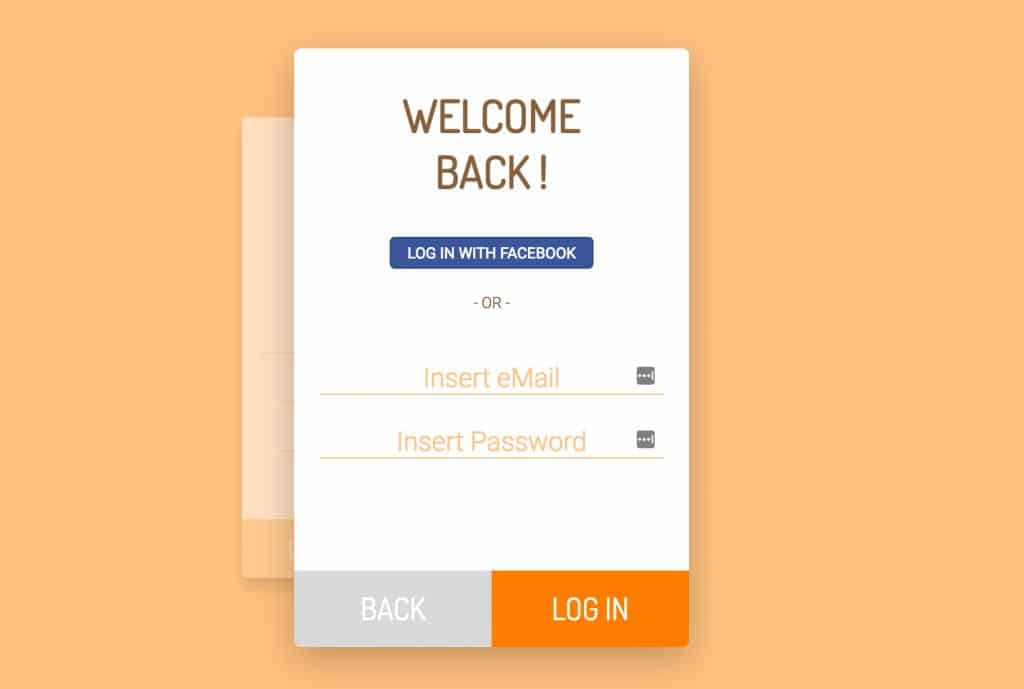
    A fancy UI card for login page that can be used to sign-in and sign-up as well. When you click on login button, the card goes to the background and login screen card comes to the front. Clicking on back button brings the registration screen back into view. This css snippet was designed by Tommaso Poletti. This new and improved login UI can surely give your website a new look and feel.

    You can find all the code from GitHub through below link.
    Registration & Login Card UI

    GitHub


    2. Responsive Calendar in Fluent Design

    A new responsive calendar has been designed in Microsoft’s new fluent design language. This is designed by Tom. You can drag the calendar to any size required, add something you want to remember. Microsoft’s fluent design system is the latest update in development for look-and-feel. It will replace the Metro design language. This calendar is going to replace current outdated calendar designs in market.

    You can download the source code through below GITHUB link


    GitHub


    3. Jagged Edge Accordion Tabs

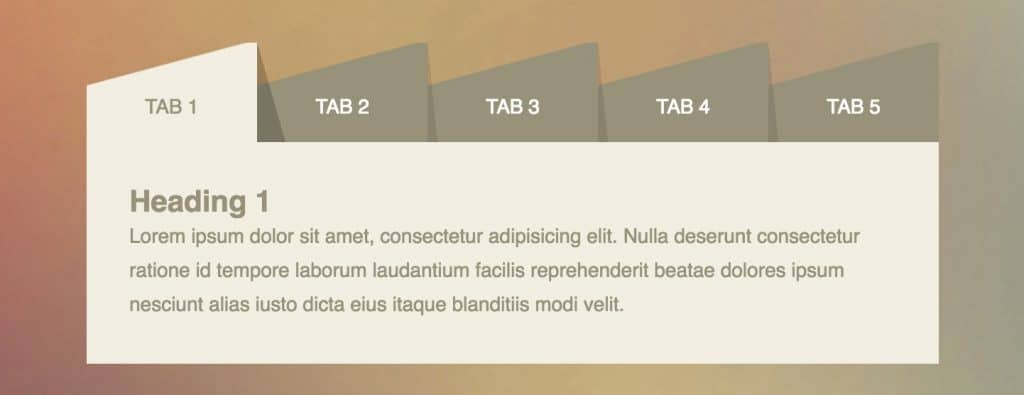
    Usually, tabs are rectangular in shape but let’s introduce you to a new and cool CSS snippet by Nikita Jadhao that re-imagines the accordion tabs with an unusual design. All the tabs have a jagged end that gives an attractive and new look. Such jiggered tab look can be used in a blog or a website providing a list through different tabs. You can get this attractive CSS source code through GITHUB.
    Responsive UI Tabs Using CSS


    GitHub


    4. Image Glitch Effect

    Now giving a glitch effect to your images would not be nail biting for your website designers. A new glitch snippet has been introduced by Yoichi Obayashi. Glitch effect is also termed as distortion effect. This effect is placed on top of the image created using ‘three.js’. This glitch effect can be used on live video feed as well or something similar on your webpage.

    Please go through below link to get the source code for this effect.

    GitHub


    5. Various Text Styles in CSS

    Below are some of the simple text effects one can create in CSS. Now you don’t need to write code for these effects anymore, just save this source code and use it on any text you want to give effect to. These are designed by Matt Schneider. The styles are as below:

    • Outline
    • Engraved
    • Embosses
    • Rainbow Shadow
    • White Border Sticker
    • Thick Shadow

    Edit on CodePen


    6. UI for Password Validation

    Let’s introduce you to new stylish password validation. Sasha Tran designed a simple UI for password validation. Before submitting the password there are 3 criteria that the password should pass.

    • 1 lowercase character
    • 1 uppercase character
    • 6 minimum characters

    This password validator is written in JavaScript with CSS and you can customize its behavior according to your requirements like if you want to add more validation points except for uppercase and lowercase. The best part of the UI is that once your qualify any validator, the validator is crossed out in the login form and once all validators are crossed over, the submit button becomes active.

    Please find the link to source code of this beautiful login UI.

    GitHub


    7. Modal Sidebar Toggle Button

    We always want to show some contents on the sidebar but if you want to show it only when some action is called then surely it will be like cracking a hard nut for you but not now anymore. A new sidebar snippet has been developed in which you can show contents and also hide it until user clicks a button to show its contents.

    This snippet is designed by Kye Hohenberger that you surely want to put in your bag and use it in your next project. Currently the modal sidebar slides in from left and reveals the hidden content although you can still change its behavior according to your needs.

    Edit on CodePen


    8. 360 degree image viewer

    360 degree pictures is a new trend in the industry and fitting the correct one in website is not easy. If you want to add a 360 degree image viewer on the front or at the background to your website you can use this snippet. This snippet is created by Sten Hougaard.

    For the same, you would be needing a 360 degree image and a kaleidoscope viewer. Visitors can click and drag through mouse on the image to move it around. Kaleidoscope is an easily embeddable, lightweight, dependency-free 360 degree image viewer.

    Below is the link to the source code for 360 degree image viewer.

    GitHub


    9. Vertical Full-Width Mobile Navigation Menu Transition Effect

    Here is the new mobile navigation menu in full-width which you will like to add to your next mobile project for sure. If you ever used a full-width mobile navigation menu in your mobile site but felt the need for an animation move to the menus than your wait is over for easy to use CSS snippet.

    This snippet is developed by Tyler Sticka in which animation is activated once a user clicks on the menu. When you click on one of the menu items it moves to the right then slides away from view to the left. There are also triggers for delayed animation for other menu items creating a fancy animation effect. This is also termed as Staggered Menu Transition.

    You can try the archived copy of the source code through GITHUB using below link.

    GitHub


    10. Sold Out Sign for E-Commerce Websites

    If you have an e-commerce website and want to inform your visitors that a particular product if sold out using some stylish sold out UI than you don’t need to write complex code for it anymore. This snippet will come in handy for such situations. You can add this sold out UI anywhere you want to place on your website like on the buy button or the shopping cart icon.
    If you would like to use this sold out UI, please go through below link to use the source code.

    GitHub


    11. Client Showcase using CardUI

    Earlier we used to just write client names with their respective company logos in our clientele list.  That is totally outdated now in terms of writing client names. A new CardUI client showcase has been developed which can give a new stylish look to the portfolio section of your website.

    This new stylish CardUI has been developed by Jared. A list of logos is arranged horizontally and you can choose from two effects, one when you hover over a logo the inactive ones goes a bit dull and the other where they stay the same.

    On hover, you get a tooltip like a card section hat has a bunch of links which will showcase a series of images that one can hover.

    If you want to implement this snippet in your website, Please follow the below link for source code.
    Client List Showcase CSS UI


    GitHub


    12. Text Styles As a Poster

    Ever wanted to convert your text into a poster? It is always a difficult one to implement using markup language but not now. With this CSS snippet, you just need to write your text and that’s all.

    This text effect is designed to look like a poster. This is developed by Bart Veneman.

    Please click the below link for the source code.

    GitHub


    13. Image Box Overlay with Caption

    Now you don’t need to write complex code to put an image box with a caption at its border. This CSS snippet would fall correctly in your requirement. You just need to download the source code and customize it accordingly. This design is developed by Rico Sta. Cruz.

    Please find below link for the source code.

    GitHub


    14. Pure CSS Vertical Line

    Ever wanted to showcase some information like company history in the vertical section but your designers failed to give it a wow look then your wait is over now. With this new CSS snippet, you can make awesome vertical lines.

    As an example, you can showcase your company history year by year with some text attached with every year. As always source code is easily customizable as per your requirements.

    Here is the link to this awesome CSS vertical line snippet.

    GitHub


    15. Concentric Circles Navigation Menu

    This is an experimental navigation menu by Bennett Feely. When you click on the menu button on the top right it expands into a series of concentric circles to display the navigation menu, you can click on it again to collapse the menu.

    Link to the css snippet is as below.

    GitHub


    Try out these awesome CSS snippet hacks and make your website stand out among your competitors.

    How to Speed up your SSL Encrypted Networks

    Online security has gained a lot of significance in the security threat-ridden digital world that we live in today. That day is not far away when internet users will be trusting and visiting only SSL certificate signed websites; or in other words, websites which use encryption for securely transmitting the data. So naturally, more and more online businesses or enterprises – not only those concerned with online transactions but almost all of them – are deploying SSL encryption technology, as online transactions as well as various web-enabled endpoints like mobiles, tablets etc., increase, making SSL encryption technology a must-have for online security.

    But as with all good things, there is a drawback to enterprises using SSL encryption technology as well. It slows down the network’s performance. So, although SSL certificates have their benefits, they are also associated with slowing down of the network’s performance. To counter this issue, network administrators use what is known as “load balancers”, for evenly distributing (and handling) the burden on the network caused because of the use of encryption technology.

    So how do these load balancers take some load off the network or, more specifically, off the backend server? By performing what is known as ‘SSL Termination’, which to explain in simple words, is the task of decrypting the encrypted data before it is passed to the backend servers so that they are spared the task of ‘decrypting the data’. Therefore the workload of the backend server is greatly reduced which in turn improves the network’s performance.

    There are a number of strategies being deployed for handling SSL encryption using load balancers. Let’s take a look at some of the prominent strategies that are in use.


    1. Perfect Forward Secrecy (PFS):

    SSL handshake involves a number of sessions between the browser and a web server. Previously all of these sessions were protected by the same unique private key. So if this private key of the web server was compromised, information relating to all the previous as well as subsequent sessions could be easily be unlocked. To solve this issue, the ‘Perfect Forward Secrecy’ load balancing technique was introduced. As the name suggests, this technique maintains a ‘forward secrecy’, by providing ephemeral (short-lived) private keys for each session, so that even if a private key is compromised, information relating to only that session will get exposed while others will still remain encrypted.


    2. Elliptic Curve Cryptography (ECC):

    ECC uses short encryption keys and therefore places a lesser load on the web server. These keys are faster and require less computing power thereby reducing the network load greatly. So this is an SSL encryption handling strategy which organizations can use to improve or speed up their SSL performance.


    3. Per-app Load Balancing:

    Enterprises usually keep replacing their load balancers for bigger and better-performing ones every few years. This can be a tedious, time and money consuming process. So now they are shifting their focus towards per-app load balancing these days. When implemented using the right methodology, per-app load balancing enables enterprises to save costs and reduce the burden on the network greatly.


    4. Real-time Security:

    Since load balancers are placed in the path of the data transmission, the data collected from them can be used to alert administrators in real-time against SSL vulnerabilities such as DDoS attacks, expired certificates etc., They can also be helpful in providing data for formulating security policies to effectively address these security vulnerabilities. So load balancers should essentially be viewed as another tool to strengthen your security and protect your enterprise from malicious hackers.

    Top 10 Must Use Travel Apps In 2017

    0

    We all carry smartphones along with us wherever we go. Then why not use it to make our trips even smoother? The smartphones, available these days feature a lot of amazing applications that would enable you to trace your location, make your hotel and flight bookings and find all the requisite details within your palms.

    It is really hectic when you have already reached the destination and you have been compelled to run here and there to get a suitable accommodation. In order to avoid those nasty deals, make things done beforehand by grabbing the top deals regarding each and every venture just as you step out of your homeland. Another important thing to mention in this context is the weather of the location where you have been planning to shift. WeatherBug prevents you to witness the harshness of the climate. This offers you detailed information about the climate predictions of the place and thus you can alter your travel plans accordingly so that you do not become a victim of the bad weather and unforeseen climatic conditions.

    This is a list of the top 10 Must-use traveling apps for the year 2017:


    1. Uber

    Uber - Request a ride
    Uber - Request a ride

    A lot of people have a fascination regarding the riding provisions available at the place. Thus, this app assists you to track the best rides at the location. It offers fairly reasonable prices so that the people can fetch the deals. This app will contribute towards loading fun.


    2. Dayuse.com

    Dayuse: Hotel rooms by day
    Dayuse: Hotel rooms by day
    Developer: DAYUSE
    Price: Free

    It gives you accommodations at the most competitive rates wherein the users can book hotels, freshen themselves up as well as take a nap or a shower after the tiring day.


    3. WeatherBug

    Weather by WeatherBug
    Weather by WeatherBug
    Developer: WeatherBug
    Price: Free

    It offers you a detailed forecast for the temperature of the place, dew point, time of sunrise as well as sunset, a percentage of humidity, UV index, pressure and more. It comes with Doppler radar effect that lets you predict the precipitation range and motion the thunderstorms with the radar beam.


    4. Google Translate

    Google Translate
    Google Translate
    Developer: Google LLC
    Price: Free

    It helps you communicate with the people at the place. It is never necessary that you would know the language of the place where you will travel. However, an interactive skill is a compulsion in order to make people understand your necessities.


    5. XE currency

    Xe -Converter & Money Transfer
    Xe -Converter & Money Transfer

    When you travel across the globe to different destinations in some foreign land, this app allows users to carry out currency conversions at ease. It gives you business-oriented ventures like charts displaying the historic currency rates and prices of some precious metals.


    6. Airbnb

    Airbnb
    Airbnb
    Developer: Airbnb
    Price: Free

    The special feature of this app is that it undercuts hotels by enhancing your travel plan with a more authentic experience, thereby offering cheaper prices. Eventually, this app has become all in one with its allowance for booking a car on rent and making your plan for the day with its additional features.


    7. Hotel Tonight

    HotelTonight: Hotel Deals
    HotelTonight: Hotel Deals
    Developer: HotelTonight
    Price: Free

    It provides reliable service by sketching out some last minute deals at the most amazing rates. It offers discounts on empty rooms thereby helping you to save your money. In case something goes awry, this offers a 24 / 7 customer service.


    8. Google Maps

    Google Maps
    Google Maps
    Developer: Google LLC
    Price: Free

    It is widely regarded as one of the best navigation apps since it comes with fair reliability in offering public transportation deals. You can also track places like restaurants, museums and all other destination spots at the location.


    9. Duolingo

    Duolingo: language lessons
    Duolingo: language lessons
    Developer: Duolingo
    Price: Free

    This is a well-designed learning app when it comes to learning. It enables you to speak and understand the linguistic ventures of the place thereby enhancing the vocabulary of the user so that they can interact with the people of the place fluently.


    10. Trip Advisor

    Tripadvisor: Plan & Book Trips
    Tripadvisor: Plan & Book Trips

    It is a catch-all app when it is about travel. It offers you a lot of reviews, videos, photos and opinions pertaining to stuff regarding your trip. It also supports well-reviewed places close by, thereby being a perfect travel guide. It is absolutely comprehensive in terms of its utility. This helps users fetch the detailed journey plan that includes all the disruption alerts as well as real-time departures.

    The availability of these Android apps has made things relating your travel plans quite easier.

    Android 7.1 Nougat For Xiaomi Redmi 2 with VoLTE (AOSP Extended ROM)

    0

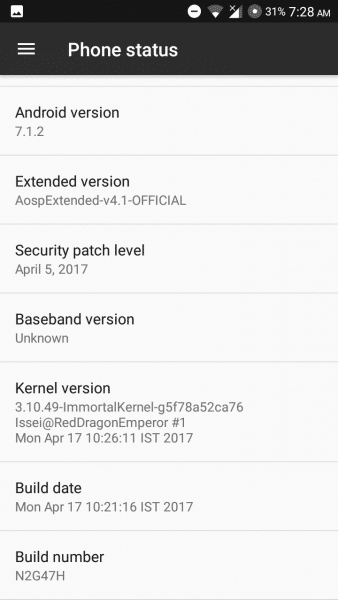
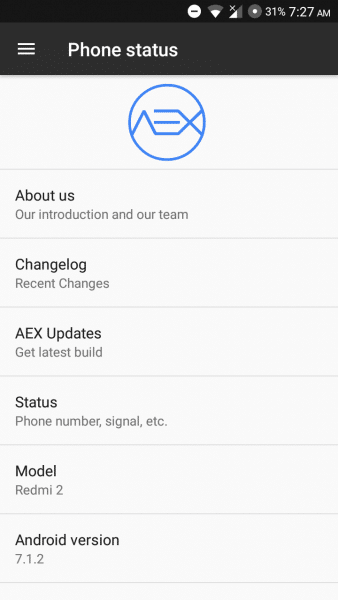
    Android 7.1.2 Nougat for Xiaomi Redmi 2 with AOSP Extended Custom ROM and Working VoLTE


    Official AOSP Extended

    Android Nougat Based Stable Rom for Xiaomi Redmi 2

    AOSP Extended is an AOSP based ROM which provides stock UI/UX with various customisations features along with the Substratum theme engine. The project has been made by cherry-picking various commits from various other projects. Being based on AOSP it provides a smooth and lag-free experience out of the box. We will constantly try to add more features and make it even better in future updates. A ROM by a user, for a user.


    You Might Like :-


    Screenshots


    Installation Instructions

    WARNING: This procedure will factory reset your device! Accounts, applications, settings, contacts, etc will be lost, so make sure to backup them before going further!

    Step 1: First make sure that you have flashed CWM or TWRP Recovery, if not then follow this guide for CWM or this for TWRP to do so, it recommended that you use Materialised TWRP Recovery for this ROM, download it from here.

    Step 2: Download the file Rom zip file from the download section below to and place it on your phone.

    Step 3: Next Download the file OpenGApps for ARM  to your phone from the links below.

    Step 4: Now reboot your device into Recovery mode by holding Power button with Volume Up + Volume Down button simultaneously.

    Step 5: In Recovery mode first format user data, cache and Dalvik cache.

    Step 6: After that choose to Install and install both the ROM and the GApps zip files.

    Step 7: After the process completes reboot your device.

    That’s it, first boot will take time after that choose your language and complete the setup process.


    Downloading


    Credits

    • ishubhamsingh(Owner/Dev/Designer)
    • JDC Team
    • AOSP-OMS
    • AOSP Extended Team


    List of All the Custom Roms for Xiaomi Redmi 2

    Share your experience with this ROM in the comment section below

    Official Lineage OS 14.1 Android 7.1 Nougat for Xiaomi Redmi 1S (Armani)

    0

    Official Android 7.1.1 Nougat for Xiaomi Mi Redmi 1S (Lineage OS 14.1) (Armani)

    Official Lineage OS

    Android 7.1.1 Nougat for Xiaomi Redmi 1S through Official Lineage OS Rom (Nightly)

    If you’ve been a CyanogenMod fan all your life, then Lineage OS is the way to go now. Lineage OS is the new standard for all custom ROMs out there. LineageOS is an open-source Operating system for smartphones which are using Android Operating System.Installations of official Lineage OS have now crossed 1 million devices! As you very well know, CyanogenMod does not exist anymore with almost all ROMs under CyanogenMod being ported over to Lineage OS.


    You Might Like :-


    Installation Instructions

    Step 1: Download the ROM/Gapps zip files from the download section below.

    Step 2: Copy ROM/Gapps zip file to sd-card (internal).

    Step 3: Now Boot your device into custom recovery (TWRP recommended).

    Step 4: From Recovery menu select backup and take a full nandroid backup.

    Step 5: Now wipe system, data, dalvik cache and cache.

    Step 6: Next Flash the Custom Rom zip file.

    Step 7: After that Flash Gapps and then do a wipe cache/dalvik.

    Step 8: Finally reboot your device.


    That’s it,  your device will boot with Android 7.1 Nougat.


    Update TWRP Recovery to Latest Version:

    1. Start in recovery mode (TWRP).
    2. Tap install.
    3. Down right side, select images.
    4. Select twrp-3.0.2-1-armani.img (Download from Downloading Section below).
    5. Select recovery.
    6. Flash.


    Screenshots


    Downloading


    Credits


    List of All the Custom Roms for Xiaomi Redmi 1S

    Subscribe to our Mailing list for more Xiaomi Redmi 1 S Roms.


    Like Our Facebook Page for Development and Support about Xiaomi Redmi 1S


    Do share your reviews and queries about this ROM in the comments below.

    A Checklist of Do’s and Don’ts of Facebook Marketing!

    Whether you just love or hate it, but you can’t ignore its capability in the growth of your business. In today’s fast and furious century, almost every marketer is engaging Facebook in their brand marketing campaign.

    However, there are still many marketers who don’t rely on the great benefits of this platform. But if you have never created a Facebook page or you want to learn more about it pros and cons then you’re at the right place. Read the information shared below to learn how to use Facebook for perfect marketing.


    Do’s

    • Best for Promotion

    Facebook can help you to promote your business to a much larger audience than you might imagine. You can instantly promote your business page in front of your potential audience with your profile picture.

    Additionally, this popular platform will allow you to choose the relevant audience, daily budget as well as the timing of your ad. If you want to promote your business in a rocket rapid manner then you must create a business page on this platform.

    • Reduce Marketing Budget

    No doubt Facebook will shrink your marketing budget as you don’t need to pay for creating a business page on this platform. Can you imagine you can reach your audience in $5? Yes, you can create an ad in $5 by clicking the daily budget menu. With each amount, you can see the estimated number of new likes you can get per day.

    In addition, you can also link your website to your business page to promote it in the same budget. So don’t forget to discuss this cost friendly marketing strategy while developing a budget to increase the chances of growth.

    • Endless Customer Support

    Today, Facebook is among the leading platform that clients are using to connect with businesses. Many times customer needs to ask questions regarding price, offers, and refund policy of a business. In these circumstances, this most popular platform enables the businesses to market their product and services in the real-time.

    Moreover, you don’t need to install a live chat option because you will get this option for free on this platform. Thus, you should avail this one-on-one opportunity to build a better relation with your customers.

    • Easy To Use

    If you’re not aware of social media world, then Facebook is the best platform to easily explore it. This platform facilitates marketers with a great number of tutorials and blogs so that you could easily enhance your brand online visibility. New online marketers can also use its online tool like analytics to track web traffic and the interest of their audience. Therefore engage this platform in your business marketing campaign to uncover new leads and predictions quickly.

    • Higher ROI

    Marketing result of Facebook is competitively higher than old methods of marketing like printed flyers. Every image video or the blog post you will share on this platform would be an opportunity to convert the lead. By engaging on this platform, you will share your views like normal people.

    Additionally, people feel comfortable to do business with other people not with companies. This is why it is imperative for every marketer to utilize this online platform in order to grow the business with more customers.

    • Go live

    When we talk about new online marketing trend, Facebook live streaming features stand at the top. With the live streaming feature of Facebook, you can connect with your audience any time to start a live conversation.

    It means you can also go live via your company profile and talk about your upcoming or existing brands in no time. Let your customers learn more about your brand with a live Question and answers session.


    Don’ts

    • Over Posting Of Content

    Many times marketers irritate their audience with too many posts on the same day. If your brand doesn’t need rapid updates, then ensure to post one or two posts on a daily basis to entertain your audience in a perfect manner.

    When you find your followers demanding more post from your side then you can post multiple posts a day. Otherwise, you will not only irritate your audience but also lose your position from their favorites list.

    • Sharing Irrelevant Post

    When it comes to online marketing content is everything. Sharing relevant content is crucial to building a better relation with customers. Make sure to share relevant posts that fit with your brand to entertain your audience in a true way.

    For instance, if you’re a magazine or publication then you can wish celebrates through your Facebook profile. Therefore keep in mind to share stuff that suits with your brand to make the most of the online platforms.

    • Slow or No Response

    A delayed or no response can create a negative impression even in the mind of your loyal customers. This is why social media marketers need CSR expertise to deal with customers speedily.

    So if your customers want you to serve them over social media, then you must engage and give timely response to their entire queries quickly. Otherwise, you might miss a great opportunity to satisfy your customers in the right manner.

    • Add People to Group

    If you add people to different groups without notification, then you might lose them from your business page as well. Every Facebook user wants full control over their profile activities.

    Therefore never pressurize your customers to join or leave a group. In addition, you should never tag any user on a new post without consent. It’s a brilliant idea to expand your post, but it also irritates followers. So, avoid tactics that can do negative marketing of your brand especially over social media.

    • Too Much Advertisement

    Surely Facebook is the best platform to tell the audience more about a brand but in an interesting and engaging way. Remember it’s not all about advertising but to entertain the audience in a way that persuades them to choose you over the list of competitors.
    For this, you will need to come up with impressive marketing ideas on a daily basis. Else you will not only make your audience bore but also miss a great opportunity to drive more leads.

    Top 5 Best Free Icon Packs for OnePlus 3 & 3T & How to Apply Them

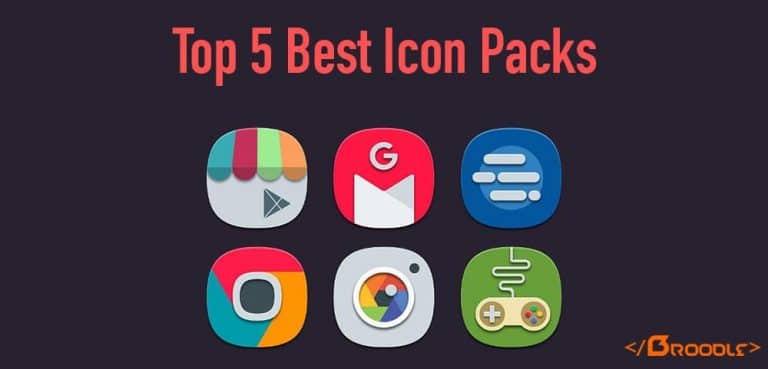
    Icon packs have always been popular. There are numerous launchers available out there who provides a cheap and unique way to customize your device but the main thing about OnePlus 3 and 3T is that it comes with Oxygen OS Launcher which by default supports third party icon packs. So this article is all about customizing the look of your OnePlus device with the help of 3rd party icon packs which are available for free on the Google Play Store. This article covers top 5 best icon packs that we like and instruction covering how to apply them. Enjoy!


    Top 5 Best Free Icon Packs

    1. Polycon Icon Pack

    A fresh new take on Material Design iconography. Polycon offers unique, creative and vibrant icons. Spice up your phone’s home screen by giving it a fresh and unique look with Polycon.

    The app was not found in the store. 🙁


    2. Krix Icon Pack

    Krix Icon Pack provides 2.450 + High-Quality Vector Based MIUI Styled Crafted Icons and provides regular updates for the app. This icon pack gives your phone a fresh and unique look with its wide range of icons availability.

    Krix Icon Pack
    Krix Icon Pack
    Developer: Göktuğ ULAŞ
    Price: $0.99


    3. Belle UI Icon Pack

    Icons in Belle UI made manually based on Vector graphic. Every icons drawn carefully to give a unique look. Belle UI designed for XXHDPI Screen, result may vary depends on your screen resolution.

    The app was not found in the store. 🙁


    4. Revolution Icon Pack

    Circles like the new Google Pixel icons. Revolution is full of 1500 handcrafted icons that behave well with your other favorite packs, even those created by other designers.

    Revolution Icon Pack
    Revolution Icon Pack
    Developer: Developer Nick
    Price: Free


    5. Materis – Icon Pack Free

    Materis icon pack is inspired by Material design from Google. Each of the icons have used the principles of design, namely “color palette” and shadows. This gives a harmonious promptness of each icon that makes them unique, interesting and colorful.


    The app was not found in the store. 🙁


    How to change Icon Pack in OnePlus 3 & OnePlus 3T?

    OnePlus 3 and 3T comes with Oxygen OS preinstalled which comes with its own launcher and it event comes with three stock icon packs of its own. So to access this feature and change the stock icon pack on the OnePlus 3 and 3T follow the below guide.

    Changing the Icon Pack

    Step 1: From you home screen long press on an empty spot to access the menu which provides launcher settings, widgets and more.

    Step 2: Now tap on Customize icon.

    Step 3: You will be prompted with the list of icon packs installed, this list automatically updates whenever you install a new icon pack.

    Step 4: Tap the icon pack that you want to apply, it will update the icon pack in real time.

    That’s it, through this you can apply different icon packs in your OnePlus device.


    That’s it for today if you have any suggestion or any good icon pack that you have used then share it with us by commenting below.


    11 Awesome Tips on Keeping Your Phone Charged the Whole Day 

    Yes! You read it right. Get acquainted with these awesome tips to keep your phone charged. Gone are the days when the cell phones would last for 1 week with just a single charging. The black and white Nokia phones enabled simple functions like calling and receiving. But nowadays, the smartphone is stuffed with functions like gaming, chatting, clicking, posting, liking, commenting! We bring to you some useful tips that will help you increase your battery life, by making simple changes to your Android phone.

    Useful Tips to Sustain to Enhance your Battery’s Lifespan  

    Your Smartphones require staying active throughout the day to entertain you during a boring lecture or avoid an awkward situation. Keep your phone charged up with some of the below tips that you need to keep in mind. The possibility of finding a charge plug can be reduced with the following must follow tips.

    1. Power off

    When you don’t need the phone(which is indeed impossible!) switch off the phone. The best way to retain battery is to switch off the mobile when not required. While sleeping or traveling, give your mobile a good sleep so that you have sufficient charge when needed.

    2. Turn off Bluetooth and Wi-Fi

    The Bluetooth and Wi-Fi should always be in the OFF mode. These inbuilt apps are power consuming monsters that need to be disabled immediately after use.

    3. Turn off Vibrations and Ringtones

    Make sure your settings for vibrations and keystones are switched off. Normally, when we are in office or college the phone is normally in vibration mode. For the continuous hours, the battery is sucked up by these default apps. Also, make sure the volume of your ringtone is such that it is audible to you rather than to a larger circumference.

    4. Turn off Flash while Clicking Photographs

    The flash in your camera is responsible for draining your battery. Yes! This might be known to some, but the flash in our phone is very powerful and absorb your battery during multiple selfies or shots. Don’t forget to turn off the flash mode after clicking selfies during a late night party!

    5. Turn the Brightness to Auto

    You have been charging your phone since morning, but your battery shows charging till 60%! Did you turn your phone’s brightness to ‘Auto’ mode? Have a habit of keeping the display brightness to Auto. With the auto mode, the phone increases or decreases the brightness according to its utility.

    6. Tune to Phone Calls Only

    If you have your battery about to reach the red mark, prefer not using the internet or messing with your phone. You have a long way to go and need your battery to last for some urgent phone calls. Keep patience till you reach home and torture your Android phone browsing, chatting, gaming, watching videos or posting!

    7. Turn your Phone to Airplane Mode

    Your phone will constantly search for signals in remote places, resulting in the battery draining drastically. You have two options, turn off your cell phone or switch to airplane mode. Save battery by switching to Airplane mode while on a flight or a dead zone.

    8. Turn your Phone away from Heat

    Every smartphone has an optimum temperature range, thus make sure you don’t leave your phone in a place facing direct sunlight. If the temperature exceeds the threshold limit of the cell phone, your battery may blast! Keep your phones away from direct sunlight!

    9. Turn the Screen Timeout to 15 Seconds  

    More the duration of screen timeout, less the percentage of battery left! Keep the screen timeout to the least screen timeout available in your Android phone. The unnecessary screen timeout may decrease the overall active life of your cell phone.

    10. Keep your Apps Updated

    Update all your apps to the latest versions. The newly developed apps have features that include battery saving options. As soon as when you come under a Wi-Fi zone, start updating your apps, this also decreases virus attacking your phone. Stay updated to extend your battery’s lifespan!

    11. Plug in your Phone Before it turns Red

    Your smartphone should not be kept for charged when it completely gets switched off, this may increase the chances of your battery being damaged. Also, the phone doesn’t need to get charged till 100%. The user needs to plug in when the charge reaches the deadline of 20%. Although, there are some smartphones that automatically stops getting charged, but this can be dangerous for your Lithium-ion batteries.

    Quick tips to Enhance Android’s Life Expectancy!

    Your Android battery is prone to battery drain due to the power of hungry apps like tv Player apk and iMovie app which reduce your battery in few time.That inherit in your smartphone. These simple tips will help the user to sustain their Android for a longer time. Forward these tips to your peers and relatives so that battery draining is no more a woe. Employ these tips to your daily life for a better battery longevity.

    Author Bio:
    Sejal Parmar loves to explore the newly released Apps & Games. She blogs at Rule.FM and writes about latest Android Apps & Games.

    Internet – and the Industry : Case Study

    0

    Who can deny the fact that our convictions are intrinsically determined by our experiences of the world, and not merely by abstract academic or theoretical sessions of reasoning out-of-tune with reality? In certain circumstances, particularly in the case of amateurs starting out with any new venture, we may imagine that we might make do with the provision of simple amenities in both our private and commercial lives – like a basic and moderately-paced Internet connection to handle all of our ever-escalating workloads. But our de facto encounters with the day-to-day tasks that encumber our professional lives soon shift our opinions in the favor of m


    Internet – and the Industry

    ore dynamic, flexible and time-saving solutions; those that offer both increased productivity and greater value (by-the-buck). In such a context, it is not difficult to determine exactly where high-speed Internet factors into this conversation. Or to be more specific, Charter Spectrum Internet, which has gained industry and consumer-wide recognition as one of the fastest and most reliable Internet services on offer to all web users out there in the country – irrespective of their geographical setting(s).

    After all, are not efficiency and accuracy, those coveted harbingers of rapid progress and growth since time immemorial, the very cornerstones that determine the potential of (and impetus for) virtually every profit-based commercial entity that exists in the world? Of course, they are. The success and prosperity of mankind as a whole is inextricably tied to the advancement of the industry.

    It is in industrial and profit-maximizing commercial settings that all innovations made by certain demographic segments of intellectuals from academic and R&D research units are capitalized upon, and subsequently marketed; thereby increasing the opportunities and scopes for all people as a whole. For this progress to be made possible, it is therefore absolutely imperative that such frontier-driven organizations be provided with the best tools available in the field to facilitate continual growth and expansion – such as lightning-fast internet speeds. Charter Spectrum Internet plans, which feature up to 300 Mbps of Internet speeds designed to satisfy even the most grueling connectivity and downloading requirements of industry specialists, certainly fall into this category. The said service provider, in addition to providing unprecedented data transfer rates to its customers, is also completely changing our perceptions of Internet speed and consistency – as we may have been led to conceive of these metrics up till now.

    Affordability of service plans always comes up as a key determinant for the success of any market-driven venture, and not just the provision of Internet services by organizations engaged in achieving that end. Even if the commodity or service being sold by a vendor is of pristine quality, and may also be deemed to be a necessity by those targeted; if it is perceived to be expensive by the end user, its scope for greater sales and popular acceptance will be severely limited. Consumer-oriented corporations, therefore, must succeed at achieving a fine ‘balancing act’ for the sake of remaining viable commercial enterprises – by identifying a kind of break-even point between quality and cost. It is not uncommon for Internet users, even entire businesses, to forestall the use of high-speed and reliable Internet services due to the exorbitant package costs that accompany them. Charter Internet prices, with the provider’s premier Internet plan starting from only $29.99 per month, ensure that the company continues to remain far ahead of all its competitors in the field – and continues to provide high-speed internet without any failings in service quality.

    The reliability of an Internet service is intimately linked to the degree and strength of the digital safeguards which may or may not accompany it (or be incorporated in it as a default option). Contending with all manner of virulent and targeted Internet-based attacks (launched by hackers, spammers, and infiltrating virus programs) has become a sort of existential occupation for most organizations – particularly in the public sector. So it is now increasingly crucial for Internet service vendors to fortify their connection plans with antivirus and anti-hacking defenses; so as to ensure safety both for their own services, as well as their beleaguered customers. In this respect, Charter Spectrum Internet plans come equipped with FREE Virus, Hacker & Spam ware protection software. So if you are a charter user, you no longer have to be concerned about any of these (otherwise significant) threats to your digital world.

    In addition to blazing connection speeds, highly affordable packages and virus-protection services, Charter also offers FREE Modems with their Internet plans, so that you (the consumer) can avail great value for your hard-earned money – without spending a dime on added accessories or gadgetry. Charter is interested in consumer-retention and making zero compromises in terms of customer satisfaction. Their service plans may be ordered instantly through cableninternet.com, and indulged in with the guarantee of unbeatable connection quality.