More
    Home Blog Page 30

    How to Use OBS for Live Streaming on Youtube – The 2021 Guide

    The technical aspects of live streaming can get a little difficult to understand for people not belonging to a technical background, and this is why we bring you a thorough guide on how to use OBS for live streaming on Youtube. Since the pandemic, communication has had a limitation. There has been a rise in screen time and amidst the unpleasant circumstances, people have been resorting to different ways to keep themselves entertained. And one such community that has seen rise globally is live-streaming. Live-streaming is very popular amongst the gaming community as well as reviewers. And since people aren’t allowed to go out and gather in crowds, artists have also chosen this platform to keep their followers entertained.

    OBS aka Open Broadcasting Software is free and open-source software and can be run on Windows, Mac or Linux.

    Features:

    Scene Nesting

    Users have the option of inserting scenes within scenes as a source. These are helpful when you want to display some particular scene during a particular period. Using scene nesting you can easily modify the content of the scene without having to manipulate the entire scene. For example, when you’re streaming on youtube and want to display the like/subscribe button during a specific part of the stream, you can create a different scene with the valid media files and show the scene when necessary. 

    Custom Browser Docks

    Custom browser docks enable users to add a browser window (via a link) to the capture window. This feature is common amongst gamers as they can add live chat boxes to the stream and vice versa.

    Replay Buffer

    The replay buffer uses RAM and stores a temporary recording of the stream(default is 10 seconds). When the hotkey is pressed, the video is saved on the system. The time can be modified from the settings. The time should be set with respect to the RAM. 

    New Features:

    • Missing Files Dialog – The new update helps identify the sources that are missing. For example, if a media file used a source has been deleted or moved, it will now be notified while changing the scene.
    • Undo and Redo Function – Undo and redo has been finally integrated into the system and the undo stack is capable of tracing up to 5000 actions in the current session. The stack is cleared while switching scenes or restarting the application.
    • Source Visibility Transitions – Users can now apply transitions to scenes when toggled. The videos created as such look more professional and that too without any additional tools or macros. 
    • Track Matte Transitions – Using an animated “mask video” users can now switch between different sources using the stinger video as an overlay. For example, check out this animated image:

    OBS Track Matte Transitions

    These new features make it perfect for users to use OBS for live streaming on Youtube.

    Also Read:

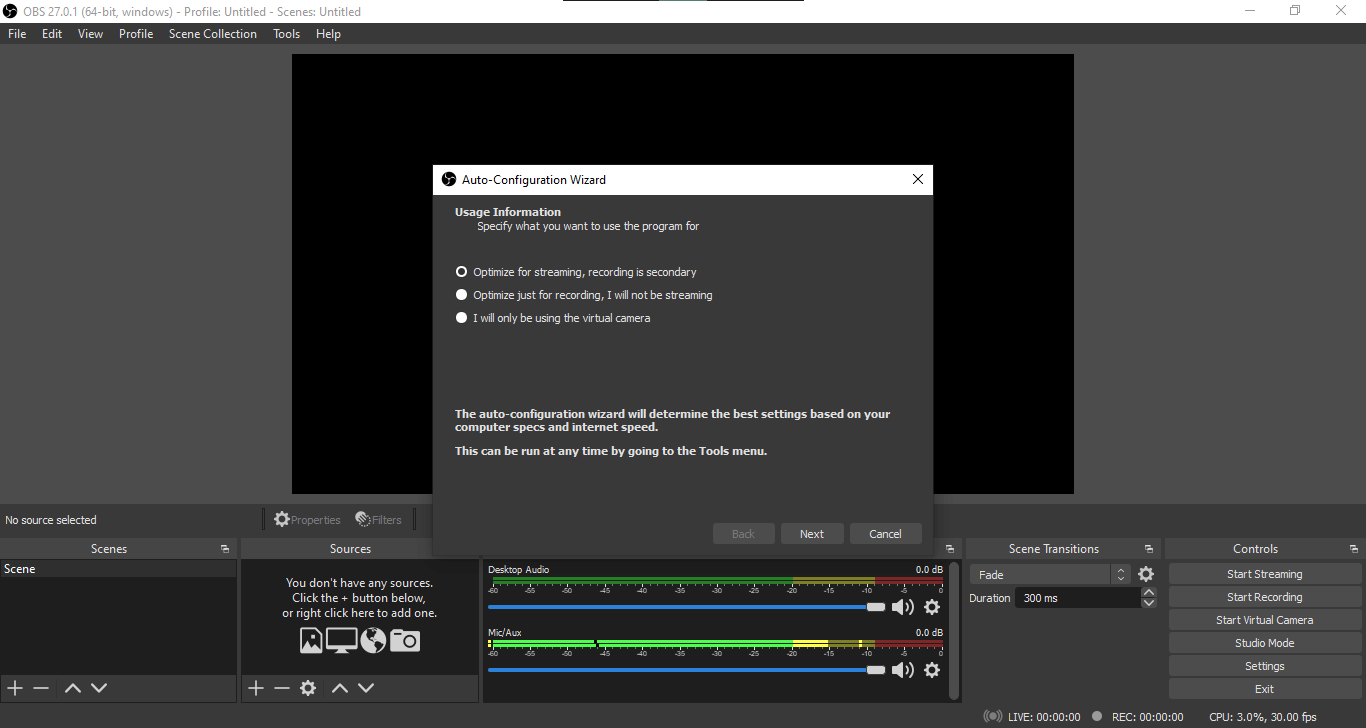
    When we start with OBS, the auto-config window opens to set some options automatically depending on how you want to use obs. To toggle auto-config settings again, click on Tools -> Auto-Configuration Wizard.
    OBS for Live Streaming

    On the top, we have the main canvas showing all content to be recorded or streamed. By default, the resolution is the same as the laptop screen. At the bottom, different scenes can be defined. Scenes consist of different sources that can be used to record or stream.

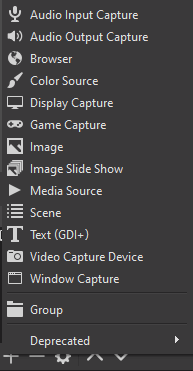
    We can add as many sources as we need. There are different options for visual sources as well as audio channels.
    How to use OBS for Live Streaming on Youtube

    For live streaming, game capture is recommended because it is optimised for recording the display as well as a camera source. When using multiple sources as scenes, users can control the visibility of any scene with a simple click.

    Before starting streaming/recording, it is recommended to check the settings. Under Stream in settings, different accounts can be connected (like YouTube or Facebook etc.)

    Output settings can also be changed to optimise streaming for low-speed internet connections.

    Users can set hotkeys to control different functions of the application seamlessly via shortcuts without having to go back to the interface. When streaming, the video is saved on the online account by default, and when recording, the files are saved locally The files can be accessed via File -> Show recordings. Users can use studio mode to make changes to the stream or recording.

    All the sources and scenes remain saved when you reopen OBS.

    Follow these simple to get started with Youtube live streaming:

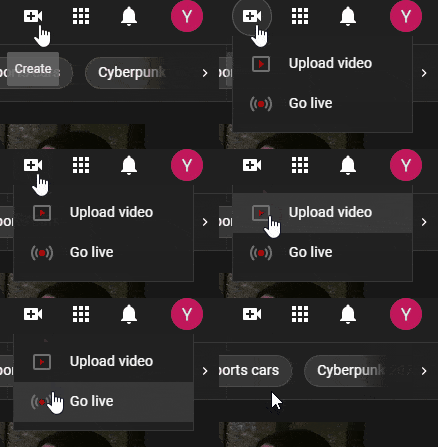
    • Open the Youtube website on your browser.
    • Click on the Create button and then on Go Live
    obs for live streaming on youtube
    Step – 1
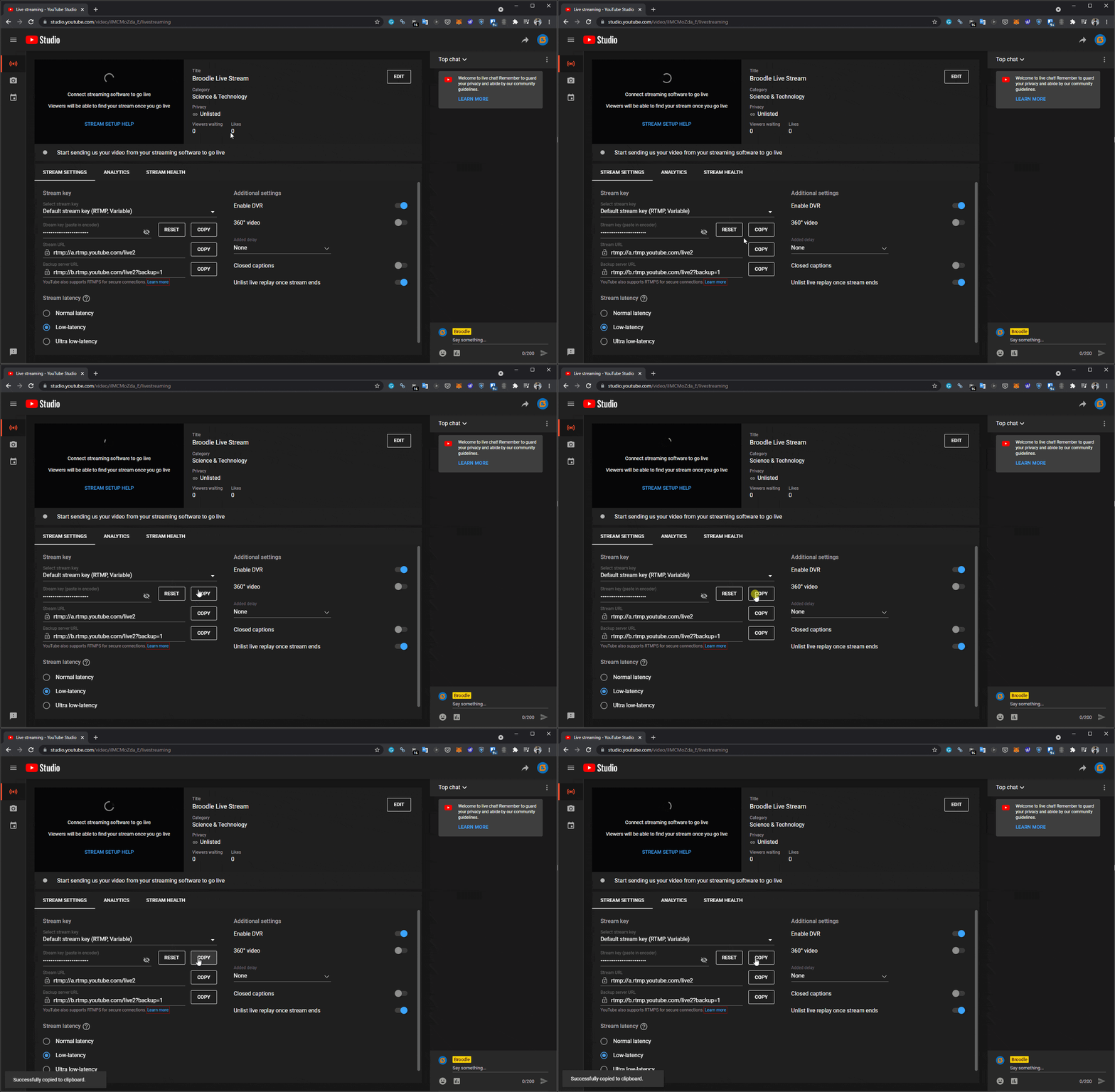
    • Copy the Stream Key
    obs for live streaming on youtube - step 2
    Step – 2
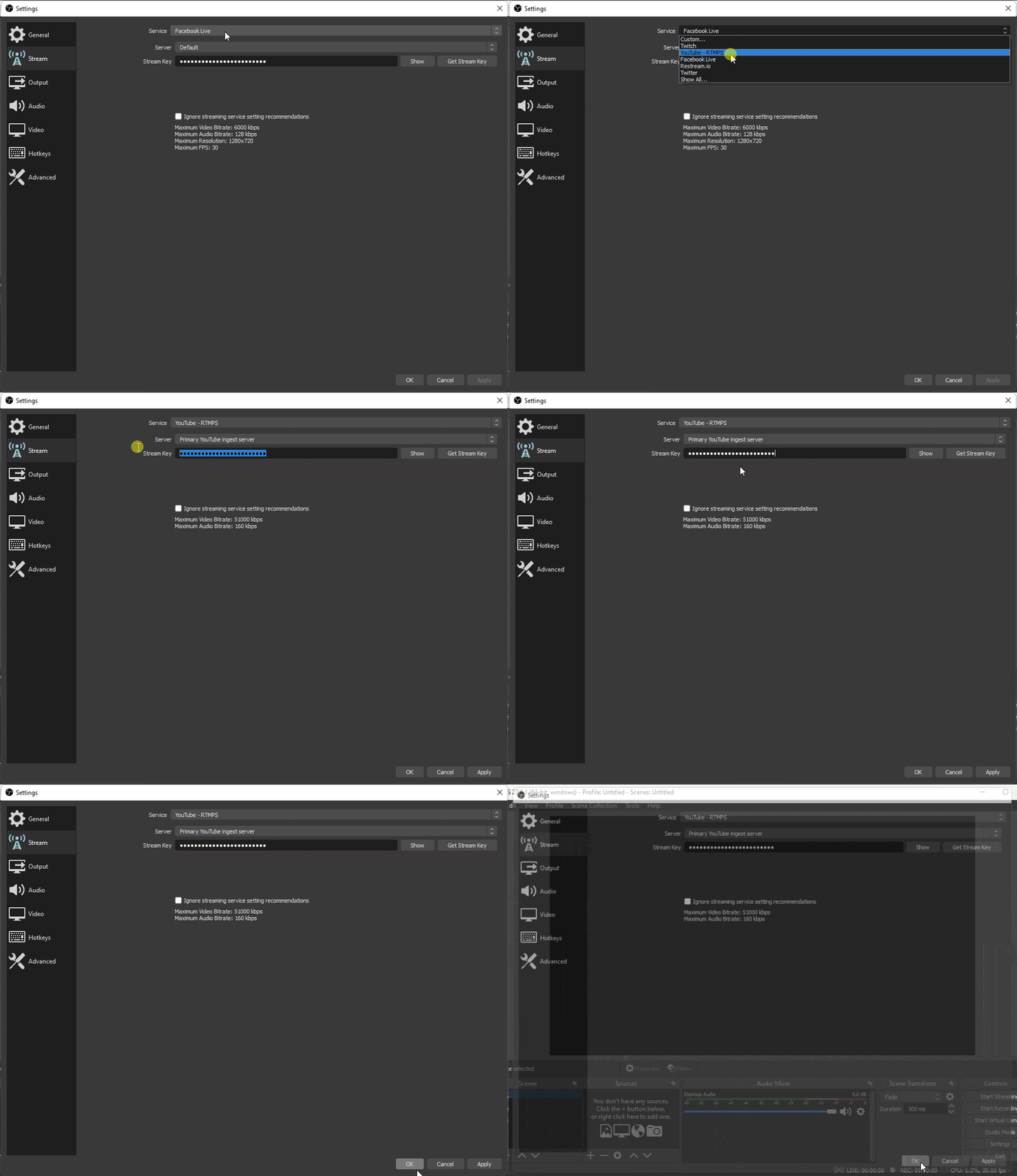
    • Open OBS -> Settings -> Stream and select YouTube – RTMPS
    • Paste the stream key in the box and save the settings.
    • You are all set to use OBS for Live streaming on Youtube!
    obs for live streaming on youtube - step 3

    You get an option to start the live stream right away. You can also schedule the time for live streaming. Users can set a thumbnail image before the stream starts, the recommended size for which is 1280×720.

    Conclusion

    Numerous users and polls reveal that beginners and professionals use OBS for live streaming on Youtube as it is a feature-rich program. It is easy to set up and use and users have control over the different settings from video resolution, frame rate, and audio bitrate. All in all, it is one of the best software available for live streaming and screen recording. It also has a big community of users and a blog which is helpful if users are stuck or confused while using OBS.

    Here Is What You Need to Know About Creating Websites Using Website Templates

    Can you imagine creating a website all by yourself? Well, that would be a lot of work and decoding the codes for a newbie who doesn’t know a dime about websites.

    In that case, you will be surprised to know that even inexperienced people are operating their websites, and honestly, quite successfully. So why do you feel the need to learn from the initial stage when you can play smart?

    Yes, we are talking about using the website templates for creating a brand-new website of your own. Intrigued to know more? Let’s dive straight into it!

    Must Read: 7 Essential Tips for Improving Your Website Design and User Experience

    What Are Website Templates?

    Shall we discover what you have to go through if you had taken the alternate route of creating the website on your own, and template to be more precise? We think we should not even go there because that would be too much alien language. And in addition, you have to bear all the codes as well.

    That’s where the website templates come to the rescue, literally.

    In simple words, for all the non-technical peeps, a website template is a pre-designed webpage that is used to create a website within hours. 

    Many website builders offer free to paid templates that allow for simple usage in exchange for domain hosting. Nearly all the CMS (content management systems) use website templates due to many reasons.

    Want to know a fact? WordPress dominates 76.4% of CMS’s market share; the reason is that it offers a range of free and paid templates that are readily available for usage.

    Benefits Of Using a Website with A Website Template

    • Create a website without hiring a professional;
    • Build a website reasonably;
    • The template can be used as-is;
    • Or you can customize to bring the uniqueness.

    Things To Keep in Mind Before Choosing Website Templates

    Free Or Paid Template?

    Now that you have decided that you will rather opt for an easy way out and hence choose a website template, it about times you keep certain things in mind.

    First things first, will you be choosing among free of paid templates? For this, you need to be ready to do a lot of research for several reasons. Number one, you won’t be creating a new website and discarding it if you don’t like it. You are creating your website for actual presence online. Hence, be mindful of the template you choose. Secondly, if you feel a paid template will give a much similar look that you have envisioned for your website, there is no reason for not buying a paid template.

    However, you might want to know before paying a dime for a template because even the free templates offer customization. So, if you are not considering a free template just for the sole reason that your website won’t remain distinctive, then think once again.

    The Layout of The Template

    The second thing, again a very crucial aspect when deciding the website template, is the layout. 

    One thing that an inexperienced website creator makes is preferring a complex template just for the sake of distinctiveness. However, that a recipe for disaster.

    What works here that you need to select a rather basic template because that’s what attracts the visitors. The layout comprises the Header, which possesses the essential tools to navigate throughout the website.

    Then comes the body and the Footer. All the essential elements of the website template are customizable. Hence, another reason not to shift to paid ones until you really want to, or your resources allow.

    The Adaptability of The Design 

    When creating a website, you need to keep one thing at the top of your mind. And that is whether the websites are adaptive or not.

    But what is that? It means selecting the website’s theme that is responsive on all the devices, primarily the phones. The adaptiveness of the template design is as essential as anything. Recently, Google has implemented the Core Web Vitals, which highly concentrates on user experience.

    Why Is It Important to Select the Right Website Template?

    When choosing from a vast series of template collections, you are surely spoiled for the choice. However, the type of template you pick should be in line with your website’s vision. Moreover, keep in mind the purpose of the website. For instance, the meaning behind the website.

    Let’s take an example of an educational website and blog website for artists. Now plug in the same website template for both of them.

    You will either have a way to colorful website for an educational purpose or have an informational site for artists. Do you see what just happened here? That’s how important selecting the correct template is.

    Sometimes peeking around and seeing what the competitor is using and then finding a similar template can do wonders too. 

    Lastly, you have to choose between the paid or free templates. Hard decisions, everywhere!

    Are Website Templates Worth It?

    We doubt that you second guess using the website templates. But even if you do, then it’s time you see the cost of creating a template from scratch. You can hardly recoup the cost of the template alone. That’s how expensive they are. Furthermore, you have to be professional too, of course.

    The only thing that makes sense is to make the most out of website templates from the website builder, and alas, you are good to go!

    In Nutshell 

    Luckily, many website builders provide a variety of website templates for you to use. Hence, it removes the slightest of chances of two sites being the same. O course, you can always personalize the website as per your liking!

    Don’t have any idea who to trust with the free and quick website making? Then we have a suggestion for you! Weblium allows you to create a website with utmost ease, convenience, and without holding any prior knowledge of coding. How amazing is that?

    So what are you waiting for? It’s about time you create a free website now!

    ActiveCampaign vs HubSpot vs EngageBay – Which CRM tool is the Best?

    The question of which CRM tool is the best is likely to be arisen because of so many options. Marketers today require a system that helps to manage many campaigns, measure, evaluate, and create information on how well they are working overtime. Marketers frequently use a variety of software and platforms to manage their campaigns and track their results. Marketers can select from a variety of alternatives. If you’re reading this, you’re probably perplexed about the situation. Well! Don’t be concerned! An in-depth comparison of HubSpot vs ActiveCampaign vs EngageBay is provided in this post.

    Must Read: How Information Technology is Important for Marketing

    1. EngageBay:

    First CRM that we will talk about in this comparison between HubSpot vs ActiveCampaign vs Engage Bay is EngageBay. EngageBay is a sophisticated, feature-rich marketing tool that can easily compete with HubSpot and Active Campaign.  This has marketing automation features that enable email follow-ups and lead nurturing, as well as monitoring, connecting, and converting visitors to leads. Email sequences, automated workflows, landing pages, live chat, forms, pop-ups, and social media tools are all accessible to you.

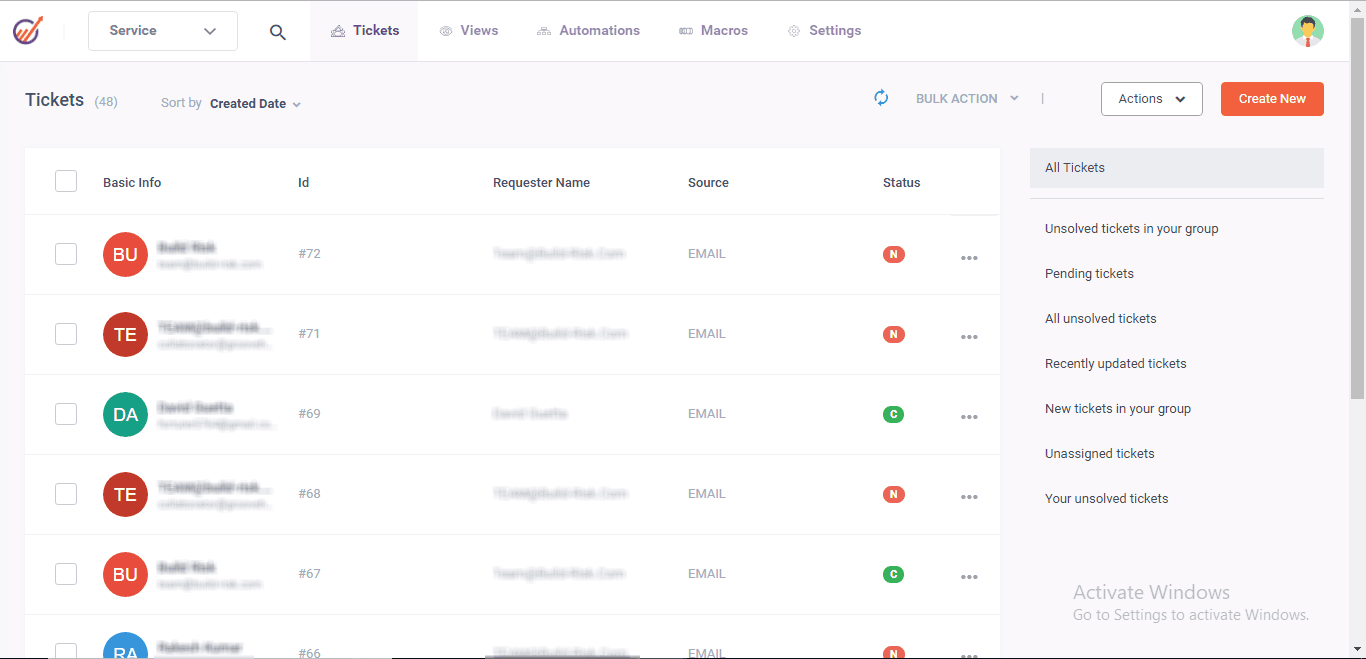
    The service desk and 360-degree customer view are what set EngageBay apart from the competition. What makes this apart is the capability to automate across all EngageBay tools. This allows you to manage your support tickets as well as your support department.

    What sets this apart is the ability to automate across all EngageBay tools. This implies you can automate your customer services in the same way you can automate your marketing department. Moreover, you can use automation to improve your team’s efficiency and productivity across marketing, sales, and support.

    Pricing:

    There is a free plan that includes all of the necessary features. Pricing starts at $8.99 per month per user and goes upwards to $47.99 per month per user.

    Pros:

    • Automates marketing and advertising tasks, sales and service workflows, lead generation, and lead nurturing.

    • Email marketing: Improves the strength of email marketing campaigns by providing Email templates that are amazing

    • With a simple drag-and-drop email builder, you can create email templates in no time.

    • Appointment scheduling software that is automated

    • Contact management software makes it easier to control track of tasks, deals, and contacts.

    Cons:

    • Automation tools are not included in the free plan.

    • There are some added features that are lacking.

    2. HubSpot:

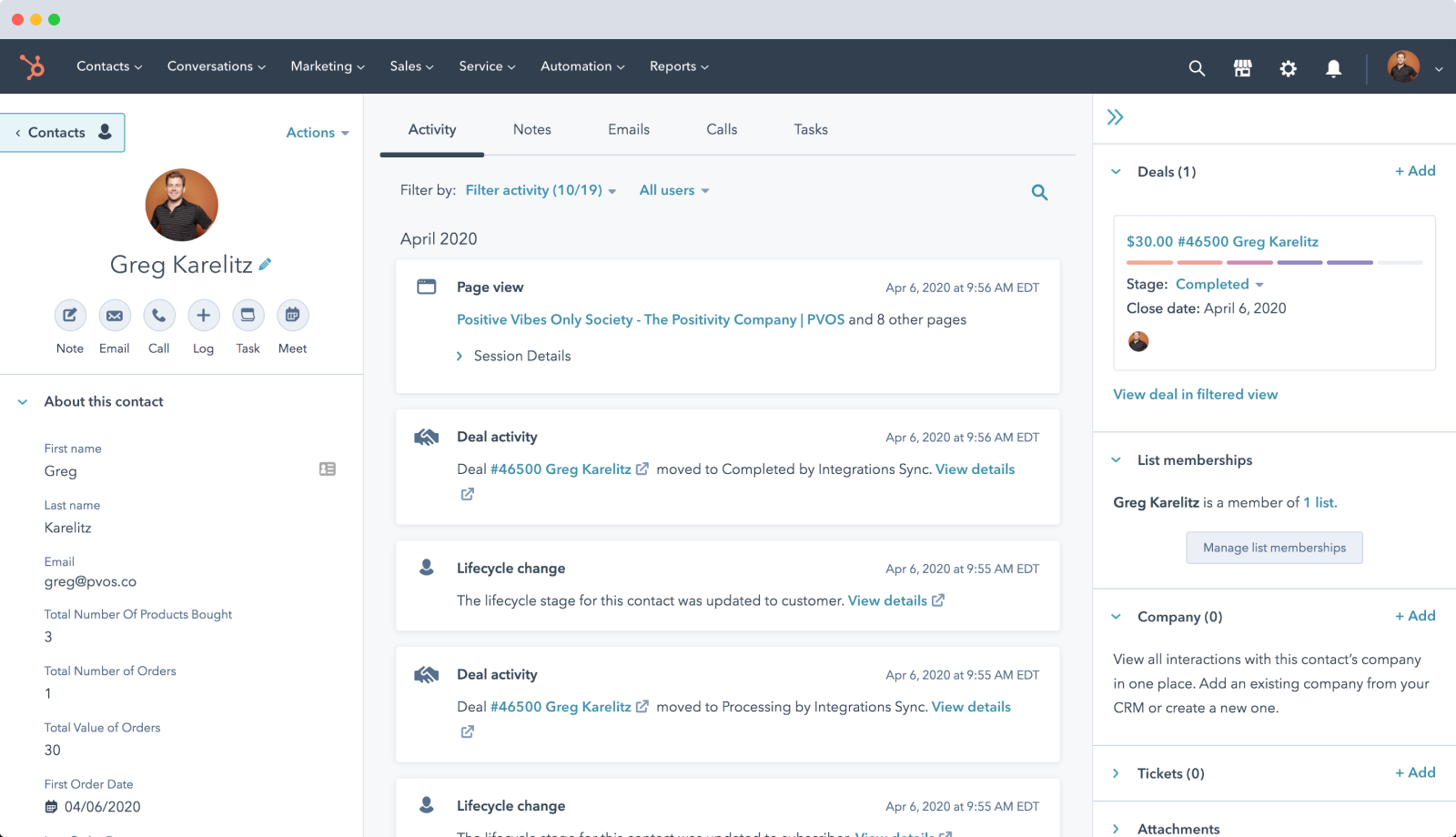
    HubSpot is a marketing, sales, content management, and customer service CRM platform. Each of our different Hubs connects to a single database, whether you use just one or the whole platform, as it was built from the ground up as a single system. HubSpot offers you a foundation of connected data to build a truly engaging customer experience at scale as your business expands.

    With an unlimited number of users and half a million contacts, their free CRM subscription is quite extensive. You can integrate it with Gmail and Outlook, create forms and newsletters, and give tasks and goals to your team. This CRM is second in our comparison of HubSpot vs EngageBay vs Active Campaign.

    Pricing:

    HubSpot’s CRM is always freely available. On the surface, this appears to be a good deal, but things are not as they look. You see, in order to benefit from HubSpot’s CRM features, you must pay for their services. With the free plan, you get a limited variety of forms, 2,000 emails per month, $1,000 in ad spend, five list segmentation choices, one discussion inbox, and limited chatbot abilities.

    Nevertheless, as your business grows and you need additional features, you’ll be forced to subscribe to at least the Starter plan, which charges $50 a month per user. That may not seem bad, but changing to the Professional plan will cost you $800 per month per user.

    Pros:

    • HubSpot is a cloud-based platform that offers a variety of services to assist you with marketing, sales, and other parts of your company.

    • You’ll like how HubSpot can assist you with customer service because it makes incorporating your marketing strategy into your help desk much easier.

    • Make use of ticketing and shared inboxes among your staff to keep track of every client question and complaint.

    Cons:

    One of the first questions to ask while choosing HubSpot CRM is, “How complicated is your sales process?” HubSpot CRM is probably not the best choice for businesses with advanced or complex sales processes.

    3. ActiveCampaign:

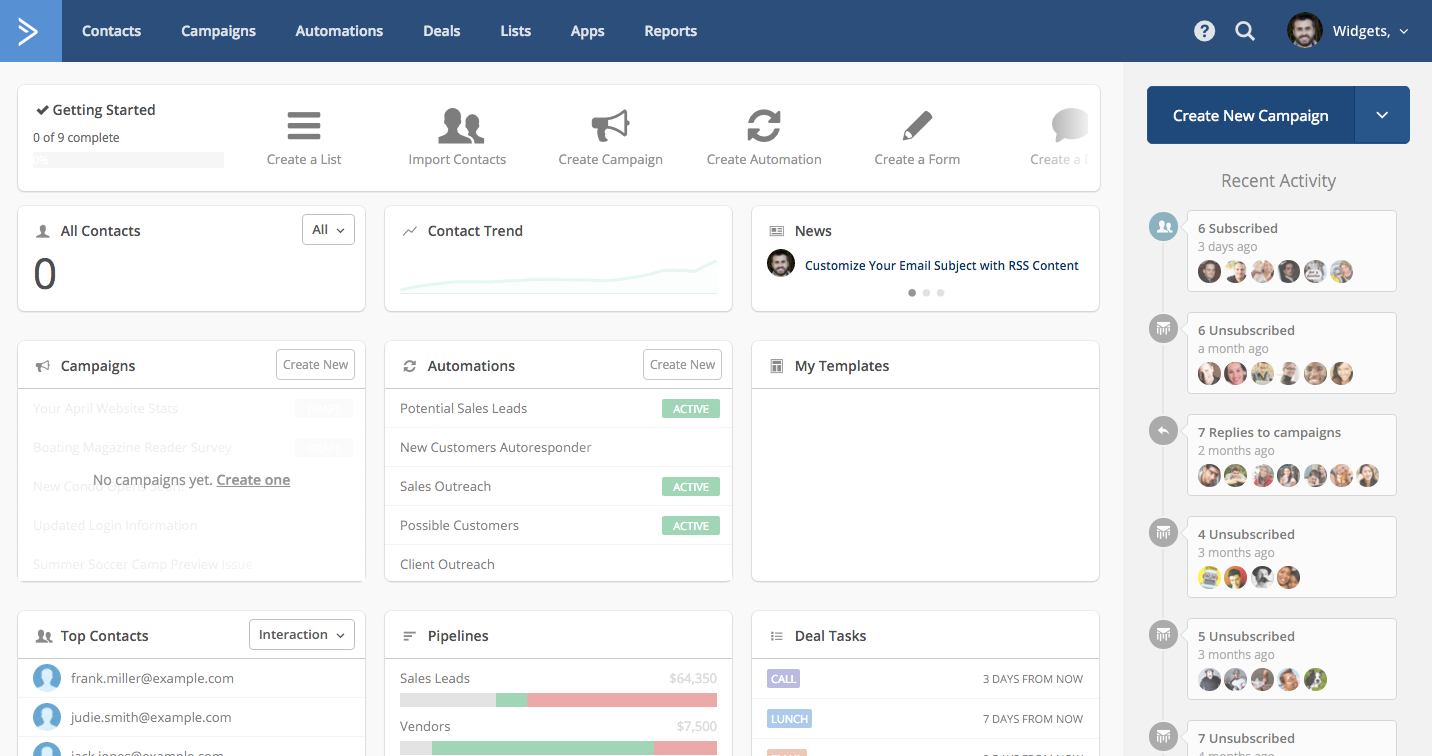
    With over 150,000 customers worldwide, ActiveCampaign is recognized as one of the top CRM tools. One of the most appealing features of ActiveCampaign is its automation services, which allow you to automate follow-up campaigns, update multiple conditions, and so on. The 3 in comparison of HubSpot vs ActiveCampaign vs EngageBay is Active Campaign.

    In contrast to HubSpot vs Active Campaign vs EngageBay, Active Campaign’s standard reporting features are superior. In addition to conventional campaign reports, you may construct automation reports, communication pattern metrics, interaction reports, and goal-based reports. Ecommerce reports are also provided.

    ActiveCampaign is a major competition in HubSpot vs EngageBay vs Active Campaign. If you migrate to Active Campaign, they’ll throw in free data migration, training, and onboarding to sweeten the bargain. ActiveCampaign also allows you to sync calendar tasks from Google Calendar, Outlook, and Apple Calendar to your CRM.

    All business sizes can benefit from signing up for ActiveCampaign because of its premium features and affordable starter plan. You may personalize your email marketing based on purchasing behavior, order data, and retrieving abandoned shopping carts if you run an e-commerce business.

    Pricing:

    • Lita costs $9 per month.

    • Plus, it’s only $49 a month.

    • $129 per month if you’re a professional.

    • $229 per month for Enterprise

    Pros:

    • Automation tools that are at the top of the movement

    • Excellent analytics and statistics

    • Migration of your account is totally free.

    Cons:

    • Beginners may find it a little confusing.

    • There is no free plan and the free trial period is limited.

    Best BCA Colleges Without Maths Requirement in 2021

    BCA Colleges without Maths [Updated List 2021]

    BCA (Bachelor of Computer Application) is an undergraduate degree in computer applications. The demand for computer professionals in India is on the rise as the IT industry in India grows rapidly. IT’s fast growth has created many career opportunities for computer graduates.
    Among students who want to make their career in Information Technology (IT), Bachelor in Computer Application (BCA) is a popular course. Depending on the courses offered, the program will be 3 or 2 years in length and divided into two semesters per year.

    In this article, we have composed a list of BCA colleges without Maths requirement. Some colleges reqiure maths as a compulsory subject, but some colleges have revised rules and you can check out the detailed list of BCA colleges without maths down below.

    Symbiosis Institute of Computer Science and Research, Pune

    BCA Colleges Without Math - Symbiosis Institute of Computer Science and Research, Pune

    Eligibility

    12th: Any Stream or Equivalent Diploma
    Minimum Percentage: 50%
    SC/ST: 45%

    Selection Process:

    Symbiosis Entrance Test -> Score -> Personal Interaction -> Writing Ability Test

    Fees:

    ₹ 1,75,000

    Institute of Management Studies, Noida

    BCA Colleges Without Math - Institute of Management Studies, Noida

    Eligibility

    12th: Any Stream

    Selection Process:

    JET (Joint Entrance Test)

    Fees:

    ₹ 3,74,000

    Lovely Professional University, Jalandhar

    BCA Colleges Without Math - Lovely Professional University, Jalandhar

    Eligibility

    12th: Any Stream
    Minimum Percentage: 50% + English Compulsory Subject

    5% Relaxation for:
    North-East States
    Sikkim Candidates
    Defence Personnel
    Kashmir Migrants

    Selection Process:

    Self Conducted Exam – LPUNEST

    Scholarships:
    Based on Entrance Exams and 12th
    1st Cutoff and 95%+ in 12th – 50% – ₹ 50,000
    2nd Cutoff and 90-94.55%+ in 12th – 40% – ₹ 32,000
    3rd Cutoff and 80-89.99%+ in 12th – 30% – ₹ 24,000

    Fees:

    ₹ 80,000

    Christ University, Bangalore

    Eligibility

    12th: Any Stream

    Selection Process:

    CUET -> Personal Interview & Skill Assessment (Past Academic Performance + Entrance + PI)

    Fees:

    ₹ 3,47,000

    Manipal University, Jaipur

    Eligibility

    12th: Any Stream
    Minimum Percentage: 55%

    Selection Process:

    Class 12 Percentage based Merit

    Fees:

    ₹ 2,11,000

    Sikkim Manipal University

    Eligibility

    12th: Any Stream
    Minimum Percentage: 50%
    SC/ST/OBC: 45%

    Selection Process:

    Class 12 Percentage based Merit

    Fees:

    ₹ 2,94,000

    Sikkim Kota Students – ₹ 1,81,500

    Poornima University, Jaipur

    Eligibility

    12th: Any Stream
    Minimum Percentage: 50%
    SC/ST/OBC/NCI/SBC/Girls: 45%

    Selection Process:

    Class 12 Percentage based Merit

    Fees:

    ₹ 37,500 Per Semester

    Chandigarh University, Chandigarh

    Eligibility

    12th: Any Stream
    Minimum Percentage: 50%

    Selection Process:

    CUCET

    Fees:

    ₹ 50,000 Per Semester + Exam & Security Fees Extra

    Poddar Group of Institutions, Jaipur

    Eligibility

    12th: Any Stream
    Minimum Percentage: 45%

    Selection Process:

    Class 12 Percentage based Merit

    Fees:

    ₹ 1,50,000

    St. Xavier’s College, Jaipur

    Eligibility

    12th: Any Stream
    Minimum Percentage: 10th & 12th Both 50%
    At least one of these subjects: Maths/Computer Science/Information Technology/Multimedia & Web Technology

    Selection Process:

    Class 12 Percentage based Merit

    Fees:

    ₹ 2,27,000

    How To Set Up And Grow An Online Store

    Creating an online store today can take you less than 10 minutes. But, to grow an online store and build a profitable online sales project in 2021, you’ll need to have a good eCommerce knowledge base and a thorough plan.

    In this article, I’m going to tell you the four most important steps you need to know about in order to set up and operate a profitable, scalable, and sustainable online store over time. Taking a few minutes to read these paragraphs can save you a lot of mistakes and headaches in the future. 

    Must Read: Basic Rules on How to Start an Online Store

    Let’s see them in detail. 

    1. Set Up Your Store: Ecommerce Platforms 

    In the market, there are many good platforms for eCommerce. But at this point, your choice should be based on which is the most suitable for you and your business.

    If you are starting in eCommerce and you don’t have much technical knowledge, a simple and intuitive platform may be the most appropriate. Take a look at this review of Sarah Chrisp’s course in case you are interested in learning about eCommerce.

    e-commerce symbol on a computer keyboard, black friday concept. 3d illustration

    If that’s the case, Shopify is a good alternative that will allow you to start up, sell, and get paid quickly. Then there are platforms like Woocommerce, which is ideal if you have certain technical skills and would like to be in control and not depend on a rented solution. Along the same lines, there is the Prestashop technology, which allows you to set up your eCommerce, but you need more technical and development knowledge to be able to refine the details.

    2. Build Your Customer Base

    grow an online store

    If you want to grow your store, you need visitors, right? So you should really pay attention to how to promote the online presence of your brand. 

    Now, attracting customers who buy from you is not enough. It’s necessary to turn them into fans or prescribers of your brand. Loyal customers will choose you as their first purchase option and will make recurring purchases.

    Here are some marketing strategy-based ideas you can use for that:

    • Generate original and quality content
    • SEO is still key
    • Combine SEO with SEM
    • See where your users are: social networks
    • Attract more customers with email campaigns

    3. Repeat: Logistics Matter

    Simply put, it’s crucial to know what are the factors that determine the cost of shipping online orders. But price shouldn’t be the only determining factor. Try to handle various rates from logistics operators. The ideal is to have 3 or 4  so you can compare and ask them to improve their offer.

    Robotics logistics and delivery service.

    In addition, this way your customer can choose the shipping option that best suits them. (There are a lot of people willing to pay more if they can get the delivery time shortened, don’t forget that)

    4. Start Scaling Your Online Store

    Now, there are three key areas you’ll have to work from now on if you want to grow your online store and turn it into a successful business:

    1. Profitability. It’s the ability that something has to generate sufficient profit or profit.
    2. Scalability. Business scalability is achieved when revenues increase rapidly while keeping fixed costs low, so the profit margin is always positive.
    3. Sustainability. Finally, being sustainable, in this context, refers to an ecommerce being able to remain current over time while remaining profitable.

    To grow in these three areas, the key is not only to get more clients. Nor is it just working on the average order amount to make it grow. Nor is it caring for every existing customer, trying to get their loyalty so that they buy more often.

    Online shopping on the laptop

    The key is to do it all at once to take advantage of math:

    If you get NEW customers, while you improve the average value of ALL orders and also ensure that ALL customers (new and old) buy more frequently, you’ll have better results than improving these indicators independently.

    Think about it this way:

    • Imagine that you get 10% more customers with an acquisition marketing effort.
    • At the same time, you increase the average amount of each order in your online store by 10%, of all orders, through crossell, upsell and sales funnel management techniques.
    • And you also improve recurrence by 10% through customer loyalty actions and marketing automation.

    The interesting fact is that the impact on accumulated sales is 33% (instead of the expected 30% that would arise from 10% + 10% + 10%).

    That is, you already have 3% more sales than you have achieved without effort, simply by working on these three actions at the same time. 

    Conclusion

    Ecommerce is a very good alternative to the problems that the physical channel is having these days, but it has its challenges, its difficulties, and its competition. You need to surround yourself with the best weapons to fight the battle of online sales.

    I encourage you to consider e-commerce as a necessity. Analyze what’s going to be sold, how, to whom, for how much, and where. Knowing the sector is of vital importance to maximize the chances of success when selling online, so perhaps investing in good online e-commerce courses could be a wise move.

    Good luck!

    Tips for Building Your SEO in 2021

    2

    It’s 2021. It’s officially time to start building your search engine presence. While the world of SEO and paid ads can seem large and, honestly, a bit frightening, there’s never been a better time to start this journey. Below are some tips for starting and building your SEO journey.

    Must Read: Common SEO Problems to Avoid in 2021

    Keywords are Everything

    Perhaps the most important part of any SEO plan is implementing keyword strategies. Despite the name, a keyword isn’t necessarily just one word. A keyword can be a single word or phrase that is typed into a search engine to pull up results. Many SEO strategies are based on getting your company to rank higher on a search engine by implementing keyword strategies. 

    building your seo

    By utilizing a keyword planner, you can see how your potential keywords would do if you were to focus on them. Google offers a keyword planning service if you already have a Google Ads account. The only trouble with keywords, though, is that Google is a smart cookie. You’ll need to seamlessly incorporate your keywords into your site in a way that Google doesn’t perceive as spam. There is a great way to incorporate keywords into your website, which brings us to our next point.

    Start a Blog for Building Your SEO in 2021

    While you might not think you run the kind of site that could incorporate a blog, I’m here to tell you that there is no such thing. Even if you hide your blog posts in the website where it’s not easy to access, having that level of content on your site can easily boost your SEO. Not only is it easy to incorporate keywords into a blog, but it’s also an easy way to bring new and exciting content to people visiting your page.

    New blog post.

    Of course, not just any old content will do. One way to ensure that your blog helps your SEO is to create original content. Try not to repeat topics in your blog itself, and do a search before you publish to see how many similar articles are out there. The more original your content is, the more likely it is to attract visitors.

    Ensure Your Site Runs Smoothly

    Caucasian woman using computer laptop

    Have you ever opened a website only to close it a few minutes later because it is so hard to navigate. Don’t be like those sites. Getting on the first page of Google only matters so much if your website isn’t up to shape! 

    Aesthetics are an important part of a site. Make sure that your site is appealing when you open it, with pictures and an easy to navigate format. Another important factor is to make sure your site is also optimized for mobile usage. A huge percentage of searches are conducted via a smartphone, so you want to make sure that your mobile site is just as clean as your normal site.

    You’ll also want to clean up any error pages or incorrect links that might be lurking on your site. Not only will this make potential customers happier, but Google will also appreciate your efforts. Google can improve your ranking if your site is clean and meets certain standards as well.

    Why Is It Worth It?

    After reading through these tips, you still may be wondering, why is an SEO strategy even worth it? At the end of the day, the statistics back it up. According to Google, 53% of shoppers claim to use a search engine to research a product before buying. And according to Search Engine Roundtable, online searches for local companies make up 46% of all Google searches.

    Business start up and idea

    Even though it may seem complex at first, utilizing SEO in your marketing plan has never been a more accessible process. There are countless articles out there, this one included, that want to help you start the process of growing your company using search engine optimization.

    Jeff Shipman is the Director of Marketing Innovation at Semify, based in Rochester, New York. At HubShout, we focus on scaling, are US-based, and a white label SEO solution that helps digital marketing agencies achieve dreams through on-time delivery and SEO fulfillment. Before moving to Western New York, he earned a BA in History and an MBA at St. Bonaventure University. Go Bonnies! 

    Difference Between i5 and i7 Processors and Generations

    Intel i5 and i7 are the two most popular processors available in the market. While i5 is a more budget-friendly device, i7 is usually considered a high-tier processor capable of better performance. So, what is the major difference between i5 and i7 Processors? The processor is the brain of any motherboard which performs all the calculations. These processors are manufactured by Intel, which holds approximately 3/4th of the processor market. Until the launch of Apple’s own Silicon, Intel and AMD were the only manufacturers of processors for desktops and laptops. Intel is a popular choice of manufacturers as it was cheaper and more power-economic than AMD.

    i5 Processors

    Like mentioned earlier, i5 is a budget-friendly, mid-tier processor that is capable of multitasking smoothly. It is widely used in laptops and desktops and, when paired with a good graphics card, can perform graphic-intensive tasks.

    Advantages of i5 Processors

    Let us look at the benefits of the i5 Processor:

    1. Although it is considered a mid-tier processor, it is capable of high-speed performance.
    2. It supports turbo boost technology, which allows it to overclock when required resulting in higher clock speeds.
    3. It is based on 64-bit architecture, which means it can handle more data.

    Disadvantages of i5 Processors

    1. High data visualization is not supported by i5 processors, which means high-quality images and video graphics is not supported.
    2. Consumes more power than i7 Processors when overclocking.

    Check out the latest i5 Processors here.

    i7 Processors

    i7 is identified as a high-end performer and is capable of extreme performance when intensive applications are involved. It can run a plethora of applications and games smoothly without any lags or frame drops. It is a bit expensive and usually preferred by video editors, gamers, and most artists who want to render 3d graphics. Anyone who prioritizes performance usually preferred i7 over i5.

    Advantages of i7 Processors

    Let us look at the benefits of the i7 Processor:

    1. It offers incredible performance with larger amounts of cache.
    2. Better multi-threading performance as it supports hyper-threading.
    3. Better speeds are achieved through Turbo Boost.
    4. Less power consumption as they don’t need to overclock as often as i5 Processors

    Disadvantages of i7 Processors

    1. Great performance comes at a cost. i7 processors are expensive.
    2. They consume more power than other processors of a similar segment.
    3. Works with DDR3 memory or higher. Can increase the budget if the motherboard supports older generations of memory.
    4. Multithreading is supported by a few programs. So, there is not much of a performance gain for an average user.

    Check out the latest i7 Processors here.

    Recommended: What’s the Difference Between i5 and i7 Processors – Which One to Buy?

    Difference Between i5 and i7 Processors and Generations

    Difference between i5 and i7 Processors

    i5 Processorsi7 Processors
    Bus Typei5 uses DMI Busi7 uses QPI Bus
    Architecturei5 Processors are available in 2 and 4 core optionsi7 Processors are available in 2, 4 and 8 core options
    Hyperthreadingi5 does not support hyperthreadingi7 supports hyperthreading
    CacheSize ranges from 3MB to 6MBSize ranges from 4MB to 8MB

    Differences between the Generations of Processors.

    Generation in the case of processors was introduced after the Core I series was released. The highlighted difference in the generations is the processor micro-architecture. Here is a detailed description of the different generations and their architecture:

    The First Generation (Nehalem) – 2008

    • Process: 45nm
    • Socket: 1156 LGA
    • RAM Support: DDR3 1066 MHz (2 Channel)
    • Intel Turbo Boost Version 1.0

    The Second Generation (Sandy Bridge) – 2011

    • Process: 32nm
    • Socket: 1155 LGA
    • RAM Support: DDR3-1066 MHz (2 Channel)
    • Intel Turbo Boost Version 2.0
    • Performance Improvement: 11.3%

    The Third Generation (Ivy Bridge) – 2012

    • Process: 22nm
    • Socket: 1155 LGA
    • RAM Support: DDR3 (1333-1600) MHz
    • Intel Turbo Boost Version 2.0
    • Performance Improvement: 3-6%(CPU), 25-68%(GPU)
    • Energy Efficiency: 50%

    The Fourth Generation (Haswell) – 2013

    • Process: 22nm
    • Socket: 1150 LGA
    • RAM Support: DDR4
    • Intel Turbo Boost Version 2.0
    • Performance Improvement: 3-8%

    The Fifth Generation (Broadwell) – 2014

    • Process: 14nm
    • Socket: 1150 LGA
    • RAM Support: DDR3L (1333-1600) MHz
    • Intel Turbo Boost Version 3.0

    The Sixth Generation (Skylake) – 2015

    • Process: 14nm
    • Socket: 1151 LGA
    • RAM Support: DDR4 2133 MHz
    • Intel Turbo Boost Version 3.0

    The Seventh Generation (Kaby Lake) – 2016

    • Process: 14nm
    • Socket: 1151 LGA
    • RAM Support: DDR3L-1600/ DDR4-2400 MHz
    • Intel Turbo Boost Version 3.0

    The Eighth Generation (Kaby Lake R) – 2017

    • Process: 14nm
    • Socket: 1356 BGA
    • RAM Support: DDR4 2666 MHz
    • Intel Turbo Boost Version 3.0

    The Ninth Generation (Coffee Lake Refresh) – 2017

    • Process: 14nm
    • Socket: 1151 LGA
    • RAM Support: DDR4 2666 MHz
    • Performance Improvement: 26%
    • Intel Turbo Boost Version 3.0

    The Tenth Generation (Ice Lake/Comet Lake) – 2019

    • Process: 10nm
    • Socket: 1526 BGA
    • RAM Support: DDR4-3200/ LPDDR4X-3733 MHz
    • Intel Turbo Boost Version 3.0

    The Eleventh Generation (Tiger Lake/Rocket Lake) – 2021

    • Process: 14nm
    • RAM Support: LPDDR4X-4267/ LPDDR5-5400 MHz
    • Intel Turbo Boost Version 3.0
    • Performance Improvement: 30%

    The Twelfth Generation (Alder Lake) – 2021

    The 12th Generation of Intel Processors is under development and is expected release by the end of the year 2021. Although, no information is official at the current time, there are rumours that the new chipset may be a redesign on the 10nm architecture.

    The major difference in the performance lies in the process size of the processor. The process size refers to the size of the smallest(possible) element of the processor. So, the lower the size, the better the performance.

    Intel i5 vs i7

    Who should buy i5?

    i5 chipsets are suitable for anyone with light to moderate usage. These chips are also suitable for entry-level gaming. It can run high-demand apps too, but it might not be as fast as expected.

    Who should buy i7?

    i7 processors are suitable for professionals who have moderate to high-performance dependency. Be it video editing software or high-demand games, great performance can be expected out of this processor.

    These are the technical difference between i5 and i7 Processors and should be kept in mind when purchasing a system.

    Game Plan to Launch a New Blog (What You Need to Cover)

    Blogs give people a brilliant way to share their philosophies, creativity, and discoveries with the world. If starting a blog feels right to you, congratulations! You’re going to join a thriving community. How do you start, though, and how much does it take to launch a new blog? We’ve laid out a game plan including all the things you should consider as you begin your journey.

    Must Read: 5 Useful Things To Consider When Starting A Blog

    Choose a Niche to Launch a New Blog

    When selecting your niche, you want to consider two major things. First, you want a topic you feel passionate about. Writing consistently about a subject you love will prove much easier.

    Second, make sure your niche has an established audience. This is what will lead you to have a successful blog.

    Oddly enough, the more blogs that exist around a topic, the more likely your blog will also thrive. Scout out the success rate of other blogs within your same niche. If you see high success rates, then you know you’re on the right track.

    Understand How You Will Monetize

    Do you, eventually, want to earn money through your blog? Then you need to know what that would look like.

    Monetizing comes in many forms. For example, running ads tailored to your niche will generate some passive income. However, they can negatively affect user experience by distracting your readers or making your blog look low quality.

    Digital tablet with piggy bank and money on blue wooden table

    Enrolling in affiliate programs has grown in popularity, though its success depends on your blog’s visitors and your trustworthiness. With affiliate links, you partner with companies that offer high-quality products or services that will benefit your audience. Your readers may purchase the product, and you earn some commission in return.

    Other options for monetizing include freelance writing jobs, guest blogging on another website or creating an e-book. You can also sell your own services and products if you have a business.

    Buy a Domain

    people using hand click searching browsing internet page on computer touch screen

    A domain name serves as your primary identifier and first impression online. It’s featured in your internet address, email and on social media. It also clues people in on whether or not they want to read your content.

    Because a domain name defines a website, bloggers can often fall into the trap of taking forever to decide on a domain name. Luckily, stressing over it isn’t productive or necessary.

    Instead, think about your audience, niche and the benefits people get by reading your blog. These three fundamental things can help you create a domain name that’s simple but memorable. Once you settle on one, you can purchase it through your web hosting site to ensure it’s yours.

    Choose a Blogging Platform

    Now, you have to find a blogging platform. Beginning bloggers may want to try a free platform like Blogger.com or Tumblr, but people who feel seriously about blogging will want to use self-hosted WordPress.

    WordPress software dominates the blogging industry. The site offers a simple set-up, countless themes and a professional look. All of this makes it a solid foundation for your blog.

    A free version of WordPress exists, but most seasoned bloggers will recommend you choose a self-hosted platform. With a self-hosted platform, you use your unique domain name and run the blog through a web hosting company. This gives you complete control over your blog and its content.

    Connect Your Web Hosting

    Choosing a secure, dependable web hosting company will make all the difference in how your blog runs. Web hosting companies maintain your blog, store content, offer customer support and manage security.

    At this point, the cost comes into consideration. Domain names and web hosting come with a fee. Usually, web hosting costs a few dollars per month, and a domain name costs around ten dollars per year.

    Starting a new blog requires investment at the beginning to see long-term benefits. Opting for a self-hosted blog with a web hosting company gives you better functionality and control. For examples of different plans, check out Broodle Host, Hostgator, and Bluehost.

    Get a Logo Designed

    A logo contributes to your brand identity. Using icons and typography, you can create a logo that people instantly recognize and associate with your blog. Through this visual, new readers will get a sense of your unique personality, style, and niche.

    You also want a logo that looks professional. Programs like InDesign and Adobe Photoshop work great when you can create your own logo, but if you don’t know where to start, logo creators like Tailor Brands will give you a bunch of options to choose from.

    When designing your logo, think about the audience that is going to be reading your blog. Personal bloggers may want to use a wordmark (text only) that mimics a signature for a more individual look. Niche bloggers—in industries like food, fashion, or DIY—would do better with a combination mark (both text and an icon) to better signify to your audience what your blog content is about.

    Once you have a logo, you’re ready to build out the rest of your visual brand identity to complement it—starting with your blog theme.

    Choosing a Theme for Your Blog

    Platforms like WordPress supply countless pre-designed themes to their users. Themes give you a fantastic starting point that you then supplement with content.

    You want your theme to feel professional and neat. Think about how users will experience your website and prioritize navigation and user experience.

    Launch a new blog

    You should also consider the pages you want to include on your blog. Do you want your home, about, contact, and blog pages to be separate? Will you combine them? Remember that photos, especially a high-quality photo of yourself, will help people connect to your website.

    Prepare Your Content Plan

    At this point, you probably have several ideas brewing in your mind that you’re eager to share with the world, but take time to plan your content.

    Content needs to engage people’s attention and encourage them to come back for more. Not only that, but your content should help or benefit your readers in some way.

    Creating quality content on a regular schedule can seem daunting. Do the same thing here that you did with your niche, and find out what interests and engages people. Listicles, how-to’s, reviews and commentary all receive a lot of readers and may be the perfect place for you to start.

    Create a Marketing Plan

    Alright, you have your blog. Now tell everyone. Promoting your blog should receive the same attention as creating content.

    Start small. Choose one social media platform — like Instagram, Facebook or Pinterest — that suits your blog and learn to use it. You can also slip your domain name into your email signature and profile bios on social media.

    Your marketing plan should also take into account how you want to participate in the wider blogging community. Staying active on other blogs, reaching out to bloggers and asking to guest blog on someone’s site will build relationships. Reaching out to select influencers who may mention or share your blog can also bring in new readers.

    Time to Begin!

    You now have everything you need to get your blog up and running. Remember to go in with a plan for your niche and how you’re going to grow, and only then to start choosing the right platforms to help you get started. Make sure to go through the above steps, and you’ll be ready to put your blog out into the world in no time!

    Do Your Employees Lack Motivation? Here Are Some Potential Causes

    If your employees lack motivation, it is one of the most common reasons for an inefficient business. This is because it reduces productivity, leading to additional man-hours being required, and ultimately, an increase in company expenditure. It can also lead to unnecessary delays, costing further resources, and potentially damaging your business’s reputation. If worker motivation is an issue for your company, it is therefore important to identify what is causing it, so you can work to address it. Here are a few of the most common causes of low employee motivation.

    Isolation

    Feelings of belonging, and highly sociable workplace culture, are both considered very important in terms of motivating employees. Isolated workers who do not regularly interact with their colleagues can consequently become unengaged and unproductive. While this may not have been a common issue in the past, the fact that many of us are still working from home has exacerbated the feelings of isolation among many workers.

    As a people manager, it is thus important that you try to bring the social elements of your work atmosphere to your employees, even as they work remotely. This can be implemented as simply as adding a social video call to your Fridays, for example. However, if you really want to address your employee motivation, you could even conduct some remote team building, for example, by using one of the packages offered by cityHUNT. It is important to note, though, that just an employee being reserved does not necessarily mean they are unmotivated or unhappy.

     A Lack of Interest in the Work

    Unfortunately, there are always going to be some roles where you’ll struggle to find employees actively interested in the work. It is therefore understandable that in these circumstances your workers may be unmotivated, the work still must be completed to an acceptable standard. In these instances, consider implementing a target-based reward scheme to boost the productivity of your employees. This can encourage your team to work harder on a project, even if the specific tasks involved are not individually interesting. However, incentive-based motivation can also have its drawbacks. Specifically, it can lead to a drop in the overall quality of the work, as workers strive to meet targets.

    Communication Issues

    If it is not clear to an employee what they should be doing on any given day, or how their work is relevant to the success of the overall company, this can also cause a malaise among your workers. Poor communication can therefore often inadvertently lead to unmotivated workers. It may also directly affect the quality of the work they produce if they do not think the work matters in itself.

    communication bubbles

    It is, therefore, a good idea to stress to your employees the relevance of the work you are asking them to do, so they understand that their work is important to the wellbeing of the company. Actively listening to your workers, and taking on board their constructive criticism, can also improve your worker motivation. This is because it will make them feel included, as well as a valuable member of the business.

    How to Schedule WhatsApp Messages in Android Device

    WhatsApp is one of the most popular messaging programs with a variety of functions. It does, however, lack some critical features, one of which is message scheduling. While WhatsApp provides a number of useful features, such as stickers, GIFs, and the ability to delete messages, the instant messaging network does not allow users to schedule conversations. If a user recalls to ping someone in the middle of the night, he or she will either have to remember to do it the next day or do it right then, because there is no option to plan it.

    While WhatsApp has a lot of handy features, including stickers, GIFs, and the option to erase messages, users cannot schedule chats. If a user remembers to ping someone in the middle of the night, he or she must either remember to do it the next day or do it right then and there because there is no option to schedule it.

    Must Read: How WhatsApp Marketing Can Benefit Your Business

    What is the best way to schedule WhatsApp messages?

    Several third-party apps can help you schedule WhatsApp messages on Android. While other apps claim to be able to do the job, only SKEDit succeeds. Here’s how to use SKEDit to schedule WhatsApp messages. The app is poorly rated on the play store because of its compatibility with devices and android versions. Yu can give it a shot if this works for you then good to go.

    • Open the app after downloading it from the Google Play Store. The user must sign up for the app when it first launches.
    • After you’ve signed up, go to the main menu and select WhatsApp.
    • Allow the app to ask for permissions. Toggle on Use Service under Enable Accessibility > SKEDit to allow. Return to the app after that.
    • Fill in the recipient, the message the user wants to send, and the time and date the user wishes to send the message after that. The user will also be prompted if they want the planned message to be repeated.
    • Finally, before the message is sent, the user will be asked if they want to be asked. Users can turn this option on by tapping the tick icon and then toggle it off. After this action, the message will be sent.
    • If the user has decided to be asked when the message is sent, they will receive a notification on the appointed day asking for approval to finish the activity. Following that, the user may watch the message be delivered in real-time.
    • The user will be requested to disable the phone’s screen lock and battery optimization if they choose not to be asked when sending the message. While this makes sending planned messages automatic and instant, it may violate your privacy, thus it is not a recommended alternative.