More
    Home Blog Page 54

    Top 7 Tech Trends To Modernize Your Digital Marketing Campaigns

    0

    The year 2018 was a roller coaster ride for most marketers. Trends that were considered as the cornerstones of digital marketing were toppled over and replaced by something else. Exciting ideas such as drone delivery, serverless databases, and other technology trends are looking to shake up the marketplace, while digital marketing agencies are doing their best to cope up with the latest demands of the market.


    A Look At 2018 Technology Trends

    2018 proved that if there is anything to be believed, it would be that things constantly change. Fake news became a recurring theme in tech, as it was capitalized on by a number of organizations with the goal of spreading misinformation. Hacker Noon notes how tech and the elections seem to go hand-in-hand, as quite a number of fake news claims were related to the polls.

    Then there is the increasing pivot of the world towards data privacy. CEO and co-founder of enterprise cloud company Box, Aaron Levie, even tweeted the following:

    This emphasizes that users are now more conscious about their digital footprint, and, for that matter, wary of what they leave out on the internet. The implementation of the General Data Protection Regulation (GDPR) certainly strengthened this stance on how information should be managed, not only in the digital world but the physical world as well.

    Yet there were more things to think about when it came to last year’s digital trends. With GDPR and other regulations being put into place to strengthen data privacy and to make more companies liable, digital marketers did their best to continue to thrive while adhering to regulations. Here’s how they did it.


    2018 Digital Marketing In Numbers

    • 73% of companies prioritize optimizing emails for mobile as it was found that those that weren’t were deleted within three seconds. This was only part of an increasing focus on optimizing for mobile. 
    • The video drove a 157% increase in organic traffic from SERPs. 
    • In line with this, 41% of digital marketers plan to incorporate Facebook video to their 2019 content strategy.

    If Sharelov’s Marketer’s Guide to the Top Social Media Trends in 2019 list is to go by, then 2019 is going to be a revolutionary year for social media as there would be big changes across all platforms.

    That being said, here are the top 7 technological trends to modernize your digital marketing campaigns this 2019 and beyond.


    Trend #1. AI Says Hi

    Artificial Intelligence

    While artificial intelligence has already become a technological staple, it looks like this trend is going to become even more important this year. A number of companies are hedging on the fact that AI continues to grow smarter and is contributing significantly to the companies’ bottom line.

    According to a recent survey on the state of AI, 44% of businesses use AI to enhance existing portfolios, products, and services, while 59% are looking to utilize AI to improve customer experience. Meanwhile, a separate study found that at least 26% of organizations are embracing AI for campaign optimization, while another 28% are capitalizing on the technology for product recommendations.

    So while you may be on the fence about the technology, make no qualms about it: AI is here to stay.


    Trend #2. AR vs VR… Or Maybe A Combination Of The Two?

    Augmented reality (AR) and virtual reality (VR) are the buzzwords that have been thrown around in earnest in the digital marketing world. And these trends are also coming in very strong for 2019.

    First things first – AR is when you see a digital element using your smartphone’s camera. Think of Pokemon Go where you see cute Pokemons as you walk along the street. Meanwhile, VR is an immersive experience that uses devices such as Google Cardboard, HTC Vive, and Oculus Rift. While AR shows digital elements in your real world, VR brings you into a completely different world.

    Why does it matter? The AR advertising industry is expected to grow from $428 million in 2018 to $2.6 billion in 2022. More and more companies are investing in AR and VR – in fact, your competitors might already be exploring these technologies. If you do not want to be left behind by the competition, it would be in your best interests to explore this avenue as well.


    Trend #3. Voice Search Is On The Rise

    voice search SEO

    As people become more and more acclimated to voice search, businesses will have to increase their efforts towards optimizing for voice. Over 58% of consumers used voice search to find local business information within the past year, while 46% of those who use voice search use the technology to search for local brands every day. Lastly, at least 27% of those who use voice search would go to the website that was recommended to them.

    So if you want to be more visible to your target market, getting more traffic to your website, and essentially grow your business, then you need to invest in optimizing for voice search.


    Trend #4. The Marriage of CMOs and CIOs – For Their Campaigns, Of Course!

    Chief Marketing Officers (CMOs) are working hand-in-hand with Chief Information Officers (CIOs) now more than ever. While these functions were traditionally independent of each other, more companies now are finding the value in complementing marketing campaigns with tech, and vice versa. These two functions are working alongside each other to enhance the customer experience. The idea is that by making their campaigns more dynamic and interactive, customers would then be more likely to remember the brand and interact with them.


    Trend #5. Be Omnipresent With Omnichannel Marketing

    Multichannel marketing gave businesses that ability to communicate with consumers on different platforms like social media, emails, and on their website. Omnichannel marketing ups the ante by not only making all available communication channels available to consumers, but also by integrating all of them to provide a seamless customer experience.

    For example, a user may ask Google Assistant what the best sneaker cleaners are. If your site is the one they’re recommended to, they might choose to communicate with you through your social media chatbots. There, you can make product recommendations and tell direct them to your eCommerce site, your physical store, or even ask them to opt into your email list for special offers. So when they choose to visit your physical store, the sales assistant should be able to access all key information on past interactions and use it to provide the customer with the best experience possible.

    This not leads to better relationships, but a higher chance of a conversion.


    Trend #6. Be Socially Agile

    There are over 3.1 billion social media users in the world today – that means that if you can efficiently harness digital marketing, you have the ability to reach at least 42% of the world’s population.

    But because everyone’s on social media, you need to have a dynamic strategy to ensure that you reach your target audience wherever they may be. And a key element of this approach is being able to repurpose your content across different platforms.

    For example, your longer-form videos could be on YouTube, while shorter teaser videos with subtitles could be on Facebook. Additionally, you can also upload snippets of the same video on Instagram Stories, while a vertical version could also be present on IGTV.

    Knowing where your audience is only half the battle. Reaching them with consistent messaging another one entirely.


    Trend #7. Chatbot Evolution

    Most customers are looking for instantaneous responses to their queries, and sometimes they ask these questions outside of business hours. A great way to make sure that their concerns are addressed is to employ chatbots.

    Machine learning has become more and more capable as time goes by. This has led to a natural progression in making chatbots go beyond answering basic queries and making generic product recommendations to becoming more human-like in its responses.

    As well, the more data is collected from different sources, chatbots can eventually be used to interact with users at every stage of their needs. Whether it’s by providing better results or slowly replacing apps with more voice-based programs, we can only expect chatbots and other forms of automated messages to get better as the tech continues to evolve. This means that for those who haven’t incorporated chatbots into their marketing strategies, there is no better time to start than now.


    The Bottom Line

    As you can see, digital marketing today is booming and rapidly evolving. Get ahead of the pack by being more creative with your utilization of this available tech. By incorporating these seven trends into your marketing strategies, you will be better equipped to conquer the future.

    Did we miss anything? Let us know in the comments below. 
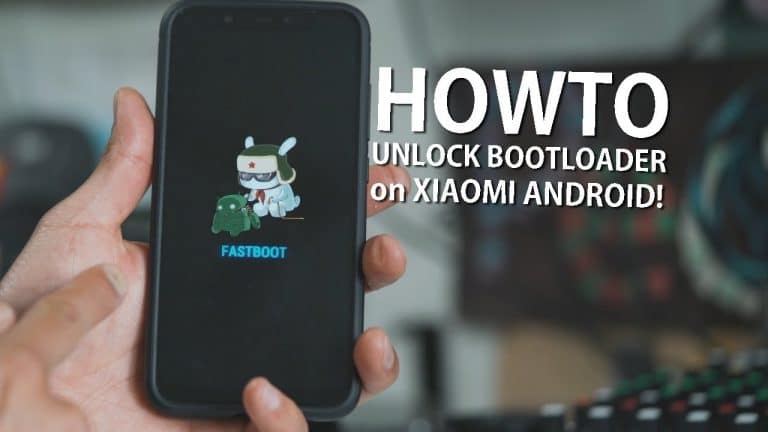
    The Right Way to Unlock Bootloader in Xiaomi Android Devices

    Since 2015, Xiaomi began to block bootloaders on its smartphones and tablets. According to the manufacturer, this is necessary to protect personal data. So in this tutorial, I will guide you on how you can unlock the bootloader on your Xiaomi Android device using the official method by Xiaomi itself. 


    How do I know if the bootloader is locked on my smartphone?


    What does an unlocked bootloader give?

    • Unlocking the bootloader allows you to install any custom firmware, recovery, and also have full ROOT access on the device. At the same time, you can still use the official global firmware and receive updates by air.


    Instructions for official unlocking the bootloader:


    Step 1: First of all, you need to log in / register in the Mi account on your device, if you have not done this before.

    Step 2: Now you need to bind the device to Mi account. To do this, open Settings > About device and tap 5 times quickly on the item “MIUI Version”, thereby opening the hidden settings for developers.


    Step 3: Next, go to Settings> Advanced settings > For developers, open the “Bootloader Status” item and click on the “Add Device” button. You should see a notification that the device has been successfully added.
    (If you get an error when trying to bind an account, try again several times if there is no result, try turning on the Chinese VPN and bind the account again.)

    Step 4: After successfully linking the device to the Mi account under the new Xiaomi conditions, 360 hours should pass, after which you can finally unlock the bootloader, however, you can try right away – for some special Mi accounts and devices, unlocking can take place without waiting.

    Step 5: Download the program Mi Flash Unlock and unpack the folder preferably on the C: / drive.

    Download Mi Unlock

    Step 6: Create a backup of all important data, because unlocking the bootloader formats all the data from your phone.

    Step 7: Now on your device, enable Fastboot mode. To do this, turn off your device, then hold down the “Power” and “Volume – (Minus)” keys until Fastboot mode appears on the screen.

    Step 8: Now connect the phone to the computer via a USB cable.

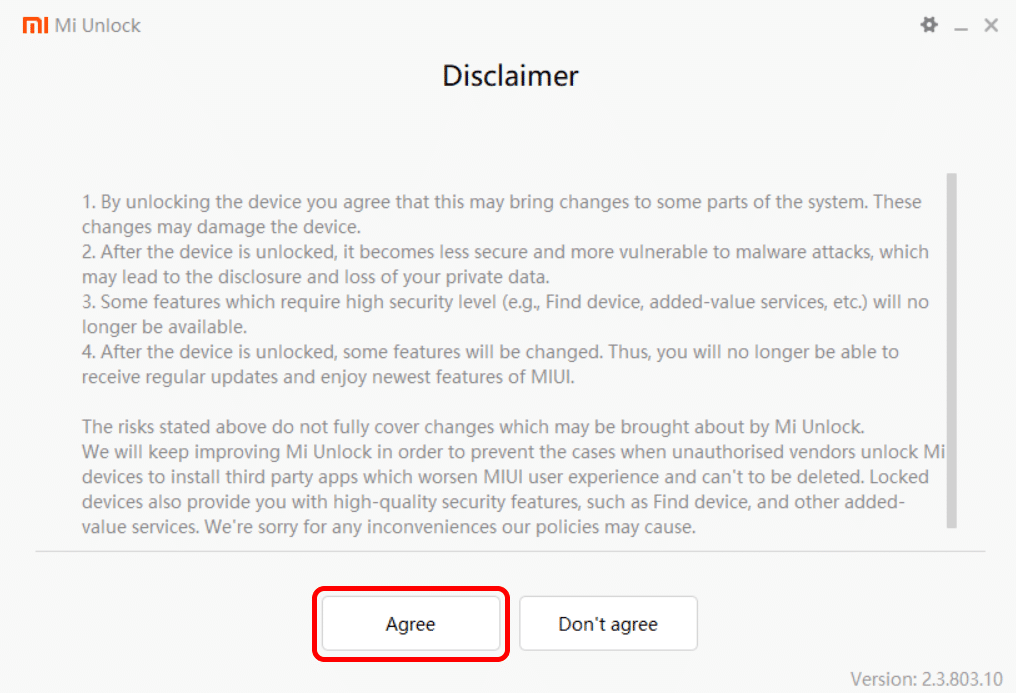
    Step 9: Next launch the Mi Flash Unlock program, read the disclaimer and click on the button “Agree” on the left, thereby agreeing to the conditions.


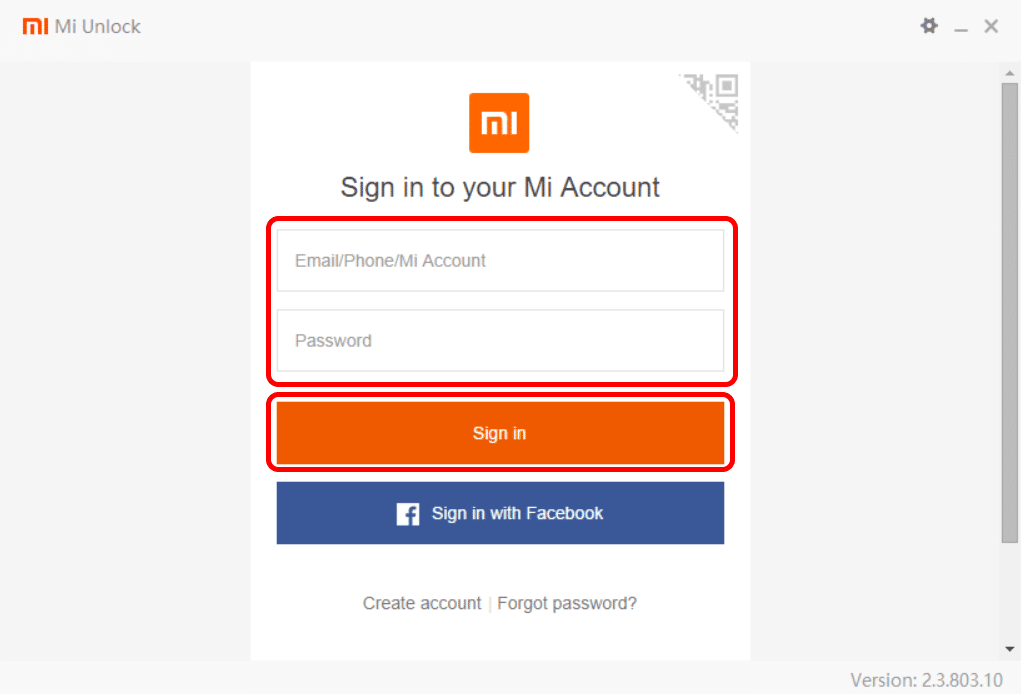
    Step 10: In the window that appears, enter the Mi account credentials: your username and password. The login can be Email/phone number / ID of Mi account. Next, click on the Sign in button.


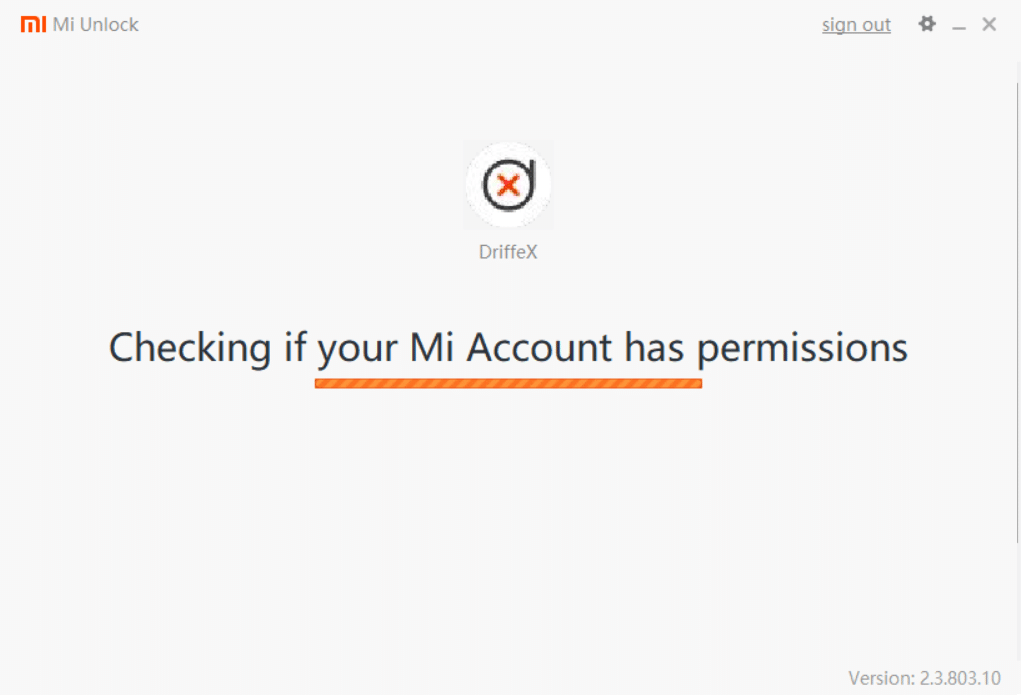
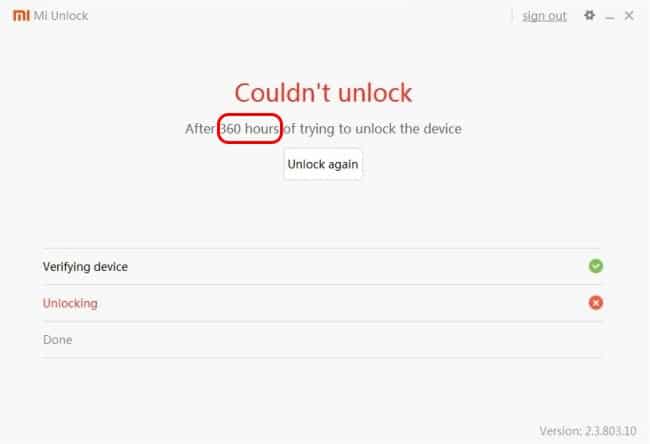
    Step 11: Now wait till it checks your account for necessary permission to unlock the bootloader. If this shows an error for you then please wait for 360 hours as Mi restricts new accounts from unlocking bootloader for this much time. After that try again.


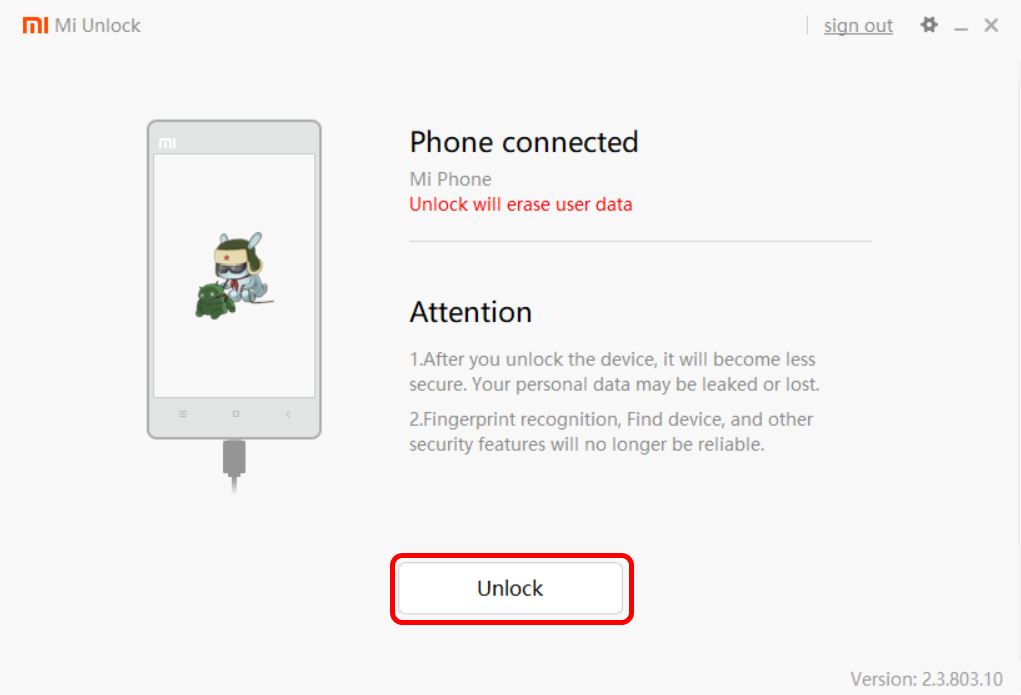
    Step 12: After the inscription appears in the program that the device is connected (Phone connected), click on the Unlock button to start unlocking device bootloader.


    Step 13: A warnings will appear, accept it by clicking on the “Unlock anyway” button.


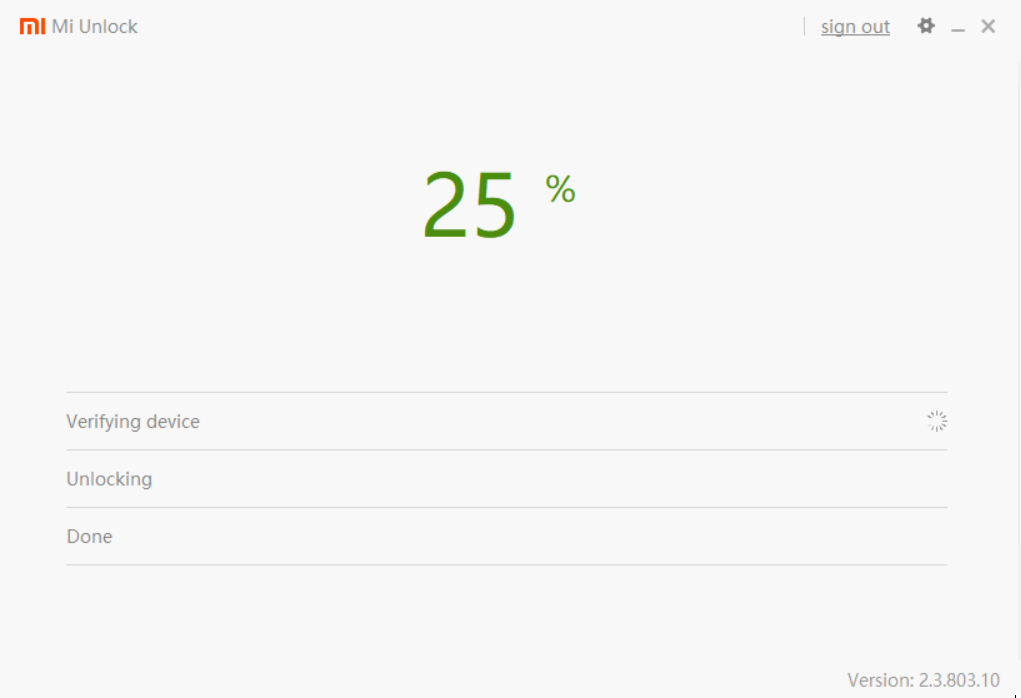
    Step 14: Now the unlocking process will start, wait until it completes.


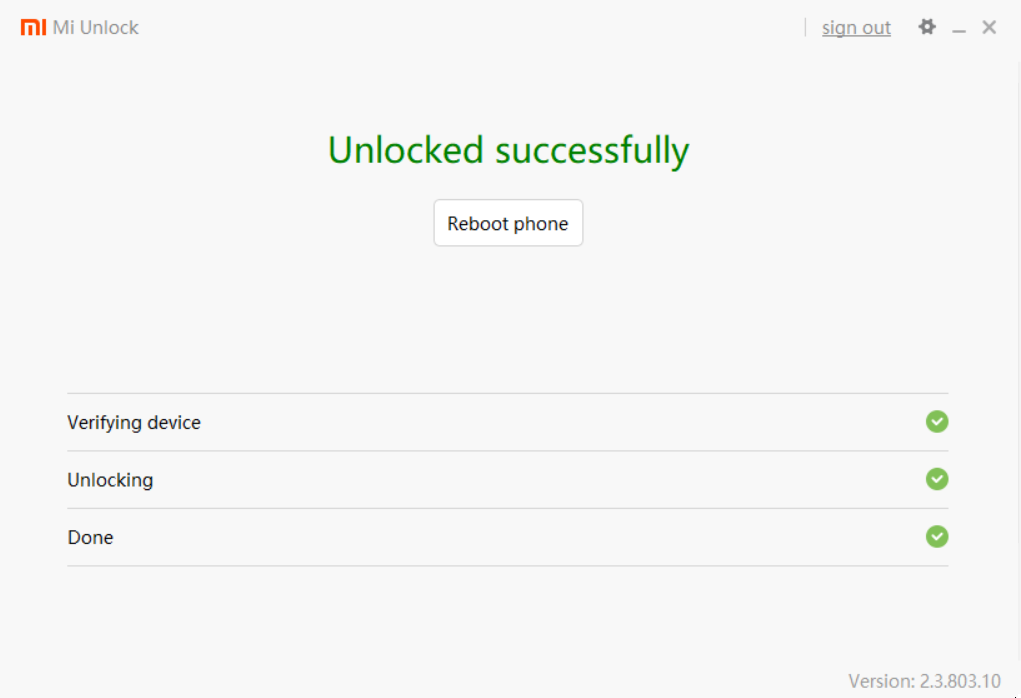
    Step 15: If the bootloader is successfully unlocked, the following window appears with the message “Unlocked successfully”, and the phone will automatically reboot. Now you can install any custom firmware!


    If you receive a notification that you need to wait 360 or 72 hours, you can safely close the program and continue to use the phone until the specified time expires. Important! Do not untie Mi account from the device, otherwise, the timer will reset. After the time has expired, try to unlock again.


    Note: From one Mi account you can unlock only 1 device every 30 days.


    That’s all, Now you can install any custom recovery or ROM on your device. Let us know if you face any problem in the comments below.
    How to Root Any Android 9.0 Device – The Right Way

    3
    Root Android 9.0 (Pie) Device in 2021 – A Step by Step guide

    Hello guys, how you all doing? Bought a new android phone and that too has the latest Pie version? I know that you can’t live without rooting your phone and gaining superuser access to it.

    And since rooting Android Pie is a tough task so we have come up with some tricks to root Android 9.0 Pie. Yes in this article we will tell you 3 ways to root Android Pie 9.0 using SuperSU, Magisk, and Kingo Root easily in 2021.

    Must Read: How to Root any Android 10 Q Device in 2021 the Easy Way?

    Root Android 9.0 via Magisk

    Magisk was introduced as an alternative to SuperSU root, which was the only rooting solution at that time. SuperSU modifies system files to provide root access to Android devices. Magisk made rooting easy with systemless root. It roots the system without modifying the core code. It is a godsend for people using Financial apps on their Android device. Magisk is the latest method to root android 9 devices. It can be done through two different ways

    Root Android 9.0 via Magisk Manager

    • First of all, download the Magisk Manager and place it in your phone’s storage. 
    • Now you have to boot your device into a custom recovery like the TWRP Recovery. If you haven’t installed one then search on Google or Youtube for proper instruction on how to install a custom recovery for your Android 9 Device.
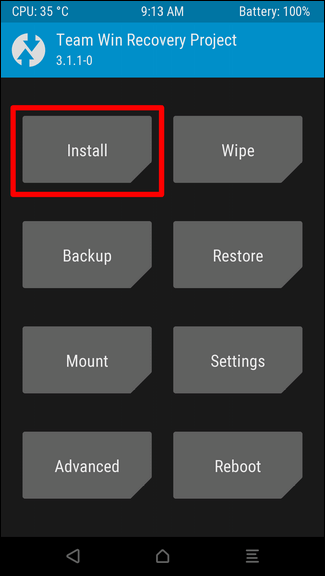
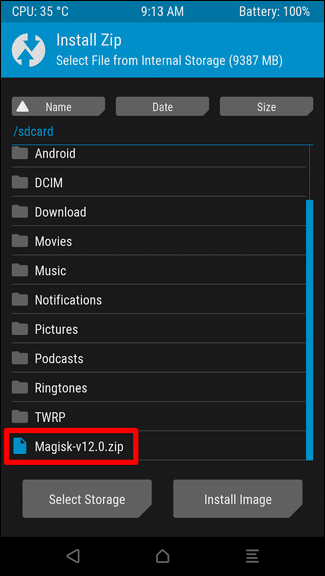
    • Click on the Install button and then select the Magisk.zip file that you had already transferred to your device storage in Step 1.
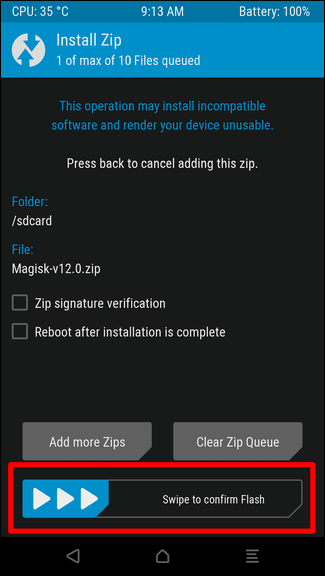
    • After you had selected the .zip file now Swipe to Confirm Flash on the bottom side of your mobile screen to start the flashing process.
    Root any Android 10 Device with Magisk
    • Once Magisk is flashed, you’ll get the Reboot System option, select it.
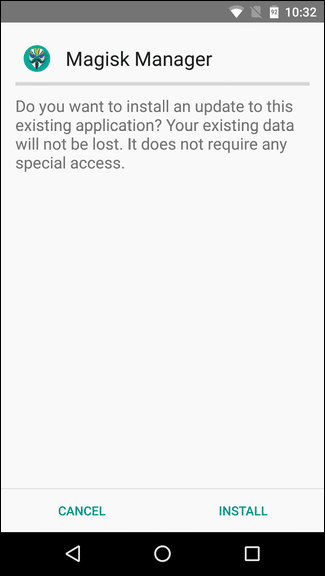
    • After the device reboots, open a file manager application and then go to the folder where you transferred the Magisk Manager Apk file in Step 1. Install it.
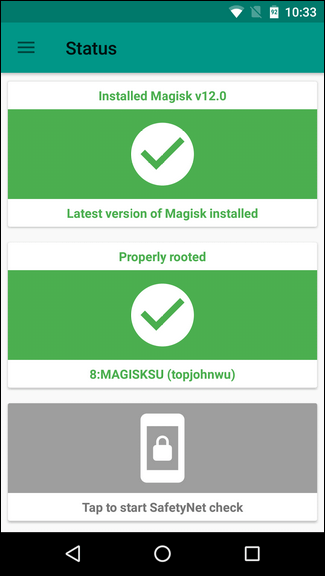
    • Open the Magisk Manager app and check your device’s root status. That’s All.

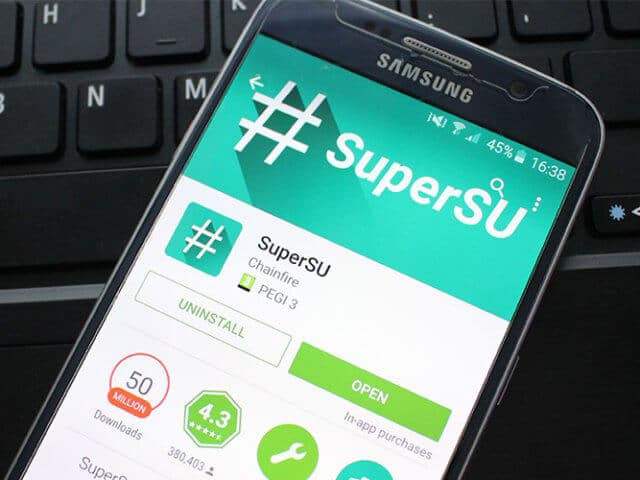
    Root Android 9.0 via SuperSU

    • First of all download the SuperSU zip file from the link given below.
    • Now you have to boot your device into a custom recovery like the TWRP Recovery. If you haven’t installed one then search on Google or Youtube for proper instruction on how to install a custom recovery.
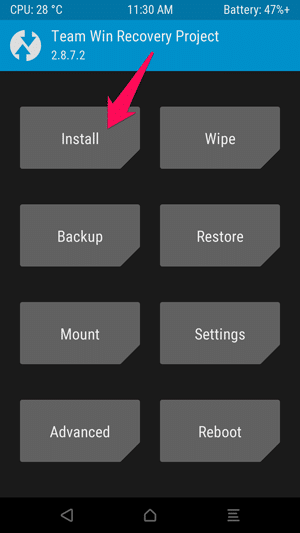
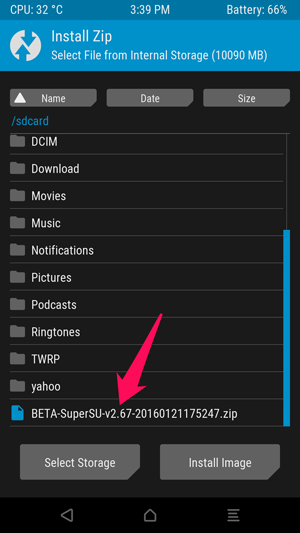
    • Now from the Recovery Menu click on Install and select the zip file SuperSU that you have downloaded from in Step 1.
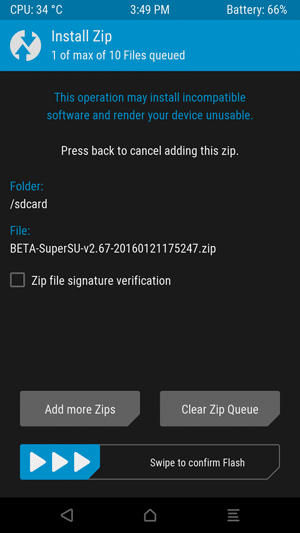
    • After you have selected the SuperSU .zip file, Swipe to Confirm Flash on the bottom of the screen to start the flashing process.
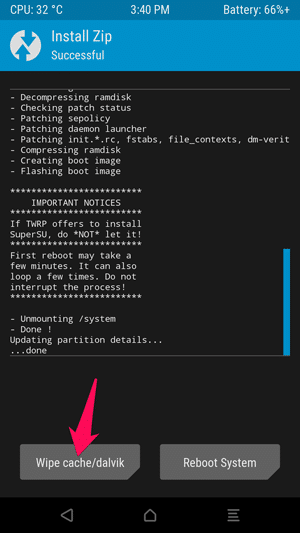
    • After the SuperSU is flashed in your device you will get Reboot System and Wipe cache/Dalvik. Click on Wipe cache/Dalvik and then on Reboot System. On the Next Reboot, you will have full root access.

    Root Android 9.0 via KingoRoot

    Root Android 9.0 via KingoRoot Android App

    Step 1. Download the KingoRoot Apk file from the button given below:

    Step 2. Locate the downloaded file on your Android 10 smartphone and install the apk.

    Step 3. If you get “Install Blocked” message, follow these few steps:

    • Open Settings.
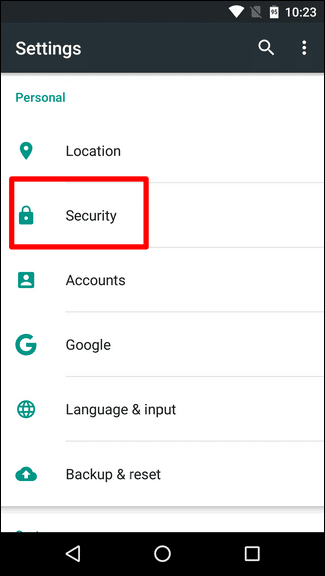
    • Go to Security and then to Unknown sources and enable it.

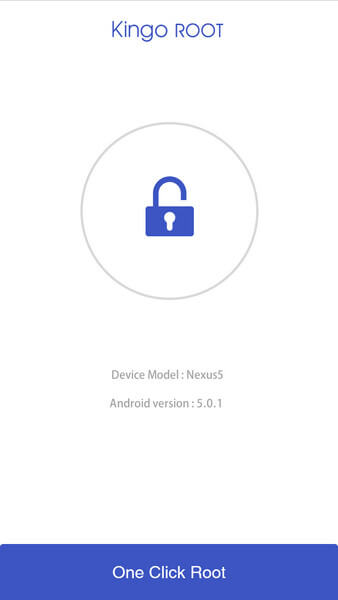
    Step 4. Open the app and tap on “One Click Root”.


    Step 5. The result will be displayed as “Success” or “Failure”.

    Step 6. If it fails, try the process again a few number of times.

    Root Android 9.0 via KingoRoot Windows Application

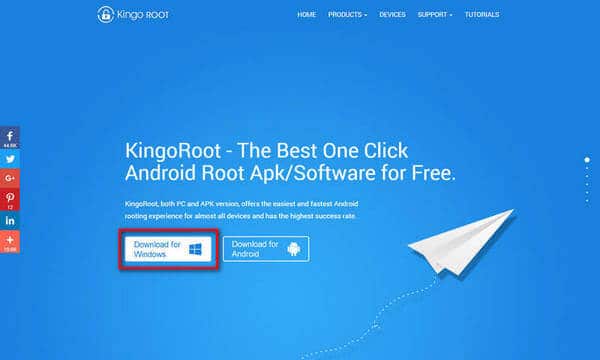
    Step 1. Download the KingoRoot PC Software from the button below:

    Step 2. Install the KingoRoot PC Software downloaded above. After the installation is complete, launch the app.

    Step 3. Connect your Android device to your PC. Make sure to enable the USB Debugging on your Android device.

    Step 4. Click on “Root” to begin the rooting process.

    Step 5. The result of root will be displayed when the process is complete.

    Root Android 9

    You can check the status of the root on your Android device. The root status should display as rooted. Check for root by downloading any root checking app from the play store.This way you can root any android 10 device

    How to Pick the Best Online Selling Platform for Your eCommerce Business

    If you’re setting out to build a successful eCommerce business, one of the most important decisions you’ll make is the online selling platform. Your choice of platform depends on a few different issues, like what type of products you’ll be selling, what your tech skills are like, and the payment processing options you need.

    So depending on the situation you’re in, you might be best off with an all-in-one online selling platform for knowledge products, or you might want to aim for a social media channel with integrated shopping functionality. Or maybe both, plus a few more.

    But there are also some features, like a custom domain name and built-in marketing tools, that are critical for every eCommerce business’s primary storefront but aren’t offered by every online sales platform.

    We’ve reviewed the 11 things to look for in an online selling platform to help you choose the best one for your eCommerce business.


    1. Ease of Use

    Just because you’re a talented photographer, writer, or businessman, it doesn’t mean you’re also a talented web designer and programmer. You want an eCommerce platform that’s easy to use and doesn’t require any technical expertise.

    There are plenty of online selling platforms with a drag and drop interface, so you don’t need to write a word of code, just select the elements you want on your webpage and drop them in the right place.


    2. Plenty of Design Options

    Your eCommerce business is unique. You certainly don’t want it to look like every other eCommerce store on the internet. That’s why you want an online selling platform that has plenty of design and customization options, with lots of different themes and templates to choose from.

    You want to be able to change the fonts, layout, color scheme – everything, in fact – so that you can create an original online store that reflects your USP.


    3. Custom Domain Name

    Possibly the single most important thing to look for in online selling platforms is one that allows you to use your own custom domain name. This means that your web address will be YourOnlineStore.com, and not YourOnlineStore/GenericSellingPlatform.com.

    Having your own domain name gives you the flexibility to move to a different online selling platform or to build your own website at some point down the line, so you won’t be tied into just one platform indefinitely.


    4. Integrated Blogging Platform

    Having a blog is the number one tip for all digital marketing. It isn’t easy, but if done right, it helps you to boost your SEO and attracts visitors to your online store. Hopefully, they’ll come for your valuable content, and stay to buy your digital products.

    An integrated blogging platform makes it easy to link your blog with your online store, so you can set up plenty of pipelines to channel visitors to your shopping pages.


    5.  Built-in Marketing Tools

    The best online selling platforms have built-in marketing tools to help you grow your business without having to step off the platform. SEO settings that allow you to manage your own meta descriptions, alt image tags, and page titles are just the beginning.

    Look for platforms that include email marketing, marketing analytics, marketing automation, and other marketing tools so that you can track your visitor journey, set up marketing funnels, create webinars, videos, and other marketing content, and quickly offer promotions, sales, and events to boost your marketing presence.


    6. Hosted vs. Self-Hosted

    This one entirely depends on your preference. Online selling platforms that include website hosting can save you money, hassle, and effort setting up your eCommerce site.

    But if you’re looking for more customization and greater control, and you have some tech knowledge, you might prefer a self-hosted eCommerce platform.


    7. Payment Processing

    Different online selling platforms have different built-in payment options. If it’s important for you to be able to accept a particular payment type, like ApplePay or Google Wallet, make sure to pick a platform that supports it.

    Check the conditions and fees for payment options, too. You might find that certain types of payments have much higher fees than others. If most of your customers pay by credit card, for example, you don’t want to have to pay 3% commission every time you make a sale.


    8. Product Creation Tools

    There are some online selling platforms that include tools to help you create your digital products. If you’re selling eBooks, graphics, or online courses, for example, look for options that allow you to create, store, market, and sell your digital products all on the same platform.

    It saves you a headache building, transferring, and saving your items.


    9. Fees

    There’s no such thing as a free online selling platform, but the way that you pay for it can be extremely important. It’s usually best to look for a platform that charges a single monthly or annual fee for your eCommerce business, rather than one which charges a commission on every sale.

    Check what’s included in the price – some platforms charge extra for things like a blog engine, custom domain names, or marketing tools. You don’t want any hidden fees, so make sure that everything is out in the open.


    10. Types of Products

    The best online selling platform for your eCommerce business also depends on the types of products you’re selling.

    Some platforms are best for digital products, with plenty of options for downloading and large digital storage limits. Others are ideal for dropshipping or for selling products from your home or warehouse. You’ll want slightly different tools and a slightly different interface depending on your product needs.


    The Best Online Selling Platform Dies Exist

    Fortunately, there are plenty of excellent online selling platforms to choose from for your eCommerce business.

    That might make it a little hard to choose, but with this information, you should be able to find a platform that matches your needs and makes it easy for you to focus on growing your eCommerce business.

    All you need to know about digital distraction

    0

    What is a digital distraction?

    Digital distraction is a term used to describe when a person’s ability to balance and manage time, energy and attention is hampered as a result of the overuse of electronic devices or electronic media. The ease of access to unlimited content provided by the internet has a psychoactive effect on the users. The smartphone is essentially a traveling internet portal and has accentuated these effects to a level where, after a period of time with the constant use of these gadgets people find it very difficult to take a break from them. This adversely affects the productivity and even interpersonal relationships of the people affected. These effects are termed as a digital distraction. Homeworkdoer has more information on digital distraction


    What causes a digital distraction?

    • Many people now are severely addicted to some of the content on the internet. This content includes but is not limited to social content and networking sites, sports content, gambling, and even pornographic content.
    • Most people are over-dependent on the efficiency provided by technological devices. The manual execution of accounting activities, planning and scheduling, and other workplace or individual activities have been automated and most people only rely on these gadgets for almost all of their tasks.
    • Some people special individual factors affecting them. Character disorders and esteem issues brought about by past occurrences or the background that someone may have been through are not uncommon. People affected by these issues normally have a problem with interaction and tend to go through most of their experiences through alter egos created on social media platforms.


    Negative impacts of digital distraction

    Digital distraction leads to a low attention span and affects the capacity to concentrate. A study shows that people who constantly go online and are on their PDAs and smartphones find it very difficult to focus at work, school and during activities that require their mental presence.

    For professionals and managers, the opposite is true. Increased technological connectivity has led to them finding it difficult to disconnect from work. This impacts their social relationships at home and tips their life to work balance.

    Heavy computer and mobile phone usage have been linked to sleeping difficulties and disorders. Most of these distracted individuals end up turning to sleep pills and other kinds of highly addictive medication. Other than addiction, medication would mostly have side-effects that could prove detrimental to the health of the user.

    The sleep-deprived people who do not use medication often end up highly depressed, lowering their productivity, not to mention causing other mental health problems.

    Digital distraction has caused a number of accidents due to mobile phone usage by distracted drivers and pedestrians.


    How do you know that you are a victim of digital distraction?

    If you have the constant need to always multitask then this is a red alert that you may be a victim of digital distraction. A good example is double screening and working on the computer while you are still going through social media pages.

    Another big sign is when you become over-dependent on gadgets for simple tasks. When you have to use gadgets for simple mathematical calculations or tasks like note-taking then you should consider yourself socially distracted.

    Technology and automation were essentially meant to simplify and provide us with simpler and faster ways to increase our productivity but when we allow ourselves to become addicted to them it becomes detrimental to productivity and personal relationships.

    In summary, doctors advise that people limit the time they spend on their computers, mobile phones, and tablets to avoid addiction and overdependence. Students are HIGHLY advised to limit themselves as they are more prone to addiction and digital distraction.

    Top 5 Best Tools for Email Marketing in 2019

    0

    Social media might be an undisputed king in the marketing domain. And then you have emails… You may think of emails as grandparents to social media marketing. Nevertheless, email marketing even today proves that it is still viable and effective. Some of today’s marketers do not deem emails to be “trendy” or “cool” as it comes to contacting clients, but email has stood the test of time and established themselves as an effective method of communication.

    You can use email marketing for various purposes such as promoting your app, pushing newsletters or just informing your clients about that special offer you’ve been preparing. 

    Let’s dive in and check out some of the best email marketing tools to make sure you hit that conversion.


    Litmus

     Litmus is a highly versatile tool, which you can utilize to track and test email. You can test your emails in traditional web tools and with popular mobile devices such as Android or iPhone.

     Use Litmus for render testing and be certain that your creative is optimized for any of the available devices. You can test more than 40 clients and instruments, and with a simple click, Litmus can obtain a test email to an address so you can send it to your ESP for distribution. 

    Pricing:

    Litmus comes with a free trial lasting 7 days, while the premium version can be purchased for 399$ a month. Other packages include 149$ for the plus version and 79$ for the basic one.


    Mail Chimp

    Even though its funny name or humorous message throw you off. Mail Chimp is all business when it comes to gathering data, sending emails and boosting performance.

    With Mail Chimp, you can even send out surveys. For example, you can use this option for your subscribers to vote between one of your services.

    The dashboard is very neat and clear: import lists, create and send campaigns and building your audience.

    Pricing:

    MailChimp offers a free subscription for 2000 users or 12,000 per month. For an account with no limits, pricing starts from 10$.


    Constant Contact

    Talking about email marketing we must mention Constant Contact. Their team has been around for over 20 years and they are one of the leading experts in email marketing today.

    Their service boasts with automatic welcome emails, testing of subject lines and contact segmentation based on clicks. Also, you can include coupons, events, and polls into your emails.

    Drag and drop editing are also included making your interaction with software enjoyable. 

    Pricing:

    Constant Contacts starts from 20$ per month to 45$ a month. If this is a bit out of your budget you can always check out some of the best constant contact alternatives.


    Drip

    Drip is an email marketing platform which is packed with many useful features, including message personalization, e-commerce platform integration (Shopify included) and comprehensive data analytics.

    It supports several tools for building emails, some of the visual and others text-based. This helps create meaningful image-driven marketing with a follow-up message that is more personal and targeted to an individual user.

    Pricing:

    The Drip starter package is free to use up to 100 subscribers. The Basic package starts around 41$ for 2,500 subscribers and the Pro costs 83$ monthly for 5,000 subscribers.

    Mad Mimi

    Creation of professional-grade emails is easy with Mad Mimi’s simple editor. Choose from 39 social networking options like share, like and pin, and easily customize your emails to add links.

    It is worth mentioning that you can copy campaigns using the clone tool by adjusting the original document without making changes to previous versions of your work. For sloppy ones among us, there is no need to worry about deleting your campaigns as you can always undo deletion!

    Pricing:

    Mad Mimi starts from 10$ per month for a basic account for 500 contacts and the pro package of 42$ for 10,000 contacts.


    Cake Mail

    Cake Mail’s tools have your entire email campaign covered. One of the great features includes split A/B testing. Alongside with Google integration, it lets you view detailed stats on how well a campaign is doing.

    Just give your campaign a title, set your recipients, design your email and pick a time to send. There are twenty different templates with fully customizable options or you can upload your own.

    Pricing:

    Free starter pack allows 500 contacts along with 500 emails. The basic package starts from 8$ per month.


    To conclude

    Starting your email campaign is a little bit of a tech-savvy task. But with these tools hopefully, you will be successful in pushing those emails!

    Top 5 Family Locator Apps for Android and iOS in 2021

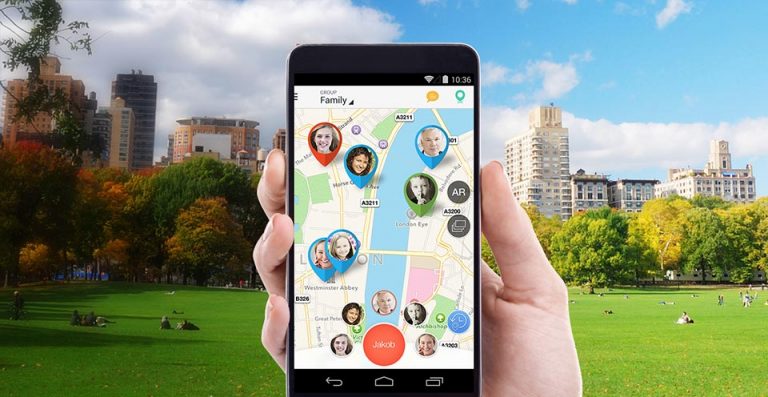
    Do you want to track the location of your children and family members, but can’t seem to find the ideal solution? This is a perfect post for you – because we have a list of the 5 best family locator apps for Android in 2021. By using the ideal location tracker app, you can track your family’s real-time location and even be alerted when they leave or enter the house. Read on to choose the best personal GPS tracking application to meet your needs.

    What are locator apps that can do for you?

    As the name implies, a GPS tracker application lets us know the exact location of the target device. The best places applications can help you in the following ways:

    • You can get the real-time location of your family members. This will help you remotely view the location of your children, spouse, friends or other members.
    • If you use a shared location application, you can also track lost or stolen devices.
    • You can also get the location history of the device to know someone’s past route and whereabouts.
    • By using the geofence, you can get instant alerts to check in and check out on your phone.

    1: Family Tracker

    ‎Family Tracker
    ‎Family Tracker
    Developer: LogSat Software LLC
    Price: $1.99+
    • ‎Family Tracker Screenshot
    • ‎Family Tracker Screenshot
    • ‎Family Tracker Screenshot
    • ‎Family Tracker Screenshot
    • ‎Family Tracker Screenshot
    • ‎Family Tracker Screenshot
    • ‎Family Tracker Screenshot
    • ‎Family Tracker Screenshot
    • ‎Family Tracker Screenshot
    • ‎Family Tracker Screenshot

    The family tracker works on iOS and Android. It is certainly one of the oldest apps on this list, but it’s still popular because it works great. The functionality of this series of tracking apps is similar to that of other apps, but other apps may focus on intra-app messaging, while Family Tracker pushes information by notification.

    This makes it a simpler process and a more efficient way to get important updates about your family members and where they are. The app features hidden pings, Web services, geo-fencing, global access, history, and location fetching. It costs a one-time fee of $3.99 or $5.99, depending on the type of device. Pro features require a subscription of $1.99 / month or $19.99 / year.

    2: Mama Bear

    MamaBear Family Safety
    MamaBear Family Safety
    Developer: Grom Social Inc
    Price: Free+

    Mama bear family tracking app works on Android and iOS devices. Mama bear is a great tracking app for teens and their parents. The application allows parents to monitor the location of their children and receive updates and messages from their children. It also allows parents to monitor social media and the driving habits of their teens.

    You can set the app to alert you when your teen starts accelerating, or even when they’re texting while driving. This is a great app for parents who have to know everything about their children and what they are doing. The application is free, but added features such as “no ads” and “the week before the day’s location” only work on paid plans.

    3: Glympse

    ‎Glympse -Share your location
    ‎Glympse -Share your location
    • ‎Glympse -Share your location Screenshot
    • ‎Glympse -Share your location Screenshot
    • ‎Glympse -Share your location Screenshot
    • ‎Glympse -Share your location Screenshot
    • ‎Glympse -Share your location Screenshot

    Glympse is a free family locator app for Android. Glympse users can really see who can keep track of their information and for how long. This information is sent via text, email or social networks. Users can decide whether to broadcast their location and ETA.

    This option can be a major drawback because location notification is not automatic and cannot be freely accessed by other family members. It requires your child to remember to send you updates every once in a while, and you can’t track them in real-time.

    4: Sygic Family Locator

    Sygic Family Locator is a real-time family locator app with some convenient unique features. If there is a place where you particularly don’t want your child to leave, you can set up an unsafe area. If your child crosses these borders, you will be notified.

    On the other hand, if your child gets lost, all they have to do is press the SOS button to tell you the exact location. The advanced version allows you to view your location history over the past week, so you don’t have to check your phone often. It provides additional details such as full address, date and time.

    5: Trusted Contacts

    ‎Trusted Contacts
    ‎Trusted Contacts
    Developer: Google LLC
    Price: Free
    • ‎Trusted Contacts Screenshot
    • ‎Trusted Contacts Screenshot
    • ‎Trusted Contacts Screenshot
    • ‎Trusted Contacts Screenshot
    • ‎Trusted Contacts Screenshot

    Trusted Contacts is one of the best family locator app from Google to check the real-time location of your family members and friends. After installing the app, you need to choose which contacts can get your location. Once done, your friends will get an email to let them know that they are now your trusted contact. Like most family tracker app, you could turn on the tracking feature and send friends a message so they can know where you are.

    But what separates Trusted Contacts from the rest is the automatic location sharing if the recipient didn’t respond for a fixed period of time. For example, once you add someone a trusted contact. They can ping you for your current location. You have the option to either accept or reject the location request. However, if you don’t respond in 5 minutes then they will have access to your last possible location.

    How to Directly Run Windows Programs on macOS Without Installing Windows

    In any case, it is important to correlate the final result with the efforts spent on its achievement. So, you can run the program for Windows on a Mac in many ways, and their choice depends on the above ratio.

    To run a modern AAA-class game, it will be easiest to immediately install Windows on your Mac, then it takes a long time to “wipe” a video card from a virtual machine or select the necessary libraries in Wine.

    For a medium-heavy working application that does not require a serious load on the graphics, a virtual machine is ideal.

    Running some light or old programs and games is most convenient with Wine. I want to talk about the last method, but first, you need to say a few words about the first two.


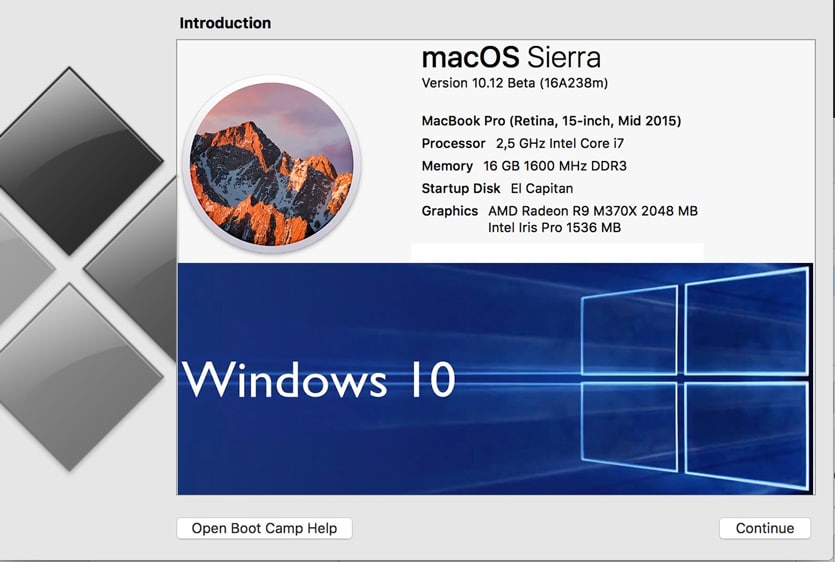
    1. Install Windows on Mac

    Windows on macOS 4


    We call it Boot Camp, but to be precise – Boot Camp is just a set of drivers and an assistant for creating a bootable flash drive.

    In any case, Windows installs on a Mac and runs at a full performance like a regular PC. Naturally, the main drawback follows from here – it is necessary to reboot each time to get into Windows and run the desired program.


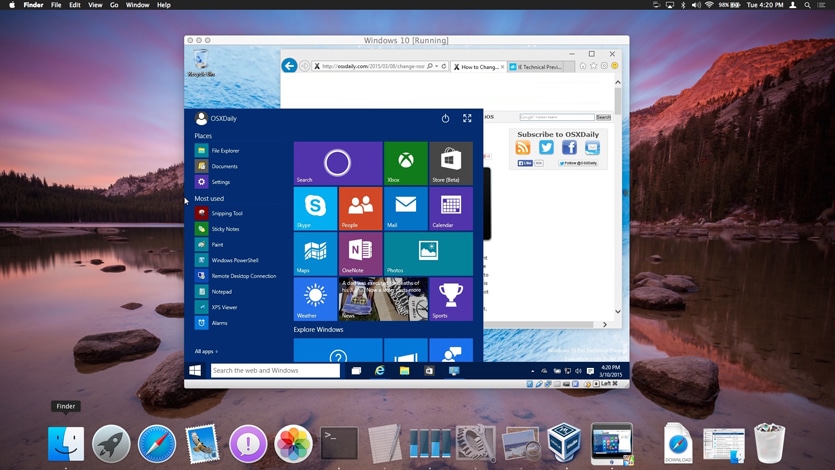
    2. Using a Virtual Machine with Windows Installed

    Windows on macOS


    Often this method is called Parallels Desktop, but along with Parallels Desktop, there are other virtual machines, from the most popular: VirtualBox, VMware Workstation.

    The virtual machine allows you to run Windows or other OS directly in running macOS. There is no longer any need to restart the computer, but the performance of the “guest system” is generally declining. Without special dances with a tambourine, this method is absolutely not suitable for games, even the simplest ones.


    3. Running Windows Programs with Wine


    In my opinion, this is a very easy to use and undervalued macOS option. It is unlikely to suit professionals but will be useful to ordinary users.

    Advantages: you do not need to install Windows, the program is launched directly from macOS. Performance losses are lower than when using a virtual machine.

    Disadvantages: not every program will work, but even in this case you don’t lose anything, just use the first two methods.


    What Kind of Wine is this?


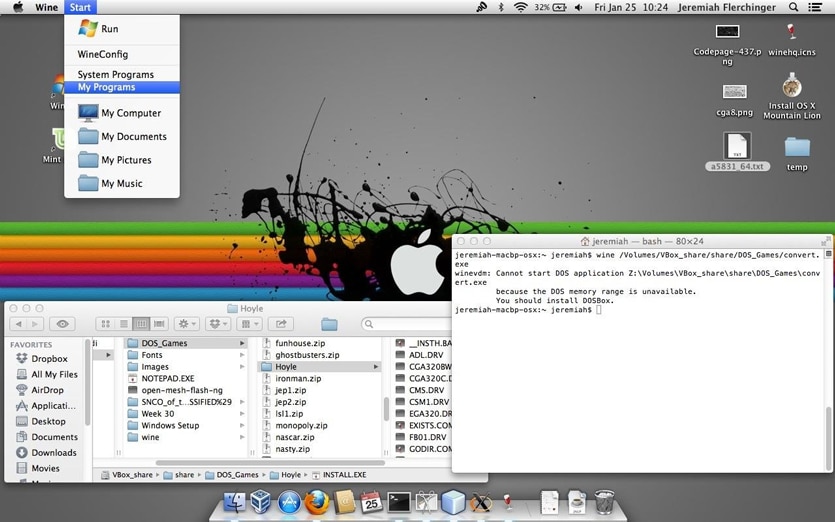
    Wine (originally the abbreviation for “Wine Is Not Emulator”) is a compatibility level that can run Windows applications on several POSIX compatible operating systems, such as Linux, macOS, and BSD.

    Instead of mimicking the internal logic of Windows, such as a virtual machine or emulator, Wine translates Windows API calls into POSIX calls on the fly, eliminating performance and memory problems of other methods, and allowing you to fully integrate Windows applications on your desktop.

    With Wine, light and/or old programs are written for Windows work well. And this is a significant advantage – after all, you probably have come across more than once when the program found after a long search on the Internet at startup displays something like “Power PC programs are no longer supported.”

    Alas, macOS has a very short memory – the transition from Power PC to Intel in 2007, various other changes made a lot of software that was abandoned by developers for one reason or another. With Wine, you have access to a huge library of “legacy” software and games.


    How to Use Wine on macOS?


    Many articles and videos on the Internet are devoted to various Wine-based add-on programs that are good and useful in their own way but are sometimes difficult to learn. You may think: do you have to spend your time and energy, or immediately use the proven methods?

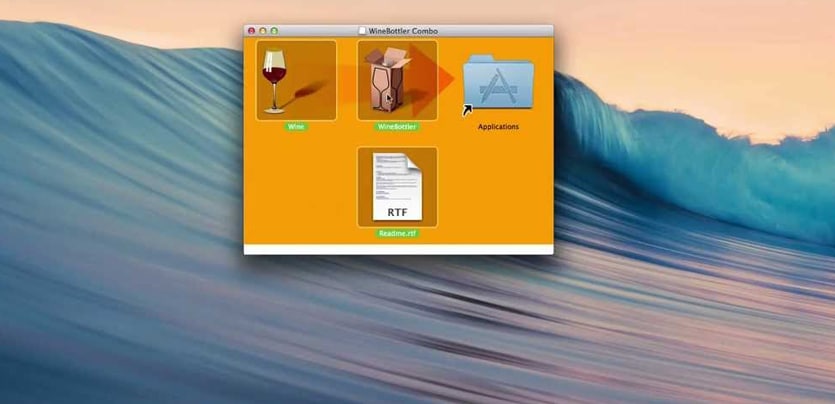
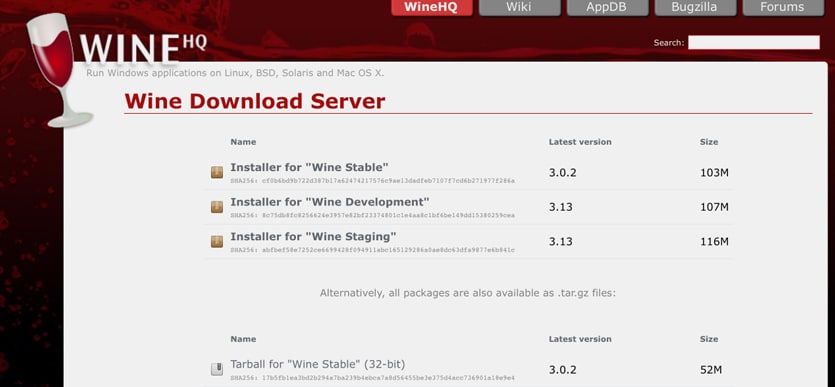
    Therefore, I recommend trying the binary package for macOS from the site of the main project – winehq.org. Here is all you need to install on your Mac:

    Install one of the versions of Wine. I recommend Wine-Staging.

    Done.

    Now let’s try to run something.

    Most of us had a difficult childhood and youth at the PC. Sometimes you want to have something good-old on your beloved Mac, for example, a pinball from Windows XP. It is called Space Cadet, it can be downloaded or obtained directly from Windows in the form of a folder with files, one of which is named PINBALL.EXE.

    Everything just works, smoothly, without brakes. Specifically, this game does not fly so well even in paid Parallels Desktop, and even worse works in free VirtualBox.

    But there is a problem. If you expand the game to full screen, then it will lose its proportions. Unfortunately, the developers of Wine did not make any tools for preserving the proportions in full-screen mode.

    I resort to the built-in macOS ability to enlarge the screen.

    Go to “System Settings – Universal Access – Zoom in” and put a checkmark in front of “Zoom in using the scroll key with the modification key. Select this key (I have this control).

    Now you can enlarge the small program window without losing its proportions. This is an amazingly handy feature for older games. The combination of Wine and this feature makes macOS the best platform for retro gaming in general.

    If the program that you have is an installer, the conditional setup.exe, you can run it in Wine in the same way and follow all the installation steps.

    To start the program you need to go to the directory specified when unpacking. It is in

    ~/.wine/drive_c/Program Files (x86)

    where ~ / is your home folder with the username (.wine is a hidden folder, to display it, click CMD + point + Shift in High Sierra.) It remains to find the desired .exe file. You can transfer the folder with the unpacked program to any convenient place.

    Another useful trick to be aware of is the inclusion of CSMT in winecfg settings.

    This increases the graphics performance in games using Direct3D but also increases the load on the system, so it is recommended to keep it turned off for undemanding programs.

    Available only in Wine-Staging. To start winecfg, you need to start the terminal by clicking on the Wine icon in Launchpad, and write winecfg. Next, go to the Staging tab and check “Enable CSMT”:

    So, with the help of Wine, we wiped away a nostalgic tear by playing Space Cadet for Windows XP. But you can go further and play Space Cadet for Windows 95. This version has a higher resolution, slightly different game mechanics and two additional tables!

    And most importantly – it does not go on modern Windows. But it goes to our modern macOS! The photo above is just her.

    Using Wine, you can run not only casual retro games, so I have very successfully used the utility for remote network access LiteManager Pro and some others.

    Of course, Wine can work with more complex software, but for this, you may have to tinker with the settings. Programs like Wineskin will be very useful. Whether to spend time on their development is up to you.

    I love my Mac and I am impressed with the ability to run any software on macOS.

    Using Wine is just awesome. I want these tools to be built into the system. And although, of course, this will not happen, it is in our power to make more people know about them.

    Best SEO Techniques to Increase Your Website Ranking

    For most people, search engine optimization (SEO) seems complicated and confusing. But it turns out that all optimization can be reduced to several of the most effective tactics. Below you will find a list of the best SEO methods. Share them with your editors and developers so that they put them into practice and achieve a high ranking of your site in search engines.


    Top 10 SEO Techniques

    1. Define target keywords for each page

    Each page should have only one primary keyword phrase. In addition, each keyword phrase should belong to only one page. Strict separation of pages and keywords will help you increase the ranking of these keywords. The key phrase should be relevant to the content, be supported by the text on the page and be relevant to your business.


    2. Use target keywords in page names / URLs

    URL or page name is one of the main indicators for search engines when evaluating content. The content of the targeted keywords in the URL is very good for page optimization.

    For example, if your target keyword phrase is “android tricks” then a good URL would look like this: https://android-tricks.com or like this: https://thebroodle.com/android-tricks.


    3. Use target keywords in the first four words of the title tag

    The title tag is located at the top of the browser, and not on the main page of your site. This means that it is often not visible to site visitors. However, it is extremely important for search engines for two reasons:

    • It is displayed as the page title (hence its name) and serves as an indicator for search engines of what keywords are on the page. 
    • The title tag is used as a title in search engine results when a page is displayed in search results, so it is doubly useful if it encourages the user to click on a link.

    The first four words of the title tag are the most important. They should contain the target keyword, NOT the name of your company. By the name of the company, your site can still be found, regardless of its location in the title tag, so it’s better to use this valuable place for keywords. If you want the title tag to contain the name of your company, put it after the keyword, separating it with “|”.

    An example title tag for the keyword “portable ultrasound”: “Portable Ultrasound | Acme Medical Devices »


    4. The title tag must not exceed 65 characters and must be unique

    Search engines display only the first 65 characters of the title tag in the results. If your title tag is longer, then its text will be truncated, and “extra” characters will be replaced by an ellipsis. Therefore, you should write briefly and succinctly to fit your message in 65 characters.
    In addition, search engines really do not like duplicate content – text that is repeated in different places on the site – and above all, they value unique, original content, so you should do everything possible to make the title tag unique. This will help search engines understand that you have not just propagated the same content throughout the site.


    5. Use one H1 tag for the page title

    H1, H2, H3 are content to design tags that are used in HTML and are responsible for the appearance of text on a page in a browser. Search engines look at these tags in a hierarchical order, which helps them determine which content on the page is most important. The H1 tag has the highest priority, it should be used only once on each page – for the title. Tags H2 and H3 can be set several times – for subtitles, image captions, etc.


    6. The H1 tag must contain the keyword

    After you place one H1 tag on each page, make sure that this tag contains the target keyword for this page. H1 tag for search engines means the importance of content.


    7. The main text should contain the target keyword

    The body text on the page should match what is contained in the URL, title tag, and H1 headers. The content of the page should have at least 3-4 occurrences of the target keyword, and at least one occurrence should be in the first paragraph.


    8. Write a unique and meaningful meta description by inserting keywords

    A meta description is a content that users don’t see when they visit pages because it’s hidden inside the code. However, search engines often use the description meta tag in displaying search results. This means that the meta description serves more marketing purposes (user transition from search results to your site) than ranking goals (improving the site’s ranking for a particular keyword).

    It’s better if the main keywords are at the beginning of the meta description, then they will be highlighted in bold when displayed in the search results, and this will help increase clickability.


    9. Create a network of linked pages using targeted keywords

    A very common mistake on sites is the use of the text “Read more” for links. Search engines consider link text (anchor text) as an indicator of the content of the page where the link leads. Therefore, it is better to come up with something more specific for the anchor text, for example, “more about portable ultrasound devices” with a link to a page with information about these devices.

    The bottom line is that you have to use linking to help search engines figure out which pages matter to which keywords.


    10. Use alt-description and thematic image names

    Search bots cannot read the text embedded in the image, but they can read the alt-description of this image, as well as the name of its file. Both that and another will help you to add the target content to the page and will enable your site to appear when searching through pictures. Google Images is the fifth largest search engine, so it’s very important that the description of your images is informative enough.

    As for image file names, stick to a system that matches your development platform and allows you to use good keywords. For example, “cute-kitten-small-x3245.jpg” is much better as the name of the image than “small-x3245.jpg”. It may take a little work, but in return, you will get a good rating in image search.

    How to Unlock Bootloader of Any Android Device in 2021

    0

    Unlocking the bootloader of the Android device is the first step to root access and flashing the ROM. And, contrary to common misconception, it is actually supported by many phones. What do you need to do to officially unlock the bootloader on your phone?

    Not every phone will allow it.

    All phones in the world are divided into two types: those that allow unlocking the bootloader, and those that do not allow.

    Whether you can unlock the bootloader depends on the phone manufacturer, model, and even your carrier. All Nexus phones can be unlocked from birth, and on many Motorola and HTC phones, you can unlock the bootloader using a method similar to Nexus.

    However, there are phones, as well as some operators that do not allow unlocking the bootloader officially, which means that if you want root access, you will have to wait until the developers check the security vulnerability. If you have such a phone – this guide, alas, will not help you.

    The easiest way to find out which of these categories your phone is in is to find information about it on XDA Developers. If you have HTC or Motorola, you can also study the possibility of unlocking it on HTC or Motorola. If it doesn’t support unlocking, you’ll have to use unofficial unlock or rutting methods – they can usually be found on the XDA Developers forums.

    If your phone supports more official unlock paths – read on.


    Step 1: Back Up Everything Valuable

    Before we begin, it is important to know: this process will erase all data. So if you have a photo or some other valuable files for you, save them to your computer. In addition, if you want to save the application settings, use the export settings to save them to backup files, and transfer these files to the computer too.

    And here’s another personal tip from me: if I’m firmly convinced that I’ll rut the phone, I’ll unlock the bootloader as soon as possible after purchasing it. Then you don’t have to spend time on settings just to erase everything and adjust it on a new one in a few days. So if you are a fan of digging into the deep Android settings and intend to rotate the phone, it’s best to unlock it right away before messing around with the settings.

    When you have made all the necessary backups, you can continue.


    Step 2: Install the Android SDK and Phone Drivers


    You need two things: Android Debug Bridge, a command-line tool for a computer that allows you to connect a computer to your phone, and USB drivers for your phone. Even if you have already installed them before, install the latest versions.

    Download Android SDK

    • Open the Android SDK download page and scroll down to the “SDK Tools Only” section. Download the ZIP archive for your platform and unpack it where you want to save the ADB files.
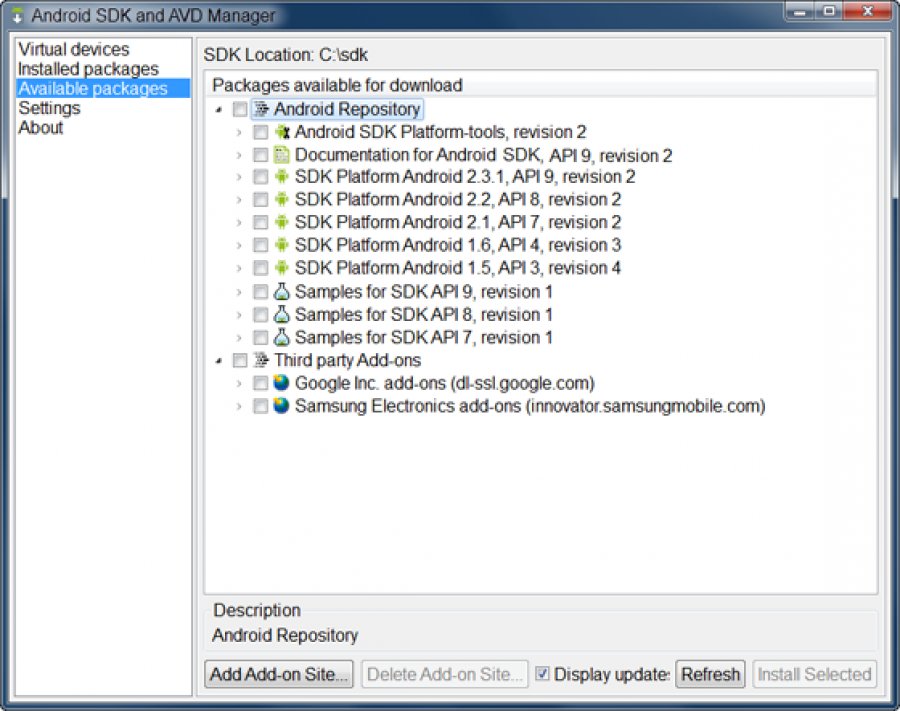
    • Launch the SDK Manager and deselect all but the “Android SDK Platform-tools”. If you have a Nexus phone, you can also check out “Google USB Driver” to download drivers from Google.
    • After installation is complete, close the SDK Manager.
    • Install USB drivers for your phone. They can be found on the website of the phone manufacturer (for example, Motorola or HTC). If you have a Nexus, you can install the Google drivers that you downloaded in step 2.
    • If the computer says that you need to restart, restart it.
     

    Turn on the phone and connect it to the computer with a USB cable. Open the Platform-tools folder in the Android SDK folder and, holding Shift, right-click on an empty space. Select “Open Command Window” and enter the following command:

    If the serial number is shown, your device is recognized and the procedure can continue. If not, make sure you follow the steps above exactly.


    Step 3: Enable USB Debugging

    Next, you need to enable some features on the phone. Open the application panel, click settings and then “About phone”. Scroll down and click “Build Number” seven times. You will see a message stating that you have become a developer.

    Return to the main settings page, and you will see a new item – “For Developers”. Open it and activate “Unlock OEM”, if this item is there (if it is not there, do not worry – it is necessary only on some phones).

    Next turn on “USB debugging”. Enter your password or PIN if required.

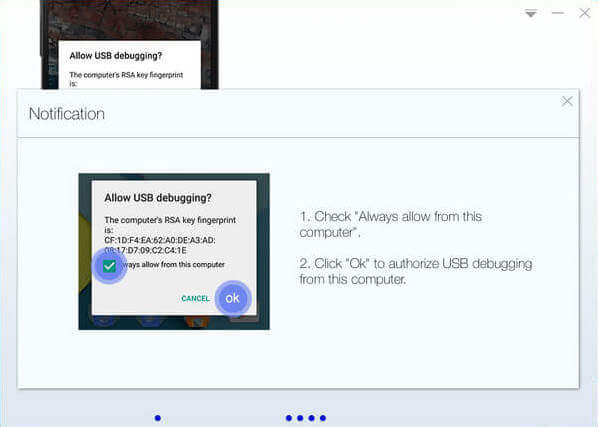
    After that, connect the phone to the computer. A pop-up window “Allow USB debugging?” It should appear on the phone. Check “Always allow on this PC” and click OK.


    Step 4: Get the unlock key (for phones other than Nexus)

    If you have a Nexus, you can skip this step. Owners of other devices may have some more work to do.

    Open the unlocking page of the manufacturer of your phone, select your device (if necessary) and log in or create an account.


    Further actions are somewhat different depending on what kind of phone you have, but the manufacturer’s website should contain instructions on what to do next. And in general, the following should be done: First, turn off the phone and turn it on in fast boot mode (Fastboot). On different phones, this is done a little differently, but on most modern devices just hold down the “power” and “volume down” buttons for 10 seconds. Release the buttons and the phone will boot into Fastboot mode (HTC owners first need to select “Fastboot” with the “Volume Down” button and press the power button to confirm the selection). You will most likely find more information on this process in Google search, which is recommended to be done before continuing.


    Connect the phone to the computer with a USB cable. The phone will indicate that the device is connected. On the computer, open the Platform-tools folder in the Android SDK folder and, holding Shift, right-click on an empty space. Select “Open command window” and use the command window that opens to get the unlock key according to the instructions of your phone manufacturer.

    For example:

    For Motorola - fastboot oem get_unlock_data command
    For HTC - fastboot oem get_identifier_token


    The command window will display a token in the form of a very long string of characters. Select it, copy and paste it into the appropriate box on the manufacturer’s website (no spaces, this is important!) And send a request. If your device can be unlocked, you will receive an email with a key or file that you will use in the next step.

    If your device cannot be unlocked, you will receive a message about it. If you want to get root access or flash ROM, use informal methods – you will find descriptions of them on resources like XDA Developers.


    Step 5: Unlock the phone

    Now everything is ready to unlock. If the phone is still in Fastboot mode, run the command below. If not, turn off the phone and hold down the “power” and “volume down” buttons for 10 seconds. Release and the phone will boot into Fastboot mode (HTC owners must first select “Fastboot” with the “Volume Down” button and press the power button to confirm the selection). On the computer, open the Platform-tools folder in the Android SDK folder and, holding Shift, right-click on an empty space. Select “Open Command Window”.

    To unlock the device, you need to enter one simple command. For most Nexus, the command will be as follows:

    If you have a newer Nexus, for example, 5X or 6P, the command will be slightly different

    If you do not have a Nexus, the manufacturer of your device will tell you which command to enter. 

    For example, for Motorola devices, you need to enter the below code using the unique key that you received.

    fastboot oem unlock UNIQUE_KEY 

    For HTC devices, enter the following code using the Unlock_code.bin file you received from HTC. Make sure to use the location of .bin file.

    fastboot oem unlocktoken Unlock_code.bin

    After running the command, the phone may ask if you really want to unlock. Confirm with the volume button.


    When finished, use the on-screen menu to restart the phone (or run the command fastboot reboot from your computer). If everything is done correctly, at the beginning of the download you will see a message saying that the bootloader is unlocked, and after a few seconds, Android should boot. It is important to allow Android to load before doing something else, for example, flash custom recovery.

    Congratulations, you have unlocked your phone! At first glance, you will not see significant differences, but unlocking the bootloader opens up the possibility of root access and firmware custom recovery.