More
    Home Blog Page 36

    Timesheet Tracking: Everything You Need To Know

    0

    Timesheets don’t have a positive perception among employed professionals. 

    Some think timesheets are a way to spy on them while others have problems with proving they worked by filling out an Excel sheet.

    However, the reality is quite the contrary. Timesheets are actually superb tools that can be of great benefit to any organization and its employees.

    Must Read: 11 Best Video Presentation Softwares To Up Your Presentation Game

    Let’s learn about timesheets in a bit more detail:

    What Timesheets Are Not

    To put it simply, timesheets are records of employees’ working hours. Timesheet tracking is the practice of analysing the timesheets filled out by employees.

    Timesheet tracking is not an evil way for employers to keep their employees “in check”. It’s simply a record that offers information that enables management decision makers to make realistic commitments and better decisions.

    Here are a few of the many benefits of using timesheets:

    Accurately Predict The Cost, Timelines, And Resource Requirements Of Projects

    With historical timesheets, you can use the information to make more accurate predictions. For instance, if you are talking to a new potential client, and have done a similar project with your team in the past, you can see the number of man-hours that went into the project. With this information, you can predict the estimated number of hours that will go into the new project, and in turn, the cost of the project.

    Similarly, past timesheet data can also tell you if you will need to ramp up hiring in the future. If, for a project, you have seen that historically, your employees have had to log overtime to meet deadlines, you can prepare better for a new project by accurately predicting your resource requirements.

    Ability To Identify Budding Problems

    Let’s face it, all projects run into unforeseen problems. If the crisis management is not timed right, it doesn’t take a long time for things to spiral out of control. Such problems often lead to a delay in the delivery of the project, and many times, that’s the best case scenario. 

    With data from historical timesheets, you can identify problems that are forming and flourishing. Let’s consider a situation mentioned in the previous point. If you suddenly notice that your employees are logging in overtime in order to keep the project on schedule, you can work on hiring more resources and ease some of the pressure.

    Accurate Billing And Payroll Processing

    Creating invoices and processing payrolls is not a glamorous task. Moreover, manually doing these tasks leaves a significant room for human error. Even minor errors can turn out to be expensive mistakes.

    Timesheets automate a lot of steps involved in invoicing and payroll processing, and give you access to accurate data that enables you to make accurate calculations. 

    You can also use timesheet management software to automate the entire process and eliminate the risk of human error altogether.

    Employees Can Ensure They Aren’t Assigned Too Much Work 

    Just like managers, your employees can also analyse their own timesheets to accurately calculate the amount of time it takes them to complete a specific task.

    With this information, they can negotiate the amount of work that is assigned to them. At the same time, their managers can also make informed decisions and commitments. Basically, the data from timesheets can optimise the decision making across all levels of the organisation.

    Moreover, this reasoning can also be used by the management to communicate to the employees that timesheet management is a beneficial 

    Conclusion

    In the end, it is important to remember that timesheet management alone will not benefit your organization. You must be able to analyze the information contained within your timesheets in order to make better decisions and enjoy the benefits of timesheet management.

    4 Signs You Should Upgrade Your Home Security System

    0

    When you bought your home alarm system, you probably expected it to last forever. The infrastructure behind it doesn’t change much. So, it really makes sense to get several years out of the best home security systems. But technology keeps on changing. With new ways to streamline its mechanism, it’s crucial to keep up and think about strengthening your home defences. This way, you can prevent sophisticated criminals from breaking into your property and disturbing your peace.

    Must Read: How to Have a Smart Home on a Budget

    When Should You Update Your Home Security System?

    You’d want an up-to-date home security system to ensure that you and your family are safe. Here’s a guideline to give you an idea when it’s time to upgrade your system. 

    1. You’re Hiding a Key in the Bushes

    This one’s pretty obvious. If your idea of safety and security is to hide a spare key under the doormat or flower pot, you may want to consider buying a home security system. House keys are a huge security risk. Burglars know where to look for hidden keys on your front lawn. Besides, these tiny objects can be easily misplaced, stolen, or duplicated.

    Even keyed locks are not entirely fail-safe. They may be cost-effective and easy to use, but it can still be picked or broken, depending on how skilled the intruder is. With digital locks, you can have a more reliable security feature at home. This is because electronic locks can only be opened with a code or through remote access from pre-approved smartphones or tablets.

    2. You Still Use a Wired System

    1. For decades, hardwired systems had been the foundation of the home security landscape. But this type of system has since become obsolete. With the advent of wireless technology, people now have a more convenient and intuitive option.

    If your security system is still tied to your landline, your home is at risk. Its design has a flaw that can be exploited by intruders who understand how its components work. Sadly, landlines are easy for criminals to sever. You would never want to leave your loved ones and valued possessions vulnerable to this attack. 

    3. You Have an Ageing Security System

    1. The technology used in home security is not like a fine wine that gets better with age. In the industry, any security system you have for more than 10 years is considered old. It’s not that your system is already bad. The problem is the outdated technology that restricts your home security capabilities. No matter how great your once state-of-the-art alarm system functions, older systems cannot compete with current advances in home security and home automation.

    Contacting an alarm systems specialist for an upgrade is not a bad idea if your system is already old. Like computers, home security systems become obsolete. Repairing them is more problematic, sometimes even impossible. Even if your home security system is less than a decade old, it’s highly advisable to get it up-to-date if you find flaws in its hardware or technical compatibility.

    4. Your Lifestyle Has Changed

    1. Have you recently gone back from a home-based job to a position that requires you to commute every day? Does your new job provide you more travel opportunities? Upgrading your home into an automated one helps ensure that your loved ones and valued possessions remain safe while you’re gone. Besides, if your elderly parents live with you, some alarm systems even offer wellness alert features. This way, you can easily monitor your family members with mobility issues.

    More common smart home technology advancements today include remote control over your home environment, such as the doors, lights, and thermostats. Many smart home solutions can also detect fire and gas leaks in your home and you can always inspect who is at your door when you are not home with a doorbell camera

    Whether it has been a long time since you installed your security system or simply want to add new security features, finding the best home security for your needs is always a good idea. Keeping your system up-to-date is important to ensure that you are getting the best protection possible. The last thing you’d ever want to do is settle with a product that gives less than satisfactory service.

    How to Install Mi Smart Security Camera App on PC

    110

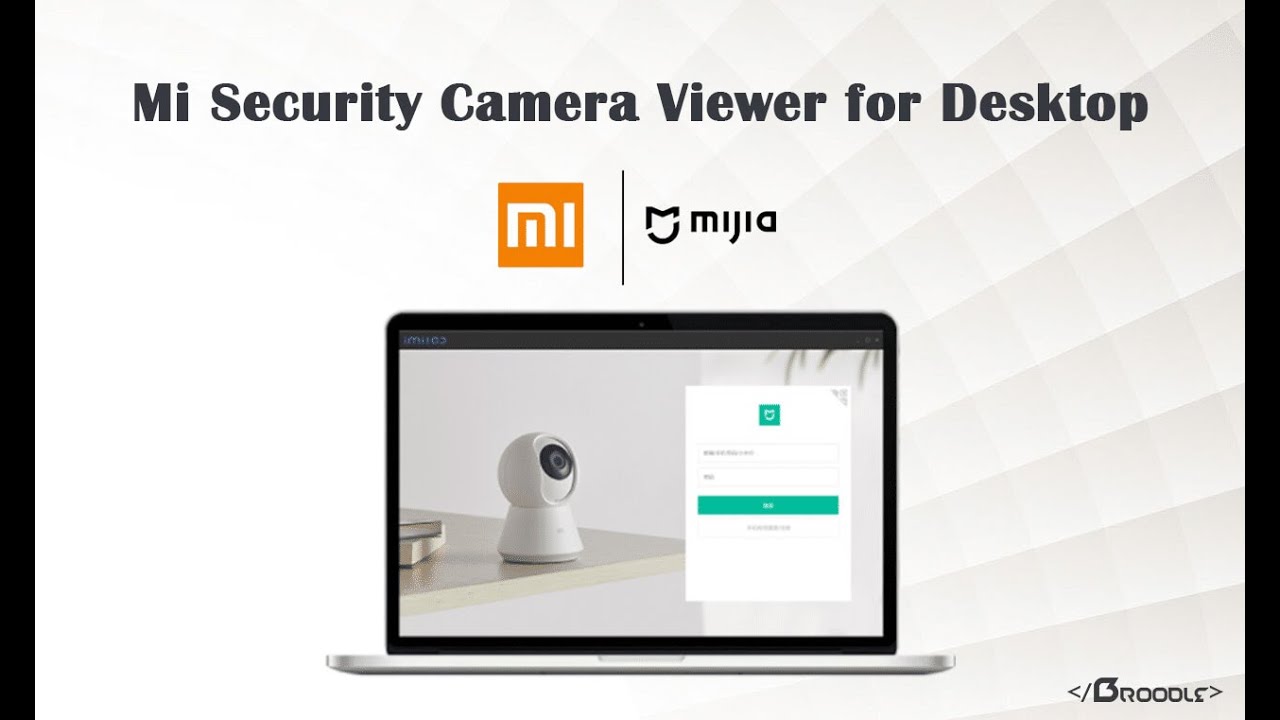
    Now you can live view your Mi Security Cameras directly on your Windows without the need of using an Android emulator (such as Bluetacks or Phoenix OS). The Official PC app which was earlier only available for the Chinese market is now translated into English and now have an option to choose the Mi Server for your cameras, However, this is still done with a simple code modification in the config file but it is by far the best option available to live view these cameras onto your PC. Earlier I also had written an article on this using the Chinese version but the only drawback with that was at that time that software only supported Chinese region cameras, this is fixed now and with a little modification you can select your own choice of server from the software. Continue reading below to know how to install it and what functions it incorporates.

    How to Live View & Manage Xiaomi Security Cameras on PC?

    As we have advanced, this application is only compatible with Windows (XP / 7 / 8 and 10) and although all the texts and menus are in Chinese, its interface is simple and intuitive.

    How to Install Mi Smart Security Camera Software for PC | OFFICIAL APP

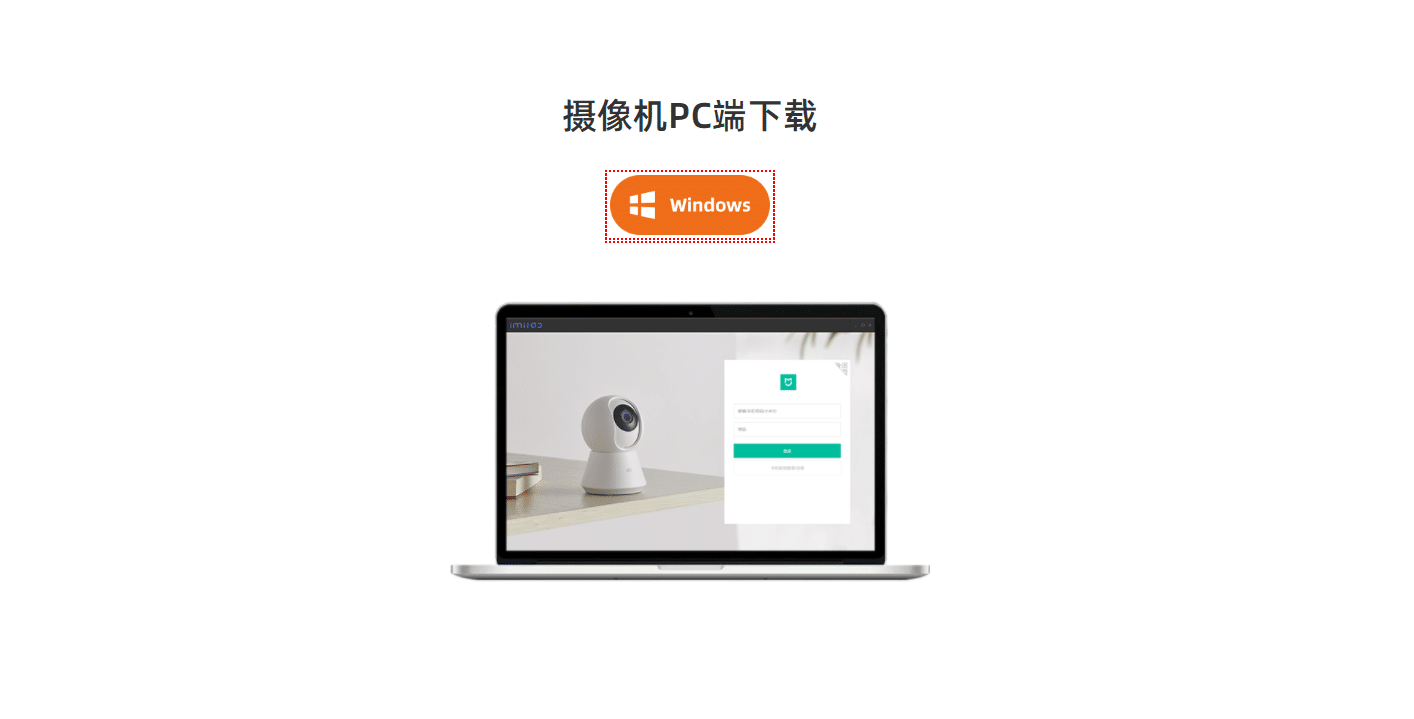
    Download for your PC

    Head over to the below link to download the Mi Security Camera App for PC.

    Download Link Updated: 05/08/2021

    Version: 1.5.8.0

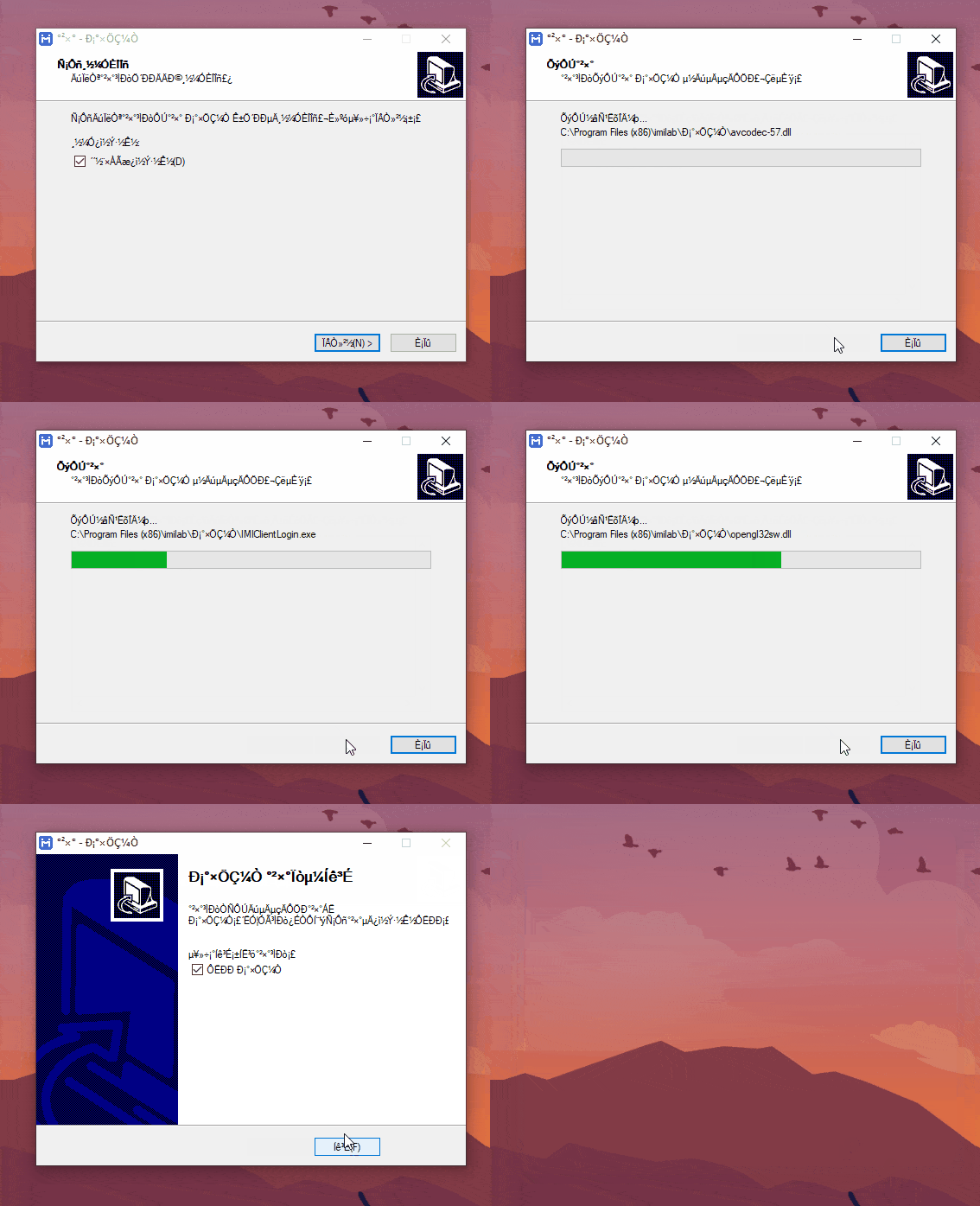
    Install it on your computer

    Double click to open the exe file to start the installer and follow on-screen instructions to install the software on your PC, the interface of the exe installer will be in Chinese so you can refer to the above GIF to understand which button to click.

    Change Server Region

    Now when you open the installed app it will only able to stream cameras in China Mainland region now to adjust the app according to your region just follow the below steps:

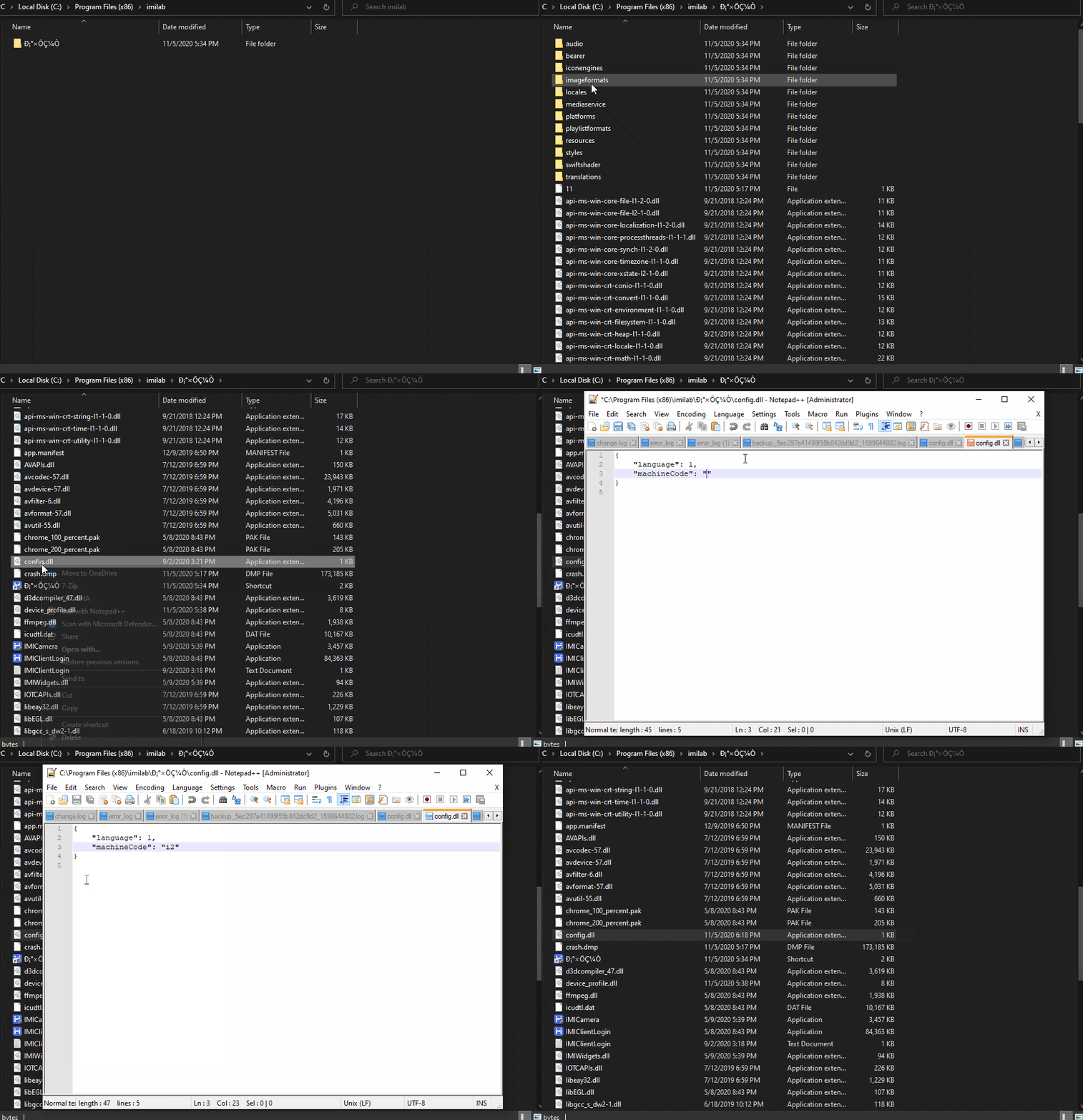
    Head over to the installation folder (C:\Program Files (x86)\imilab\С°×ÖǼÒ) and open the file config.dll in any of your editor (Notepad). You will see two lines in the config.dll file first one is for language and another is machineCode which represents your server region. By default the machineCode is set to cn which is for China Mainland, you just need to replace the cn with the below-mentioned codes as per your region and save the file.

    cn – China Mainland
    sg – Middle East and Asia
    i2 – India
    de – Europe and UK
    us – North and South America

    Server Region in Mi Security Camera App

    Login with your Xiaomi Account

    Launch the software from your start menu after you have saved your chosen region in the config.dll file.

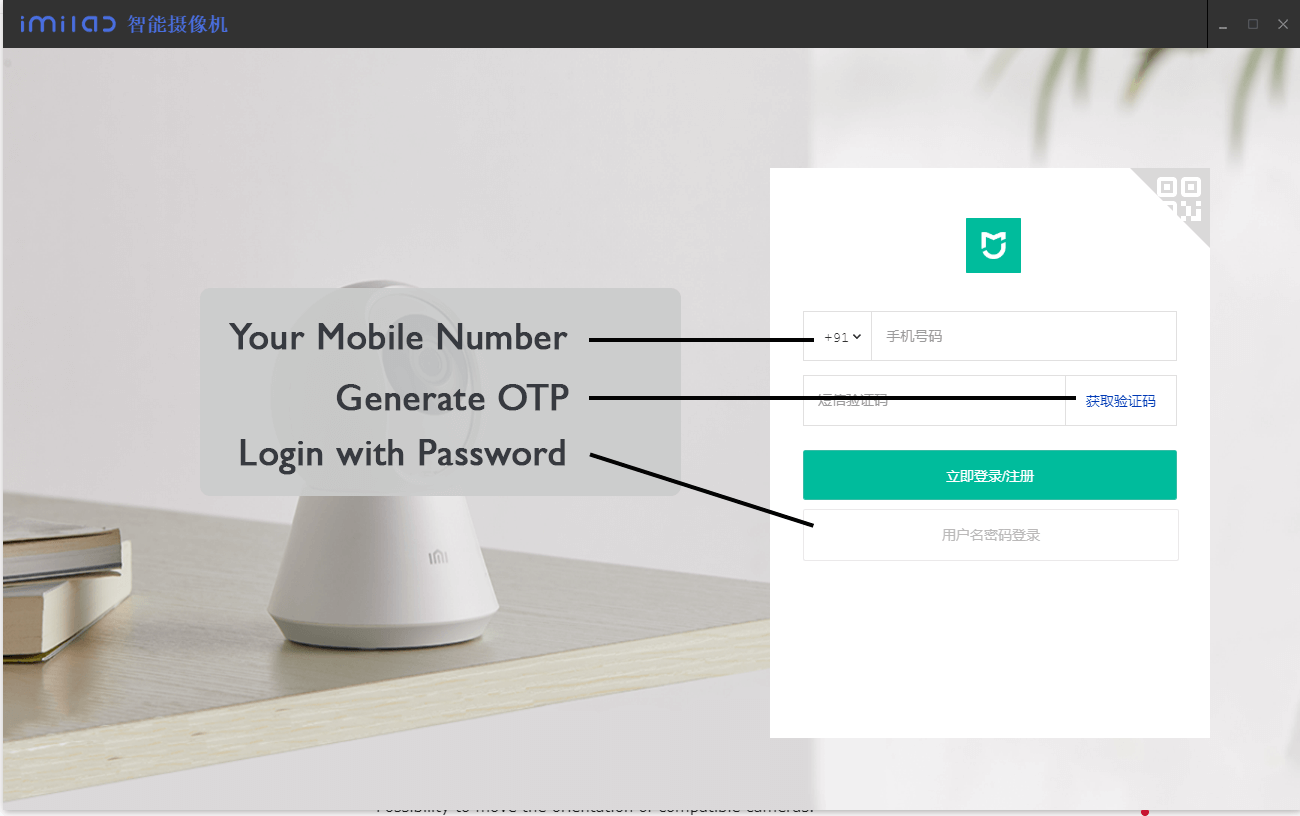
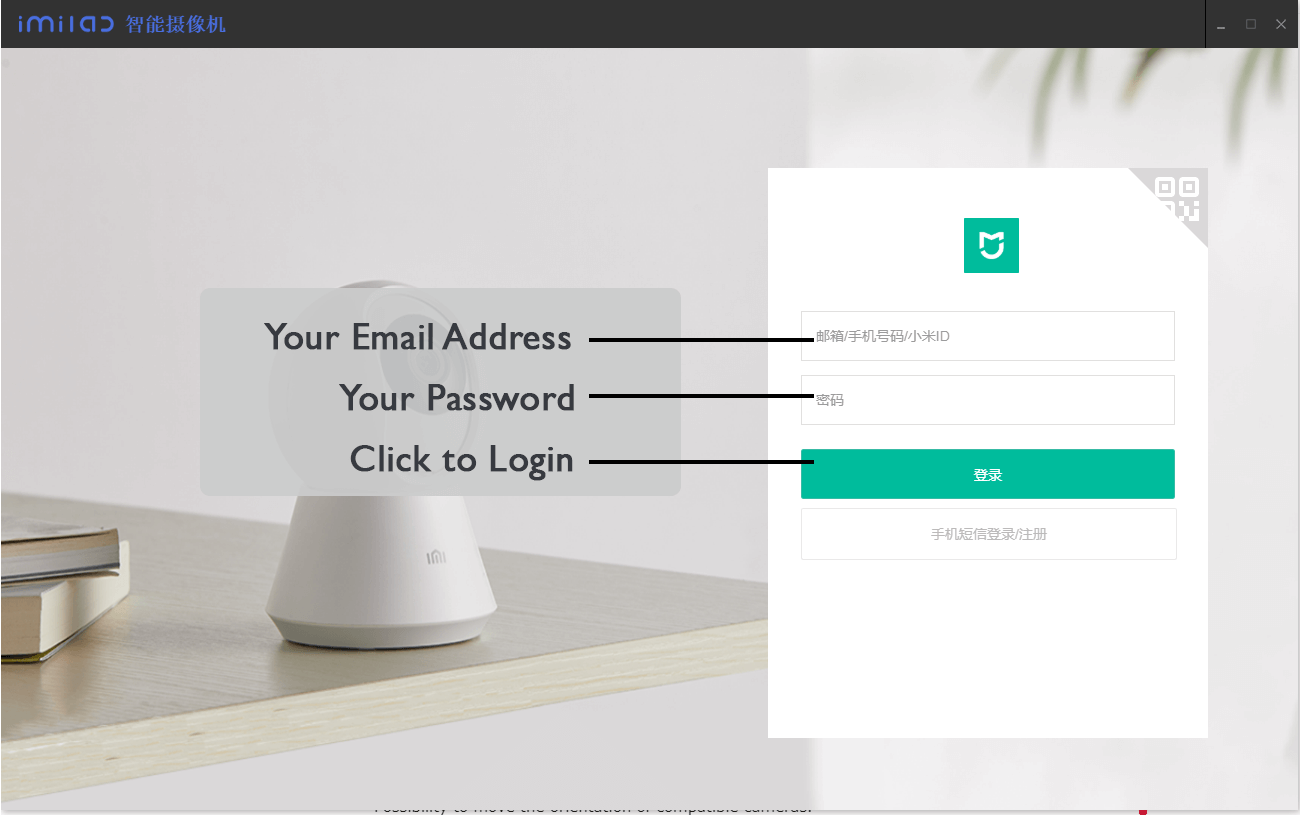
    Login with either your mobile number with OTP or use email id and password to access your cameras. Make sure that you have added the cameras in your Mi Home Mobile App.

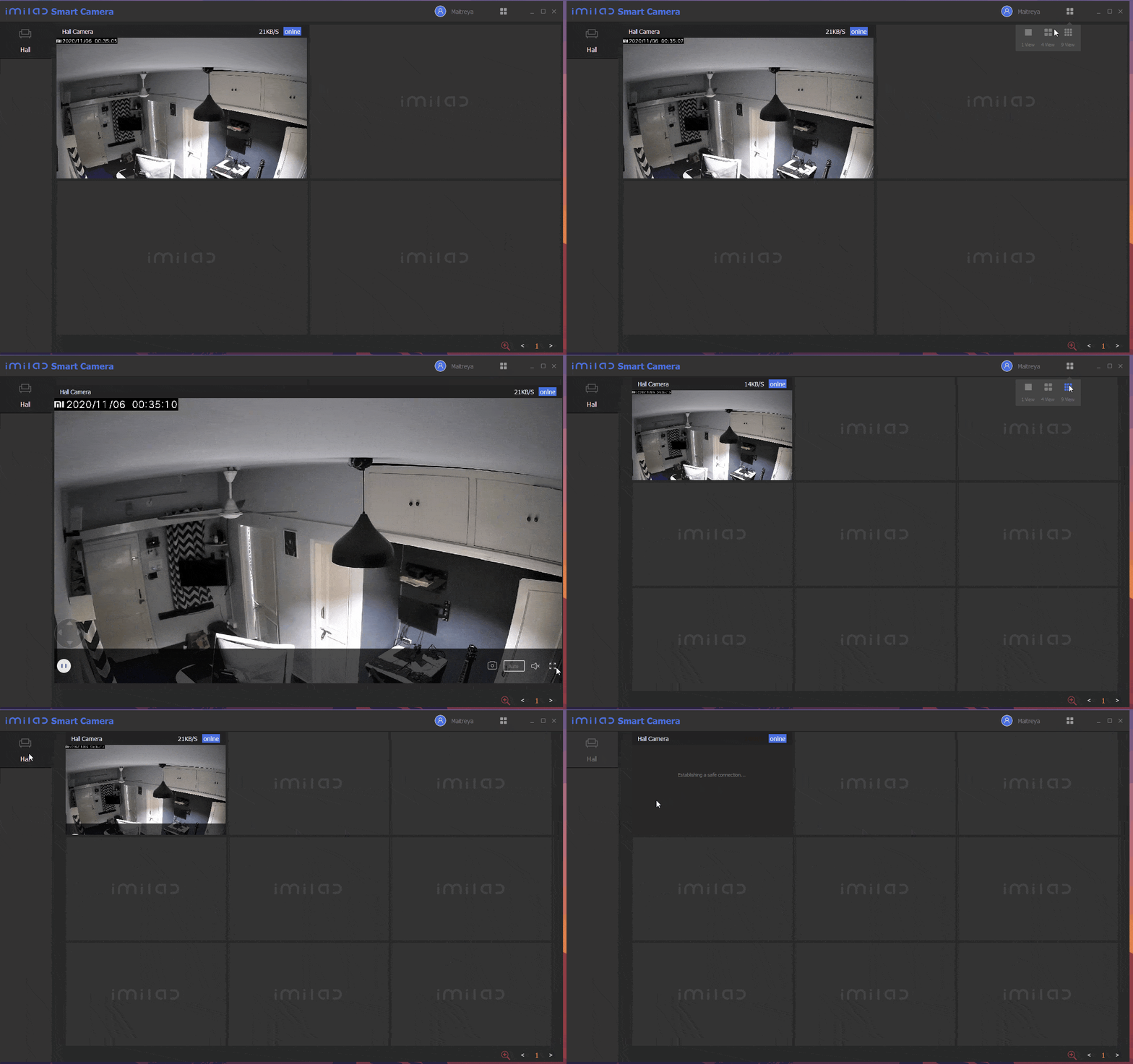
    Once you logged in you can switch views to view multiple cameras, control audio, pause feed and more.

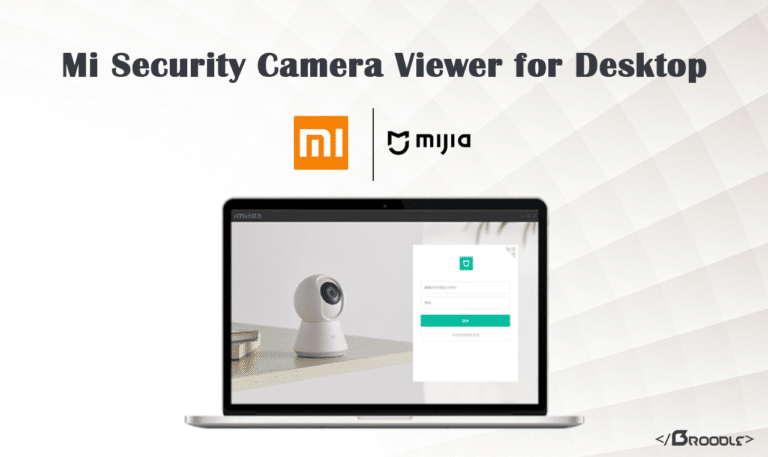
    Mi Smart Camera Viewer

    Software Compatibility

    The Software currently supports only the Windows Operating system, It is not compatible with macOS, and other Linux OS.

    PTZ Functions are not currently supported. Above all, it will allow you to Live View your Mi 1080p Basic and Mi 1080p 360 Security Cameras.

    Logout functionality is buggy as of now, app will crash as you hover your mouse over the username, To do re-login you can run the IMIClientLogin.exe file from the installation directory.

    Unsupported Cameras:

    • Xiaofang Camera
    • Dafang Camera
    • IMILab EC2 Camera

    You Might Like: 13 Best Android Emulators for PC and Mac To Download

    Software Functionalities:

    • Ability to adjust the camera, such as video quality, sleep, status lights, etc.
    • Support for detection configuration, including record management.
    • Built-in functions for camera playback, pause, forward and rewind recorded videos, turn sound on and off, etc.
    • Possibility of operating several cameras at the same time, dividing the screen into 1, 4 or 9 windows.
    • Possibility to move the orientation of compatible cameras.

    Why Your Business Needs Video Marketing

    Introduction

    People always used to talk about how important the video will become. It has finally happened. So many businesses have incorporated video content marketing as part of their campaigns and strategy. And why is this? Well, most people are more likely to buy a product or service after watching a clip about it than just merely watching about it. This is why using video is a useful marketing tool.

    However, having an introductory clip about your products or services is not enough. You need a good video that properly captivates your target audience and prompts them to make a sale. A lot of creativity and skill are involved in creating the perfect advertisement video. Getting professional video marketing services is a great way to go; it guarantees you high-quality, well-structured clips to engage your viewer. Below are the reasons why you need to give video marketing a try.

    Must Read: How To Do Video Marketing Systematically? Here’s A Guide To Help You

    It appeals to mobile users

    Today, most people use their smartphones to browse or use internet services. Video and mobile go hand in hand. Most smartphone owners watch videos on their devices. The number of people owning smartphones keeps growing every day; therefore, this market will keep growing. Take advantage of the market!

    Investing in video marketing, especially mobile videos, is the way to go. Many businesses today are benefitting from mobile video marketing because of the broad market that the avenue supplies. Mobile videos need to portray your brand sensitively correctly. The video should relate to your viewers’ personal experiences to understand your product and service, which helps influence their purchasing decision.

    It boosts conversion rates and sales

    Video marketing can seriously earn you good money. Adding a product or service video on your landing page increases your conversions by more than 70%. It is because videos keep viewers on your website long enough to look and navigate through your website; this is primarily for people who are not big readers.

    Data chart with calculator

    People are more likely to buy a product after seeing it in action. This is why incorporating a video on your website can increase your sales. Vision is a dominant sense; people easily remember videos they see and use that information for various aspects of their life. Using professional video marketing allows you to explain your product to viewers more in a great and exciting way that generates leads for your business.

    It encourages social shares

    A great way to advertise your products is through social media. Facebook launched Live Video and Lifestage, Instagram has put in place Instagram stories and 60-second videos; Twitter has Periscope, and YouTube is one of the most popular social networks in the world. Creating short clips of your products and services and posting them is an excellent form of advertising since social media offers a large audience base.

    However, remember that social media focuses more on emotions than facts. Therefore, when creating your videos, try to make them entertaining to capture the attention of your target audience. Most people are likely to share a video with their friends and loved ones if they find it funny. Social shares can increase traffic on your website, which can turn to leads and sales.

    It explains everything

    Do you have a new product you wish to launch? Come up with a video on how it works. Many people go online to watch explainer videos on the development and services they are interested in before making a purchase decision. It is why most businesses have now added an explainer video to their home page. No matter how complicated something is, you can easily explain it using a video.

    It’s not always easy to create explainer videos; you can use animated videos for complicated concepts. Animation has a way of bringing life to text so that no live video or book can. They are the best combination of nostalgia, entertainment, simplicity, and work. To create the best explainer video, try outsourcing professional video marketing services. An experienced video creator will come up with moving, easy to understand explainer clips for your business that not only informs your audience about your product but prompts them to make an order.

    Conclusion:

    People are watching more videos now than before. It is now necessary to incorporate video marketing strategies into your business to get left behind in the market. Video marketing gets your product’s information out there interestingly and descriptively, generating more leads and sales for your sales.

    What is Display Advertising and Its Types

    In this brief article, you’re going to learn the basics of the world of display advertising. Whether your goal is generating leads, brand awareness, or app downloads, we’ve got you covered. With this quick guide as your coach, you’ll learn how and why you should create display ads to meet your various digital marketing objectives.

    Must Read: 10 Ways Advertising Can Help Your Business

    What Is Display Advertising?

    First things first, let’s define what display ads are all about. Display advertising is a precise method for attracting a specific audience on a website, social media platform or other digital medium. Display ads are typically text, image or video advertisements that encourage consumers to click-through to a landing page or take a specific action — make a purchase, visit a website, download an app, make an enquiry, etc. 

    The critical thing to note is how display ads are charged. Most online advertising campaigns are set on a “cost per click” (CPC) basis. Meaning that you, the seller, only get charged every time the user on a search engine clicks on your ad. This is economical as you don’t get charged for merely showing your ad to prospective shoppers, they have to take a defined action for you to get billed. How much you’ll be charged per click depends on your bidding strategy.

    The other unique thing about display ads is that they can also be used in highly targeted retargeting campaigns. You might not know what these are by name, but undoubtedly you have come across them in your own life. Retargeting is when online users are specifically shown an ad for your product/brand because they already visited your specific website (but for whatever reasons did not complete their action). And, thus, the aim of “retargeting” said shoppers is to subtly encourage them to return to the website and continue further down the purchasing funnel (hopefully to completion!).

    Types of Display Ads

    Now that we know what display ads are, let’s explore the different types of display ad formats available to marketers. Believe it or not, they come in a vast array of different shapes and sizes to suit different purposes and budgets.

    Banner Ads: 

    One of the most classic and well-known forms of display advertising is banner ads. As the name would suggest, these usually appear at the top of websites in a banner-type format. They are ubiquitous across any and everywhere website on the internet, as well as on Google Search (here they can be along the top or in the sidebar).

    Video Ads: 

    These types of ads are particularly prevalent on social media sites, such as YouTube, Facebook, TikTok, and Instagram. Since they burst onto the scene a few years ago, they have opened up an exciting new avenue for marketers. Videos ads are shown to have higher engagement and click-through rates than static text/image ads.

    Interstitial Ads: 

    These ads are interactive, full-screen ones that cover the interface of their host site or app. What that means is that they are shown to users before they are directed to the page originally requested. They are very popular as a mobile ad format because they generally gain high impression rates and increased downloads.

    Rich Media: 

    Rich media ads, as the name evokes, are an amalgamation of rich visuals, text, audio, video, animation, and so forth. These ads are fully dynamic, whereby they can adjust themselves to each users’ on-device / on-screen movements and interests. The overall intent is to deliver a better, and more engaging, user experience.

    Conclusion

    And, thus, the aim of “retargeting” said shoppers are to subtly encourage them to return to the website and continue further down the purchasing funnel (hopefully to completion!). However, for retargeting to be successful, you need to use a healthy variety of content, not to show repeating ads to your audience. This strategy will help you avoid ad fatigue that can make even the most promising campaigns fail.

    How To Do Video Marketing Systematically? Here’s A Guide To Help You

    0

    Video marketing has gained momentum in the last few years. Consider this, the number of marketers that feel video marketing is an integral part of corporate strategy has gone up from 78% in 2015 to 92% in 2019, according to Smart Insights. 

    The majority of marketers agree that ROI from video marketing has gone up multiple times during that same period!! The important question is just how do you carry out a successful video marketing strategy? Read on to find out how. 

    Must Read: 5 Simple Tools to Create Professional Marketing Videos

    Complete Guide to Video Marketing

    No matter what sector, industry, or domain you might belong to, video marketing is indispensable for success and survival. Take the healthcare domain, for example. In Boston, the Boston ai for healthcare marketing initiative has powered the healthcare business to the next level. 

    Here are a few steps to successful video marketing: 

    Having a Sound Strategy:

    The starting point for video marketing would be your pain points or the issues you need to address to make your business successful. It would be followed by the platforms that will give you access to the end-user or target audience. The video needs to be recorded, edited, and integrated into different types of marketing content. 

    Word Strategy On Wooden Background

    Coming up with fresh ideas and innovative campaigns is essential. You need to ask yourself what emotion you want to generate. Finally, the video should be analyzed, and your strategy improved based on the feedback. 

    Type of Video:

    Your video will depend on the kind of marketing campaign you have in mind. Explainer Videos provide awareness about a product, service, or concept.  

    How-to Videos show the customer how something can be done.  

    Videos on customer testimonials are the best bet for improving your brand image. Demo Videos give your customers a preview into what they can expect when they order something. 

    Videos with personalized messages generate higher conversion rates. When it comes to interaction, live videos score much higher compared to the non-live video. 

    With a current market size of 16.8 billion dollars, according to Search Engine Watch, augmented reality or AR and virtual reality or VR have revolutionized customer experiences. 

    Customer Journey:

    There are four stages in the customer journey: Awareness, consideration, decision, and advocacy. 

    At the ‘awareness stage,’ the customer is introduced to the product or service. The customer will have identified their problem and seeking a solution at the ‘consideration stage.’ At the decision stage, the customer is ready with a decision. 

    The satisfied customer is now going to advocate your product or service in the fourth stage, advocacy. 

    Defining Your Campaign Goals:

    Before you decide what the type of video or the customer journey will be, you need to have a well-defined goal. 

    There are specific key performance indicators or KPIs that will determine the success of your campaign. They are the rate of play, view count, click-through rate, sharing on social media, conversion rate, and completion rate. 

    Optimize the Video for SEO:

    If you want more traffic on your video, you need to optimize it for SEO. Just as keywords are required for articles, for video marketing, its the video title that matters. Your ranking on the YouTube channel depends mainly on your video title. 

    Your video needs a description, as this improves its searchability. The keywords in your description should be relevant and should describe your video accurately. For a successful video marketing strategy, storytelling and metrics are the two essential ingredients.

    Collaborating With Influencers:

    With video marketing, you can get the same mileage as a ‘celebrity endorsement’ for your brand at a cost you can afford. This has been made possible due to social media and the changing tastes of the modern consumer. 

    The online platform has ‘micro-celebrities’ who can give small brand owners the same bang for their buck. These celebrities are online influencers who have a huge following online and can have a significant impact on their followers. They can feel the pulse of the target audience. 

    Targeting the Relevant Audience:

    You need to use the power of social media to reach your target audience. The primary marketing principles remain the same, even with video marketing. With the right strategy, you will generate traffic both from the organic and inorganic media. 

    Some fantastic Facebook tools can customize your ad to address the target audience with their targeting mechanics. You can differentiate the advertisement based on age, location, and gender, among other parameters. 

    targeting

    Measuring the daily reach of your ad is possible with Facebook ads. If you want to have two separate segments in the target audience, one in the retirement bracket and the other just graduating for college, you can create two distinctive ads. 

    The platform you choose will depend on the audience you want to target. If you find a better response on Instagram, then go for Instagram.

    Creating the Perfect Storyline:

    When it comes to video marketing, nothing sells better than a great story. There are some pointers you need to keep in mind while telling a story.

    • Humor: Ensure that your story has humor. Humor gets the audience to laugh, and this leaves a more significant impact on them.
    • Creativity: Whatever message you need to convey to your audience, it needs to be an out-of-the-box idea. The audience will experience a surprise element, and that will get their attention.
    • Structure of the story: Every story you tell should have an introduction, body, and conclusion. Think clearly about how you want to tell your story through the storyboard. The right script will ensure that the making of the video goes smoothly.
    • Display, no narration: You need to use visuals and sound to convey the message, not narrate the story verbally. Your product must fit in smoothly in the video, and it should not be forced.
    • Don’t be Impulsive: Brainstorming is a great way to generate ideas and shortlist the best ones. Give your team complete creative freedom when making ideas.
    • Avoid multiple stories: You should stick to one story and avoid squeezing in various stories into your video.
    • Be concise: Brevity is king when it comes to timing. If your video is too long, your audience loses interest.

    Generate Higher Profits With Video Marketing:

    Video marketing that is done systematically has the potential to take your business to the next level. It requires the definition of your goals, choosing the right type of video, analyzing your performance, and making improvements.

    Apart from all this, you need to have great storytelling and use the right medium to post your video for the best results. With the right video marketing strategy, your revenues will grow exponentially.

    Top 6 Digital Marketing Trends This Year

    0

    Digital marketing has grown to be an indispensable aspect of the marketing industry. It’s a broad marketing space that covers email, social, customer experiences, content marketing. 

    As a rapidly evolving form of marketing, it requires individuals and business owners to stay informed on the current digital marketing trends. To know more about how your business can utilize digital marketing, especially when you’re on a budget, click here.

    In addition to that, here are the top six trends in digital marketing this year:

    1. Immersive Customer Experiences

    Customer experience is on top of the list again this year because it’s impossible to separate the effectiveness of digital marketing from the customer experience. This is why social media platforms and search engines are focusing more on customer experiences because customer satisfaction determines the overall growth and customer retention of business.

    The different stages of customer experiences, including the initial brand awareness and post-sale follow-ups, should be more emphasized in this year’s digital marketing efforts. To know their experiences and ask suggestions on how it could be made better, interactive content, such as newsletters, review forms, and polls should be provided to customers.

    2. Visual Content Marketing

    Visual content marketing refers to the use of images and pre-recorded videos to better deliver information. Visuals are a great medium to facilitate one’s content because humans can process more information visually than they can via text or audio.

    The elements of visual content include images, videos, and infographics. These are effective means of generating reactions and increasing engagement. Hence, the creation of a strictly image and video-sharing platforms such as Pinterest and Instagram. 

    This is a highly viable marketing trend to take note of this year.

    3. Virtual Live Events

    As newer and powerful technologies are being used in live video content, which allows low latency video delivery over the lowest network strengths, virtual events are on the rise. The COVID-19 pandemic that continues to ravage 2020 has made virtual events in demand, such as Apple’s WWDC conference happening live over the web for the first time.

    Closely related to visual content, virtual live events offer real-time interaction with a business’ products and services. It can be used for customer service purposes, onboarding, and webinars that are geared towards brand elevation. It leverages a phenomenon known as the Fear Of Missing Out (FOMO) that keeps your attendees and customers anticipating your scheduled virtual live event as though it’s physical.

    There are several platforms, such as Facebook, Instagram, Zoom, and YouTube, that can be used for your virtual live events. To ensure the delivery of premium content each time, businesses and organizers must analyze the peculiarities of which platforms work best for them.

    4. Chatbots

    Driven by the foundational Artificial Intelligence (AI) and growing adoption, Chatbots have grown to become more important this year. They’re very useful for providing marketing information and quick responses to basic queries from customers. With improved machine learning features, these automated assistants can provide better, tailored marketing responses to customers.

    chatbot development

    While they haven’t reached a level of complete independence from human supervision, they’re still able to generate basic conversations and keep customers in the loop until there’s an agent to attend to their needs. This makes it a useful marketing and customer experience tool.

    5. Personalized Marketing

    As more consumers become wary of generic marketing content, personalization has become more important. As more people interact with plenty of marketing information daily, personalization is the only way to make your marketing information distinct from others.

    Personalization that started with the basic name-calling has extended to the use of data insights to study a user’s behavior, providing tailored products. This is an effective interaction that more businesses are adopting to increase their digital marketing efforts this year.

    6. Featured Snippets In Google Search

    These are otherwise known as no-click searches in a Google Search results page. It’s a result that perfectly suits the query being typed in the search bar to a level that you don’t need to click the results at all. They offer images and text answers in a distinguishable position in search results, known as position zero.

    It’s one of the most important digital content marketing trends in 2020 as it allows the user to provide customers with quick answers and enables them to click your website for more information. It has become a proven way to show you’re providing valuable content to searchers, which greatly increases your leads and conversions.

    Conclusion

    Digital marketing will continue to evolve. This year, one of the most important trends to note is immersive customer experiences. Businesses can leverage this for effective digital marketing by obtaining reviews.

    With the pandemic outbreak, virtual live event demonstrations and seminars are great for digital marketing this year. Also, the use of AI-powered chatbots for customer service and marketing continues to enjoy massive adoption. Lastly, personalized marketing and featured snippets remain a distinctive digital and content marketing method this year.

    How to Do Link Building the Right Away

    0

    Many things have changed in the SEO world, and tricks like comment spams and black hat practices no longer work. To rank on the top spots using a primary SEO technique such as link building, you must know what you are doing.

    Implementing information from any source you come across won’t provide desirable results, since you’re not even sure if the suggested tricks are legit. In this definitive guide, you’ll learn how to do link building legitimately and get results. So, keep reading to know what you might not be doing and should start immediately.

    Must Read: The Power of Link Building for SEO

    1. Write Roundup Blog Posts

    Did you know about 4 million or more blog posts are published daily? This huge number raises stiff competition making it hard to rank significantly high on SERPs. So, you must figure out how to beat this competition and emerge at the top.

    One way to do that is by creating blog posts using ideas from popular experts in your niche. After contacting these experts, ask relevant questions that’ll help cover everything your audience needs to know. Doing this makes your content stand out and trustworthy since your information is from renowned leaders in that field. 

    Additionally, these experts can even link back to you in their future blog posts, enabling you to rank even higher.

    2. Create Infographics

    Infographics are vital in content as they enable readers to visualize what they’re reading, making it more interesting. You can create infographics easily by repurposing your past blogs or articles. Therefore, take the explained data and steps in that content and make them visual.

    Luckily, you can use easily accessible tools like Piktochart and Infogram to make unique infographics. Infogram, for instance, provides about 35 templates and over one million images to choose from.

    Many webmasters love using infographics today as they’re fantastic for building quality backlinks since people like reusing them. So, you’ll be getting a free backlink every time a website uses your infographic.

    3. Have an Outreach Strategy

    Outreach is a huge part of every effective link building strategy, and it involves reaching out to people and introducing your content. However, outreach is not all about content as you can also introduce other things such as your business, brand, or even online tools. Provided you have something worth linking back to, you’re good to go.

    For instance, if you have an online Keyword research tool, then why not email bloggers and webmasters and tell them about it? If they like your tool, they’ll start using, recommending, and even linking back to it in their blogs.

    This might seem like a tricky process, but it’s not. You can use an effective tool like Pitchbox to find the right targets. This platform makes everything easier since all you have to do now is to request for backlinks. Also, Pitchbox allows you to create unique templates for your outreach, making you look outstanding and professional.

    If you feel like outreach is confusing and exhausting, then you can hire professionals offering quality blogger outreach services to do it for you.

    Link building is surrounded by many tricks and techniques. If you’re not careful, you might find yourself applying illegal methodologies that will only harm your SEO. In this article are the best legal ways to perform link building and blogger outreach that can guarantee great results and zero google penalties. Start implementing them today, and they’ll provide faster results compared to the generic tricks you’ve been using.

    How to Add Interviews to Your Blog

    0

    If your blog has been feeling stale and you’re looking for ways to spruce it up or you want to start a blog but you’re not sure what format it should take, you might consider including interviews. Whether you write about travel, food, current events, film, or something else, there are probably knowledgeable experts and amateurs in your subject area that can bring a fascinating perspective to your readers. So, how do you go about finding the right people and getting them to answer your questions?

    Choose Good Subjects

    Ideally, the people you choose will be knowledgeable in their area, interesting enough to interview and well-known enough to draw people to your blog. Of these criteria, as long as the first two are in place, you probably have a good subject. Beware of scoring a well-known personality who doesn’t know much about the topic you want to interview them on or is a dull subject.

    If you think about the times that you were watching a show about something you know a lot about and one or more of the talking heads are obviously chosen only for their fame, you’ll get a sense of the frustration you could cause in your readers. And unfortunately, some people may be experts and very good at what they do, but they are not particularly interesting to talk to.

    Finding a Transcription Service

    You might have put off adding interviews to your blog because you were dreading the time-consuming process of transcribing them. Even if you plan to post the interviews as sound files or videos, it’s a good idea to include a transcription since some people prefer to skim over listening to or watching something. A service can produce a transcription in seconds, which saves you time and money and allows you to be more productive and deal with other elements of writing and promoting your blog.

    Respect Your Subjects’ Time

    Even though your interview might be helping your subject promote something they have created or are involved in, be respectful of their time. Keep your communications with them friendly and to the point. Be clear about how long the session will take and stick to that.

    Choose the Right Questions

    As you’re choosing your questions, there are a couple of things you should keep in mind. One is other interviews the person may have done and the other is your audience. For the former, try to avoid asking the same questions the person has answered in a dozen other interviews. For the latter, think about what would most interest the audience that you hope to reach.

    For example, if your blog’s focus is on helping people get started with backpacking, your interview will differ from one aimed at an audience of experienced backpackers who are especially interested in details about ultra-light gear. Arrange your questions in a logical way, and think about whether any follow-up questions may be prompted by your subjects’ answer. Finally, in case the interview runs shorter than planned, have a few bonus questions set aside, but be prepared to discard them if you reach the end of the agreed-upon time.

    How To Write A MOM While Working Remotely

    0

    In this ‘new normal’ due to the worldwide pandemic COVID-19, almost everyone is working remotely and routinely attending board meetings, management meetings, and brainstorming sessions virtually. Certainly, technology makes organizing and running of virtual meetings easy but taking minutes in a virtual meeting remains challenging. Taking detailed and clear minutes of a meeting (MOM) under normal circumstances can be tricky, but doing so in a virtual set up is more of a challenge. 

    Before we begin to understand how to take minutes of a virtual meeting without missing out on important details, it is important to know exactly what are meeting minutes and how they are different from meeting notes. 

    Must Read: Tips for Better Virtual Meetings in 2020

    What Are Meeting Notes?

    Meeting notes are the informal version of meeting minutes. They are written quickly in a short format to record ideas, important dates, decisions, etc. They can later be converted into formal meeting minutes. 

    What Are Meeting Minutes?

    Meeting minutes are a written record of any important meeting. It is a formally written legal document that highlights the key issues of a meeting like attendees, agenda, deadlines, topics discussed, motions proposed, decisions, plans, etc. It is highly important to write meeting minutes in detail with clarity and consistency of tone. 

    What To Include In Meeting Minutes?

    It is advisable to follow a single template while taking meeting minutes so that you can maintain the same format in upcoming meetings. If you follow this pattern, you can always refer to a template of a former meeting to ensure you have included all the necessary items. For effective meeting minutes, you should include the following in the template. 

    how to write a MOM
    • Venue
    • Date and time
    • Duration
    • Name of the attendees
    • Agenda of the meeting
    • Tasks discussed
    • Decisions made by the attendees
    • Important dates and deadlines
    • Future action plan
    • Reference files (images, documents)
    • The proposed date for the next meeting
    • Concluding remarks

    How To Take Effective Virtual Meeting Minutes?

    Here are some tips you should keep in mind while taking virtual meeting minutes. The tips include all the specifics required before the meeting, during the meeting, and after the meeting. 

    Use the most appropriate virtual meeting format 

    Virtual meeting platforms like Skype, Zoom, Google Meet, Microsoft Teams are preferable for virtual meetings as they allow all participants to be seen and heard at the same time. Depending upon personal preferences and as per the necessity, each participant can switch the microphone/camera on and off easily without any disturbances. However, it is advisable to do a trial run ten minutes before the meeting to ensure everyone can access the meeting link and are heard/visible properly.

    Know the number of participants 

    This is an important pre-meeting preparation to ensure the smooth running of the meeting. If you know who is expected to attend the session, you can fill the section in the template before the meeting and also inform other attendees. If not, once the meeting begins, you can quickly scan the chat room and make a note of who has joined.

    You will also be required to make a note of who leaves the meeting in the middle to be able to note it in the meeting minutes. To make things easier, you can make it a requirement for everybody to announce their joining and leaving of the virtual meeting room. 

    Set an online screen recorder.

    Online meeting platforms like Google Meets and Skype do not have a screen recording option, but you can always download a recording software easily available online to do the same. Online meeting records will allow you to refer back to the meeting points in case you miss writing anything during the meeting. It will also help you clear any discrepancies or confusion which might occur later.

    However, make sure all the attendees of the meeting are aware of the meeting being recorded. You can also create a section in the meeting minutes template stating that the meeting was recorded for documentation purposes. 

    Do not be hesitant to interrupt 

    There is a high probability of you not being able to hear what someone is saying due to technical issues, signal issues, low volume, or other disturbances. If you cannot hear them, the probability is that others cannot hear them either. Do not be afraid to ask the participants to speak loudly, adjust the microphone, or repeat what they just said. 

    Being afraid to interrupt might compromise with the quality of your meeting minutes. The inaudible person might be making a noteworthy point like an important date, the requirement to place an urgent order, etc. 

    Take a break 

    Continuous screen time can easily affect your focusing capacities or give you a headache. If the meeting is stretching too long, do not hesitate to ask for a comfort break. Use the break to relax by closing your eyes and lying down for a minute or two. 

    Use the meeting papers 

    The majority of the time, important meeting papers are submitted ahead of the meeting to familiarize all the attendees with the agenda of the meeting. For a virtual meeting also, the papers must be emailed to everybody, including you. Go through the meeting papers carefully and use them to make your meeting minutes accurate and effective. 

    Additionally, the meeting papers will also allow you to double-check the spellings you are doubtful about like some technical terms, attendees’ full names, etc. 

    Sharing the meeting minutes

    Lastly, it is a standard procedure to share the minutes of the meeting with the chair of the meeting. Before forwarding the final draft, you can circulate it amongst the other participants to get feedback and ensure no important point has been missed. If you are afraid your colleagues are too busy to read the entire draft, you can make a small video email summarizing all the important points you have included in the meeting minutes. 

    Bottom Line

    Being an expert in taking meeting minutes requires patience, willingness to listen, fast notetaking skills, and lastly, practice. The current scenario of virtual meetings and working remotely makes the task more difficult but do not lose hope. Follow the above-mentioned tips carefully, practice regularly, and you will soon become an expert.