More
    Home Blog Page 65

    Digital Pesticide: The Best iPhone Antivirus Apps of 2019

    Unlike Android devices which allow users to install APK files that could potentially be infected with viruses and malware, Apple devices only allow downloads from their dedicated iOS App store to protect users from harmful fake apps. With this in mind, you may be wondering if there’s a need at all to download antivirus software for your iPhone.

    Although it’s less likely that your Apple product will get infected by malware compared to a PC or a laptop, it doesn’t mean they are entirely immune – so it’s best to protect yourself as much as you can. There are many threats out there that can potentially harm your devices such as malicious websites and web trackers which means there’s plenty to be concerned about even if you own an Apple product. The good news is that many credible organisations specialising in anti-virus protection offer products that are specially created and tailored to devices that are run on iOS for iPhones and iPads.

    Installation of the right anti-virus software can protect you from web-based threats and local network snoopers as they provide you with other powerful features such as cloud backup and identity theft protection – software that’s especially vital for the many of us who use mobile-based banking apps today.

    One of the main factors to remember is that not all apps will deliver on their promises, meaning that it’s important to have the right apps to protect you and your device. Here’s a list of the very best anti-virus apps for Apple products available today:


    1. Avira Mobile Security
    Avira

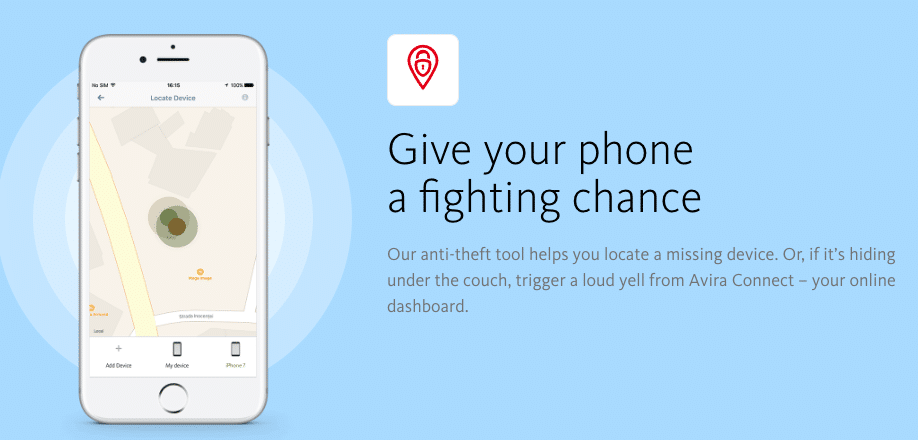
    Avira Mobile Security is free and blocks malicious websites as well as providing alerts for hacked accounts to avoid identity theft. It is thought to be one of the most effective antivirus engines on the market today, boasting added features such as secure protection from malicious websites online. The app also provides an Identity Safeguard which automatically scans email addresses to check if they have been leaked online. A versatile Contacts Backup feature also protects your address book by emailing the details to yourself or backing them up. Handy management tools allow you to analyse your device’s memory and storage use, as well as providing monitoring reports on recent security events.


    2. Lookout
    Lookout

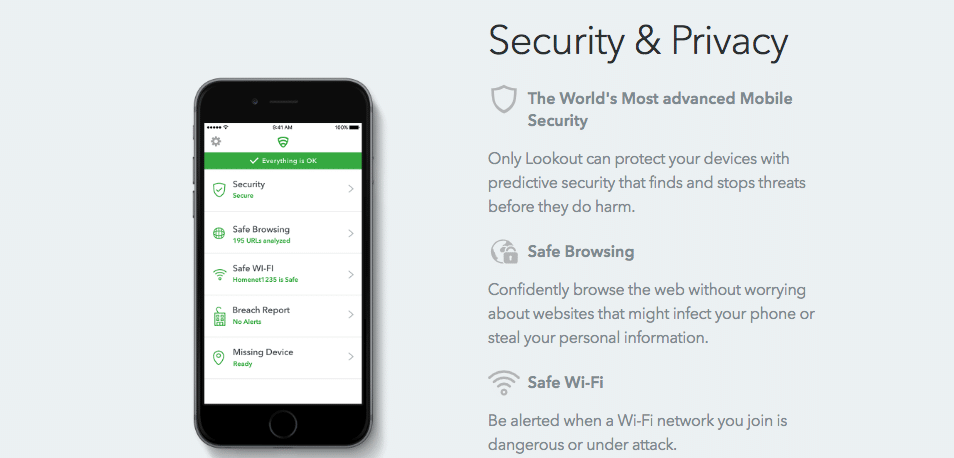
    Lookout is a free and powerful security app that helps to shield your Apple device through four layers of in-depth protection. Powerful security tools check for common vulnerabilities, as well as monitor running apps for suspect activity, and raise an alert if you connect to a dangerous Wi-Fi network. With the new, sophisticated Wi-Fi systems Apple and Samsung have implemented (802.11 a/b/g/n/ac – iPhone XS and 802.11 a/b/g/n/ac/ax – Samsung S10 – According to SmartphoneChecker), this app will protect your device from connecting to a dangerous network. Anti-theft technologies included in the app protect various device location tools. Simple backup options are on hand to keep your contacts and photos safe from harm.


    3. McAfee Mobile Security

    McAfee

    McAfee Mobile Security has many familiar functionalities like Anti-theft, contacts backup, secure local storage for your media files; it also has a Media Vault which hides your photos and videos from prying eyes. You can also snap pictures or videos directly from the app, and have them automatically encrypted and stored in the vault which you can quickly reopen with Touch ID or Face ID if the device has the capabilities. The app has the standard options to track your device on a map or activate a remote alarm. It also has a CaptureCam feature which can email you a snapshot of anyone trying to access your vault. Other features include automatic contacts backup and remote wiping of contacts if your device is stolen.


    4. Trend Micro Mobile Security
    Trend

    Trend Micro Mobile Security has a built-in web filtering function which works with Safari and other browsers to prevent you from accessing malicious or unwanted websites. Integrated ad and tracker-blocking keeps your privacy while cutting data usage and speeding up website loading times. A Social Media Privacy feature will scan your Facebook and Twitter account settings and alert you on any potential privacy concerns. Trend Micro’s Safe Surfing provides users with a secure browser that supports its own private surfing mode. A bundled anti-theft feature also enables the relocation of missing devices via GPS, Wi-Fi, or cell towers.


    5. F-Secure SAFE
    F-Secure

    This app offers a simple web filtering function that blocks access to dangerous sites. A simple Banking Protection feature sees F-Secure check each website you visit to confirm it’s on the ‘trusted’ list for banking or shopping online. An indicator shows you F-Secure’s safety verdict at a glance. SAFE’s parental controls are capable of setting up detailed system filters that can limit content by category. F-Secure SAFE also throws in basic anti-theft features, including a device locator and an alarm.

    Create The Most Outstanding SEO Content Using Simple Steps To Follow

    0

    SEO is mainly noted to be a promising technique, which is widely used in the web publishing for the sake of increasing the visibility of web page and traffic for the higher rankings in Google and other search engines and among readers as well. Creating or rather crafting an article with the help of SEO will require some good writing skills, just for making the article quite interesting and also easier for the people to read. Proper placement of strategic keywords or key phrases in the text along with the inclusion of hyperlinks is some of the ways to boost the current readership of the page. You can always get in touch with the SEO consultant Dubai to help you with ways to write a proficient article over here.


    An outline for the article:

    The articles, you are planning to write, should have an engaging and informative platform with well-written practices. They must be able to present that new angle on any specified topic. Good hook at the beginning with useful information will certainly make people willing to read through the entire article. The article needs to be entertaining, useful and valuable.

    • Properly written article with great content is one way to attract more readers through traffic. It means more readers will come to visit the site.
    • The article will turn out to be more attractive to link the marketers and increasing the likelihood of the advertisers willing to use page for advertisements.
    • Google search engines might offer greater weight on title of articles and even blogs. So, it is quite crucial that the keyword phrases are present on the title as a major part of an effective form of SEO content.


    Create a list of the keywords and phrases for the articles:

    It is always mandatory for the publishers to include the keyword or phrases in metadata of the page, which is also a significant part of the HTML code.

    • It is always useful for the readers and even for Google ranking in case, the article gets divided under multiple subheadings. Readers will appreciate the articles even more in this way with an easy way to go through it. They are ready to stay on the page a little longer in this manner.
    • Key phrases and keywords are mainly words which people generally look for while searching on a particular topic. You need to be aware of those words and try incorporating the same in your article so that your write-ups will prop up at the top when the customers or readers enter those words in the search bar.

    Key phrases and the words are mostly registered by spiders, which are noted to be scripts that the search engines might send out to every possible page on the internet. These spiders might crawl across web pages and sites to analyze the same for content and quality of it. You can do that by registering the keywords or phrases to determine the proper subject of the page. You can ask the pros to help you with that.


    Optimize your images’ alt text

    Blog post shouldn’t just contain text – you ought to likewise incorporate images that help clarify your content. Be that as it may, search engines don’t simply search for images. Or maybe, they look for the images with alt text.

    Since search engines can’t “see” images a similar way people can, an image’s alt text discloses to them what an image is about – which at last enables those images to rank in Google Images results. Alt text additionally makes for superior user experience, as it’ll show inside the image container when a picture can’t be found or showed and can improve availability for individuals with poor vision who are utilizing screen readers.

    How To Find A Reputable SEO Tool Provider

    0

    There are countless SEO tool providers available in the online atmosphere. You have to be careful when searching for a company as many claims to offer top-notch SEO services but then fail to deliver. This makes it hard for you to distinguish between quarks and reputable providers who will serve to meet your desired needs.

    There are, however, a few things you can take into consideration that will help you find the most reliable SEO tool provider to work with.

    Here are 4 important things you can check for to prove whether an SEO tool provider is reputable:


    1. Check On Their Customer Care

    A reputable SEO tool provider is one who will be present every time you need assistance from them. Their communication system and channels should be open and reliable in such a way that you can always rely on your needs and have them catered for hustle free.

    A reliable customer support system is proof enough that the SEO tool provider has customer satisfaction as a major priority and is ready to step in at any time to provide the needed assistance.


    2. Concrete Experience

    One major factor that determines how reputable an SEO tool provider is the duration of time that the provider has been offering the service. The longer the provider has been in service, the more experience they will have amassed over the years to satisfy the needs of the customers.

    When analyzing the concrete experience the provider has, you’ll want to check for the satisfaction level of previous customers from the services rendered, the innovations the provider has come up with over the years, and the overall impact that the SEO tool provider has made.


    3. Exemplary Performance

    A reputable SEO tool provider is one that has some client results that are genuine and tangible. They should have concrete data showing how they carry out their processes and how they achieved the results that they claim to have accomplished.

    A simple but effective way to prove that the provider is indeed reputable and their displayed performance is indeed real and tangible is by getting in touch with previous customers and finding out from them the kind of service they received and asking them to give an honest rating of the provider’s performance.

    Also, check on how the provider is performing in terms of ranking on search engines. The service should work for them first before getting to the target clients.


    4. Analyze The Services Offered

    When searching for a reputable SEO tool provider, you’ll want to analyze the kind of service provider offers. A reliable provider is one that focuses on the most important SEO packages that customers are really interested in. One example of a very important package is Technical SEO.

    Technical SEO is vital to your website’s success. It is the feature that enables Google to locate, crawl and index the content that is on your site.

    SEO tools will be able to identify a robot.txt file as well as a sitemap but a reputable SEO tool provider will be able to provide additional functionality by crawling your site in the exact way that Google does, and pinpoint the main issues that Google searches for while crawling through your websites such as broken links, duplicated content, HTTPS and HTTP conflicts.


    Conclusion

    An SEO tool provider that we recommend and consider to be highly reputable who provides the best services with a high level of functionality is eCrawl. Check them out today.

    How Android Jetpack Helps to Accelerate Android App Development

    0

    A report stated that more than 100 Billion mobile applications had been downloaded till the date and the number is doubling almost every year. One way to tackle with such a humongous need of applications in less time is to reduce the complexity of the code and rapidly adapt to the culture of the application. To help the app developers towards that, Google is continuously making efforts to detect the current drawbacks in the application development process and then to eliminate them using the available technology components. The latest solution by Google is ‘Android Jetpack.’


    What is Android Jetpack?

    In May 2018, Google released the next generation Android APIs in the form of Android Jetpack. It is a collection of components, tools, and guidance to create awesome Android apps. The combination & arrangement of existing Support Library and Architecture Components in Android Jetpack solved many challenges of Android application development. The developers can now manage the activity lifecycle, do custom configurations, and prevent memory leaks which results in making complicated things quite simple. Android Jetpack has ‘unbundled’ libraries and adaptability to different versions of platforms to provide the best modern design practices.

    By leveraging the benefits of Android Jetpack, a developer can get the unique infrastructure code while keeping the focus on the most interactive app version for the users. The companies like LinkedIn, iHeartRadio, and Zillow are facing fewer bugs and focusing more on making their apps unique by adopting the components of Android Jetpack.

    However, I know you want to get more! So, let’s have more idea of how Android Jetpack is beneficial in the application development process.


    Android Jetpack Components

    There are four categories of Android Jetpack components:

    1. Architecture: These components include Data Binding, Lifecycles, LiveData, Navigation, Paging, Room, ViewModel, and WorkManager. They help in building robust, top-quality, testable, and easily maintainable apps.
    2. UI: The UI components consist of Animation & Transitions, Emoji, Layout, Auto, TV & Wear, Fragment, and Palette. They help in making an easy and delightful application for people.
    3. Behaviour: Download Manager, Media & Playback, Permissions, Notifications, Sharing, and Slices are behaviour components. The integration with the standard Android services like permission, assistant, sharing, and notifications are possible due to them.
    4. Foundation: There are four foundation components including AppCompat, Android KTX, Multidex, and Test. The Kotlin integration, backward compatibility to different app versions, and testing framework for UI tests are feasible with them.


    Key Features of Android Jetpack:

    1. Independence: The Android Jetpack components are independent of any app version so you can run the app on various platforms with full backward compatibility.
    2. Less Coding: Productivity features like Kotlin integration and separation of concerns & testability help to quickly build high-performing Android applications with less coding.
    3. Unbundled Components: The unbundled Jetpack libraries are excluded from the Android platform. That means you can incorporate new Jetpack functionality in your app, deploy it on Play Store, and give access of new features to users; all in the same day (of course, depending on your speed).
    4. Quick Integration: Android Jetpack also supports Android Studio Integration. It helps to include new features to the app without disturbing the current functionality of it.


    Benefits of Android Jetpack in Android App Development:

    • High Performance: The integration of all the modern design practices help in preventing possible crashes while running the app as well as reducing memory leaks.
    • Stay Focused: Jetpack components help to stay focused on the application needs at the time of development. As a result, it became easier to implement new features in less time.
    • Ease of Functionality: Android Jetpack makes it easy to handle some of the most robust activities like navigation, lifecycle customization, and background tasks.
    • Improved Productivity: The components of Android Jetpack and the Kotlin language which is used by most of the Android app development professionals help to increase productivity.


    Key Components of Android Jetpack:

    • Navigation: The high-quality alpha version of the shipping helps the developers to overcome the problems they were previously facing at the time of in-app navigation development.
    • Android KTX: Most of the app developers use Kotlin language. Android KTX increases the Kotlin support by transforming the codes quickly and thus, boosts productivity.
    • Paging: Paging stable version can load the large data sets from the network or local storage or both. It helps in providing sufficient data amount of the app and increasing the page scrolling speed. This functionality gives a pleasing experience to the user.
    • WorkManager: WorkManager is a vast library which can be a perfect replacement of SyncAdapters. Developers can get the guaranteed solution for the restricted background tasks with the help of it.

    This way Android Jetpack helps to develop a robust Android app. The notch of Support Library and next-gen Architecture Components benefits to accelerate the application development and to make quick & convenient app updates.

    10 Best Free SEO Tools to Instantly Improve Your Google Ranking In 2019

    0

    Search engine optimization (SEO) has become more important than ever in today’s competitive world.

    New trends like the AI revolution and the rise of voice search indicate that if you want to stay on top, you have to up your SEO strategy.

    Luckily, there are some SEO tools that have the power to improve your online business. If used properly with a good optimization strategy, you can expect to see improvements in your online discoverability. These tools will also help to boost customer loyalty and generate more leads and conversions.

    Several studies have already proven this fact:

    • 93% of all traffic comes from a search engine.
    • Nearly 80% of internet users ignore paid advertisements in search results.
    • More than 67,000 searches are performed on Google every second.

    Are you looking to get started with SEO or seeking better results with the minimal financial investment? If so, here are the ten best SEO tools you can start using for free!


    #1: Google Analytics

    As the world’s largest search engine, Google created a full set of tools to help webmasters in the SEO optimization process. Thus we begin our list of top SEO tools with Google Analytics—the best free SEO solution in 2019.

    It covers almost everything one has to know about user behaviour. From the performance of a certain webpage to acquisitions, Google Analytics provides you with valuable insights in order to improve your website, as well as help you to run profitable digital marketing campaigns.

    #2: Google Keyword Planner

    Keywords are a crucial matter in terms of an SEO strategy. If you want to succeed in the field of SEO, you must be careful to choose the most effective, relevant solutions for your website content.

    This is where Google Keyword Planner comes to your rescue! It’s a pretty nifty tool that highlights the latest keyword trends and helps you discover new terms and search phrases relevant to your target demographic.

    #3: Google Search Console

    The Google Search Console tool was designed to focus on site traffic and troubleshooting. You can use this free tool to define and get rid of pain points.

    The Search Console helps you to keep your website fresh and up-to-date, allowing the opportunity to review indexed web pages and submit new links for crawling. In addition, it gives you insights related to mobile usability, keyword and URL performance, sitemap status, and much more.


    #4: Google Mobile-Friendly Test

    More than 70% of web traffic takes place on mobile devices. Therefore, it’s necessary to optimize your website for mobile viewing.

    Google Mobile-Friendly Test allows you to test each page of your site and determine how they perform in mobile-based internet browsing. This way, you can boost user experience, as well as improve your ranking in search results pages since Google considers mobile-friendliness to be one of the key SEO parameters.


    #5: Google Trends

    It can be a daunting task to come up with new, innovative content ideas week after week, especially if you don’t use tools like Google Trends.

    It’s an amazing tool for those who are struggling to keep the same pace in content creation for a long-term. Google Trends lets you surf through the most popular topics based on your targeted locations, keywords, and periods. This way, you are unlikely to run out of intriguing content ideas.


    #6: Screaming Frog SEO Spider

    This one is a specialized SEO crawler that’s designed for technical site audits. SEO Spider can capture website information in real-time and provide you with effective tips on what needs to be enhanced.

    You can use the tool to identify broken links, analyze meta-elements, find redirects, create XML sitemaps, define duplicate content, visualize site structure, and so much more. It also comes with a free package that gives you the basic elements of SEO audits.


    #7: Pingdom

    Improving your page load speed is a great way to boost the ranking of your site. As of 2019, we all expect a webpage to load in under 4 seconds. Thus you need to utilize tools like Pingdom to test and boost your site performance.

    Pingdom doesn’t only help you in identifying your page load speed but also provides practical suggestions regarding how to make the website faster.


    #8: Similar Web

    Looking for a non-Google SEO tool to test your website’s status? Don’t worry; we have just the solution you need!

    Similar Web analyzes a wide range of SEO optimization indicators, thereby helping webmasters to enhance everything from sales strategies to marketing campaigns. The free version of Similar Web comes with a set of limited features, but we highly recommend you to check this one out!


    #9: Ahrefs Backlink Checker

    As the name suggests, Ahrefs Backlink Checker inspects backlink profiles and identifies inbound linking opportunities.

    Your results are then compared with over 16 trillion known links, updating information in every 15 minutes. Apart from this, the tool lets you compare URLs with a few of your biggest niche rivals.


    #10: Varvy SEO Tool

    And last but not least, Varvy SEO Tool is the best SEO solution for those who want to analyze how well their websites follow the optimization guidelines made by Google.

    It’s a free tool that explores a variety of technical details, such as page load speed, accessibility, robots.txt, security, mobile optimization, etc. The process is also very straightforward: when it determines an issue on your site, Varvy SEO Tool highlights the defect using red markers.


    Wrapping Up

    So, these were ten of the most important SEO tools you should be using in 2019.

    If you don’t rank highly in Google searches, you might as well shut down your website as there’s no point in running a site with no visitors.

    Implementation and experimentation are the key aspects when it comes to SEO, but all the results and recommendations are pretty much useless if you don’t follow through and execute. Make sure to test each of the tools mentioned in this article and strengthen your website optimization strategy.

    Don’t Look Scammy: Take Care Of These Details For Your Webshop

    Selling online is convenient and easy – all you need to do is set up a webshop, fill it with products, and start promoting it. There are volumes upon volumes written about what makes eCommerce websites successful – all you need to do is to learn from the experience of others that have succeeded in this area. And, of course, to be aware of your competitors – both legitimate merchants and scammy ones. Yes, you can learn a great deal from fraudulent online stores, too: they serve as a great example of how to do your job without coming off as scammy. Here are a few details you need to take care off to set yourself apart of them.


    Contact details

    The first thing many people look for before buying anything online from a smaller webshop is the contact page – this tells a lot about the company behind it. If the only type of contact information shared on the website is a contact form or an email address, well, it is a bad sign. Even worse if the email address is from a generic service provider like Gmail or Yahoo.

    When your webshop is run by a legitimate company with actual people behind it, you’ll want to communicate with your (potential) customers in any and all ways they prefer. This usually means phone, email, live chat, even snail mail (no, a simple PO box won’t do). Having your company details, business hours, phone number, and perhaps the name of a person who actually responds to emails and calls listed on your contact page will make your online store look way more professional and legitimate.

    Your website

    One of the telltale signs of a scammy webshop is the language used on it: it is often filled with grammatical errors, typos, and such, not to mention the use of “unnatural” language that shows that the people trying to sell don’t really know what they are selling. Aside from bad language, a bad design is also a bad sign – placeholders instead of pages showing important information, forms that don’t work, many 404 errors, and a design that falls apart when viewed on different screen resolutions. It makes the store look unprofessional, perhaps even a scam.

    A web shop is your storefront on the internet – it has to be helpful and it must look welcoming and professional.


    Details about your product, service, and the way you work

    Last but not least, make sure all the information a prospective client may want to ask is to be found on your webshop, both as a document (outlining warranties, shipping, and return policies) and as a FAQ – there are people who prefer one format over another. If these are not clearly stated on the website, your clients may hesitate to order from you – some may ask for more details, others will simply close the tab and find another source.

    Keeping your webshop transparent, professional, and helpful will make you stand out of the crowd – and perhaps sell more.

    How To Have A Personalised Hey Siri Experience with Apple ML

    0

    The first touch-free, voice assisted way to interact with Siri was introduced by Apple with the iPhone 6 (iOS 8). Users to adduce Siri without having to press the home button. All it needed to wake Siri up was a voice command, ‘Hey Siri’.

    For example, a user could say, “Hey Siri, how is the weather today?” and the phone wakes up upon hearing “Hey Siri” and processes the rest of the utterance as a Siri request. This feature came in ‘handy’ to users in situations where their hands might be otherwise occupied, such as while driving or cooking, as well as in situations when their respective devices are not within arm’s reach.

    Imagine a scenario where a user is asking his or her iPhone 6 on the kitchen counter to set a timer while putting a turkey into the oven. It was a great time if you ran an iPhone app development company. Entrepreneurs and budding app development enthusiasts went gaga over developing apps that integrated with Siri to provide users with a breathtakingly fresh experience.


    Uplifting Personalization

    Apple says that the phrase “Hey Siri” was originally chosen to be as natural as possible. They found out that even before this feature was introduced, users would invoke Siri using the home button and inadvertently prepend their requests with the words, “Hey Siri.” This word articulated brevity and ease of use.

    Apple also pointed out that sometimes users might activate Siri unintentionally. Unintended activations occur in three scenarios – 1) when the primary user says a similar phrase, 2) when other users say “Hey Siri,” and 3) when other users say a similar phrase.

    In order to reduce such False Accepts (FA), Apple wanted to personalize each device such that it only wakes up when the primary user says “Hey Siri.” And in order to do so, they leveraged techniques from speaker recognition.


    Speaker Recognition

    I

    The primary motive of speaker recognition is to ascertain the identity of a person using his or her voice. Speech Recognition performed using a phrase known a priori, such as “Hey Siri,” is often referred to as text-dependent SR; otherwise, the problem is known as text-independent SR.

    The performance of a speaker recognition system is measured as a combination of an Imposter Accept (IA) rate and a False Reject (FR) rate. For both the key-phrase trigger system and the speaker recognition system, a False Reject (or Miss) happens when the target user says “Hey Siri” and his or her device does not wake up. This sort of error occurs more often in acoustically noisy environments, such as in a moving car or on a bustling sidewalk.

    The applied methodology of a speaker recognition system is a two-step process: enrollment and recognition. At the time of the enrollment phase, the user is asked to say a few simple phrases. These phrases are used to create a statistical model for the user’s voice. In the recognition phase, the system then compares an incoming utterance to the user-trained model and the underlying system decides whether to accept that utterance as belonging to the existing model or reject it.


    Overview of how the system was developed

    On each “Hey Siri”-enabled device, the company stores a user profile that consists of a collection of speaker vectors. This profile contains five vectors, each vector with the sound of ‘Hey Siri’ prompted by the user stored in it, after the explicit enrollment process. During the Model Comparison Stage, as they call, they extract a corresponding speaker vector for every incoming test utterance and compute its cosine score against each of the speaker vectors currently in the profile.

    If the average of these scores is greater than a predetermined threshold (λ), then the device wakes up and processes the subsequent command.


    Further ahead

    Apple says that even though the average speaker recognition performance has improved for them significantly, their experimental evidence suggests that the performance in reverberant and noisy environments still remain more challenging.

    At its core, the purpose of the “Hey Siri” feature is to enable users to make Siri requests; however, the company also aims to make use of the Siri request portion of the utterance (e.g., “…, how’s the weather today?”) in the form of text-independent speaker recognition.


    Conclusion

    Siri has come a long way since its inception. And with Machine learning capabilities, Apple took the game a notch above. The company has skyrocketed its sales with the recent devices and aims to go further ahead with full throttle. Did you want to make an iPhone app? Now would not be a bad time to hire iPhone developer and start working on your dream.

    8 Effective Web Design Principles You Should Know

    Web page design is more essential for conversions. In spite of using a high conversion boosting strategy, your website must be in hand of good website designing company. However, website design doesn’t mean what it looks like and feels like, yet is how it works. Indeed, even an essential looking website with exceptional usability and well-structured regularly performs amazingly on Google. User perspectives on such sites are additionally higher than those with poor user experience. The presentation relies upon the adequacy of the website.

    All in all, how to design a decent website?

    Excellent website design needs a full scope of experts having aptitude in different zones. Their aggregate endeavours need to put in when there is an essential choice to happen. Here in this article, we’ll lay out the eight fundamental principles of a good website design which must be considered while building up a website. These design principles will help web designers to create dazzling designs and to improve the usability of a website.

    Below are the 8-great design principles which will make your website stylish, user-accommodating, powerful, and locks in:


    1. Straightforward is the best

    The over-designed website may not work. Putting such a large number of elements on the page may prompt divert visitors from the primary reason for your website. Straightforwardness dependably works in a viable web page design. The clean and crisp design of your website makes the site appealing, yet also help the user to explore starting with one page then onto the next flawlessly. Stacking a website having design features which don’t fill the need might disappoint. Keep your design as straightforward as could be expected under the circumstances with the goal that the visitors can feel it simple to utilize and can discover their ways effectively.


    1. Consistency

    Consistency in website design matter a great deal. Give your regard for match design elements all through every one of the pages. It tends to be comprehended that your fonts, sizes, headings, sub-headings, and style of the button must be the equivalent all through the website. Plan everything ahead of time. Settle the fonts and the correct colours for your texts, buttons and so forth, and stick to them all through the improvement. CSS (Cascading Style Sheets) would prove to be useful to keep the complete data about design styles and elements.


    1. Typography and Readability

    Regardless of how great your design is content still standards the website as it gives users the ideal data. Since search engine crawlers are particularly acquainted with this information, it turns into an important piece of SEO exercises. You should keep your typography visually appealing and intelligible for visitors, alongside dubious utilization of watchwords, meta-information, and other SEO-touchy elements.

    Consider using fonts that are simpler to peruse. The advanced sans-serif fonts as Arial, Helvetica and so forth can be utilized for the body texts. Make legitimate mixes of typefaces for every single design elements, for example, features, body texts, buttons and so forth.


    1. Versatile compatibility

    Remembering the regularly developing utilization of cell phones, tablets, and phablets, web design must be compelling for different screens. If your website design doesn’t bolster all screen sizes, the chance is that you’ll lose the fight to your rivals. There are various web design studios, or administration focuses from where you can transform your work area design into a responsive and versatile one for all screen sizes.


    1. The colour palette and symbolism

    An ideal colour blend pulls in users while a poor mix can prompt diversion. This requires you to pick a perfect colour palette for your website which can make a pleasant environment, along these lines leaving a decent effect on visitors. Improve users experience by choosing a complementary colour palette to give an honest look to your website design. Make sure to blank area use as it stays away from your site from visual clutter and wreckage. Additionally, abstain from using an excessive number of colours. 3 or 4 tones for the entire websites are plentiful to give an appealing and clear design.

    Same is the situation with pictures. Try not to utilize various dynamic images.


    1. Simple stacking

    Nobody prefers the website that sets aside a lot of effort to stack. So deal with it by streamlining picture sizes, combing code into a focal CSS or JavaScript record as it decreases HTTP demands. Likewise, pack HTML, JavaScript, and CSS for improved stacking speed.


    1. Simple Navigation

    The study demonstrates that visitors remain additional time on the websites having simple navigation. For viable shipping, you may consider making a logical page chain of importance, using bread scrums, and designing interactive buttons. You should pursue the “three-click-rule” so visitors can get the required data inside three ticks.


    1. Correspondence

    A definitive motivation behind the visitors is to get data, and if your website can impart your visitors productively, most probably they would invest more energy in your website. Traps that may work to set up a natural correspondence with the visitors are – sorting out data by utilizing features and sub-features, cutting the waffle, and using bullet focus, as opposed to long windy sentences.


    To wrap it up

    Keeping the previously mentioned principles of good website design, you can undoubtedly build up a stylish and practical website. Without this base, it is difficult to travel a long way. Just with a clean and user-accommodating design, you can think to succeed.

    Conference Live Video Streaming Solutions for Corporates

    In the modern time, conferences, trade shows, and large-scale gatherings have become an industry in itself and innovators, experts, journalists, and trendsetters look up to such events for advancements in design and technology. Therefore, it is natural for venues to be full to capacity. In order to overcome the space constraint, businesses and organizers opt for conference live video streaming solutions to connect with audiences globally. Live video streaming services have enabled businesses to convert the missed opportunities into extra revenue, thereby adding value for presenters. It also gives an opportunity to capitalize on people who are unable to attend and to make the video available on-demand after the event.

    Why Opt For Live Video Streaming Solutions for Events?

    It has been observed that around 30 per cent of people who view the event on an online video platform will attend in person the following year. With the decrease in costs and hassle-free live video streaming services, there is no reason why one should not opt to go for it. Conference CDN live streaming not just maximizes the audience, creates more impact and generates more revenue, but it also has the ability to do the following

    • Highlights the sponsors’ products in videos or interviews with exhibitors’ executives.
    • It leads to premium content spending and generates interest with the help of sample videos
    • Heightens community interest with the help of broadcast pre-show material
    • Boosts event relevance and reach by the globalizing and broadening audience
    • Provides access to presentations and past events for on-demand viewing to supplement live broadcasting
    • Offer a value-rich and comprehensive service to presenters and companies
    • Stream key parts of the sold-out venue to extra viewers

    Read: 5 Best Streaming Apps For Android in 2019

    Live Webcasting Conferences

    It is a must to have a multi-camera setup for conference settings which can be linked to a central production/ switching hub. The consumer-grade cameras use HDMI, while the pro-grade cameras use SDI for these connections. The capture cards/ devices are used to connect the camera to the switcher. The mixing is done through live streaming software being run on computers as the software encoders allow more flexibility as compared to the hardware encoders. Also, software encoders include features for adding titles, graphics, image overlays, special effects, transitions, etc. Live stream encoding software also encodes the video stream to prepare it for online delivery using the RTMP protocol. The advanced conference streaming solutions, on the other hand, uses HLS for minimum latency. After encoding, the video can be delivered to the online video platform and then to the audience.

    Online Video Platform (OVP) Features

    In conference streaming solutions, OVP happens to be the key element. Conference live streams can be monetized in either of the two ways- with a one-time fee or advertising. So be sure to opt for conference streaming solutions that supports advertising and transactional monetization.

    API Access and SDKs for Custom Projects

    Application Programming Interface (API) is a computer language that enables you to ‘programmatically’ control a live video streaming provider and helps you build a video streaming solution of your own. The Software Development Kit (SDK), is a package of sample code and tools that helps coders to use APIs easily. API and SDK can also be used for automating streaming and VOD publishing/ categorization and creating custom apps for fans and conference attendees.

    Custom Branding and White-Label Streaming

    Through the white-label live streaming platform, your video will not include any branding except for what you specify. This means you can choose to have your own colours front, centre and logo.

    Security Controls

    In order to stay safe from hacking, piracy and other digital attacks, conference streaming solutions must support the following security features-

    • Referrer restrictions
    • Geographic (IP) restrictions
    • Password protection
    • SSL payment security

    Read: What is an EV (Extended Validation) SSL Certificate and How it Works?

    Chapter Markers

    These are VOD feature that enables you to characterize the videos. It is a great feature to facilitate user ease when one chooses to navigate around longer forms of content. The chapters can be named with the help of appropriate terms which will help the users to view and navigate to the appropriate segment by placing the mouse over the seek bar in the video player. This proves to be beneficial in case of a lengthy conference video as it maximizes audience engagement as well as the number of views.

    Analytics to Track The Performance

    Analytics track data about the audience, like the number of people watching and the place where they are turning from. This will be beneficial in assessing the success of keynotes, individual sessions, and the whole conference. Knowing what material is popular will reveal your strength as well as weakness and will help you in taking care of them as well. It is, therefore, best to opt for a conference streaming solution that has a full analytics dashboard so that you can monitor your content conveniently.

    App Store vs Setapp: Comparison of the Main Features

    When there is only one provider of a service or product you need, it’s called a monopoly. Monopolies are no good because they make you pay more and there’s no competition to push them to grow. Apple App Store used to be a monopoly as the only place where MacOS users could get their apps. Not any more, though.

    It’s important for all Apple devices to know that there’s an alternative. Setapp lets you download the same apps, but the store works under different principles. For some users, it may be the better app store for Mac.

    Let’s see: should you start using Setapp or should you stay faithful to the good-old App Store? We’ll discuss the pros and cons of each Mac store app so it will be easier for you to decide.


    What Is the Apple App Store?

    The App Store Apple is the default place where you can download applications for your Mac. It’s not a platform that hires designers and instructs them to design specific apps. It’s open for all developers who want to feature their apps on it. The developers have a lot of flexibility to develop app features, and they can also set their price.

    Still, Apple regulates the apps that are being distributed via the Apple App Store. First of all, the developer needs an Apple Developer Program membership (which costs $99) if they want to feature an app there. Once they get that membership and develop an app, Apple has to check and approve it. 


    What Makes SetApp Different? 

    The Setapp apps are no different from the ones you find in the App Store Apple.

    Then how is this platform different from App Store?

    It’s a platform that curates apps. The team chooses the best apps from each category and recommends them to its users. There’s a difference in the prices, too. Instead of paying for each app that you want to download and install, you pay a monthly membership for Setapp ($9.99 + VAT). With that, you can use all Setapp apps without additional charges and without limitations.


    The Pros and Cons of Apple App Store

    Let’s start with the good things:

    • The official App Store Apple gives you access to a greater number of apps. If you need a productivity app, you’ll get a seemingly endless list of apps to try before you make the final decision.
    • Some apps give you a trial period before you make the full payment.
    • Each app is being tested and verified before its distribution through the app store for Mac.

    But are there any disadvantages? Of course, there are. When you analyze things, you’ll always find something that could’ve been improved. Let’s see: what doesn’t work so well with the Apple store?

    • The apps often crash and it takes time for the developers to fix the issues. Although Apple has to test and approve the apps before featuring them in the store, the testers don’t have enough time to reveal all flaws. So, we get crashing apps.
    • There are too many apps in each category, so you usually try several before choosing the one you stay with. Sure; you can try trial versions. But too much choice creates confusion, don’t you think?
    • Some apps are very expensive. The price may reach hundreds of dollars. And even if you install a free app, you may need to pay for the best features. The costs add up.   


    The Pros and Cons of SetApp

    Whenever there’s competition, the industry improves. Here’s why Setapp works:

    • You pay a monthly fee of only $9.99 to use everything in the store. We’re talking about full versions of apps. You will not be required to pay extra for in-app purchases like in the App Store. You get the real deal and you can use as many apps as you’d like to.
    • If $9.99 + VAT seems like a big commitment, you can use try the store for free for seven days. If you like what you get, you can start paying for a monthly membership.
    • There are more than 130 Setapp apps, and they are carefully curated. If you need a productivity app, you get a choice of the top ones from the App Store. The Setapp team tested them so you can rest assured you’re getting the best of the best.
    • When an app is featured in Setapp, the developers take responsibility to keep it working all the time. They are very focused on providing functional updates, so the store will keep featuring their product.

    What about the disadvantages, then?

    • You don’t get thousands of apps, you only get 130+ apps. Some consider this an advantage, but others get bored by limitations.
    • When you stop paying the membership, you lose access to the apps from your Setapp folder. That policy makes sense.


    What’s the Best App Store to Use for Mac?

    If you’re using apps that require one-time payment and you don’t need many of them on your Mac, maybe you don’t need the Setapp membership. But if you use very expensive apps and you want to install several of them, you’ll spend less money by using SetApp.

    The best part is that Setapp gives you access to all apps for free during a 7-day trial period. Try it and do your math! It’s a great alternative to the Mac App Store, to say the least. For many users, it’s the superior option.