More
    Home Blog Page 56

    Migrate WordPress Website to a New Host – Step by Step Easy Guide

    If this is the first time you’ve done this task, learning how to migrate a WordPress site can be a big task, but in fact, the process is much simpler than it seems. As businesses and websites continue to grow, they are increasingly demanding their hosts, and sometimes this means that your site needs to move to a larger space in order to scale.

    Often, the web designer who originally created the site has moved to other projects and is too lazy to move the site for you, allowing him to make some decisions—find a host that provides migration services, hire a professional, or perform surgery on the site himself.


    How to Migrate a WordPress Website?

    While hiring a professional is a sure way to get things done, you should try to learn how to migrate your WordPress site, or you will spend your hard earned money. why? Because the migration process is likely to occur multiple times, and this is also a good, worthwhile skill.

    1. Back up website files

    2. Export the database

    3. Upload the website files

    4. Create a database at the destination

    5. Import the database

    6. Fix wp-config.php


    Let’s walk through all of these required steps to learn how to quickly and easily you can migrate a WordPress site.


    1. Back up Website Files

    First, we must retrieve your website files from the original host. We will use the File Transfer Protocol (FTP) to download them to your local computer. If you don’t already have a favorite FTP client, we will use FileZilla.


    This process can take some time depending on the number of plugins installed and the number of uploaded files. Once the transfer is complete, you can proceed to the next step: copy the database.

    If you have cPanel powered hosting then you can also use the cPanel file manager to make a zip of all your website files and download the zip file into your computer.


    2. Export the Database

    The database is the most important part of the WordPress site – it is like the brain, hosting all your pages and articles. Surprisingly, copying is also the easiest. Most hosts provide access to the database via phpMyAdmin.

    Simply log in to your host control panel and access phpMyAdmin.


    Select the database for your website in the left column and click Export in the top menu bar.


    The export method should default to fast, which is acceptable for these purposes. You will also want to make sure the format is SQL. This will ensure that your backup is generally accepted for MySQL.


    Then you will click Next and you will be prompted to download the .sql file. Move this file to the same folder as your website to track it when the migration is complete.


    3. Upload Website Files

    Now that we have copied the site, we can back up the site files in the same way we used to upload them to the destination host.

    Log in to the destination account using FileZilla and browse to the web root of the destination host account. If you are using cPanel, it is usually a public_html/ folder.
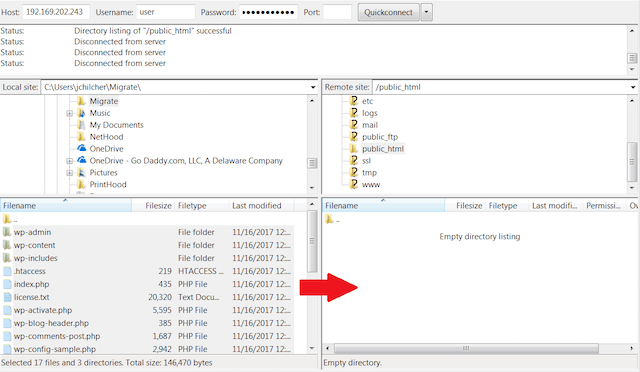


    Then, drag and drop your website files from your local computer to the web root of the new host. This process can take some time depending on the size of the uploaded file and the size of the plugin.

    You can also use the cPanel file manager to upload the zip file of your website files and then extract it via the file manager itself.


    4. Create a Database at the Destination

    Before you migrate your database to a new host, you must first create an empty database.

    Log in to the control panel of the destination account. If you are using cPanel, you are looking for a MySQL® database.


    Create a new database and name it a website that’s right for you.


    Once the database is created, create a new database user, then add the new user to the new database and have all its privileges. Make sure to record the database name, username, and password – you will need them later.


    If you are facing issues while creating the database or assigning the user with permission to it then alternatively you can also use the MySQL Database Wizard from cPanel to create your database.


    5. Import the Database

    Once the database is set up, we can import the database. This step is similar to how you exported the database before.

    Log in to phpMyAdmin on the destination account and click on the name of the new database you just created. Then click the Import button in the top menu bar.


    As before, you won’t need to change any settings – just click the Browse button and select the .sql file you generated earlier.


    Click Next and the database will begin the import process. Depending on the size of your site, this process can take a while to complete.

    If you face error while uploading the database due to size restrictions you need to modify the php.ini file and increase the size limits.


    6. Fix wp-config.php File

    We have successfully moved all of your data, but the site has not been properly loaded on the new host. Now we will modify the wp-config.php file to put the file and database together.

    You can edit this file in FileZilla by right-clicking and selecting Edit (cPanel also provides a file manager that can edit the file). What you are looking for is the following settings in the file:


    Get the database information you recorded earlier, and then replace the old database information in those lines with the new one.


    At this point, if the domain name remains the same and the DNS is set up during the migration process, then your site should be working properly. However, there may be some different scenarios that can make you unsuccessful.


    Finishing Work

    Now, there are some small details that may prevent your migration from completing.

    Domain Name Change

    If the domain name of your website has changed during the migration process, the site URL and home page URL will need to be changed to reflect the new domain name. You can do this by adding the following line to the wp-config file and replacing the text “example.com” with your domain name:

    Define(‘WP_HOME’,’http://example.com’);

    Define(‘WP_SITEURL’,’http://example.com’);


    DNS Change

    If the domain name is the same after the migration is complete, then you only need to change the A record of the domain name to point to the IP address of the new hosting account. Depending on the registrar, this process will be different, so it’s best to know how to do this with your domain name provider.


    In Conclusion

    Congratulations! You have successfully mastered the migration process for a WordPress site. You can save the website files and databases to this folder on your local machine and save them in a safe place, as it can now be used as a backup for your website, just in case.

    Keep in mind that all sites are different at build time. Sometimes, if your site is more complex, you may need to take additional steps. Keep practicing. Remember, you can always take a step back and try again. 

    Thank you for reading the article, you can share your questions or opinions in the comments below.
    How to Clean And Recover a Hacked WordPress Site

    There are so many factors threatening WordPress sites today, so you need to master the way to clean up hacked WordPress sites. Hacking a website can affect the core of your online business because it lowers your search results rankings and makes unauthorized products appear on your website, making your website vulnerable to virus attacks. Therefore, once you find that your site has been hacked and the operation is abnormal, you must clean up your site.

    Next, I listed several ways to clean up the hacked WordPress website to get rid of website hackers.


    Create a backup of your website and database

    You must back up your data before you start any technical steps on the website. Your website and database contain everything you do to promote your website’s online business. Creating a website backup allows you to recover files and folders in time if something goes wrong during the operation. In addition, even if the site is hacked, there are still valuable documents and information. So in the process of cleaning up and repairing, try to keep this valuable information.

    In fact, in the worst case, you will be able to restore your site to the state it was in when it was hacked and then start the program again. So you must back up your website and database before proceeding to the next step.


    Copy the files on your website

    Many times, after you fix your site, it’s hard to find the images you uploaded to your site earlier. If you don’t upload an image after the site is fixed, then your post may contain broken images. Therefore, we recommend that you make a copy of the pictures and files you upload to the website.

    In addition to image files, if you are using non-image files for visitors, you should probably have an up-to-date copy of these files, such as non-image files like zip files, PHP scripts, and plugins.


    Delete files and folders in the WordPress directory

    Once you’ve created the latest copy of your backup directory and files, you can delete files from your existing WordPress directory. Deleting all files and folders is the most effective way to remove all files that have been compromised by viruses. You can use FTP to delete these files. However, if you want to perform this step faster, you can delete the file through cPanel’s file manager or command line.


    Download the latest version of the WordPress plugin

    Some new developers will recommend using the WordPress auto-upgrade feature to get the latest version of WordPress software and plugins. But this won’t clean up your site, because automatic updates just replace specific files and folders, and those that are discarded will still appear on this site. So if you use the automatic update feature to update a website that has been hacked, the hacker will attack your file again.

    Wordpress Plugins

    Get rid of hackers, you should start with the details. In short, you should have a copy of the WordPress software and an up-to-date copy of all the plugins and themes you want.


    Upload a new version of WordPress software and files

    After the above steps are completed, you will need to upload the file. To do this, you should make sure that the copies of the pictures and files you have downloaded before are located on the desktop easily found. Then you can use the FTP client to upload files to your WordPress site. Remember, this is the first step in the recovery process, and you must operate it correctly to ensure that your site has high operational performance.


    Upgrade your database

    Once all the files have been uploaded to your WordPress site, you can upgrade your database. This is an important step because upgrading the database allows the structure of the database to adapt to the newly installed version of WordPress.


    Change your administrator login credentials

    Your site is hacked most likely because an administrator has failed to protect the username and password. Therefore, you must change all administrator passwords, and we recommend that you choose a password that is highly secure and not easy to guess. In addition, you should check the user list and limit the number of users to a minimum to ensure a higher level of security.


    Check and fix incomplete articles

    Since your WordPress site is used for access, you should make sure there are no errors in your article. Then you need to browse your articles one by one. If you find any images or files that do not exist, fix them immediately. You can browse the article through the query window in the database.


    Test your website

    Install a new version of WordPress software, activate valid themes, plugins, and check articles. After you’ve done this, you should verify that the site is working. To do this, you should log out of the management system and enter your website as a guest after entering your website domain name in the address bar of your browser. If the content, themes, and plugins are running smoothly, you have successfully restored your site.


    Improve security

    After following and implementing so many steps, you are definitely not willing to be hacked again. Therefore, you must strengthen the security of your website. First, you should change the access permissions of the web server to protect FTP. In addition, you must ensure that all username and password passwords are extremely secure, so you can use an advanced password generator tool. In addition, you can also choose to authenticate with 2 options. In this case, any user who wants to access the website will need to enter the dynamic password sent to the mobile phone number of the corresponding binding.

    In addition, you’d better use some website and server monitoring tools so you can track and record your visit and visit traffic. Advanced monitoring tools maintain website security and software updates. In this way, your website will not be hacked or become a target of hackers.

    How to Calculate the Bandwidth Required by a Website?

    Before choosing a hosting service, you need to consider many factors, of which computing bandwidth is the most challenging one. Bandwidth refers to the total amount of data transferred from your host server to your guest’s computer over a period of time. Unlike desktop storage, you only need to delete a portion of the large images and videos to control it. Bandwidth needs to be carefully calculated because if there are many visitors viewing or downloading large files from your website, your website may be closed midway.

    In fact, there are a lot of hosting companies that offer several bandwidth options in their plans, so you can choose a bandwidth of the right size so that you don’t waste money. But how do you know how much bandwidth you need? We will answer this question in detail.


    How much bandwidth does a website need?

    In fact, it’s easy to calculate how much bandwidth you need. You just need to record the daily activities of your website and do a math calculation.

    • Estimate the average number of bytes in a page on your site, in KB
    • Estimate your estimated daily visits to your site
    • Estimate the average number of visits per person you expect
    • Multiply the results of the above three steps and multiply by the number of days in a month, that is, 30

    This simple formula is very intuitive to calculate bandwidth, but don’t forget to calculate all the sites on your server if you only have one account calculated.


    Consider extra bandwidth

    In fact, the result of the above calculation is only an estimate, you should know that there is a difference between the theoretical calculation and the actual value. For example, if your website has 45KB per page, and there are 1000 visitors per day, each visitor looks at an average of 4 pages, so the theoretical value is about 4.5GB a month. However, these bandwidths are not enough in practical applications. You also need to consider the following aspects:


    • File download

    If you allow visitors to download files from your website, you will need extra bandwidth for these downloads. So, you also calculate the average size of the files that visitors have downloaded from your website and the number of downloads you expect and then multiply this value by the theoretical value you calculated.


    • Multimedia

    If you plan to put some video, music, Flash animations or other multimedia material on your website, you may need more bandwidth than just putting HTML text and images. For example, if you provide a 200MB file for a visitor to download, 22.5 downloads will require approximately 4.5GB of bandwidth.


    • Growing liquidity

    If your website has high-quality content, you may have more and more visitors, which means that your estimated daily visitor volume, number of page visits, daily downloads, etc. will increase significantly. The required bandwidth will also increase. In short, you need to consider this to a dynamic growth process, plan for the future, and leave room for improvement on the site.


    • Layout change

    If you are not satisfied with the current website interface, you can change its layout. However, what you need to know is that this change may change your page size, so you may use more bandwidth.

    To sum up

    In fact, the bandwidth is like a highway. If there is only one car on a highway, you can drive very fast. But if there are too many cars on a highway, you may be stuck in the middle or slow down because all the lines are occupied. Therefore, calculating bandwidth and planning ahead is very important.

    Finally, if you want to choose a suitable hosting provider, there are many factors to consider, not just bandwidth, such as speed, price, credibility, and technical support. Here, we recommend that you choose Broodle, because we can provide the best hosting service and unlimited bandwidth for the webmasters to make your website run fast.

    Why Use CloudLinux As a Server System for Shared Hosting Environment?

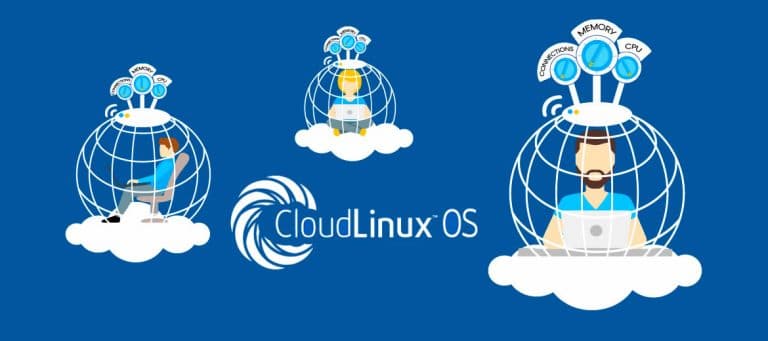
    Those who have used virtual hostsVPS may know that there will be many virtual hosts running on a physical machine. The machine resources are certain. If there are some large users, because large users consume too much CPU, it will directly affect the performance of small users’ websites.

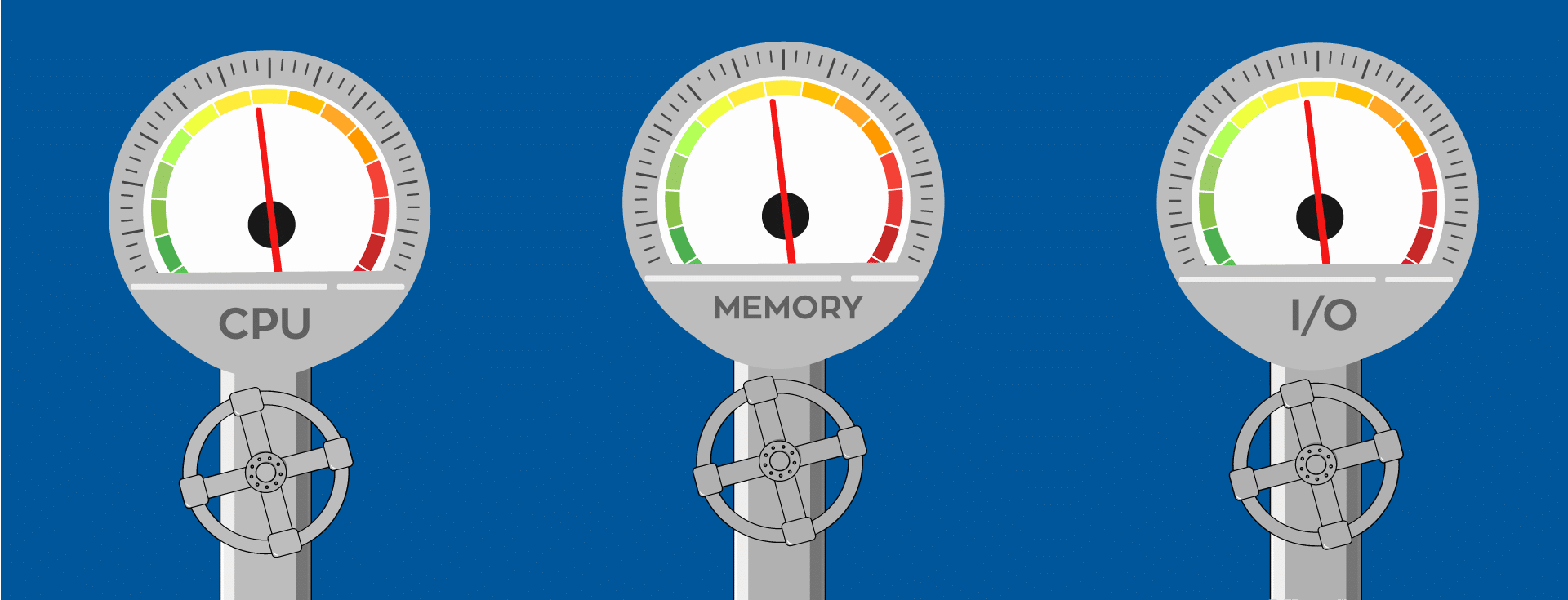
    CloudLinux can evenly allocate users’ resources. The original kernel-level technology ensures that each user’s resources are their own, such as CPU and memory. They don’t have to “preempt” the resources of other systems to ensure fair use of resources.

    CloudLinux was established in 2009, it is a dedicated space for the virtual server customized business systems. It can be seamlessly upgraded to the Cluster, ready for load balancing; has a strong technical support team, ready to be healthy for the server.

    In addition, CloudLinux can be perfectly integrated with many virtual host control panels such as cPanel, Plesk, ISPManager, DirectAdmin, HosingController, H-Sphere, etc.


    CloudLinux and cPanel integration:

    1. The perfect combination of CloudLinux and cPanel enhances the resource management, security, and performance of the server. (Improving server stability by limiting the resources available to individual users).

    2. CloudLinux’s LVE technology has greatly improved the server’s resource utilization and stability. (Isolated between administrator and user).

    3. LVE technology is isolated between server administrators and users. (Improved the efficiency of the server).


    4. Through the monitoring of resources, the resources of the server can be used more reasonably (using cPanel/WHM to manage account resource usage).

    This makes it easy for users to manage and use CloudLinux, making it easy to count the resource usage of their own servers/websites.


    At the same time CloudLinux supports a large number of virtualized environments and compatible software:

    • CentOS or RHEL
    • Xen, VMWare, HyperV, KVM, Baremetal
    • R1Soft
    • Ksplice
    • Apache, LiteSpeed, Nginx, Varnish

    Cloudlinux brings new life to the hosting industry, and its features are mainly suitable for shared hosting and data centre services. Whether you use CloudLinux for both the host and individual users, you can effectively limit the resource usage of the shared account, allowing each server to place more and more stable accounts.

    Samsung Galaxy Note 10 and 10+ Revealed: Specs and More

    The first official rendering of the Samsung Galaxy Note 10 has been exposed by foreign netizens, and the renderings are basically consistent with previous rumours.

    As you can see from the image, the Galaxy Note10 has a very narrow border with a perforated screen. The punch is located in the middle of the top of the screen and looks bigger than the Galaxy S10.


    There are three cameras on the back and a flash on the right. The bump on the left side of the border may be the volume button and the Bixby button, but there seems to be no power button on the right side. It is not clear why, and it must be confirmed by the official release on August 7.


    Then there is the S Pen. It is rumoured that it will get more features this year, support Bluetooth, and have a larger battery. But in this photo, it looks exactly the same as the other S Pens that Samsung introduced.

    This is the “Standard Edition” of the Galaxy Note10, not the Galaxy Note10+, which should be larger and has other features such as a micro SD card slot. This will be the first time Samsung has released two different Galaxy Note smartphones. Samsung will launch the Galaxy Note10 and Galaxy Note10+ at the Unpacked event in New York City on August 7. It is rumoured to be launching some other hardware, such as the Galaxy Watch 2 and Galaxy Tab S6, as well as the Galaxy Home smart speaker.


    Configuration

    The website indicates that all the current parameter information is the result of breaking the news, does not mean that the official final 100% will launch the product with this configuration.

    Samsung Note 10+ is equipped with a 6.8-inch, resolution 3040*1440 AMOLED screen with a pixel density of 498PPI and HDR video support. On the core configuration, Samsung Note 10+ is equipped with Snapdragon 855 processor, the storage capacity is up to 1TB, and the built-in 4170mAh battery supports fast charge.

    Samsung Note 10+ offers four rear cameras: 12 million pixels main camera + 12 million pixels sub-camera + 16 million pixels super wide-angle lens + TOF lens, support 4K HUD video recording; the machine supports IP68 waterproof, support 2D face unlock + Screen fingerprint recognition.

    In other respects, the back of the Samsung Note 10+ fuselage uses Corning Gorilla Protector Glass, aluminium alloy metal frame, supports NFC, supports Type C interface, supports Bluetooth 5.0, and uses Nano SIM card.

    This Charging Stand Turns Your Apple Watch into an iPod

    0

    The watch is a watch, what kind of flowers can you play? If you are as curious as I am, take a look at the famous accessory manufacturer Elago. Recently, this company has launched a special charging stand for Apple Watch. With it, your Apple Watch can instantly transform into iPod Classic.


    This bracket, called the W6, is Elago’s newest Apple Watch stand, which you can see from the outside. That’s right, this looks like the iPod Classic but is a watch stand, made of silicone, with a classic iPod wheel design on the front (but also silicone), while the top display is reserved for the Apple Watch.


    In order to be able to tuck the Apple Watch into the upper cutout area, the W6 leaves plenty of room for the side, so that it can stand directly on the table, giving people a feeling of security. Thanks to the silicone material as a whole, even if the bracket is lowered, the dial can be stably protected.

    Maybe you will be curious, the watch is stuffed in, but how to charge it? To this end, the W6 bracket deliberately designed enough space inside to plug into the charging base, and then let the charging cable pass-through from behind, so that the bracket hides the ordinary Apple Watch charger.


    Seeing here, do you think Elago’s design retains the flavor of the iPod and adds some delicate thoughts? This company does have a lot of hands in this regard. For example, this iPod charging stand, not only has a white version but even a black and red color iPod commemorative version, it also restores the look of the year.


    In fact, rather than saying that its name is W6, it is better to say that this is the official product model. Because so far, the official support for Apple Watch has six models, each of which is named after the W plus number, so in addition to W6, there are W1, W2, W3, W4, and W5, not just W For example, the GameBoy is designed as a W5.


    I have to say that in terms of harvesting, the Elago company has quite a set. By reverting the design language of some old products, Apple Watch has become interesting even if it is through a charging station. Since the Apple Watch has almost no change in overall design since the first generation, these charging stands also support generations of products from generation to generation.

    If you happen to like to wear the Apple Watch, then such a stand may make your life more interesting. The W6 stand costs $14.99. If you are interested, you can go to the official website to learn more. You can also order this product from Amazon.

    Apple Watch Compatibility: Works with all Apple Watch Series (Series 1/ Series 2/ Series 3/ Series 4, 38mm, 40mm, 42mm, 44mm) and is compatible with Apple Watch Nightstand Mode.

    Price: $14.99

    Buy from Amazon

    Is SEO Strategy Affected by Your Business Size?

    0

    When you begin reading about Search Engine Optimization (SEO), and the countless opinions there are about it, you may start to feel a little indecisive. It is difficult to determine how much your business should invest in SEO marketing through marketing companies like Montreal SEO | 10X Media. You would like to enjoy a full-blown SEO marketing campaign that allows you to compete with the bigger companies, but you are worried that you are unable to have the funds for it or are unable to dedicate the required resources to it.

    Unfortunately, search engine optimization does not have a one-size-fits-all strategy. Each company, whether small or large, must first set some specific business objectives and goals. Then, it is possible to set a strategy that fits your company’s size and goals for growth. Companies of all sizes can apply at least one element of internet marketing that can improve their SEO efforts and can see more traffic and better rankings.


    Small Businesses

    Small businesses have the lowest budgets to work with, and as such, feel as though they do not have much chance to make a difference in the search engine rankings.

    Small businesses –particularly startups –have a fixed budget, which results in them often undertaking their own online marketing, which includes SEO, using valuable time.

    Rather than spreading the companies budget and online marketing strategy too thin, these types of businesses will do much better focusing on one or two areas of marketing instead.

    So, there are two types of small businesses: those without a physical store and brick and mortar businesses with an address and building.

    The business with a physical address would do best investing in local SEO, online public relations (PR) and branding, experimenting with Google AdWords, and optimizing for mobile.

    The goals of brick and mortar businesses are to get the consumers in the store, which is why they must focus on third-party review sites such as Yelp and getting listed on Google Local.

    Small businesses that do not have a physical address or building in which they do business can benefit by executing AdWords campaigns, undertaking social media marketing, starting a content strategy, and exchanging links with other sites.


    Mid-Sized Businesses

    The budget is still an issue with mid-sized companies. However, these businesses likely have bigger websites where technical SEO becomes more critical.

    A great starting point from this size business can launch their SEO strategy would be a comprehensive SEO audit of companies websites.

    Social media marketing and online public relation are still beneficial for mid-sized businesses. These businesses can also start their long-term content strategy, as well.

    In mid-sized businesses, there should be at least one steadfast internet marketer that can manage social media messaging, editorial calendars, as well as oversee the execution of the businesses SEO -strategy. This individual could be an in-house employee or outsourced professional such as 10X Montreal SEO.


    Large Businesses

    Large businesses have resources to afford an entire SEO campaign, and as small businesses, there are two types of companies: B2C and B2B.

    For B2B (Business to Business) organizations, the greatest areas to focus on are technical SEO and content marketing. A vital part of content marketing is driving content out on social media.

    Large organizations that conduct business with consumers tend to have bigger budgets. Therefore, they have the biggest opportunity to experiment in every aspect of internet marketing and not just one aspect of it.

    Large businesses working to get consumers must be diligent in managing and protecting the companies brand online. Prompt social media responses and PR as well as monitoring all content (social posts, page content, and blog) are crucial in maintaining a business’s reputation.

    Large businesses frequently outsource work to internet marketing agencies like Montreal SEO | 10X Media.


    Finding the Ideal Marketing Strategy

    It does not matter how small or large your business marketing budget is. There are relatively inexpensive internet marketing strategies that can optimize your online presence and website.

    Consumers of all size businesses are online. If you allow your limited budget to stop you from being easily found online, you will lose out on customers and business. Perhaps you believe that you are unable to afford SEO; however, the truth is that you cannot afford not to do SEO.

    Whether your business is small, mid, or large, there is an SEO strategy for you. ContactMontreal SEO | 10X Media for more details.

    6 Great Resources That Will Help You When Building A New PC

    0

    Building your own PC could be a daunting task if you are inexperienced. But this should not be the case. All you need to do is to source for the right components and assemble the PC. Once you are through with troubleshooting, you will then install the operating system and you will be set to go. Building your PC has an edge over buying an already assembled unit. You have the freedom to choose the specifications you want and the components to use. It takes time but saves money. In this article, we focus on the resources you need to help you build a new PC.


    1. Core components

    You have an unlimited number of components to choose from. Thus, the first thing you need to do is to ensure that you understand the anatomy of the PC you want to build. Typically, you will need several parts to build up the computer. But the core components include the processor, random access memory and power supply. You also need a case where you will have all the components installed.


    1. The motherboard

    You need a motherboard to hold the components of the computer together. So, choosing the one that can fit all the building blocks is an added advantage. It acts as a nervous system that links all the components of your computer.


    1. Graphics card

    It is another important resource when building a computer. It improves gaming and makes it easier for you to edit images and videos. When choosing graphics cards to use, pay attention to the wattage. By wattage we mean the amount of power the graphics card can supply to the system.


    1. The hard drive

    It is the digital storage you need to be able to store your applications and files. Ensure that it fits into its slot in the case. The hard disk is then connected to the motherboard using cables. Consider buying the older hard disc drive. It is cheaper, solid and gives you more capacity at a relatively cheaper price. You may also choose to buy a solid state drive. It is faster but costs more. Let the storage capacity be your main consideration when buying a hard drive.


    1. Cables

    They are the most important resources when assembling your new computer. The cables connect various components onto the motherboard. They also help to connect the power supply onto the system. Unfortunately, there are tons of cables you may need to choose from. So you must select those you will use carefully to avoid having too many of them dangling inside the case.


    1. Operating system

    When you build a PC, obviously, it will not have the Windows. So it may be necessary that you buy a license from Microsoft. Windows will enable you to do a variety of things on the computer. It will allow you to play games and use the computer to perform some tasks.


    Of course, there are other resources you will need to help you build a new PC.  But having the right components, a motherboard and cables could get you started.  You also need a hard drive, graphics card and an operating system to make your new computer functional. Check inside-tech.co.uk for more details.

    How to Use Instagram Automation to Grow your Business

    Using Instagram automation you can save your time and energy for social media marketing, make your account popular, and gain tons of followers. From this article, you will know how you can boost your Instagram audience by social media automation tools. 

    You have to promote your profile in an organic way without mass following and liking. Instagram users are tired of spam and fakes. Therefore, follow and like the accounts that would be interested in your content. It’s long and tedious to follow and like manually. As we mentioned earlier, you need to automate the current work with Instagram bots as much as possible.


    Scheduled posting

    If you have opportunities to automate a task, do it! Clear your day and mind for strategic issues. Spend some time creating individual posts a month ahead to avoid casual distraction. When users see your Instagram updates at the right time, engagement is boosted, traffic is driven, potential new customers are gained. 


    Auto liking and auto following

    Automatic promotion services like follow (and unfollow) by different parameters: location, hashtags, activity, images, gender, age, and so on. Instagram bots also leave comments for posts of users. You can make changes in your ongoing advertising campaign to increase efficiency.

    Some Instagram promotion services help attract only interested followers. Specify niche-specific hashtags, or add the follower’s list of your competitors. If your content is eye-catching and useful, the possibility of the mutual following is extremely high.


    Influencer marketing strategy

    How do you choose the right people to collaborate with? Some influencer management tools help you identify and collaborate with the relevant influencers for your business without difficulty and effort. Influencer Marketing Platforms allow you to create special projects together with influencers that can’t only attract new consumers and brand’s admirers, but also make your audience fall in love with your products at the first glance and forever.


    Tracking your comments

    Some social media automation tools keep track of comments, brand links and any key requests on Instagram. You can monitor your accounts and profiles of your competitors. Moreover, you can find people who talk about your brand or product in social networks, communicate with them and converted into customers.


    Smart analytics tool

    Do you want to track the return on investment from Instagram? All you need is an Instagram analytics instrument. It helps you boost engagement, get more views, and increase sales. You can analyze the published content, choose the best time for posts, see the geography and age of followers, read the promotion statistics of promotion. Artificial intelligence helps keep track of comments and notifications, facilitating the monitoring. Services analyze trends, hashtags, and images. You can learn much more useful things about which photos and videos are hyper-popular, and also understand what percentage of users don’t view your page. In addition, the services show thematic accounts, analyze your followers, help identify bots.


    Hashtag generator

    The services allow you not only to look for suitable hashtags but also to monitor their popularity, modern movements, changes and search for contestants. It helps to choose the niche-specific hashtags for your followers. It categorizes content, helping in the search process. Through tags, you can find strongly attracted ideas or photos.


    A short brief to using Instagram Hashtags

    • Every tag has its proper “gallery”. Users look through these galleries to see pictures they are gripped. Each hashtag gallery has a “Hyper-popular” block and a “Recent” block. The more tags you write, the more galleries you create. The maximum admitted is 30 hashtags per post. 
    • #hashtags can be used at any part of the caption, or in the comment section. If you want to put a lot of hashtags in a comment, you can reach an aesthetic look. How? Well, let me give you a hint! The comment needs to be begun with five dots, each on their own line. So, the comment section will be collapsed. 
    • You need to combine hyper-popular tags (which tons of users browse), and niche-specific hashtags.


    Shopping on Instagram: sell products online

    Instagram is a platform that inspires users to shop. Instagram automation gives an opportunity to create a mobile store window. It’s fantastic when you can present exclusive products on Instagram and tagged their in one publication to make the shopping process easier. Social media shopping tools help to highly increase sales, as people want to learn more about products.

    Wrapping up all these points, we can say that Instagram Automation makes your life easier on the image-centric platform and drives organic traffic. 

    Why Quality Printing Is Still Vital in the Age of Digital?

    1

    The digital age is well and truly upon us. Mobile phones are no longer a device only in our pocket, they’re blended with each activity we undertake. While devices are making our lives easier in so many ways, they are also changing the landscape of the printing industry. Presentations, content, and information are now consumable with the click of a button, so printing can sometimes be viewed as unnecessary. High-quality printing, however, is still a vital output for a number of reasons. Finding the right blend of digital and printed media is the best way to achieving your desired outcome, and here’s why.


    We all learn differently

    Going into an important business presentation with laptops or tablets may seem like the environmentally friendly thing to do, but you may not be hitting the mark with your entire audience. Individuals all learn differently, and that is what makes us unique as people. It is important to cater to all those in your audience, especially those that prefer a high-quality print using high-quality inkjet cartridges or something tactile to better absorb and understand the information. Business presentations are also a great leave behind. Allowing your audience an opportunity to continue to learn after you have left, make notes and potentially respond with questions is made much easier with a high-quality print.


    A combination of both

    It can be argued that no one solution is better than the combination of both digital and printed solutions. In fact, the two often complement each other to deliver innovative new solutions. A great example of this new innovation is the development of 3D printing. Printing in years gone by were simple 2D outputs that could struggle to bring to life the story behind the print. With the assistance of technology, 3D printing has changed the way high-quality printing can deliver not only output but an experience at the same time. Physically printing gadgets, houses or even data sets that aid with presentations, 3D printing has changed the way we view printing and the benefits a high-quality print can deliver.


    Personalization and privacy

    In a world of push notifications, email marketing and new levels of spam, there is a growing distrust of digital media and concerns about privacy. Print media plays a vital role in delivering value for organizations direct marketing to their customers. Print marketing is a tangible piece of communication that has the ability to deliver a more personalized experience. Direct mail campaigns are making a comeback due to their personalized nature and the benefit of being a tangible item. Individuals now remember the novelty of getting letters delivered, as opposed to another email in their overcrowded inbox. Businesses can thrive in a competitive market by allowing their digital engine to learn about a customer, then delivering a personalized and tangible communication to their customer’s door.


    Tell the story

    Digital platforms are a great way to quickly and immediately impact a large group of customers. As audience attention spans diminish, however, there is a growing concern that the digital platform isn’t the best place to tell stories or build brand identity. High-quality printing, however, is a great way to reinforce the identity behind a brand. A longer form channel that delivers to a captured audience makes a printed piece much more impactful at telling a story. Printing also allows for a creative execution that forges a memory and emotional connection with the recipient. That sort of impact is hard to come by on a digital channel.

    For years many commentators have thought printing would eventually time out. Instead, the industry has shown its benefits in a number of ways. Individuals and businesses now opt for a mix of both to make sure they create tangible, long-lasting experiences for a wide range of audiences using digital and high-quality prints.