More
    Home Blog Page 143

    FB Messenger Vs WhatsApp Messenger – Which is better?

    WhatsApp is a widespread app which is used by billions of people. Its popularity is incomparable when it comes to messaging.

    You all must be aware that Mark Zuckerburg, the owner of Facebook has bought WhatsApp for $19 Billion. It all happened when the WhatsApp app became more popular than the Facebook messenger app. Mark Zuckerburg himself said, “WhatsApp is a great company and it’s a great fit for us. Already almost half a billion people love using WhatsApp for messaging. It’s the most engaging app that we’ve ever seen that exists on mobile by far. About 70 percent of people who use WhatsApp use it every day, which kind of blows away everything else that’s out there.” Facebook messenger app and WhatsApp app are no more the competitors but are compliments. Many mods like gbwhatsapp are also available for WhatsApp users.

    But even now when it comes to the users as which message application is better, there are some points in which Facebook messenger app wins and other in which WhatsApp messenger app wins.

    So go on reading this article to find out which one is your favorite.

    We will go on comparing them point by point:
    1. USER INTERFACE

    When it comes to the user interface, WhatsApp has a very easy to use interface as compared to Facebook messenger application. But the people who are techy might love the messenger user interface. So overall the WhatsApp user interface is such that any new user who is new to using the app and stuff, can get to use WhatsApp app quickly and easily as compared to the messenger app.


    2. SENDING CONTACT FEATURE

    WhatsApp feature which I personally like is that you can send the contact available in your contact list directly to some other contact without noting down the number first. All you need to do is select an option to send contact and then choose the contact from your contact list and just click on the send button.

    So here, WhatsApp message app wins, leaving Facebook messenger app behind.


    3. DEVICE SUPPORT

    WhatsApp is not made only for smartphones like Android, windows but also for feature devices like Nokia S40 etc.


    4. EASY LOGIN

    With WhatsApp, you don’t have to remember your login credentials but with Facebook messenger app you have to remember your login credentials.


    5. SIM CARD

    To create a WhatsApp account you need a sim card as WhatsApp verifies your mobile number while creating an account.


    6. SECURITY

    There is the end to end message encryption of all the messages in WhatsApp. Facebook messenger also has this feature but the encrypted messages have a certain time limit after which they disappear and not all the messages are encrypted. Hence WhatsApp app wins in this feature as well.


    7. LOW BANDWIDTH

    WhatsApp requires less bandwidth as compared to the Facebook messenger. It can connect to even the weaker wifi signals. Facebook requires a good speed internet connection to work. WhatsApp is quicker than the messenger. Data usage is low in WhatsApp than the Facebook messenger app.


    8. CONTACTS ADDED BY DEFAULT

    Facebook messenger requires the user to add people to whom to would like to connect but this is not so in WhatsApp app. WhatsApp by default add the people in your contact list to your WhatsApp list if they are using WhatsApp.


    9. COMMUNICATION OVER THE FRIENDS ON PHONE AND NOT ON WEB

    WhatsApp has replaced the SMS and MMS and you can WhatsApp to the people of which you have the contact number. Hence it is much more private and secure. If anyone wants to send any message, knowing the name is not enough in WhatsApp. They must know your contact number too.

    But this is not the case in Facebook messenger app. Any person, they know your contact number or not, can message you by searching your name. Facebook is more like communicating over web and WhatsApp is more like communication over the mobile phone.

    WhatsApp feels more like your own personal space where you have only the close one in your touch while Facebook messenger is not as anyone can message you there.


    10. TWO WAY VIDEO CHAT

    In WhatsApp, you can have two-way video chat. You can have a voice call as well in WhatsApp and it works like an ordinary phone call.

    So overall, I personally like WhatsApp and you can decide your favorite from both of the points mentioned above.

    3 Android Libraries Every Android Developer Should Use

    0

    Developing in Android is definitely not a walk in the park. It’s usually time-consuming and at times, it can even be frustrating.

    Developers have to deal with a number of requirements, like doing API calls, processing images, and development-related matters such as optimizations, project structure, and logging – just to name a few.

    If you want to input all of your implementations manually, dealing with problems we listed above takes a lot of time. However, it doesn’t have to be like this. There are numerous open-source libraries, in which developers spent countless hours solving the issues we mentioned above.

    Once you start using these libraries, you’ll instantly notice an improvement in your app performance, code quality, and overall productivity.


    Top Three Android Libraries for Android Developers

    1. Android Dagger 2

    If you need to implement the DI pattern into your app, this is the library that will make the job a lot easier. While there are certain libraries, such as Butter Knife and Robo Guice that can help you achieve the DI pattern, in our opinion, Android Dagger is the best option available.

    In the past, there’ve been two versions of the library from Square Inc. and Google. The first version, Dagger 1x is no longer maintained by Square. Google has built on the first version of the library and is currently maintaining the second version of it.

    Dagger 2 has brought a great performance and development improvement on the framework. Some of the welcome improvements include the full-trace ability, object graph, and debugging of provisions, just to name a few. If you want to learn more about this library, here’s a great place to start.


    2. Crashlytics

    Crashlytics was originally developed by fabric.io, however, since January last year, it’s been owned and maintained by Google. In short, this is one of the best crash reporting tools on the market. It gives you a real-time view of crashes with a full de-obfuscated stack trace of it.

    In order to integrate it into your app, you need to install a specific Android Studio plugin. Just go to File, find Settings, and click on the Plugins and type “Fabric” in the search bar. Find “Fabric for Android Studio” in the search results, click install, and follow the instructions until the plugin is installed.

    As soon as you finish, you’ll see a Fabric tab view in the Android Studio. Now, you need to create a new account. Once you click on the tab, you’ll see a “Sign Up” button that will lead you to an account creation page on fabric.io. You just need to input your personal information and you’re all done.

    The site will send you a confirmation email that will allow you to confirm the validity of your account. Go back to your Android Studio fabric view, go to the product list, find and select Crashlytics. From there, you simply need to follow the instructions to finish the integration of your app with Crashlytics.

    3. Android Ion

    As you know, writing HTTP code is a huge chore. As a developer, you usually have to manage everything from caching and threading to parsing and compression in order to make efficient requests. Luckily for you, Android Ion will do most of the dirty work for you.

    The Android Ion library gives you a fluent API code do to a set asynchronous task related to API calls. All Android Ion operations return Future Object and can be easily canceled. And this is not just an ordinary library. As a matter of fact, Android Ion combines different features of a number of libraries into one.

    Speaking of APIs, if you’re developing one of your own, we should mention one more useful tool. Like any other software out there, APIs require regular maintenance, so you should use a tool like Spotlight to assess the health of your API. You can run tests within the software that will give you valuable insight into how your API behaves under certain scenarios.


    Final Thoughts

    While the quality of your apps should be a top priority, you still have to deliver them in a timely manner. The digital age moves fast. There are literally thousands of Android apps being released every month. If you want to stay competitive, you have to work as quickly as possible.

    In order to catch up with the digital transformations’ train, you have to be a proactive dev. That means you need to keep an eye on the best tools and libraries that will improve your productivity and maximize your development skills at all times.

    Make sure to pick your tools and libraries wisely.

    What to Keep In Mind While Choosing the Right E-Learning Software

    0

    The world of education is changing at a rapid speed, and things are shifting the levels every second.

    The i-Pads have replaced the textbooks, the virtual reality glasses have substituted the classroom theaters, and the social media has given the students a platform to express.

    The teaching sector has seen the most significant boost and rightly so. The e-learning software is the latest hit in the market, and it has benefited the studies better than any other invention.

    Everyone is purchasing one online and from the stores but none can tell how to choose the right e-learning software.

    This piece of work will tell you what things one should keep in mind while buying an e-learning software.

    Do The Research And Compare

    You are going to spend a considerate amount of money on a software that you don’t exactly have a clue, does what? Not a very bright idea.

    Before buying any e-Learning software online, you must know what it can do and what it cannot. You may as well have to spend as many as three-four hours before making a decision.

    You must explore different techno websites and blogs to and try to get as much information as you can from them.

    There are some sites on the internet that do the whole research for you and compare the prices, specifications and other vital details of the e-learning software.

    You require this software to create learning objectives, and only this should be your first, second and last concern.

    Stick To A Budget

    Internet business is a blessing but is a condemnation at the same time too. More than often one end up spending more than one intended to at the first place, while shopping online.

    So, here what you should do, make a budget, set three amounts in it. Minimum amount, an amount that you must spend to get the right software, with the correct output.

    An ideal amount, an amount that you are happy to spend for a top-dollar e-learning software. And an over the horizon amount, which you will only spend if you find something that you think, may help you for a very long time.

    Could You Be Able To Use It?

    There are a lot of e-learning software available in the market today. Some are user-friendly, and some are quite complex.

    So, when you are buying an e-learning software, you must check whether you be able to use it properly or not?

    If you buy something, you don’t know how to use it is a bad investment. Also, check how is the outlook and results of the software are.

    Check if it creates learning objectives your target audience may like to have?

    Try the Trial

    All the software developers and big companies too now are offering customers; trial offers of their software.

    This works best for you, download several trail offers of this software and ask you, team, to try it.

    Ask the team to review every aspect of the software and make notes about them. At the end of the day compare the reviews and choose which matches your requirements, the best.


    Ending Note

    Buying something online is not an easy task especially when it is something new and unfamiliar. But if you keep these things in mind before you fill up your shopping basket, it will be quite helpful.

    These software are an excellent investment for the future and after sometimes pay for itself. Hence, don’t be cheap while buying it.

    An ideal software must initiate blended learning and an excellent output, so choose wisely.

    Happy buying!

    7 Essential Tips for Improving Your Website Design and User Experience

    Can visitors to your website determine what your company does and what products/services it manufactures/serves? Can users easily go to the blog page on your website, if they want to? Is your pricing easy for users to understand? Do you have an extremely high bounce rate? If you find that your answers to all the above questions are a ‘no’, then you need to get worried. You need to take a hard look at your website design. You need to rework the way you optimize your website. A website cannot excel if attention is paid only to its content or only to the keywords in the content. It is necessary for a website to be user-friendly.


    Seven Essential Tips for Improving your Web Design

    Here are seven essential tips for improving on website design services, which you can use in order to improve your web design. These tips are standalone tips and you may or may not follow all of them at the same time.


    1. Make a Plan

    You need to make an elaborate plan to understand the behavior of visitors on your website. You need to know which areas of your website are they visiting, which piece of content; they are reading the most and finally, which buttons they are clicking the most. Based on this data, you have to formulate your website design strategy. You have to incorporate all this information in your website.


    1. Eliminate these from your Website

    Eliminate words like flexible, best-of-breed, groundbreaking, easy to use, next generation and other flowery words from your website. With an audience that has a span of attention of eight seconds, what do you expect them to do? They will just skim through your website and if they do not find what they are looking for, they will go to visit the competitor’s website.


    1. Try to Incorporate Follow and Share Buttons

    Social media buttons are small icons around the bottom or the top of a web page or blog post. You should use these buttons to share and follow your content on social media websites. These buttons are a non-pushy medium of sharing content. There are apps like SumoMe and Shareaholic which help users to share their content on social media platforms.


    1. Put Action Buttons on your Website

    Insert call-to-action buttons on your website. These will help the user navigate the site when he is new to your website. By providing such buttons, you will be guiding him through your website and thus, you will be solving one of his pain points, that of not having to use his brain to navigate through your website. Likewise, you can insert other buttons.


    1. Use the Correct Images

    It is said, ‘a picture speaks a thousand words’. This adage is true for every website. Try to earn the trust of your visitor by incorporating pictures of real people working in your company, on your website. Try to get them to say something good about your company and say how happy they are working for your company. Such images may be available online for free or you can shoot videos yourself and insert them on your website.


    1. Provide Navigation Keys on your Website

    Try to provide navigation keys on your website. This will reduce a lot of the customer’s pain. He can just follow the instructions given by the navigation keys and find out what he is looking for. He will not have to waste more time on your site. Doing this will take his attention to other significant points on your website and help you gain eyeballs.


    1. Allow your Visitor to Scroll your Home Page

    Try to create a seamless experience of your website by providing an excellent landing page on your website. You can also allow your visitor to scroll the home page of your website, to understand what you do and how you do it. Doing this will inform him about your product/service and this may at times lead to a purchase.


    Conclusion

    Thus, if you abide by the above seven tips, you will be able to improve your website design manifold. Moreover, these tips will also help drive traffic to your website and keep it populated with visitors. In short, it will garner eyeballs and consequently garner sales leads.

    How to Easily Track and Find Your Friends & Family Using their Mobile Phones

    Tracking mobile phones have become more than the important task in today’s generation. In our day to day’s life, due to modernization and contracted time period, we are not able to give time to our family and loved ones. Our attention span has gradually decreased to a petty level due to which distances have been created between us and our loved ones. We as human, unwillingly and unintentionally are gradually moving towards an era of isolation and disorientation. An era where there is a concerned absence of our loved ones. Whether it is the relation between parents and kids, or a group of close friends who are busy in their own lives, these problems are prevalent at every level of our society.

    But how can it be overcome? Is there no solution for this? There is! And it is mobile tracking apps!

    As fancy as it sounds, they are loaded with an equally fancy feature that will help you to be around your loved ones and to know where they are. Due to modernization, many such modern needs started to be considered and fulfilled and one such solution to these needs is mobile tracking apps.

    Fortunately, there are several of applications and websites available on the internet through which you can easily track and monitor your loved ones be around them.

    So let us take a look at them.


    Mobile Number Tracker

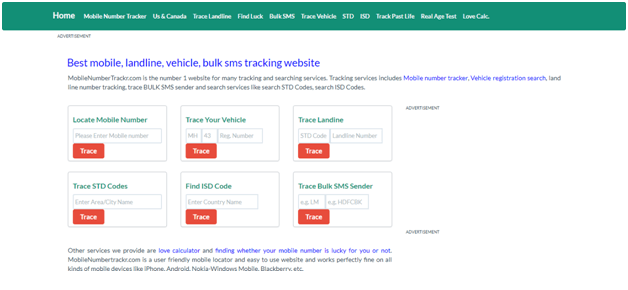
    This is one of the websites that will help you track your kids, your loved ones or your group of friends. The website efficiently tracks down the phone and that it also in few seconds. To use this website you don’t any prior registration. All you need to do is go to the Mobile Number Tracker and enter the mobile number that you want to track. Within few seconds the website will track down the location of the entered mobile number. It is user-friendly and easy to use. The app has received good reviews and is used by millions of people. So visit this website if you feel like tracking someone’s phone.

    Apart from the website, there are several applications available on the internet that will help you get in touch with your loved ones with their mobile tracking features. They are precise and provide quality results to their users. So let’s take a look at it.


    1. Norton Family Parental Control

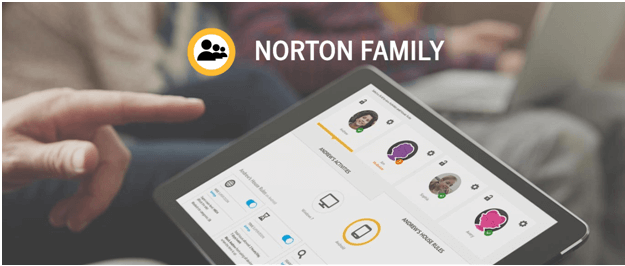
    Available on iOS and Android, this app is great for those who want to stay in touch with their family, especially for the parents who want to stay in touch with their kids. The app efficiently tracks the phone that you want to. So now with this app, you can easily track your child’s phone, which will help, both the parents and kids to stay in touch with each other. The app comes with a $49 annual subscription.

    Norton Family Parental Control
    Norton Family Parental Control


    1. Family GPS Tracker

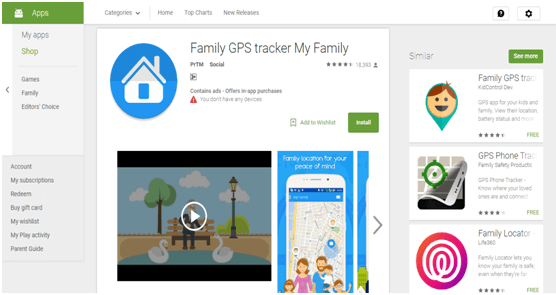
    Family GPS tracker is another app that will help you find your friends and family members on the map. The app is available only on Android platform and will help you determine a real-time location of your loved ones. The app also has a child mode which doesn’t allow your child to turn off the location settings of their Smartphones. The app also allows you to set entry and exit points so that if anyone enters or exits that particular area, you’ll be instantly notified. Apart from that, one of the cool features is that it allows the members to chat and have a conversation. Hence, with this app, you won’t be missing your loved ones anymore.

    The app was not found in the store. 🙁


    1. Find My Friends

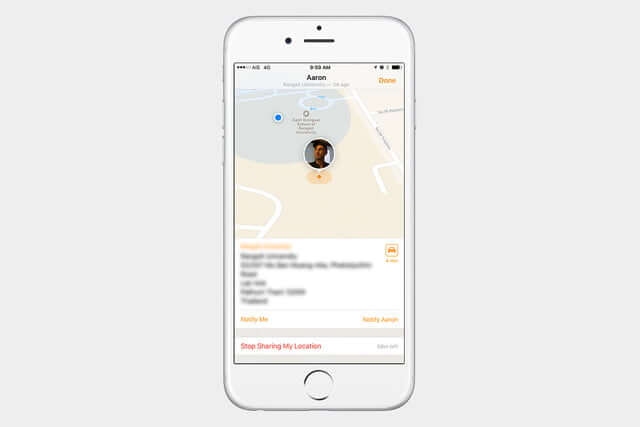
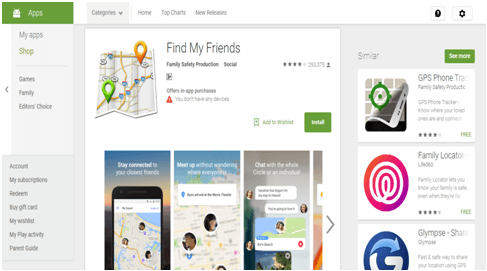
    Yet another android tracking application that will help you track your loved one’s phone. Whether it is your kid who stays up late till night or whether your friend who never comes on time, the app will efficiently track down your kid, giving them no chance to excuse. The app tracks your friends and kids on the map, giving you a real-time location, also, the app allows you to chat with them so that you are can ping them if they are late as usual.

    Find My Friends
    Find My Friends
    Price: Free+


    Hence, by using this website and applications, you can always be in touch with your friends and family members and never have FOMO (fear of missing out). the website will help you to track the phone of your kid’s or your friends, however, if you are looking for more than a tracking software that allows you to monitor as well, then the applications are best for you.

    10 Essential Android Apps that You Must Have In 2018

    In 2018, it is highly possible that your phone is your most trusted friend. Phones bail you out of dicey situations, helps remind you of upcoming events and birthdays you always forget, help you with your studies and do so much more. In short, you are a more efficient person because of your phone. Today, we are bringing you a list of the top ten Apps that every Android user must install on their phones. We swear that you will thank us later.

    All of these apps are available on the Google Play Store. But as a matter of fact Google Play Store, due to its policies, tend to discard many exciting apps. These apps then find their way into the unofficial Android app stores like aptoide. Like most of the unofficial Android app stores, you can install aptoide for free and explore all the apps which couldn’t see the light of day on Google Play Store.


    1. Due Today – Task Manager

    Due today (tasks and to do lists) helps you get organized in your personal style. It helps you organize task lists for you to finish, set the start dates and deadlines and reminds you as per your settings. It features the Get Things Done method and can sync multiple accounts of yours to the calendar. Work or personal life, Due Today can handle both for you with ease! It is rated 4.4 stars in the Android Play store.


    1. Alarmy – Alarms That Won’t Let You Sleep

    Rated 4.7 stars, Alarmy has a “Sleep if you can” challenge that they deliver to really well. Filled with tasks for you to shake your brain out of that sleep fog, Alarmy won’t let you sleep till you complete their random little tasks to turn the alarm off. If you have an oversleeping problem, this alarm will save you a lot of misery.


    1. Inshorts – News On The Go

    Inshorts is one of the best news reading apps in the play store. It summarizes news to 60 words so that you get an idea of all the things that have happened during the day. There is an option to read the complete description too if you’d like to go into details. Moreover, it’s fake news proof!

    Inshorts - News in 60 words
    Inshorts - News in 60 words
    Developer: Inshorts
    Price: Free


    1. Adobe Acrobat Reader – PDF Reader

    Everyone gets a lot of PDFs over the mail and messages to read through, and sometimes the default apps are inefficient and slow. Adobe Acrobat Reader is the standard and leading app when it comes to accessing PDF documents. It consists of features such as editing, adding sticky notes, comments, quick zoom in and out, etc. It is also lightning fast when it comes to opening and sharing big files on any app that supports sharing.

    Adobe Acrobat Reader: Edit PDF
    Adobe Acrobat Reader: Edit PDF
    Developer: Adobe
    Price: Free


    1. Firefox – Web Browser and Search Engine

    Firefox lets you work quickly by providing quick search results, opening pages without a lag and protects your privacy. Its newest feature helps you protect your data from social media sites such as Facebook to ensure you are safe from third-party viewers.

    Firefox Fast & Private Browser
    Firefox Fast & Private Browser
    Developer: Mozilla
    Price: Free


    1. Nike Training – Stay Fit

    Nike training has over 160 workout videos for free! This means that you can rock a killer body by working out at home as well. For those who can’t make time for gyms, we highly recommend you to use their personalized workout plans which can be tailored according to your problem areas that need improvement.


    1. Kaspersky Mobile Antivirus – Secure Your Phone

    Kaspersky makes it in the top 10 grossing tool apps on the Play store because it is an all in one security system for your phone. It features an antivirus, web security system and an app lock. It is rated at 4.7 stars and has amazing user reviews.


    1. Google Drive – Save Data in the Cloud

    Ever run out of space on the phone? We know how it feels. Google Drive is a cloud computer that helps you to save literally everything you want from your phone, all you need is a Google account. You can access the data online and hence there is no need to keep copies on the phone, which means more free space. It is very secure and can be accessed from multiple devices.

    Google Drive
    Google Drive
    Developer: Google LLC
    Price: Free


    1. Google Maps – Travel Efficiently

    Never get lost again, never get stuck in a traffic jam. Google Maps dominates the street view mapping of the country and even globally. They provide the shortest routes, track traffic you can avoid by using alternate paths and have a very accurate ETA display. You can choose your mode of transport for customized views, save addresses and even gives access to apps such as Uber to book yourselves a cab.


    1. Spotify – Music That Matches Your Mood

    Find all your favorite music and artists on Spotify. All you need is an internet connection. The premium feature lets you go offline by downloading and saving your playlists. They have a continuous playlist according to your preferences, moods and search pattern. Fewer ads are a big plus!


    These top 10 apps will definitely make 2018 a very productive year for you as they sum up everything you need in your daily life. Please let us know your experience using them and how helpful you found our article.

    Banner Stands: Your Most Versatile Marketing Resource

    0

    If you own professionally designed corporate banner stands, you already know that this marketing resource offers impressive versatility and convenience. Visually compelling, yet lightweight, banner stands can be used virtually everywhere that you want to get your marketing message out to the masses, in just a single glance.


    Get Creative When Using Your Corporate Banner Stands

    Are you optimizing the use of your banner stands? Many entrepreneurs use their corporate signage for trade show events alone; however, only using these signs at exhibits can mean missing out on some major marketing opportunities where banner stands can add extra impact. Get creative when using your corporate signs and consider using them anywhere you need to live market your company, including:


    As Part Of A Sales Presentation:

    Do you want to add a little extra visual punch to your next client presentation? Use your corporate signs. One large image of the product or services you are promoting delivers the optimal return on investment with your audience.


    Grouped Visual:

    Don’t have the resources to purchase a full-sized trade show exhibit for use at live encounter events? Not a problem! Use several customized banner stands together at the various function for a cohesive final message.


    Restaurant Marketing:

    Are you running a restaurant or nightclub? Use your signs to showcase specials, drinks, meals, and live entertainment.


    Project Bids:

    Looking to stand out from the competition, but also bidding on a specific client project? Setup your business signage to enhance your overall proposal. Your sign will reinforce your message, as well as give them an up close and personal look at your branding.


    Silent Sales:

    Are you missing out on a live encounter marketing opportunity, because your sales team simply does not have the bandwidth to attend? Your sign can act as your silent salesperson to get the message out about your organization without ever having to say a word.


    Healthcare Facilities:

    Hospitals, family practices, and other healthcare facilities can all tap into the power of business signs to announce the latest medication, treatment process, or offered services.


    Lobby Resource:

    Everyone wants a fun way to spend their time waiting in a business lobby. Give your guests something to look at and learn about while they wait in yours. Setup your sign to give information on your hottest merchandise to encourage a conversation when the wait is over.


    Eliminate Crowd Buildup:

    Have you found that your main exhibit quickly gets overpopulated with visitors? Eliminate a crowded bottleneck by setting up a smaller display area using signage, so guests can get an up-close look at your merchandise without having to wait in a lengthy line.


    Hotels:

    Hospitality facilities are always offering various promotions and specials to guests. Use your banner stands to get the word out about what your patrons can look forward to during their stay in a clear and professional way.


    Before And After Messaging:

    Everyone loves seeing what a certain product or service can do. Use high-quality images on your signs to show before and after shots of what your business offers to get people excited about trying your services as well.

    How Content Marketing Agencies Can Boost Business With Interactive Content

    The Internet came into existence in 1993 – that’s when the first web browser was created, and since then, there’s a lot of content that has been created and put up on the internet. According to one report, it is estimated that approximately 1.2 Terabyte (1 terabyte = 1000 gigabytes) of data is present on the internet. But how much of that data is utilized by the user?

    In a digital age, everyone is in a hurry, and everyone wants to make big with the knowledge they possess. But to bring out something positive out of that knowledge, the first thing that needs to be done is to develop these insights in the first place. And the primary source of any information in today’s world is the Internet. The World Wide Web contains the answer to everything, from a size of a tip of the needle to the diameter of the Sun. You can know everything.

    But still, there’s a void present. There’s too much content but not enough knowledge, and the main reason behind this disconnect is the way the content is presented in front of this world. We creators understand that nearly a decade ago, that’s when we start developing the new method to convey our content to the world. And when platforms like Youtube, Pinterest, and Tumblr come into existence, where we start putting up our content not just in the form of blogs or essays but an interactive medium as well – that is what sparked the early rise of Interactive content. That’s the time when we start communicating with the people in the form of videos and images, i.e. through multimedia.

    This form of content became popular and boomed in a way that we didn’t even imagine. But like every other thing, this method is also coming to its saturation, and for people, it’s becoming less appealing. And to attract more and more people, we creators need to come up with something new. This time rather than changing the medium we change the form of content. And come up with something called Interactive Content.


    What is Interactive Content?

    Going by the definition provided by SnapApp, interactive content requires a participant’s active engagement – more than merely reading or watching. In return for that engagement, participants receive real-time, hyper-relevant results they care about.

    In layman’s terms, we need to provide content which doesn’t bore people and leave them with some experience.

    According to the Time Magazine, ‘An Average Person loses concentration after 8 seconds.’ This means that you are provided with an 8-second window in which you have to convey a message to your audience, and also ensure that a message is presented in such a manner that it doesn’t bore your audience & leaves them with a satisfactory experience. As a result, the engagement rate of an audience with your content becomes higher.

    That’s exactly what a good content marketing company or a good content marketing agency should try to achieve.
     

    Types of Interactive Content

    Interactive content can be of many forms, and a content marketing agency can use any of these types to grow their content marketing services easily. There’s always a higher chance that your audience will engage more deeply and actively with your interactive content rather the traditional forms of content.

    Here are some types of Interactive Content:

    1. INFOGRAPHICS – As the name suggests, Infographics is a visual representation of your information using the graphical images, charts or diagrams.
    2. INTERACTIVE VIDEO –  Videos are an effective way to engage your audience with your content. According to the survey, 43% of the users are more interested in the video content from the brand rather than the traditional content.

    3. POLLS AND SURVEY – Polls and Surveys provide the user with the freedom of giving feedback. And many times, these feedbacks are anonymous. So, the user ends up providing honest reviews, which can help the agency to improve their content marketing services.

    1. CALCULATORS – These are one of the most effective tools when it comes to finding out the leads and sales generated. A large number of users tend to like these tools because you don’t need to give any fancy words and you are getting a pure data in return. They are efficient and straightforward to work with. They take the input from the users and based on formula gives the output, which is usually in the form of numbers.

    1. INTERACTIVE EMAILS – Though Interactive email is still in a developing phase, it is still the most efficient way to interact with your audience. Since emails are always one-on-one and not one-to-many, they can communicate with your audience better than any other medium. Another advantage of having an interactive email is that the emails have the most significant ROI. For every 1$ spent, email marketing generates 38$ in ROI.

     

    So these are some of the interactive content techniques, using which content marketers can boost their businesses. Every content marketer could use these techniques and be as interactive as he can with his audience.

    What You Should Know About Mobile Apps For Your Business

    0
    Is your business considering a mobile app? These days, it is becoming more and more important to have a mobile app designed for your business. However, owners need to make sure all the factors that should go into developing a mobile app.
    Created by SnapMobile

    4 Tips To Boost Your Site’s Conversion Rate Using Images

    Getting traffic to your site is great. But we all know it is not your main goal. Instead, your primary goal is to make sales or to convert your visitors into buyers or subscribers. For that reason, it is ideal that you also focus on conversion the same way you focus on getting traffic.

    Images can engage people. We can communicate with them in a clearer way. In fact, pictures are better than words. Hence, it is necessary that you carefully choose images to improve your conversion rate.

    Readers or customers expect freshness each time they go back to your site. If you have an eCommerce site, it is vital that you provide personalized recommendations to your online shoppers as they are more likely to purchase from your site.

    On the other hand, most shoppers will give out their personal information if they think they could benefit from it. That is why personalized ads convert way better than an ordinary advert.

    But how can you use images to influence your relationship with your customers and convert them? Here are some real estate photography tips that you can use, regardless of what kind of website you have.


    1. Increase Empathy

    You may be happy with stock images. But it is a big mistake if you just put some random image choices. Remember that images can draw a lot of attention. Not using them correctly will mean wasting your primary real estate on your site.

    In a study, researchers found that doctors empathy to their patients increased when they see a photo of patients attached to their medical reports. Doctors said that they feel a better connection with patients who had pictures on their medical records than those who do not.

    Online marketers have a similar problem. You and your customers do not meet in person. Hence, how can you create a connection with them? You need to use images and utilize it wisely on your sales and service.

    One way to connect with your customers is to put your photos along with your name on your About Us page, instead of just a huge list of names. By implementing images, you are forming a connection with your customers more easily.

    On your sales page, do not just add crappy stock images that you can find online. Instead, add real images of the product. You may also add photos of your customer support representatives on your contact us page. On your testimonials page, you can ask your customers to submit their images. Any images that can relate well to your readers or buyers can boost your conversion rate.


    2. Use Images of Women, Babies and Beautiful People

    Although it is true that you need to add images to your website to increase empathy and boost conversion, you cannot just use any images. Women, babies and beautiful people can attract more readers. They always work in many cases.

    It is especially true if you are using cute babies. They always sell. Humans are wired to react to a beautiful face of a baby. In this study, it showed that babies encourage a high level of activity in our brain, that’s why we react emotionally. Unfortunately, adult photos do not have an impact in this area of our brain.

    But, just because babies can have that influence in our brain, does not mean you use baby photos on your sales page.

    Apart from using baby photos when necessary, you can also choose photos of women to help sell your products to men or women. Between a picture of a beautiful woman and an image of a man in a mailing packet, the former has a higher response rate than the latter.

    Furthermore, the use of images with attractive people can boost conversion rate. The reason for this is that these people are considered to be more intelligent, successful and charismatic. But not all people share the same perception because, for them, attractive people lack intelligence. For instance, when you look at the late Steve Jobs, you can say that he is charismatic and successful, but he is not good looking.

    But all of us succumb to allow attractiveness to affect our judgment of a person through the halo effect. Studies after studies showed that attractive people are often considered as more charismatic, intelligent and successful. In fact, with their attractiveness, they are given shorter prison sentences than those who are not so attractive.

    That is why models are extremely good looking because their main role is to entice you to purchase the product they are selling.

    So, should you use those photos of models on your sales page? Not really. The main goal here is to use photo quality that creates attraction.

    And when you state facts, you need to show related photos to increase the likelihood of the facts to be accepted as true. It is one of the reasons publishers on Kindle use realistic book mockups to make them look legitimate in the eyes of their readers.


    3. Add More Detailed Images

    In addition to using baby photos, and images of beautiful people and attractive women, you also need to provide your visitors with more photos that showcase your brand more clearly. Opt for shots that show different views and close-ups of your product, for example. The more photos you provide to your customers, the more likely they are going to convert.


    4. Use Trust Badges

    Online fraud is rising. For that reason, it is vital to ensure that your customers feel safe and secure when they shop at your site. When someone trusts in your brand, he is more likely to buy from you.

    You can put a trust badge on your checkout page to increase conversions. Your site’s trustworthiness rises if your site has a trust logo. Most customers will not compete for their purchase if they do not see a trust logo on the checkout page.

    However, images may slow down your website. Hence, before you upload some photos, make sure to optimize them first. Opt to use a lossless image optimization tool to leave the image look the same even though its file size has been reduced.