More
    Home Blog Page 58

    How Do You Motivate Yourself to Study Hard?

    As exams get nearer every single day, you will find yourself studying harder and longer to catch up with your readings. In fact, it can be overwhelming and frustrating if you realize that you do not understand most of the topics you’ve already covered with your professor in class. What do you do?

    The last thing you want to do is to quit. You don’t make any progress by quitting. As long as you don’t quit, you still have a chance to excel in your academic exams or assignments. Today, we are going to discuss some of the best ways to keep your head down all day and catch up with your intelligent colleagues. Let’s get started!


    1. Acknowledge and accept your resistance to studying

    Instead of fighting this resistance and forcing yourself to study, the best thing you can do for yourself is to acknowledge and accept your resistance. By acknowledging and accepting your resistance, you get the minimize the power of your resistance and you generate some of the best ideas on improving how you study.


    2. Keep studying

    Do not avoid studying by indulging in fun activities such as texting, playing custom video games and watching TV. You are free to do all these things after your study session. But during your study session, do not avoid studying or working on the assignment.

    You cannot run away from it forever. And when it catches up on you, you’ll only end up regretting. So start working on it. Force yourself. After a few minutes, you’ll realize how weak your resistance is. When you run away from your tasks, you feed your resistance. Draw a line on the sand and resolve that failure is not affordable.


    3. Improve your studying style

    According to a research paper writing service, your studying style could be the source of your resistance. Maybe you’ve been studying using one style for too long that it’s starting to get boring. As the popular saying goes, familiarity breeds contempt.

    There are a variety of ways you can spice up your study sessions. For instance, you can join a study group and or offer to be someone else’s study buddy and use past exams to study to name a few. You’ll be amazed by how things can work out for you just by changing a single aspect of your study session.


    4. Don’t question your abilities

    There is a big difference between someone who won’t study and someone who cannot study. You should never question your abilities. A person who does not believe in himself or herself can never perform well no matter how hard he or she works or studies. You should always remind yourself that no one is smarter or better than you. Use the right study methods and work just a little bit harder.


    5. Focus on the journey

    When you are so focused on the end result, the journey becomes boring. Yet, without the journey, you can never get the end result. Learn to enjoy the process. Do everything in a perfect way. Spend most of your time focused on what you are doing right now.


    6. Break down your work into chunks

    One reason why most students postpone studying is that the task ahead seems intimidating. Working a very big task can be overwhelming. That’s why it’s important to break down any pending task into small chunks.

    Breaking your task into smaller chunks will make the entire task easy to compete effectively. After completing one or two chunks, take a break and indulge in an exciting activity such as taking a walk, chatting with your online friends or listening to music. For example, if you are supposed to read a book chapter and write an essay, you can divide the total number of pages you have to read by the number of days you have left and finally writing the essay. Focus on doing every single thing efficiently.

    7. Reward Yourself

    People who fail to reward themselves tend to run out of motivation. It’s always important to take some time off, free yourself and recognize your achievements. If you’ve completed an intimidating task successfully, go out and have fun with your friends or watch a good movie. Rewarding yourself always pays off in spades because you get motivated to study harder and work longer.


    8. Create a study routine

    Human beings are governed by their habits. Students who struggle to study can motivate themselves by building good study habits. One of the best study habits is having a study routine. A study routine allows you to study at the same time every day. If you study at the same time every day, you build momentum.

    Momentum is a very important ingredient of success. If you lose your momentum, you cannot excel. To create a study routine, you need to have a timetable or a schedule. A timetable helps you to know the time of your study and what you’ll be studying. Help yourself by getting organized. Once you get organized, you start building momentum. Students who study when they feel like it rarely gets anything done.


    9. Discover you’re why power

    At the end of the day, there are goals you want to achieve. Having a clear idea of what you want to accomplish is the key to success. You cannot hit a target you don’t see. So, why are you studying hard? Do you want to develop yourself?

    Do you want to make your loved ones proud? Do you want to have a great career? Do you want to live with no regrets? You can write down a list of the reasons why you should study hard. Put the written list in a visible place. Knowing why your studying hard could be the key to your success.


    Conclusion

    You have to love studying. You cannot excel in something that takes your life away. If you don’t like studying, discover the reason behind it. Look for ways to solve the problem. Excelling in your education will open up doors for you.

    However, everything has a price. It all comes down to your determination to pay the price. For you to be successful in anything, you have to pay the price in full and in advance. There is no shortcut. The student who is always looking for the shortcut never makes any progress.

    By following these tips, you’ll put yourself on the side of the angels. When you do everything in an efficient way, there’s no way you can fail.

    React Native or Flutter – The Framework For Your Next Project

    0

    Everyone wants to grow new clients and companies. Need to develop a fresh mobile app for new small businesses; programmers need robust technology which makes the time-consuming coding time simple and efficient. In order to reach this, most developers have started using the cross-platform app, so they can design e-commerce apps, interactive programs, and social programs. Flutter and React native would be both main growth frameworks that show their worth and they are the host of the cross-platform mobile app development.

    Facebook introduced React Native and Flutter introduced by Google is a newcomer in the mobile application world. Flutter helps developers increasing native software and helps them in creating cross-platform apps easily. We’re here with Flutter vs. React native functionality comparison, so start-up needs to identify, which framework will be the best for their mobile app development.


    Which is the best hybrid frame?

    React Native is based on native components whereas Flutter works perfect with the proprietary widget sets, owner widgets are absolutely exciting and will be the best for getting a customized UI layout that provides dynamism and native support. React native takes all of the credit to be a very dynamic framework that improves the user experience.


    Development Time

    React native among the most reliable frameworks for developing a mobile app and it decreased the time period for the development along with that it increases the user experience also requires less time in developing the project. React Native makes the development process simple and quick, consequently elevates the scope of mobile application development. Flutter promises high-quality usability no matter how the development frame demands more recognition within React Native.


    Performance

    Flutter vs. React native performance mapping is the ideal way to spot which frame is ideal for mobile app development. Alternatively, React Native has a bigger fan following and community however, developers understand the pain that they face in regards to creating hybrid applications. Developers sometimes face difficulties while running React Native hybrid application structure. Whereas Flutter makes it easy for developers since they may reuse the current code.


    Stability

    Stability is one of the important aspects of businesses that expect a perfect mobile app. When we compare React Native vs. Flutter the contest appears very hard. The newly started Flutter beta 2 version provides some impressive features for the developers.


    Customer Base

    React Native requires no introduction these days and it is one of the most promising mobile app development platforms for those programs. Since this framework is fresh to the market it will take some time for it to make a base in the marketplace.


    Documentation & Toolkit

    Documentation processing is a very time-consuming thing. But, Flutter is quite great at this point. It gets the mobile app developer’s life easy by allowing them to utilize while recording their applications. Hence it is evident that resources bring a tough competition between the 2 frames. Flutter has extensive IDEs and resources with React Native. The two frameworks have their own positive points concerning stability, performance, documentation, etc.


    The concluding word

    Hence, it is very tough to determine which the better framework is because equally have their own pros and cons. But we can say that Flutter is a new framework, it is going to require some more time to receive stable in the market as compared to React Native. Flutter and React native would be both major growth frameworks that are proving their worth and those they are the main host of the cross-platform mobile app development. React Native vs. Flutter has become the most popular technology in 2018 and 2019.

    Both frameworks are popular among start-ups in business growth. The two frameworks have their own and points concerning stability, performance, documentation and other aspects as mentioned above. But we can say that since Flutter app development is a new framework, it will take a while to get stable in the industry compared to React Native. This makes it clear that React Native is a smart choice to start with. Flutter has a long way to go and it’s an extraordinary potential.

    5 Crucial WordPress Plugins for Your Startup Ecommerce Website

    Content Management Systems such as WordPress is like a gold mine for startups and budding entrepreneurs.

    With a wide array of elements that can be added to your e-commerce website easily (like website themes and plugins), you can create a money-making e-commerce website without having to spend thousands of dollars.

    And so the question becomes, which plugins are you supposed to use to transform your website into a cash cow?

    That’s what we’re going to cover right now

    1. BigCommerce

    If you want to give you WordPress website a major e-commerce facelift (both inside and out), then you’ve got to try the BigCommerce plugin for WordPress.

    This plugin alone can do wonders for your WordPress website.

    You’ll be amazed at what the plugin can do for your WordPress website. It can help you with:

    • Payment processing
    • Catalog management
    • Order fulfillment
    • PCI compliance
    • Creating gift certificates
    • Shipping and returns
    • Etc.

    The good news is, you can get the plugin for as low as $29.95 per month (for their Starter package).

    With the help of the BigCommerce plugin, you won’t have to migrate your entire website to a new e-commerce platform — which can be tedious, expensive, and time-consuming. You can continue to housing your website in WordPress while enjoying its new e-commerce capabilities.


    2. WPForms

    Aside from choosing the best platform for your e-commerce website, you need to consider essential site elements such as your online forms.

    A contact form is one of the easiest ways for site visitors to communicate with you, and a WordPress plugin that offers features to create contact forms, payment forms, polls, subscription forms, surveys, and other types of online forms for websites, is WPForms.

    The WordPress plugin is a form builder tool that seamlessly integrates with popular payment and marketing platforms, such as PayPal and MailChimp, allowing you to build your forms faster.

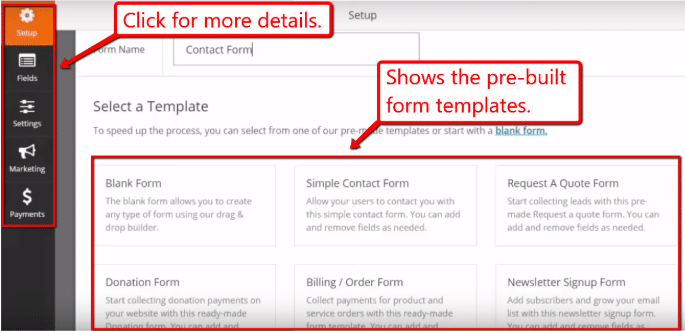
    Also, WPForms has ready-to-use form templates with the form fields you need that you can customize to your liking, and it’s mobile-friendly, optimized for SEO, and 100% responsive.

    Ecommerce Website

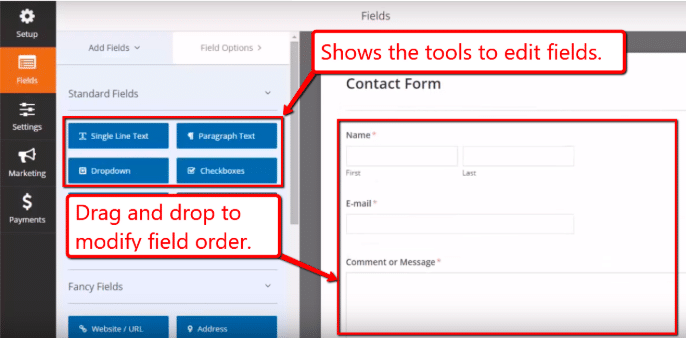
    The plugin’s drag and drop feature offer a straightforward way to create contact forms for your website to help build your email list and newsletter subscriptions, which can be a perfect tool for beginners.

    Ecommerce Website

    WPForms is free, but you can get more features such as conducting surveys, create job application forms, collect customer payments, and even use smart conditional logic with the premium version.


    3. Akismet

    For beginners, it’s crucial to know what tools you can use to help automate repetitive tasks such as identifying and removing spam comments.

    Website spamming can have several reasons, such as a way to slip in backlinks to your site and snatch some of your traffic, or as a “negative SEO” scheme.

    So why is this a problem?

    Because even though have the option to delete or approve comments each comment, dealing manually with the sheer volume of spam comments will take a significant amount of time and effort.

    On top of that, you will still have to filter out the legitimate comments from the fake ones and respond to them.

    Let’s say you offer training programs on how to become a life coach on your website. Your site visitors are bound to ask specific questions that they might not find on your FAQs section.

    So it’s crucial that you respond to legitimate user queries promptly to help establish a more approachable image for your brand.

    Also, you might lose sales opportunities if it takes you too long to respond because you have to sort through thousands of spam comments.

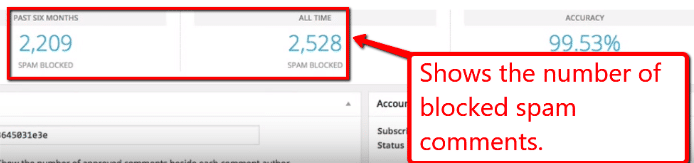
    A solution to protect your website from spam is the Akismet plugin. The plugin can automatically filter out spam comments and stop them from appearing on your site.

    Ecommerce Website

    Akismet has a free version with WordPress but additional security features, such as malware scanning and daily backups, are available with the paid version.

    With the features that the Akismet plugin has to offer, you can cut down on your workload, protect your website from constant comment spamming, and remain “spam free” to aid in upholding the credibility of your site.


    4. Yoast SEO

    SEO is a great strategy to drive more visitors from SERPs to your website, and one way of increasing your traffic is with the help of plugins.

    Plugins like Yoast SEO offers one of the most comprehensive SEO solutions with its tools and features to boost your on-page SEO.

    The plugin lets you generate sitemaps, optimize your website for social media, connect your site to Google Search Console, and more.

    Some of its key features include optimizing your content, adding your meta keywords, meta description, and SEO title to every web page and post.

    The tool provides you with an analysis with specific recommendations on how to improve your on-page and website SEO.

    Additionally, the plugin’s Redirect feature detects URL changes, lets you make 301 redirects and auto-redirects to help eliminate broken links on your site.

    You can consider Yoast SEO as one of the best WordPress SEO plugins with its extensive features, SEO functionality, and popularity.


    5. Wordfence

    Like most e-commerce websites, you run the risk of cyber attacks if you don’t keep your site protected.

    And yes, there are WordPress plugins for that too like Wordfence.

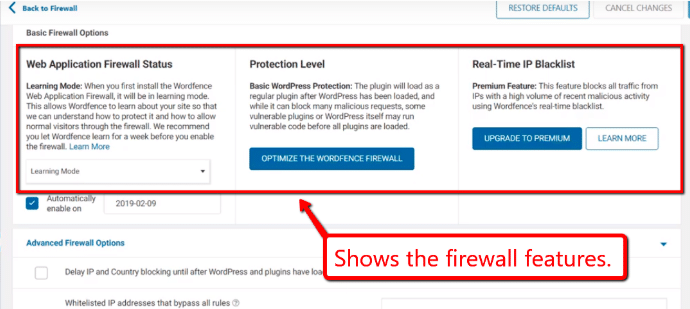
    Wordfence acts as a guard dog for your website, with features like login security measures, automatically scheduled scans, and a firewall (among other things).

    Ecommerce Website

    Powered by the cloud, the plugin performs scans of your website – WP files and database – for viruses, malicious scripts, or any changes.

    Wordfence offers a basic options panel (that everyone can use) and an advanced options panel to fine-tune the performance of the plugin.

    Ecommerce Website

    The plugin will inform you through email updates if, let’s say a hacker, tries to access your website.

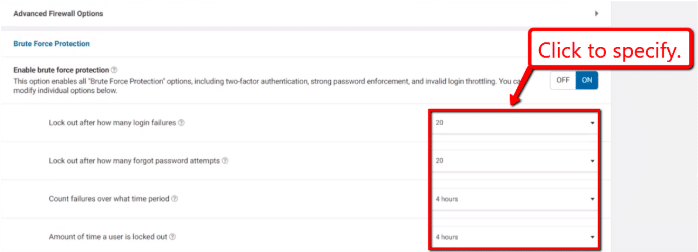
    Also, the firewall allows you to throttle website requests if there are suspicious activities, which is handy to help protect from brute force (automated password guessing) or denial-of-service (DDoS) attacks.

    Using plugins like Wordfence to boost your website’s security is crucial to protect your business from potential threats, and not lose all the hard work you put into building your business.


    What’s Next?

    There you have it.

    Regardless of the products or services you’re offering in your e-commerce store, whether you’re into selling shirts, logo designs, novelty items, or baby rompers, you stand to gain from installing the five links that we mentioned.

    Remember to keep the essential functions in mind such as task automation, streamline operations, and website security, that you would want to integrate to your site when establishing your startup business.

    What other WordPress plugins do you plan on integrating to your e-commerce website?

    Let us know in our comments section below. Cheers!

    How to Choose a Switch For Your Home Network?

    Don’t you hate it when you exhaust all the Ethernet ports on your router? Or when you have to string bundles of Ethernet cables for all your devices across the living room.

    An ideal way to extend your wired network at home is to buy a network switch. A switch functions as a hub. Plug your devices into it and then connect the switch to your router. Your devices will access your home network as if they were connected to the router directly. Sounds easy, right?

    Also, with a data switch, your Ethernet connections will be more reliable and much faster because of the higher bandwidth it provides.

    Picking the best switch for your needs can be quite tricky considering there are tons of switches available in the market. But if you’re hunting for the ideal switch there are a few concepts you need to keep in mind:


    1. Fast Ethernet vs. Gigabit

    In terms of speeds, Gigabit Ethernet is your ideal go-to choice. Your router will most probably come with gigabit Ethernet ports. You get ten times the download and upload speed of fast Ethernet.

    You can still stream 4K video to your TV with fast Ethernet. And if your ISP plan gives you 50Mbps downloads, you will barely notice a difference in download speeds if you use a device connected via Fast Ethernet rather than gigabit Ethernet. But if you are on a faster fiber network, you won’t miss noticing the difference.

    If you do tons of file copying between servers on your home network, you will need the maximum smooth sailing speeds of Gigabit Ethernet instead of slow Fast Ethernet speeds.

    You want all your components to be at or above the speeds you intend to use; otherwise, a home network switch could create limitations. A gigabit Ethernet switch is a sound investment if you want to upgrade your connection in the future.


    2. The number of ports

    You will need first to figure out the number of ports you need your switch to have.  Switches offer between 4 and 54 port models. The number of ports you need boils down to the number of devices/users your network supports. The more extensive the network, the higher the number of ports you’ll need.

    If you only need to connect a handful of devices, a five-port switch is an excellent choice. It allows you up to 4 wired devices and one connection to your router. Unless you need a primary hub for your entire house’s connection, you probably don’t need a 16 port switch or a 24 port switch.

    If you want to connect up a gaming console or two, tv and a set-top box, you don’t need a pricey switch with more ports than you’ll ever use. You can get away with an eight-port switch for most of your needs, and it’s within budget.


    3. Level of technical support

    Is the configuration process for your switch seamless? Is there a local support team in your country in case you run into any technical issues? While shopping for the ideal switch ensure you have specialized options in place.

    Lack of technical support when you need it can be quite a deal breaker. Projects allow you a small window of time to troubleshoot your devices. If troubleshooting/configuring a device exceeds the time limit, you will need to contact alternative technical support. However, outsourced support centers are not a guaranteed solution owing to language barriers and different time zones.

    Keep in mind the level of support available and plan accordingly to save you the hassle and refine uptime.


    4. Price

    Managed switches are the most expensive type of home network switches costing between $110 to over $1000, but they offer superior features. Unmanaged switches are inexpensive and ideal for most house connections.  They cost around $30 or less, support Gigabit speeds and come with up to eight ports.


    5. Type of switch to buy

    There are three types of POE switches to consider depending on your needs: managed POE switch, unmanaged POE switch, and smart POE switch.  We recommend managed switches as it’s the best poe switch. Even though they are expensive, they give you more excellent control over your network devices. However, an unmanaged switch will get you covered for your home or small business.


    6. Unmanaged POE Switch

    The unmanaged POE switch is like a dumb networking box you plug things in. It requires no inputs and no updates to do its tasks. The switches can’t be modified, so no need to enable or disable interfaces.

    It does not offer any security features, so if you are handling sensitive information; we recommend you opt for something more secure.

    Unmanaged POE switch is ideal for shops, small business offices, and home networks. They are affordable, and the configuration is simple.


    7. Managed POE switch

    The Managed POE Switch is ideal for data centers and enterprise networks. Managed switches provide a high level of control, network security, and management. They are suitable for remote access control and round the clock monitoring.

    Managed switches are expensive but are worth the investment. With these switches, you can scale your networks, prioritize user traffic, and optimize a network’s resource utilization and speed.


    8. The Smart or Hybrid POE Switch

    The smart POE switch is ideal for smaller networks and business applications such as VoIP. It offers security features, no-frills management, and costs less than managed POE switch.

    It has limited capabilities compared to a managed switch, but the interface is more than simplified. It is an excellent option for VLANs and VoIP devices. You can configure ports and set up virtual networks, but it lacks troubleshooting, monitoring, and remote accessing options.


    To sum it up

    Wired networks are the best solution if you want performance and stability. Wireless networks are prone to interference, which can be quite a deal breaker when you want to watch your favorite tv show on Netflix.

    To keep those annoying wires out of sight or if you want to connect more wires than the ports on your cable, opt for a switch. A good home network switch will expand your router and give your network greater flexibility.

    How a SEO Company Can Help Your Business Thrive

    0

    In a global economy, your presence online matters as much as your physical presence as a business. Digital marketing can help your business grow and thrive. For any kind of business who wants to be found online, search engine optimization (SEO) is crucial. With the use of SEO, you can boost your sales and consumer satisfaction. Here are some other ways how a search engine optimization company can help your business thrive:


    1. Increase Web Traffic

    SEO companies can help your website gain more traffic in the sphere of the World Wide Web. By providing valuable keywords, you will be able to make it easier for search engines to find you. Organic searches are often the primary source of traffic for various websites.

    Moreover, with better SEO rankings, you will be able to gain a top spot in search results. Increased exposure in search results will mean more visitors to your web page. With more visitors on your web page, you can have higher chances of people buying into what you are selling. SEO companies, such as Floodlight SEO, can help you choose the right keywords to climb the rankings and bring more traffic to your web page.


    2. Improve Visibility

    Nowadays, when a person needs to ask a question, they usually use search engines to get their answers. Whether it be about a product or service, consumers use search engines to compare and contrast their choices. Dabbling with SEO, and with the help of an SEO company, you’ll be one of the options for these consumers.

    Even if the customer is already familiar with your brand, they are also more likely to use a search engine and look for information about your company. They would not automatically know your domain and get to your website immediately. You would, at the very least, want to make sure that search engines will include your company in the results page.


    3. Provide Effective Metrics

    Working with an experienced SEO company, you will be provided with tools that will help you evaluate the effectiveness of your ads or websites. This is something that traditional marketing tools will not be able to do as effectively. The SEO company can help you perform the following:

    • Optimize your meta tags and website titles
    • Identify words and key phrases you need to rank for
    • Analyze your fellow competitors
    • Provide statistics on consumer conversion


    4. Builds Credibility and Trust

    Having an experienced SEO company will help you establish a good foundation for your website that will provide a user-friendly experience for your consumers. Your website will be easily discoverable by using the credibility built by its digital properties, which will, in turn, increase sales. Your authority as a website will be built over time by SEO companies using the following:

    • Optimized content and elements on your page
    • Machine-learning signals
    • Positive user behavior
    • Quality backlinks


    5. Impacts the Buying Cycle

    With the shift in consumer behavior, lots of customers do their research online. Using SEO tactics, you will be able to target these potential customers that don’t know what they want yet. SEO will allow you to send messages on good deals depending on what your customer searches for. This will effectively impact the buying cycle of consumers in a very positive way.

    SEO tactics are continually being updated to bring more and more consumers to your website. It is also constantly being studied to be able to provide consumers your website—even before they realized they needed it—using machine-learning signals. By doing this, SEO companies will be able to help in bringing more sales into the company and gain new customers.


    6. Creates a Better User Experience

    User experience is an essential factor that will help your business thrive. Aside from maximum visibility and organic rankings, SEO will also play a significant role in creating an optimal user experience. Positive user experience has also become a pivotal element to the success of a website. Quality SEO companies will incorporate positive user experience and leverage this to bring users your website with fewer clicks.


    Conclusion

    Traditional forms of advertising can be very expensive. Now, you can shift your marketing efforts to SEO companies. Digital marketing will not only drive more traffic to your business and convert potential customers to paying ones, but it will also provide you with effective metrics to evaluate how your business is going. Now that you know the benefits of having an SEO company onboard, you might want to consider digital marketing to help your business thrive.

    How to Transfer Your WordPress Site To The HTTPS Protocol

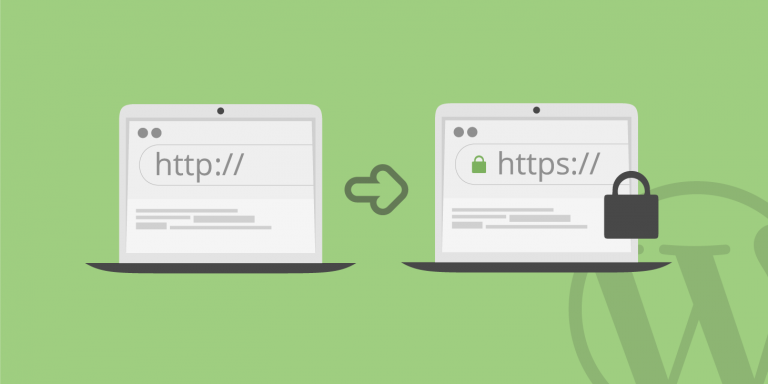
    The latest monitoring shows that about a third of all sites in the world are built on WordPress. But most sites still do not use a secure protocol.

    What is HTTPS for?

    The story takes its beginning when someone in the “corporation of good” decided almost forcibly to make the Internet safer. Good or bad, that’s another story.

    But the fact remains that Google gives preference to sites working over an encrypted protocol. And if you consider that now mobile traffic has long surpassed traffic from a PC, and more than 90% of mobile devices have Google search by default, then recommendations will have to be taken as voluntary-compulsory.


    What does SSL do?

    As the name implies (Secure Sockets Layer), the protocol encrypts all transmitted traffic, the data is relevant for authentication when the username and password are transmitted to the site, how much this protocol is needed for read-only sites, the question is of course controversial.

    Since July 2018, Chrome has marked all HTTP sites as “insecure.”


    How to enable HTTPS in WordPress

    There are a lot of options, but we will consider the most simple, in my opinion.

    Before switching, you first need to get the certificate itself, directly from the hosting control panel and wait until the certificate is installed. The certificate is renewed automatically.

    We make a backup of the entire site, you can do this with the help of special plug-ins, such as Akkeba, or with hosting control panel tools.

    Really Simple SSL is one of the most commonly used plugins for switching HTTP to HTTPS. In addition, it is really a simple plugin, plus support for the Russian language.

    You can download the plugin from here.

    Load and activate the plugin. Go, settings – SSL, the plugin will check the certificate. Go to the update section and update the translation, after which the plugin should be displayed on the “great and mighty.”

    Plugin setup

    Configuring the plug-in is simply disgraceful, the only thing that needs to be done is to turn on the protocol, in the figure it is a green button. Then you have to log in again.

    In some cases, the site may be marked with a yellow lock (mixed content), then you need to go to the settings of the plug-in and enable the correction of mixed content.


    SEO

    Remember that the search engines http://site.ru and https://site.ru are two different resources, so register the site with Yandex Webmaster and Google Webmasters, if you haven’t done it before, and report that the site has moved.

    Make a redirect to the site version in SSL, this can be done in the hosting control panel, in the “Sites” section.

    8 Useful Tools For Developing Projects In PHP

    PHP is one of the most popular and common programming languages. This article contains the most useful tools that are useful to PHP developers.

    1. PHPStorm


    This is an integrated development environment (Integrated development environment, hereinafter IDE) for PHP from JetBrains. The editor has many useful functions, it is great for working with PHP, HTML, and JS, it has automatic refactoring tools for PHP and JS, as well as an auto-completion function. In addition, it can work with SQL and databases.

    The editor is paid but has a 30-day test period. There are special offers: free use for students and teachers, as well as for developers of open-source projects.


    2. XAMPP


    This is a free tool that is easy and simple to install and use. XAMPP is an Apache distribution, which in addition to PHP also contains Perl and MariaDB. So, it is perfect for those who work with this database (previously the distribution came with MySQL). It has an open source code.


    3. Eclipse PDT


    It is an integrated development environment that is freely distributed and suitable for the development of modular cross-platform applications. Initially, Eclipse was used to develop projects in Java, but the special PDT plugin allows you to enable PHP support. Eclipse has all the features you need to develop, such as profiling PHP code, syntax highlighting and unit testing. The only drawback is the resource-intensive environment, which will make it difficult to use it in small projects.


    4. ScriptCase


    ScriptCase RAD (rapid application development – rapid application development) allows you to give a web application in just a few minutes. This is a web-based platform, it can be installed on a server on the Internet. It is a platform for developers, allowing them to use a graphical shell for code generation, which is accessible directly from the browser. Of the minuses – the service is paid (from $ 349 per year), but after installation, there is a test 20-day period.


    5. phpDesigner


    phpDesigner is a processing environment with wide functionality. It has everything for creating and debugging dynamic web projects, including a tool for cleaning and improving PHP code. Also in this IDE, there are built-in editors for HTML5, CSS3 and JS code. Thanks to an intuitive interface, even new users in development can use phpDesigner. The product is commercial but has a test period of 21 days.


    6. Aptana Studio


    Aptana Studio has an amazing amount of features for an open source project. Works on Windows, Mac, and Linux. Thanks to the integrated PHP server and debugging tool, you can integrate other PHP tools here to create and test PHP applications in the same environment.


    7. Code Lobster


    Code Lobster is suitable for those who are looking for a portable IDE option. This development environment can be used as a plugin for one of the popular CMS (WordPress, Joomla, Drupal) or for a popular framework (Symfony, Yii, etc.). Code Lobster is available in two versions – free and paid, which has advanced features.


    8. PhpED


    PhpED is one of the many PHP tools from NuSphere. Apart from PHP 7.1, this editor supports HTML5, CSS3 and JS. Of the interesting features, you can highlight the built-in support for DBG (debugger and profiler for PHP) and the ability to remotely debug PHP scripts. PhpED is also compatible with many other tools from this article.

    Top Features Of iOS 13 That Will Make Your Life Easier

    0

    The following small series gives you a detailed introduction to the most useful new features of iOS 13.

    1. Access Wi-Fi and Bluetooth in the control center

    In previous versions of iOS, in order to connect to other Wi-Fi or Bluetooth connections, you must go to Settings and access the Wi-Fi or Bluetooth settings. In iOS 13, when you press and hold the Wi-Fi or Bluetooth icon, you can now access this feature list through the Control Center.

    2. New extended reply menus and formats in the mail

    In the Stock Mail app, when you reply to an email, you now have a new extended response menu. You can choose to reply and forward, as well as delete. In addition to new emails from this particular contact, you can mute or notify you. Another new feature is formatting text. You can change the font and make the text larger, adjust the alignment and change the color, and add bullets. All of these new features make the mail application even more powerful.


    3. Screenshot of the full page in Safari

    In iOS 13, you can now take a full screenshot of a web page, you can annotate it and save it directly to a file as a PDF, or share it with your contacts using a new shared worksheet window. If you have a keyboard connected, Command + S will also save the entire page as a PDF.


    4. Silent unknown caller

    The new feature in iOS 13 is the ability to mute unknown calls, so when a stranger calls, your phone will automatically mute these calls and send them to voicemail.


    5. Compress and decompress in the file application

    With the new file application, you can also compress and unzip files directly from iOS devices without having to use macOS. Once you are done, you can return these files to your iOS device. For those who use the iPad as productivity and don’t want to download third-party applications for this task, this new feature is very convenient.


    6. New search in the information application

    Inside the message, you have a new way to search within the app. This will give you contact suggestions and links that others have shared with you, as well as the photos they send you.


    7. Pinch and zoom the voice memo

    If you are a user who frequently uses voice memos, you can pinch the Enlarge Voice Memo app, which lets you zoom in on the waveform to help edit your recordings more easily.


    8. Download Manager in Safari

    In iOS 13, when you download files from Safari, you can access the download manager or display a list of the files you downloaded, similar to the ones you got from Safari on macOS. This will sync to the new file application where you can view all downloaded files.


    9. Optimize battery charging

    Optimized battery charging Use machine learning algorithms to learn your daily charging program so that your iPhone can wait for up to 80% to complete charging until you need to use it. If you usually get up at 6 am on weekdays, your iPhone will only charge up to 80% at night, and then it will charge to 100% about 30 minutes before you wake up. This helps protect the battery life because it does not continue to charge to 100%.


    10. Mouse support

    With the accessibility of assisted touch, you can now choose to add a wireless mouse or trackpad to your iOS. You can use it to scroll through documents or web pages and interact with the entire operating system.


    11. Low data mode

    In the Cellular setup, you now have the option to switch between low data modes, which can help the application use fewer data. Apple doesn’t know how you use it, but it pauses background activity when you’re not connected to Wi-Fi.


    12. 3D touch function can also use shortcut operation

    iOS 13 provides us with a clearer picture of Apple’s iPhone support plan for non-three-dimensional touch. In the past, only Peek and Pop were available for iPhone 6s and above. You can now hold down for a short time and access Peek and Pop.


    13. Tactile feedback of face ID

    When you unlock the iPhone, the new feature you can enable under Accessibility in the Face ID is tactile feedback. When the phone verifies your face, a subtle click and touch lets you know that you can swipe your card and unlock it.

    Gadgets That Can Replace The Smartphone

    0

    Do you feel addicted to a smartphone?

    It’s hard to imagine your life without a smartphone today. People have become addicted to this gadget and its absence can cause them to have a panic attack. Excessive dependence on the phone can cause sleep disturbance, causeless anxiety, stress, depression, and a decrease in libido.

    The term “no mobile phobia” appeared – nomophobia, which describes an exciting state and panic in a person who has lost contact with a smartphone. Understanding their vulnerability, people begin to limit themselves in using the phone, delete applications, refuse social networks, set tight time frames.

    However, it is already impossible to completely eliminate gadgets from life: they are too deeply ingrained in our existence. Digital detox – a chance to escape from the stifling grip of technology. At least for a while. While we can still afford it.

    People with phones


    What alternatives to a smartphone can I use?

    Let’s look at four gadgets that can replace a smartphone. There are both already known to you, and completely new. No one denies the great role of smartphones in our lives, but at least you can temporarily limit its use. These devices will help you stay without a smartphone and not feel bad.


    1. Large Button Cell Phone

    Based on statistics, the popularity of large button cell phones grew by 5%, while sales of smartphones increased by only 2%. This can be explained by the fact that many users prefer battery life.

    Surely, many business people prefer that the device for communication more effectively cope with the main task, rather than auxiliary functions: shooting, games, and others. In addition, people want to get rid of dependence on social networks.

    There are several undeniable advantages of a simple large button cell phone over a smartphone. This is cheap, long battery life, but most importantly – freedom from social networks.

    Many people know firsthand how a smartphone kills time. At every free moment, we go online to get news, check email, view new photos on Instagram, chat with virtual friends. We do not notice how we spend on this most important thing – the precious hours of our lives.

    Internet addiction with the advent of smartphones has gained new momentum: if a variety of things make us distract from the computer, then you can use your smartphone almost anywhere and at any time: at night, in transport, at work or during outdoor recreation.

    Many people find it difficult to control themselves. Therefore, as therapy, people with Internet addiction are switching to large button cell phones. And they are surprised to find out how much time has been freed up for a hobby, reading books, communicating with live real friends.


    2. Standalone Smartwatches

    Smartwatch, they are also smart watches – this is an interesting gadget with really great capabilities. The device can be made in a variety of styles – from elegant classics, close to the shape of traditional watches, to all sorts of high-tech variations.

    Smartwatches perform, first of all, the role of assistant for a smartphone – the perfect tandem of two gadgets. However, now there are smartwatches that can replace your smartphone.

    Want to be a modern and fashionable person? Stop depending on your bulky smartphone? Just imagine, you can not take the phone for a run and at the same time be in touch! Behind the wheel, you will not have to use the Bluetooth headset anymore, because a smartwatch with a SIM card will allow you to make and receive calls in one easy movement, even during a trip.

    Standalone smart watches can be used for calls. You will be able to communicate with the other person through the speakerphone, using the palm raised to your ear, or connect a headset via Bluetooth. Some models provide the function of dialing the clock manually.

    But that’s not all. In addition to the main function, smart watches perform many others. For example, a fitness tracker, audio player, alarm clock, and some models are even equipped with cameras.


    3. Palm

    California startup Palm, which owns the exclusive rights to the legendary brand, introduced the device of the same name, designed for fans of compact phones. The gadget is in addition to the smartphone and can do everything the same as a smartwatch – but in a more advanced form.

    Palm looks like a miniature smartphone, but in reality, it is not. The device is running Android 8.1 Oreo with a proprietary user interface, reminiscent of Apple’s watchOS. Instead of the traditional desktop, a Google search and application icons are displayed in a mixed order that you can move as you like. Unlike smartwatches, Palm launches full-fledged versions of applications.

    But the most interesting is the Life Mode, which not only removes messages but also suppresses cellular communication with Wi-Fi. Until the user decides to check what is happening online. American operator Verizon, which has exclusive distribution rights for Palm, does not sell it “alone”: the device is available only as a supplement to the main one, and both share the same number.


    4. Smart Speakers

    Large corporations are doing everything to make smart speakers become the same household appliance as kettles, microwaves or stereos. Life figured out what gadgets are already on the market, and which ones will go on sale very soon.

    Every fourth American bought a smart column home. For example, in the first quarter of 2018, US residents bought as many as 3.5 million Google Home and 2.5 million Amazon Echo, and more than a million Echo Dot columns during the Thanksgiving sales week. Impressive performance.

    Everything is very simple: a clever speaker is a device that hears the user, analyzes his speech and tries to fulfill all the requests of the owner. In fact, the voice assistant from the smartphone is simply transferred to the speaker case, which also plays music, if asked.

    In the future, this is really convenient, because many people are not ready to communicate with a smartphone, but have nothing against talking with a separate gadget that is intended for this. Thus, a smart speaker can replace your smartphone when you are at home.


    Conclusion:

    We reviewed with you 4 gadgets that can replace the phone.

    Try an experiment: replace your smartphone with a large button cell phone for a week: how will your life change? Will it become duller and harder or, on the contrary, simpler and more diverse?

    9 Factors For Selecting The Best Soundbar In Your Budget

    0

    When it comes to buying a soundbar for your TV, you will obviously look for the model that will offer you the best audio. But finding the best isn’t a straightforward process as a lot of considerations come into play that will decide which model you should get. So let’s go through those factors that will guide you to the best soundbar according to your requirements.


    1. Price Range

    Soundbar varies widely in price, and it ranges from standard soundbar under $200 to feature-rich models costing more than $1500. Before moving, you should narrow down your price range before purchasing because it will smooth up your buying process.


    2. Type

    Along with price range, there is too some variation in the type, and it includes all-in-one soundbar, soundbar with subwoofer, passive soundbar, and home theater soundbar. You should type depending upon setup you are planning to couple with your new TV. For a standard upgrade, all-in-one and passive models will be ideal while for surround sound with cinematic experience soundbar with subwoofer and home-theater model would do the justice.


    3. Surround Sound

    Surround sound serves as a big highlight of any soundbar, and it totally immerses you in the movie or audio. You should opt for 5.1 or 7.1.2 channel soundbar as they offer the best surround sound output. You can even opt for 2.0 or 2.1 channel soundbar, but they won’t enchant you with an immersive effect.


    4. Additional Subwoofer

    A soundbar will cradle your ear with good audio, but it won’t deliver a punchy bass that you will yearn while watching a movie or listening to modern music. An inbuilt subwoofer will provide the required bass output, but if you are looking for that extra depth, you need to have an external subwoofer. The better the power and frequency range of the subwoofer, the better will be the output. So depending upon your requirement, you can choose either wired or wireless subwoofer.


    5. Drivers and Frequency Range

    Having adequately sized drivers is a crucial consideration when it comes to buying the best soundbar. A large driver will deliver exceptional audio output as they get more space to produce the sound.

    Never compromise on the frequency range and always hunt for the widest frequency range possible like 50Hz to 20KHz. Also try to opt for a model with an adequate number of drivers like two tweeters, two subwoofers and one subwoofer as they lead to unparalleled audio quality.


    6. Technologies

    First and foremost, look for surround sound technologies like Dolby Atmos, DTS:X, DTS: Surround if your priority is realistic surround output. These technologies not only offer a lifelike faux cinematic output but also adds richness and depth to the sound. Besides, also check whether the soundbar has 3D or surround mode as it will enhance the surround audio effect.

    Dialogue or voice clarity technologies is another aspect that you should keep in mind because they will enhance the voice clarity in the music and movie.

    If you are planning to use your soundbar as a hub then make sure, the soundbar comes with 4K, HDR or 3D pass through as they will retain optimum visual quality. So when you connect a lot of devices to your soundbar, this technology ensures you get the exact 4K, HDR, or 3D visual quality without any degradation.

    Look for Amazon Alexa or Google Home support if you want to transform your room into a smart hub. These smart devices will allow you to control the soundbar with just voice, which will ultimately ease up the usability.


    7. Connections 

    RCA, optical digital cable, and HDMI serve as the primary connection you should have in a soundbar as you will require them to connect different devices. It would be great to have a USB port as it will facilitate USB music play or other connectivity options. Want to stream music wirelessly from your smartphone or other devices? Then check whether it offers Bluetooth or Wi-Fi connection facility.


    8. Size and Design

    Always opt for a model with a sleek design and compact size as it will easily fit around the TV. You won’t love to have a soundbar that is bulky and will occupy a good amount of space around your TV, which will ultimately hinder your decor.


    9. Usability

    A soundbar with well laid out remote control and onboard control will not only offer top-notch functionality but will also ease up the usability. Emphasis on the convenience and usability factor while purchasing a soundbar.