More
    Home Blog Page 63

    Top 4 Content Marketing Trends Ruling The Year 2019

    Content marketing is the most popular form of marketing followed by businesses across various industries. We can say that an entire business runs on only one thing – CONTENT. Though it is important to add here that the ways of spreading this content across various customers are also indispensable to thrive a business; we can say that content plays a chief role. Starting from product brochures, information booklets, newsletters to big advertisements on hoardings, a business needs content to convey information about its offerings to the prospective customers. Just producing content is not important, it is essential to market it to make a business thrive and expand. With the advent of the internet, businesses are increasingly shifting to the online platform and disseminating the content they generate through various methods.

    Every year there are set trends which help your content get maximum reach. Studying the rapidly changing trends, I have arrived at the following content marketing trends which you must follow to stay aggressively competitive in your industry.


    1. Lengthy Content:

    Gone are the days when 500-word content was more than sufficient for a web page. Although it’s certain that visitors don’t go through ALL the content on your blog, it is still important for your blog post to have at least 2000 words to get maximum hits. The reason? Google’s last update focuses chiefly giving importance to meaningful content rather than the content just stuffed with keywords. Keywords will still be important but will not be the only deciding factor in ranking a page. To gain maximum reach, content marketers will have to place keywords meaningfully across the content so that visitors can reach it through the queries they enter in the search text box.

    According to a study, pages with lengthy content were ranked the highest on Google’s search engine results page.
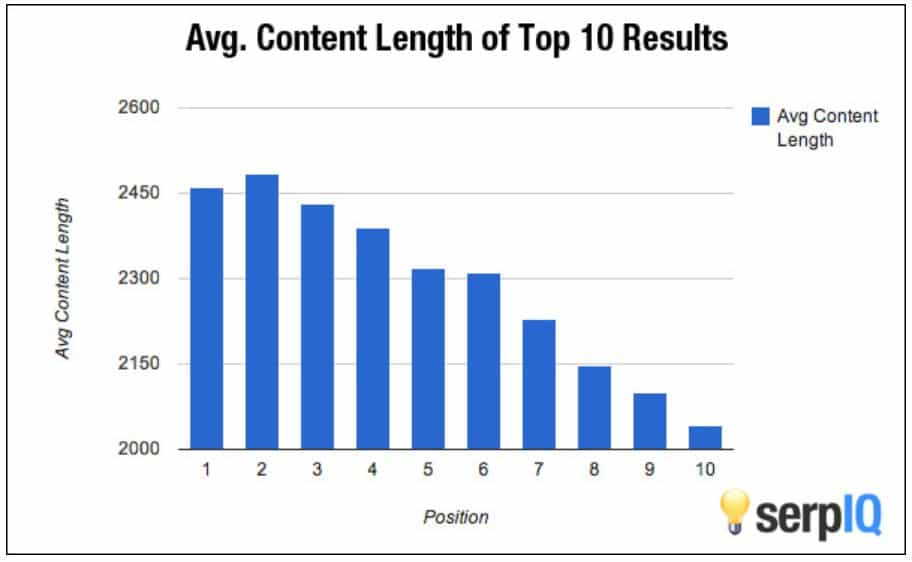
    Content Average Length

    So, if you want your pages to perform well or your blog posts to have a wider reach, then ensure that you keep this content marketing trend in consideration.


    2. Messaging Apps:

    Currently, sales representatives are constantly communicating with customers through messaging apps for personalized interactions and quick resolution of queries. This year we will see that even content marketers will be seen reaching the customer base through these messaging apps. Messaging apps such as Imo, Whatsapp, etc. will be increasingly utilized to distribute content. More and more people are spending time on these apps and due to which these businesses are focusing on distributing their content through the messaging channel. This way it will be possible for businesses to reach right on the fingertip of the customer. Content Marketers will also have to generate succinct yet creative and intelligent posts to reach customers through messaging apps and leave an impact. Over time, these messages can be automated to be sent on specific days of the year.

    Messaging wins over emailing as it has more views and responses compared to emails. Businesses can expect higher engagement and interaction levels with text messages. According to a study by a single point, texts have 99% response rate.

    Text Message

    We can conclude from the above image that the messages reach almost 95% of the viewers just within three minutes. Creating interactive two-way messages or even push notifications can ensure that your messages are actually viewed by customers.

    3. Video Marketing:

    This hot favourite method has increasingly gained popularity off-late. The reason for this is reducing attention spans. A number of forms of videos can be created to capture and engage the attention of the audience. In this age of stressful and busy lifestyles, people hardly have the time and patience; they feel that reading is a drudgery which they want to avoid at all costs. This is why videos have increasingly been gaining importance. They present information in an engaging way which appeals to the users. If apt background music is used in the video, it evokes the right emotions in the minds of the viewers and leads to more number of conversions. Video marketing will continue to be a favourite method of marketing content.

    Following are the forms of videos businesses create and share through various channels to attract more customers.

    1. Product demonstrations
    2. How-To Guides
    3. Presentations
    4. Video blogs (vlogs)
    5. Tutorials
    6. White Board Animations
    7. Q & A videos
    8. Webinars
    9. Funny commercials
    10. Customer testimonials
    11. Interviews
    12. Live streams


    4. Content Clusters:

    One of chief methods of content marketing which is gaining prominence is content clusters. It is a great way for a website to establish its authority over a specific set of topics. It is a technique under which a cluster of content is created around a single topic. Each topic links back to the main topic. Picking up the right topics to create cluster content is very crucial to gain the expected results from this content marketing strategy.

    The main aim of creating cluster content is to spread information about your products or services by writing content related to them. Secondly, writing content clusters helps you establish your authority over those specific topics as viewers can find all the information right at one place.

    With the change in Google’s search algorithm, content clusters have gained more popularity. With Google giving importance to meaningful content rather than just keyword stuffed content, websites have to emphasize more on generating meaningful and well-knit content. Content clusters make it possible to cover a topic in-depth and they also make it possible to explore various topics surrounding a single topic. This is why content clusters will be gaining importance in the year 2019.

    Keeping these trends in mind while launching content marketing campaigns can help you use it in a smart way. Content marketing will continue to evolve with changing Google algorithms, user experiences, evolving technologies, improving lifestyles, and many other factors. The challenge for businesses will be to follow these trends closely and implement them in the right way at the right time to achieve improved outcomes. What content marketing strategy do you think will continue to be in vogue during the year 2019? Please share your experiences in the comment section below.
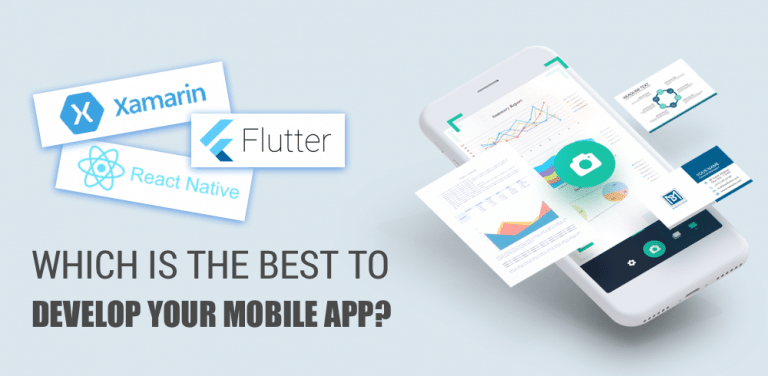

    Xamarin, Flutter or React Native: Which Is Best To Develop Your Mobile App?

    Mobile applications have turned into a fundamental piece of necessities in our everyday lives. The millennial clients today are dependable in a hurry, contingent upon mobiles for each conceivable commitment – be it for making buys, paying service charges, banking, web-based life, and so forth. The rundown is interminable. This has caused organizations to understand that versatile innovation is the method for the future for getting just as holding clients.

    What is Flutter as per mobile application development company?

    It is a free and open source stage. It depends on Dart – a snappy, object-arranged programming language which is anything but difficult to learn. It gives its own specific contraptions, drawn with its own prevalent rendering engine. They are speedy, excellent, and movable


    Pros of Flutter

    • Faster code composing that typically takes seconds and helps groups with including highlights, fixing bugs, and testing quicker
    • Developers need to compose only one codebase which is utilized for applications covering both Android and iOS stages
    • Having a comparable application for two stages implies that it requires less time in testing and the Quality Assurance procedure can be quicker.
    • Simple to make your very own gadgets or tweak existing gadgets, for example, material structure gadgets or Cupertino gadgets.
    • Ideal for MVP since you have to manufacture the application in less time


    Cons of Flutter as per mobile application development company

    • Flutter is still in beta and has not discharged the steady form yet. It is additionally not bolstered by Continuous Integration (CI) stages like Travis or Jenkins. In this manner, so as to accomplish programmed assembling, application testing, and arrangement, your advancement group needs to utilize and keep custom substance.
    • Flutter is completely bolstered by Google and there are a few valuable libraries with functionalities that are prepared to execute. In any case, Flutter is still not in any way that rich regarding local improvement


    Xamarin at a Glance

    In May 2011, Xamarin was propelled and later gained, by Microsoft. Xamarin was planned for keeping an eye on the unavoidable issue of disengaged innovation to energize the local application improvement utilizing its open source stage.


    Pros of Xamarin

    • The structure utilizes C# language that capacities perfectly over a heap of stages (Android, iOS, and Windows)
    • More than 1.4 million designers utilized Xamarin in the primary quarter of 2017, because of its capacity to compose local UI codebase for versatile application improvement
    • If you are building an application when you hire an app developer for numerous stages (like Android, iOS, and so on.) you can share or reuse the greater part of your code in your application for different stages
    • Access to local API: You can get stage explicit functionalities in your application
    • Several controls and formats gave in Xamarin enables a quicker advancement to process
    • Faster application improvement with NuGet and Xamarin modules
    • Used by various understood brands, this cross-stage application improvement system offers aggressiveness in creating extraordinary local application interfaces that effectively beat the constraints of half and half applications


    Cons of Xamarin

    • Xamarin isn’t free and you have to purchase the system as well as its cost. Along these lines, this isn’t at all for new companies or spending imperative organizations
    • Limited access to various imperative libraries for the making of an application utilizing this system
    • User-Interface (UI) advancement is tedious as the center UI creation isn’t mobile
    • Xamarin experiences low network action, which isn’t useful for building up a structure.


    React Native at A Glance

    Exhibited by Facebook in 2015, React Native rose as a cross-stage application advancement innovation since it utilizes JavaScript to assemble a local mobile application.


    Pros of React Native

    • React Native offers different prepared to-apply components that can stimulate the advancement time
    • Hot Reload: You can reload your application rapidly, without recompiling.
    • Direct utilization of local code to upgrade your application to an extraordinary dimension
    • Code sharing on both the stages – iOS and Android
    • Faster application when you hire app developer improvement with pre-fabricated components
    • Access to local functionalities like camera, accelerometer, etc.


    Cons of React Native

    • The route of your versatile application would not be equivalent to a local route. A route structured in React Native isn’t that smooth.
    • Like Xamarin, React Native even allows you to create unrivaled quality applications. Be that as it may, applications worked with React Native are slower than local Android applications worked with Java and local iOS applications worked with Objective-C and Swift.


    Which is better for you?

    To give a clearer picture by react native developers for hire, underneath is an examination guide of their highlights that will enable you to get a thought of these structures with the goal that you can choose the correct system for your business.

    Simplicity of Learning

    Ripple as per react native developers for hire is anything but difficult to learn on the off chance that you know Dart – Google’s item situated programming language. You have to fabricate mobile applications with the assistance of Dart in Flutter. You may imagine that learning another dialect would be tedious, however, all you need is to get a handle on the ideas of this language. Also, on the off chance that you realize different dialects like JavaScript, it will be simple.

    Learning the ideas of React Native is simple on the off chance that you are an accomplished JavaScript designer and you have some React aptitudes. This system is anything but difficult to learn and does not require much exertion but rather needs the information of JavaScript.

    In the event that you know Android, it is simpler to get a handle on Xamarin in light of the fact that numerous things are indistinguishable and C# is fundamentally the same as Java. Xamarin can empower you to set aside to 70% of the advancement chip away at a second mobile stage by reusing code.

    While building a versatile application with Flutter, you don’t need to think about speed as the system will give you the exhibition that will satisfy clients. React Native ideas close local exhibitions.

    Along these lines, on the off chance that you are building a mobile application by mobile development solutions with this system, your application will be too brisk. In addition, applications which are worked in Xamarin will give you better execution and will always improve to coordinate the principles of local advancement. With the assistance of Xamarin, iOS and Android applications can be completely local applications by exploiting each stage. It is very comparative on the off chance that you are building local mobile applications with Xamarin.


    Conclusion

    These three systems used by mobile development solutions are incredible for creating effective mobile applications. Be that as it may, it’s actually difficult to state which one is better. All you require is to clearly understand which system would be an ideal choice for your business. Some give importance towards coding in React Native while others like Flutter and a couple consider Xamarin.

    Blogging Requires An Unhealthy Lack of Physical Activity

    0

    Speaking from personal experience, I can attest to the fact that blogging, writing, or running a website for any length of a time requires you to sit at more or less motionless at a desk for extended periods of time. Your back will start hurting, your butt gets sore, and your eyes burn from too much time spent staring at a computer screen. You need to do it in order to do your job, but the lack of physical activity isn’t good for your body or your mental health.

    Researchers at the University of Wisconsin in Green Bay have come up with a two-page Computer Workstation Ergonomic Self-Assessment you can take to determine what actions you need to take to reduce the stress and strain on your body. It will also help reduce the odds that you’ll develop some kind of musculoskeletal disorder.

    Simple Steps

    There are 16 very simple steps you can take to improve your skills and one of them is to take breaks. Sitting motionless for hours on end will wear you down in no time. You need a break to relax your mind and re-charge your batteries. After you complete each task on your to-do list, get up and take a 15-20 minute break.

    Go outside, take a walk, windmill your arms, drink some coffee, splash water on your face, talk to a co-worker; do anything except to continue sitting at your desk staring at the monitor.

    There are some fortunate people who make money travel blogging, that is, they get paid to travel and write about the places they visit. Their job, by definition, requires them to get up and move around. Great! But for the rest of us, there needs to be another answer.

    There is.

    Adjustable Desks

    Desks from HADO (Height Adjustable Desks Online) are available in electrical models, hand-cranked ones, and gravity adjustments. The height of these desks can be adjusted for use when you’re sitting down or standing. They can also be adjusted to accommodate different chair heights. You can even move them up or down so you can sit on a bar stool.

    Benefits

    There are benefits to using a standing desk or adjustable desk. We’ll examine them one by one.

    ● Weight

    People gain weight because they eat (or drink) more calories than they burn during the day. When you turn the equation around and burn more calories than you eat or drink, you lose weight. Simple.

    Exercise is the best way to burn calories, but did you know that you burn an extra 170 calories in an afternoon by standing instead of sitting? That works out to more than 800 calories a week burned off, just by standing instead of sitting – in the afternoon! You can still sit in the morning and lose weight this way. Pretty impressive.

    ● Blood Sugar

    Your blood sugar spikes after you eat a meal, but it spikes even more if you’re sitting instead of standing or walking around.

    Researchers studied small groups of office workers and discovered that the group who stood for 180 minutes after lunch reduced their blood sugar by 43% compared to the group who sat down for 180 minutes.

    By the way, the steps the two groups walked in the afternoon – going to the printer, bathroom breaks, etc. – were the same, proving it was the standing that created the difference in their blood sugar.

    ● Heart Disease

    It’s been known since 1953 that standing lowers your chance of developing heart problems. Since then research has shown that excess sitting can increase your risk of heart disease by over 145%. That’s a big jump just because you’re sitting on your rear end all day.

    ● Back Pain

    We already mentioned back pain from too much sitting. It’s one of the most common complaints from office workers. The CDC (Centers for Disease Control) found in one study that using a height adjustable desk for a little as four weeks reduced back and neck pain in the participants by 54%.

    Other studies support the CDC’s conclusions, demonstrating that standing at your desk instead of sitting can decrease chronic back pain.

    ● Mood

    Finally, our physical well-being is heavily influenced by height-adjustable desks. Studies have shown that people who use them report significantly less stress and fatigue than their counterparts in the studies who remained sitting all day.

    The study reported that 87% of those who stood during the day reported feeling better and more energetic throughout the whole day, which allowed them to get more done.

    Be a Pro in Web Component Grid In a Few Minutes

    Web components are a suite of web platform API’s that consists of three main technologies, HTML templates, Javascript APIs and shadow Dom. These technologies make it easier to create reusable HTML tags, which can be used to develop web pages and Web Apps. These components save the substantial time of developers because while developing websites they have to use similar elements on multiple pages and they can do so with these re-usable components much easily and quickly. In this article, I will elaborate, how in just 5 minutes one can get started with HTML web component grid.


    What is a Smart Grid?

    Through smart grid, data can be grouped into columns and rows. The latest release of smart HTML elements consists of various features like scrolling, paging, sorting, and infinite scrolling.

    smart_grid


    Installation:

    Installing the latest version of HTML web components is very easy. You can find commands for installing any element by referring its READ ME. Today, most of the web components can easily be installed using NPM.

    If you want to use NPM, type following commands to install web components.

    npm i@smartelements/smart-core (This command is for core version source file)

    npm i@smartelements/smart-elements (This command is for commercial version source file)

    npm i@smartelements/smart-elements (This command is for a library to develop custom elements)


    Folder Structure:

    The folder structure of the web component grid requires 3 files; CSS, JS, and HTML.

    Integration of HTML files with smart grid:

    The HTML files can be integrated with the smart grid by using DIV tag. The HTML DIV Element with id=Grid can be used to create a web component. The index. Js file is a javascript module, where Grid web component will be created within a function”init”.By calling the smart grid function and passing the first argument as the id of the DIV tag and second argument as initialization with grid web, the DIV tag is replaced with a smart grid tag.

    <! DOCTYPE html>

    <html xmlns=”http://www.w3.org/1999/xhtml”>

    <head>

    <title>Grid Lazy Load Demo</title>

    <meta http-equiv=”X-UA-Compatible” content=”IE=edge” />

    <meta http-equiv=”Content-Type” content=”text/html; charset=utf-8″ />

    <meta name=”viewport” content=”width=device-width, initial-scale=1.0, maximum-scale=1.0″ />

    <link rel=”stylesheet” type=”text/css” href=”../../../source/styles/smart.default.css” />

    <link rel=”stylesheet” type=”text/css” href=”../../../styles/demos.css” />

    <link rel=”stylesheet” type=”text/css” href=”../../../styles/common.css” />

    <link rel=”stylesheet” type=”text/css” href=”styles.css” />

    <script type=”text/JavaScript” src=”../../../scripts/common.js”></script>

    <script type=”text/JavaScript” src=”https://cdnjs.cloudflare.com/ajax/libs/webcomponentsjs/1.2.0/webcomponents-lite.js”></script>

    <script type=”module” src=”index.js”>

    </script>

    </head>

    <body>

    <div id=”grid”></div>

    </body>

    </html>


    Styling:

    Styling of a web component can be done along with the styling of the rest of your website. You can apply CSS styling to the Grid. The following two files are responsible for styling:

    Smart.base.CSS: These file styles layouts like the width of border and margin etc.

    Smart. (Theme name).CSS: The HTML elements colour, background, and font, etc. can be applied using these files. While styling the web component, the smart.base.CSS file must always precede the theme name.CSS file.

    A single HTML element can be styled uniquely with an inline CSS. The following example changes the text colour of h1 to blue.


    Example

    <h1 style=”color: blue ;”> this is a Blue Heading</h1>


    For a full HTML page, a style can be defined using internal CSS.

    <!DOCTYPE html>
    <html>
    <head>
    <style>
    body {background-color: powderblue;}
    h1   {color: blue;}
    p    {color: red;}
    </style>
    </head>
    <body>

    <h1>This is a heading</h1>
    <p>This is a paragraph.</p>

    </body>
    </html>


    Grid Component’s features:

    The Grid has very useful features like cell editing, pagination, and live updates. Besides, 100,000 columns and 50,000 rows can be automatically loaded. I will discuss some of these features:


    Cell Editing:

    If you are editing data like spreadsheets you will need cell editors. Editing in a cell can be performed in run time and the simplest way to enable editing is to set colDef.editable as true.


    Live updates:

    You can have updates after every second. You only need to set the interval (may be set in milliseconds) and the data will be updated accordingly.


    Pagination:

    This is an essential property of a web component grid and can be enabled by setting pagination as true. You will have to set other properties like visibility and page size and page index too.

    pagination


    Practical application of grid features:

    Besides some features discussed above, there are many other useful features like filtering, sorting, scrolling, and data catching, etc. You can create great functional websites or applications for your clients using various features available in the web component grid.

    Talking about practical applications of grid features, let’s take the example of coupon discounts, a very hot favourite of current retail business scenario. Using these features you can develop a coupon site of your own, sharing the latest deals with your visitors. Alternatively, you can design catchy mobile phone couponing apps for your clients. With amazing features, the web component grid offers to application builders, the sky is the limit for your creative genius.


    Wrap Up:

    The smart HTML elements and web components can be used in any framework. The technologies are emerging and are compatible with PC and mobile phone. These help you develop eye-catching and responsive web apps. This handy guide suggests simple steps for getting started with web component grid in just 5 minutes. Start exploring the opportunities to enhance your websites by making them more functional.

    4 Triggers That Will Tempt The Readers To Share Your Content

    0


    Apparently, one of the biggest frustrations concerning content marketers is adding the elements that make their content highly shareable. Also known as “share triggers”, experienced and smart content marketers use such elements in their blog posts to register numerous shares from their audience.

    Here are the major triggers that should tempt readers to wildly share their content.


    Information gaps to ignite curiosity

    According to a study by Carnegie Mellon University, people normally consume and share content that clears particularly unknown topics. The research also talks about the information gaps, strong motivators that encourage people to acquire clarity regarding a topic.

    In short, filling information gaps makes people avidly read and share your content like never before.

    The idea of identifying and enlightening the information gaps is to ignite that emotional curiosity, later getting rewarded in terms of many shares across the web.

    Consider an example of an information gap in the “Basics of Facebook Ad Targeting”.

    Around 99% of marketers fall into the trap of detailed targeting and custom audiences and are unaware of it. We’ll talk more about it later and learn how to avoid it.

    Now, this is a common example of an information gap that readers most probably won’t know about, but will learn about it in detail later in the article, guide, etc.


    Create a memorable piece

    Around a staggering 2.4 million blog posts are published each day. And what is your chance to make your piece stand out from this ocean of content out there and register social shares?

    While a memorable content makes a lasting memory in the minds of your readers.

    However, easier said than done. One of the best techniques is the zig-zag method which explains that when everything else zigs, you zag.

    The content we publish either goes against popular opinion or a particular topic is examined from a different perspective unlike previously explored. Remember, it’s not about writing a piece that is obligated to beat the world, it just has to zag.

    Consider the example of the SEO industry. It is commonly believed that web traffic, brand recognition, and some quality backlinks can be achieved through guest blogging, i.e., posting articles on third-party blogs.

    According to Tim Suolo, guest blogging isn’t as effective as people normally consider. Obviously, the article gathered the attention of numerous SEO professionals, hence, registered regular shares and backlinks.

    In other words, Tim zagged when everyone else was busy zigging. However, be sure to back your counterargument with credible data, as Tim used in his article.


    Great content design

    Great content design is one of the most underrated aspects of content sharing. When people first visit the landing page on your website, they’ll be subconsciously inspecting the content design through micro-impressions.

    Putting it simply, an attractive content design assists readers in deciding whether they should stay or leave, presents perceived value, and influences their motivation to link or share it across their network.

    Using quality infographics is a great way to enhance the content appeal on your website. Furthermore, the colour changes should also be kept to the minimum and consistent throughout the content piece or blog.

    Another important thing to note is that your content should be designed for skim readers. Nobody likes to read a long wall of text, but the writer should smartly breakdown the content in bite-sized chunks with appropriate headings, subheadings, quotes from SMEs, and visual content to make it more presentable.


    Relevant content utility

    The content utility is about creating actionable content that gives readers more of practical, how-to steps rather than plain introductory information found elsewhere. Try to write more through worksheets, checklists, step-by-step recipes, free online tools, and related ways.

    But why does content utility holds an utter significance for sharing?

    As we know, the internet is flooding with millions of blogs, forums, and articles at each second, and a typical descriptive blog is another boring piece that a reader will find at almost every link on Google’s search results.

    The prospect is to provide some valuable advice or steps, something that educates your readers to become a better learner, cook, teacher, digital marketer, data scientist, or any other profession you’re writing about.

    Consider the example of top blogs such as Content Marketing Institute, Smartinsights, SEMrush, etc. Such platforms only accept quality articles that talk about actionable tips, “how-to” articles, or step-by-step processes, rather than simple listicles.

    Nevertheless, the primary objective is to make the content popular enough to get as many shares as possible.

    Amazon Echo Input Review: Add Alexa To Any Speaker

    0

    With the rise in the use of smart home appliances, every manufacturer is putting a lot of effort into making more affordable smart speakers. Since Amazon holds a majority of the market when it comes to smart speakers, they were likely going to be the first in line to manufacture something like this new more affordable and portable “smart -not a speaker” Amazon Echo Input. So, here’s our review for the newest and tiniest smart “not a speaker” by Amazon.


    Amazon Echo Input Review

    Amazon Echo Input Review

    The Amazon Echo Input is clearly not a speaker like the Echo dot instead it is a device built to make any stereo speaker of your choice into a smart home assistant. So? Yes, now you can use the high-quality speaker you once only used for music streaming with Alexa always around.


    Design

    The Amazon Echo Input is a mingy little round disc that can be hard to notice without your lenses. The Echo Input has two buttons on top, one that can mute the four microphones used to give the voice “input” to Alexa and the other that will manually trigger Alexa without using any wake-up voice commands. Unlike its older siblings, the Echo Input doesn’t have any glowing ring of LED’s on its surface instead this mingy little round disc has a single mingy little LED dot. The LED dot on the top shows a blue light whenever Alexa is enabled or giving output and a red light whenever there is trouble in connecting with the speaker. For charging and wired connection with the speaker, a USB to micro-USB port and a 3.5mm output port are given on the side of the device. You can easily buy this device online using Paytm Mall Cashback with great deals.

    All in all, the Echo Input has a really low-cost design with plastic all over the place and no signs of fabric.

    Features

    The Echo Input, however small works almost exactly like its other elder siblings do. It consists of the same mic array as the Echo Dot. Since these appliances lack an otherwise highly conventional visual interface for inputs, the Alexa app does most of the work in the absence of an interface, however, the lack of an interface is not much noticed since most of the work is done through voice commands. You can connect the EchoInput with your desired speaker via using Bluetooth or a 3.5mm cable, there is no optical output or RCA but we have to consider the fact that this is a budget device. The Bluetooth connectivity of the Echo Input and the connected speaker works just fine when in the same room.


    Performance

    The Echo Input does most of the things flawlessly just like its elder siblings but lack of an in-built speaker does have its demerits. Alexa in the Echo input is always listening to meaning that it is always ready for your input command however some stereo speakers have a tendency to turn themselves off after some time if no input is given, the Alexa app does have a solution to this problem where it will alert you on your phone if it feels like the connection is lost or the speaker has been turned off but still the app doesn’t always work. In terms of performance better options available in the market and one can buy those using Mobikwik Promo Code with great offers.


    Sound

    The sound quality of the device depends highly on the speaker that is giving the output, however comparing your normal output speaker connected with your phone or any other device against your normal output speaker connected with the Echo Input, the one with the Echo Input tends to give out a slightly low volume output. The price the Echo Input is available for in the market makes up for all the other downfalls this device has.


    Price and Availability

    The Echo Input is available right now in two colours white and black, with a retail price of ₹2,999/ £19.99on Amazon. The price of the Echo Input is almost around 30 to 40 per cent less than the price of the Echo dot, depending on your location. The low price means a cheaper design and builds quality, the price and the functionality of the device seems right as the majority of the people purchasing this device will mostly be using it as an addition for their speakers or for experiencing Alexa without spending much of their fortune.


    Verdict

    The Echo Input is a rather small and cost-efficient device the production of which can be considered as a smart move made by Amazon. However, we feel like there’s more room for improvement even in this price bracket. With minimal or no Bluetooth connectivity issues (none if you’re just using the 3.5mm output) the Amazon Echo Input is a really useful device if you’re looking to turn your old speaker into a smart speaker.

    Our suggestion: The Amazon Echo Input is for you if you’re just looking for an additional device for your speaker, however, if you’re purchasing it just for the purpose of using Alexa, we suggest you put some extra money and go for the Amazon Echo Dot instead.

    Blogging Trends To Keep You On Top In 2022

    Blogging is one of the most common online activities that attract both amateur writers and highly proficient writing professionals. Millions of digital contributors are active on the Internet, covering almost every topic you can imagine – from lifestyle to nuclear physics, you can find it all online.

    However, this also means that it’s very challenging to get the foot in the door and become a distinguished blogger. It takes a genuine expert to keep creating attractive blog posts week after week and constantly rank high in search engine results.

    You just have to follow the latest principles of digital writing in order to become a key opinion leader in your niche. If this is your goal, keep reading our post to learn seven blogging trends that can help you reach the top in 2022.

    1. Write Long-Form Articles

    In case you haven’t noticed, blog posts are getting longer and more analytical. In the sea of articles, you can only distinguish yourself by publishing long-form content that covers a specific topic from all points of view.

    A study reveals that the ideal length of a blog post is approximately 1.6 thousand words. It doesn’t mean that every article has to reach the same word count, but it is definitely better to show readers that you take things seriously and write all-encompassing posts.

    For instance, Backlinko is one of the most popular blogs dedicated to digital marketing because they publish highly comprehensive studies. Instead of creating short and ephemeral content every day, they make large articles once or twice a month and generate thousands of likes, shares, and comments.

    1. Add Multimedia Formats

    A blog is a textual medium and it must rely on written content primarily. However, you can add a little spice to it by using multimedia formats such as images, infographics, animations, or videos.

    Jake Gardner, a member of the writing service team in charge of digital marketing, says these elements can only augment and improve an article: “The point is not to burden your posts with tons of photos or videos, but rather to position those components strategically in order to support textual statements.”

    YouTube is filled with amazing videos that you can embed in your articles, while a tool like Canva allows even beginner-level designers to create outstanding visuals for their websites.

    1. SEO Is Still a Big Thing

    If you believe SEO is not a big thing in 2022, just check out this stat – 93% of all traffic comes from a search engine. To put it simply, optimizing your content the best way you can is still the basic precondition for a successful blog.

    It all begins with keywords, so make sure to find the most relevant search phrases and their synonyms for each topic individually. Lots of apps and programs can help you with this, including Google Keyword Planner and WordStream’s Keyword Tool.

    You also need to take care of metadata, particularly the following elements:

    • Title tag: It’s the first thing a user sees in engine results, so you have to make it perfect.

    • Meta description: This part of the text is placed below a title tag and it must be concise and keyword-rich.

    • Alt tag: If you want search engines to recognize your images, don’t forget to write alternative text tags.

    1. Increase Page Load Speed

    Internet users are spoiled and they demand nothing but maximum efficiency. A typical website visitor expects a page to load in less than three seconds, which means you need to increase load speed and make your blog super-fast.

    As always, there are many online platforms that can assist you in improving your website. One of those tools is Pingdom, a simple program that analyzes page load speed and gives recommendations on how to improve it. You only need to enter a URL to the search box and Pingdom will quickly display the result along with the corresponding instructions.

    1. Use Tools to Ensure Quality

    Writing a high-quality post is difficult, but doing the same thing all over again is a different kind of challenge. Most authors are struggling to maintain the same level of quality in the long run, which is why they rely on digital tools to simplify the process.

    It’s pretty much impossible to discuss every tool there is, but we do need to mention a few basic options:

    • Grammarly: Content creators must know Grammarly, the most popular proofreading plugin globally.

    • Assignment Help: A team of professional authors can give you valuable content suggestions or even help you to write the entire article.

    • Headline Analyzer: Titles attract readers and CoSchedule built a platform to help you create better headlines.

    • Evernote: If idea generation is your pain point, then make sure to try Evernote.

    1. Don’t Neglect Email Newsletters

    Emails are an ancient digital marketing technique that still drives engagement and inspires subscribers to take action. A study reveals that marketers who invest $1 in email campaigns gain $32 in return. In such circumstances, you simply cannot afford to neglect email newsletters as the means to promote your blog.

    Do it consistently and create a schedule of activities. The best solution is to send newsletters weekly because it’s frequent enough and it doesn’t burden recipients too much. This is the easiest way to approach fans who don’t visit your blog regularly and build stronger relationships with potential customers.

    1. Always Include a CTA

    Speaking of customers, this tip directly affects the conversion potential of your blog. You can write the best article ever but it won’t matter unless you include a call to action (CTA). It’s the only way to keep the audience tied to your blog and give them a concrete task after reading. A lot of options are possible here:

    • Invite users to subscribe to your newsletter.

    • Encourage people to read another post.

    • Ask them to like, share, or comment on your article.

    • Suggest them to download an eBook or an infographic.

    • Convince them to buy a product in case you are selling something.

    Conclusion

    Blogging is the oldest content creation model in the digital universe, but it still keeps changing after all those years. Only the most flexible and creative authors are able to stay on top for a long time, so you have to follow the state of the art tactics in order to keep pace with the best bloggers.

    In this article, we showed you seven blogging trends that could help you reach the top in 2022. Keep them in mind and use them in your everyday work – they can make you a genuine start of the blogging world.

    Content Marketing Tools for Writing Attractive Blog Posts

    If you do content marketing, chances are that you know how important it is to automate everything you can to speed up your work. To share an article on a blog, for example, you have to write a text, headline, meta title, meta description, then proofread, optimize for Google, include call to actions, insert relevant visuals (which are often created from scratch, too), and do many other things to make sure that the piece contributes to the goals of your content marketing strategy.

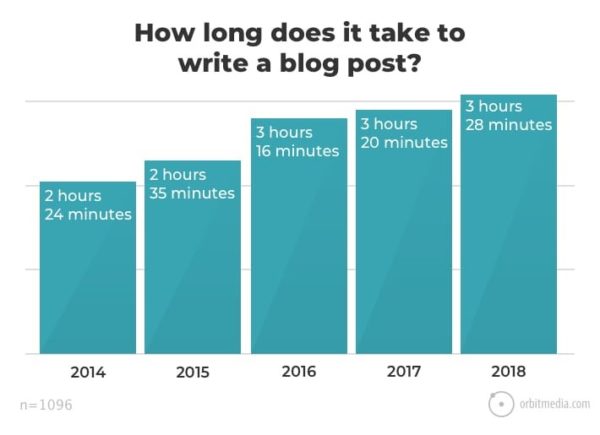
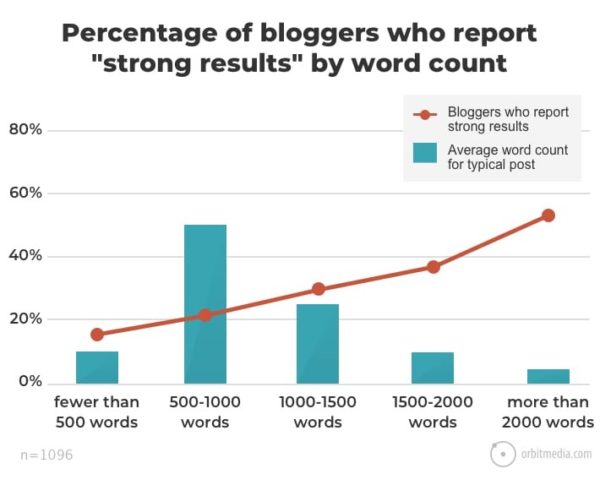
    In fact, a recent OrbitMedia survey shows that blog writers spend about 3 hours and 28 minutes just for writing, and the amount of time it takes to complete this task has been steadily increasing.


    For many content producers, automation of tasks has become a necessity to reduce the time they spend on repetitive – as well as some creative – tasks, and do more.

    Fortunately, one can automate a lot of content marketing tasks and have more time for other important things. In this article, let’s explore HOW MANY super helpful content marketing tools that both beginners and experienced marketers, as well as content producers, can use to complete blog posts.

    Tools to Make Better Titles

    The first thing that readers see is the headline, so having an attractive headline is a must to attract their attention. Besides, there’s a lot of creative work that needs to be done, and you can use tools for that.


    1. BuzzSumo

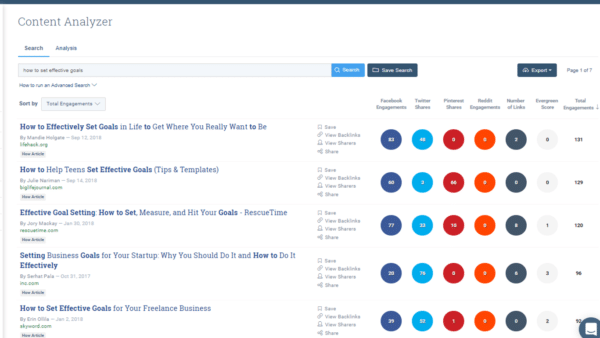
    The first tool on our list is a content discovery tool that allows finding the most popular blog articles based on the number of times they were shared on social media. This could be helpful to content producers who write a lot of content and sometimes struggle with coming up with topics.

    For example, by using Buzzsumo, a content writer can determine trending topics and provide their own perspective on them; as the result, it may become possible for them to get some of the traffic related to the keywords used to describe those popular topics.


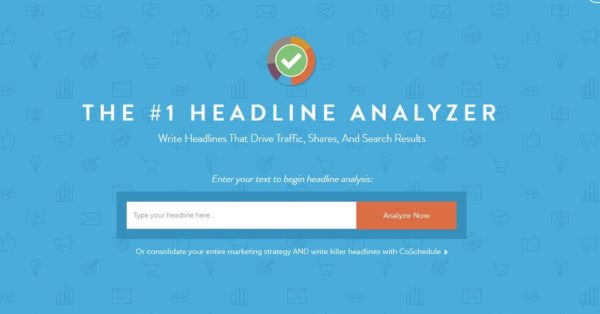
    1. Headline Analyzer

    If you’re unsure whether a headline you came up with is worth using, feel free to analyze it with this free tool. Just input the headline, and you’ll get a detailed report that can help you make a better decision.

    The list of the sections in the report includes:

    • Headline score, based on the analysis of the overall readability, grammar, structure, word balance, sentiment check, and word choice
    • Headline type. For example, you can discover that your headline is generic, i.e. the one that has a low chance of helping you to get a lot of shares
    • Tips from CoSchedule blog based on the analysis of the headline that you created (if necessary)
    • Headline length analysis based on character and word length
    • Keyword analysis
    • Google search preview.


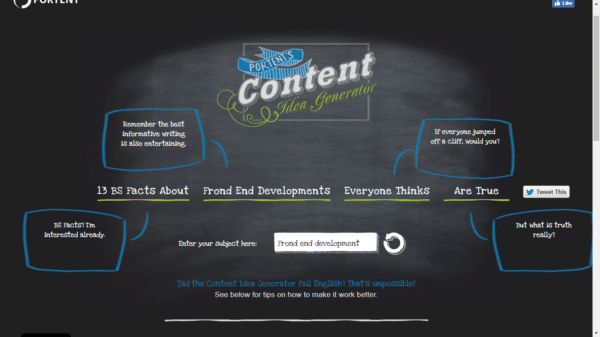
    1. Portent’s Content Idea Generator

    This one can help you to create various versions for headlines so you can select one that has the best chance of attracting the attention of your readers. All you have to do is to provide the keywords you’d like to target, and the tool will generate options.

    For example, here’s one of the options I’ve got for “Front End Development.”

    So if you have to generate a quick title for a blog post, feel free to try this tool to get some options for inspiration.

    Tools to Improve Your Writing


    1. Hemingway Editor

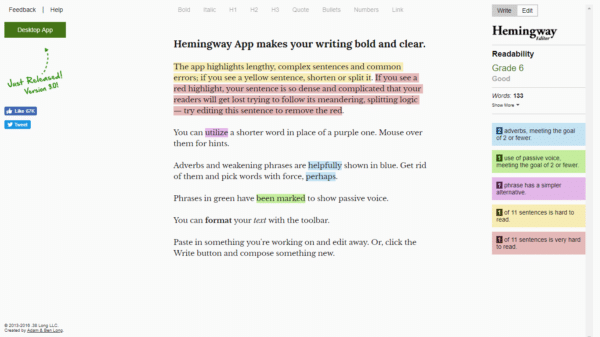
    If you’re having some trouble with increasing the readability of your blog content, take a look at Hemingway. According to the developers of this tool, their main task was to help writers to make their copy clearer and easier to read, and the tool achieves that by identifying complex sentences, passive voice overuse, complicated words, and proposing simple alternatives for complex phrases.

    “Hemingway Editor is an ideal option for me because it’s so easy to use and gives good suggestions to improve my text,” explains Mark Greenberg, a content writer from Studicus.com. “Even though you may not want to write exactly how Hemingway tells you, chances are that your writing will still benefit a lot from it.”

    To help you with assessing the quality of your text, Hemingway Editor generates an automatic readability score from 0 to 15. The tool also allows to use it as a word processor, so you can type your text directly in the app’s window and get instant tips. Basic formatting options such as headlines, bullet points, links, and bolding are available as well.


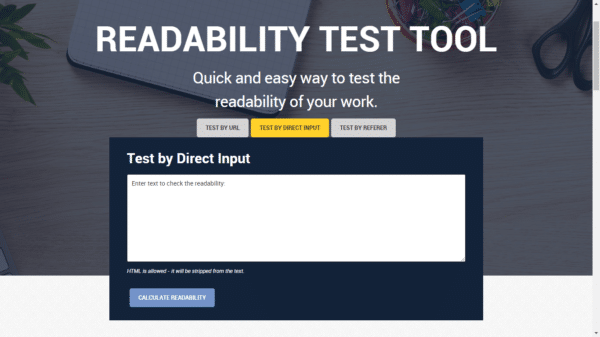
    1. Readability Test

    Another way to check the readability of your text is to use this tool. You can paste your text in the editor’s window or just insert a URL with it and get a detailed report on your writing.

    Checking is really quick but you get such helpful stats as average sentence length, passive voice overuse, percentage of complex words, and more.


    1. Wolfram Alpha

    Blogs that give readers expert-level answers are often the ones that perform the best. That’s why long-form content is popular; in fact, the above mentioned OrbitMedia research confirmed that bloggers who write detailed, long-form pieces of content (ranging from 1,000 words and higher) get positive results.


    However, to be able to write expert-level blog articles, you need to have a reliable source of information to support and help your research. So, if you’re thinking of writing about something that’s not easy to answer without professional knowledge, Wolfram Alpha could be helpful to you.

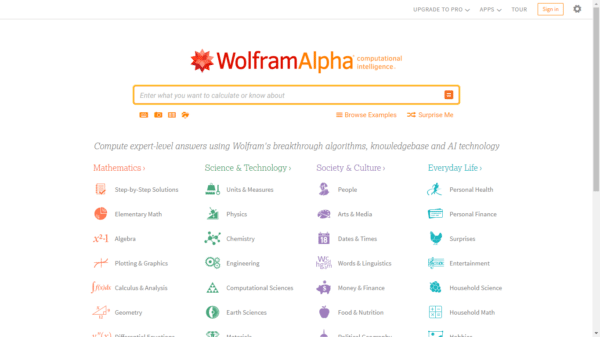
    This tool was designed to generate specific, reliable data and information about pretty much everything in different contexts. This means that if you need to research a concept, an object, a theory, a person, an event, or a fictional character – Wolfram Alpha will be able to generate the information that you could use for your articles to improve credibility and quality of your tips for readers.

    Wolfram Alpha is completely free and generates lots of information within seconds, and could be a great tool for your content research.


    Conclusion

    As you can see, you can use online tools to automate a lot of content marketing-related tasks, including headline creation, text proofreading and editing, readability analysis, and more. Hopefully, these tools will help you to speed up your content effort and produce more quality blog posts to attract more traffic.


    3 Best iOS and Android Entertainment Apps

    Mobile devices make it possible to carry various types of offline and online entertainment anywhere you go. This review is about 3 apps of the top-rated services that allow you to consume, create, and share content.


    Netflix app

    We love Netflix app at Freepps.top as it allows to stream and download content by one of the most prolific series and movie productions in the world. It’s also a huge source of popular TV-shows and thousands of Hollywood and world movies. All titles become available for downloading immediately after premier broadcasting.

    This wide range of features is available for surprisingly reasonable prices. There are 3 subscription options that provide you with access to the entire content library on up to 4 devices in HD, Full HD, and 4K. Up to 37% of the total US bandwidth is used by Netflix users in peak-time periods, which is much more than Hulu, Amazon, HBO, YouTube, and Google Movies have ever had.

    One app allows you to hold several accounts on a single subscription. For example, you can create an adult account for yourself and lock it to hide mature content from your child. At the same time, there’s a basic kid-account option that includes suggestions with top-rated cartoons and children movies.

    Netflix app is technologically ahead of its competitors as well. If you decide to watch the whole season of your favourite show, just play the first episode. The rest will launch automatically without any interruptions for loading. Unlike other apps, it also offers an adaptive resolution algorithm. It scales stream resolution automatically when the quality of signal changes.


    Dubsmash app

    This entertainment service is based on the idea of lip-synching that became widely used in social networks over the past few years. To make a lip-sync video, you have to repeat the words or sounds from an audio sample to match it with your lips and mimics.

    The app provides you with access to a vast library of famous audio samples from movies, series, video games, trending vines, and music tracks. You can pick up whatever you want and make selfie videos where you act like your favourite star or anyone else. The results are usually hilarious! You can save them for yourself, share in messengers, or post in social networks.

    Dubsmash has a simple built-in video editor. It allows you to fix the final video by dragging the audio to achieve a perfect match. Besides, you can add various graphic elements, such as emojis, AR masks, funny stickers, GIFs and text. There are thousands of items and to find the wanted ones you have to type keywords in the search. The same principle works in the sound library.


    YouTube app

    YouTube app is a mobile client of the world’s biggest video hosting. This web environment allows you to become a member of the creative YouTube society and start posting videos of any kind for free to share them with over 1,3 billion users.

    Using this app, you can upload clips to the platform, edit online, and submit them without restrictions. The editor allows you to add graphics and sounds (royalty free library is available), cut, place advertisements, create subtitles, and more.

    If you prefer watching, then YouTube app allows you to watch any videos by authorized creators online for free. They post over 300 new videos in different categories per minute, so it’s impossible not to find something to watch. If you already have a YouTube account, you can sign in to synchronize your activity history. It includes automatic bookmarks, likes, recently viewed titles, subscriptions, notifications and other data to keep you updated across all devices.


    Conclusion

    These 3 entertainment services proved to be among the most demanded apps and will surely stay there for years. Netflix is the best streaming service for series and movies, Dubsmash is an inexhaustible source of gags, and YouTube is a place where all user-created videos in the world are stored.

    How SEO Marketing Can Impact Your Bottom Line

    At the end of the day, a business owner wants to see a high, positive number in the bottom line of its’ balance sheet. Otherwise, somewhere along with the company’s business operations, certain processes are underperforming and therefore need to be optimized to gain more revenue. More often than not, this underperformance is due to the business’ lack of interaction with their customers

    To be able to expand a business’ reach and attract prospect partners and customers, it is important to take advantage of the available online platforms. In today’s digital trend where most people spend a big chunk of their time on the internet, businesses are strongly encouraged to set up a professional website and create social media accounts to establish their online presence. These platforms should be able to clearly present a brand’s expertise and offers.

    event marketing

    However, this effort would not be able to achieve satisfactory results if potential customers and business partners find it troublesome to navigate through the internet in order to find businesses. A company should, therefore, achieve a prominent position in the search engine results when people search for businesses catering to their needs.

    A website’s searchability can be improved through search engine optimization (SEO) marketing – the process of acquiring traffic from search results of search engines. Optimizing websites for search engines are done primarily through adding keywords, H1 tags, title and meta descriptions, and image alt tags that are relevant to the business. Consequently, site traffic would rise since search results would readily reflect the most relevant business related to the searchers’ inquiry. In addition, average online searchers would less likely click on other links beyond the first page, therefore it is necessary for a company’s website to appear at the top finds for search engines.

    Being the top result for searches also increases a company’s credibility. People generally trust the first few links presented to them by search engine websites. As previously mentioned, these websites show search results which they consider as most relevant to the people’s search queries. With this in mind, a potential customer would perceive these businesses as authentic and dependable. A good public perception gives a business a higher competitive ground in the industry it belongs to.

    There is a very large number of people utilizing search engines every day. With Search Engine Marketing, a generally consistent influx of new leads and customers is guaranteed. Since these prospect clients’ first interaction with businesses would through their websites, the overall website design should be functional and professional enough so as to encourage visitors to explore and learn more about the business. By presenting easily understandable information with carefully targeted offers, customers are conveniently assisted in their buying journey. If searchers are interested in the website’s design and the types of products and services offered, then there is an increased possibility of engaging customers that would turn out to be potential business partners.

    The main goal of SEO is to generate leads for businesses. In the long run, this effort aims to expand customer base and establish new key business relationships. Through SEO marketing, businesses are more than likely to positively impact their bottom line and generate abundant returns.