More
    Home Blog Page 175

    Top 10 Mobile Apps for Daily Maths Practice

    In today’s scenario, a mobile phone can be used in many different ways with students and out of which one is learning maths. It can also be used to help your students or anyone practice basic maths skills daily. On the other hand, it’s become difficult sometimes to teach or understand maths and especially in the case of your kids and students.

    Maths is actually a boring and difficult subject for those whose don’t understand its basic concepts. So, to get a tight grip on maths, you need to master the basics with some innovative methods like mobile apps. With some superb apps, you and your kids can easily practice maths at all levels. Further, you can also develop early skills of maths like counting, shapes, addition and some advanced skills as algebra and geometry.

    Below is the list of top 10 and most useful mobile apps for your daily math practice:

    #1 – Operation Math
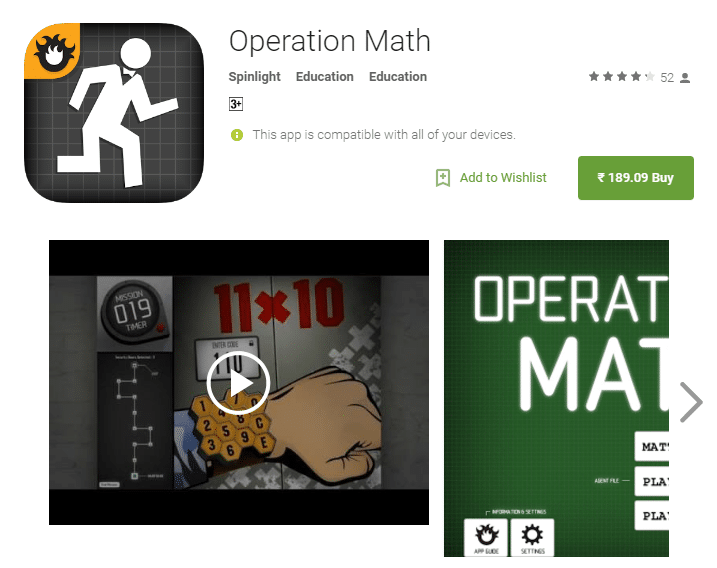
    Operation Math
    This is one of the best and most commonly used mobile app for daily math practice which turns your students into secret missionaries who will travel around the world on different missions. It is basically a fun way to teach to practice and sharpen your child’s arithmetic skills.

    The app was not found in the store. 🙁


    #2 – Kids Math

    Kids Math
    This is the other superb educational app for practicing maths daily and it basically has more than 8 levels which you have to complete within a certain time period by answering a set of questions at each level. It has a unique feature which only gives you 30 seconds for answering each question and if your answer is correct.

    Kids Math
    Kids Math
    Developer: Mobiloids
    Price: Free+


    #3 – Tiggly Math

    Tiggly Math
    Tiggly is the other beautiful app designed for your daily math practice. It basically consist of colorful number blocks which adds something new to your learning process. It brings physical objects and digital process of learning together in one place. This app basically focuses on teaching math to kids who are between 4 to 7 years of age.

    Kids Math
    Kids Math
    Developer: Mobiloids
    Price: Free+


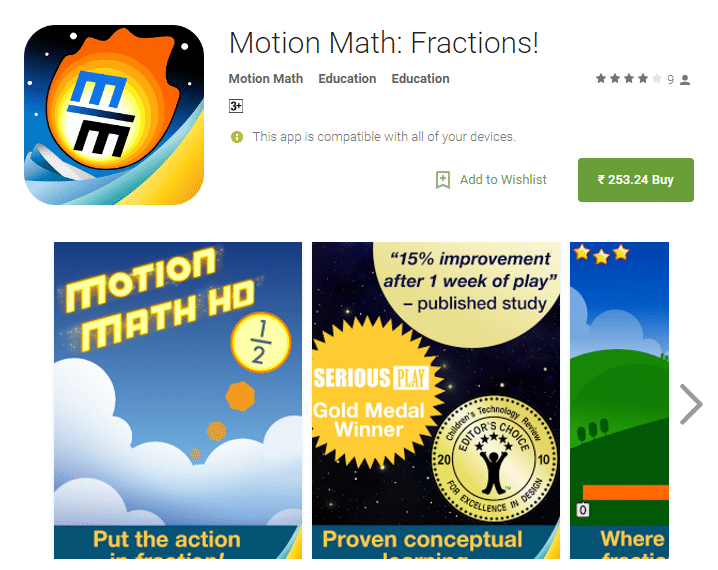
    #4 – Motion Math Zoom

    Motion Math Zoom
    Now, here is the other innovative app which helps you practice maths with some exciting skills and concepts. It is basically a free app for all types of elementary students. This app is also approved by teachers who have seen quick learning of decimals by students in a very short period of time.

    The app was not found in the store. 🙁


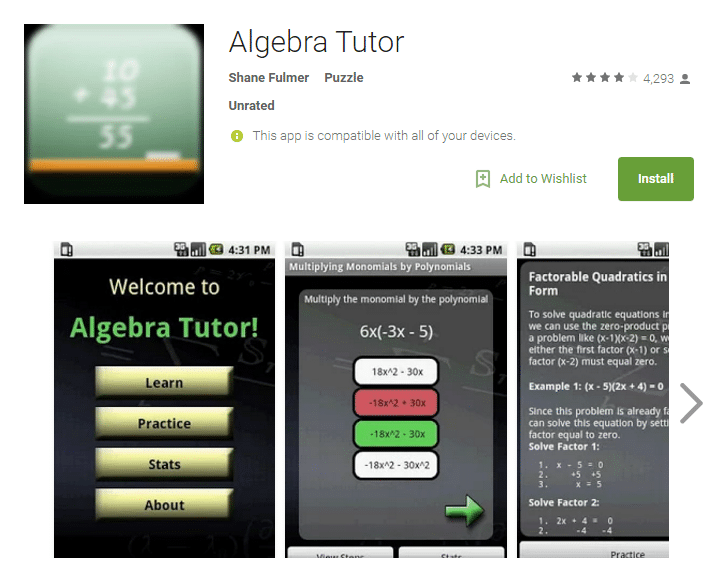
    #5 – Algebra Tutor

    Algebra Tutor
    This app helps you in explaining various concepts of algebra by a step by step guide which comes with solutions and also explain you that where you have made a mistake. It usually, comes with more that 30 practice concepts like fraction addition/subtraction, linear equations, finding greatest denominator and many more.

    The app was not found in the store. 🙁


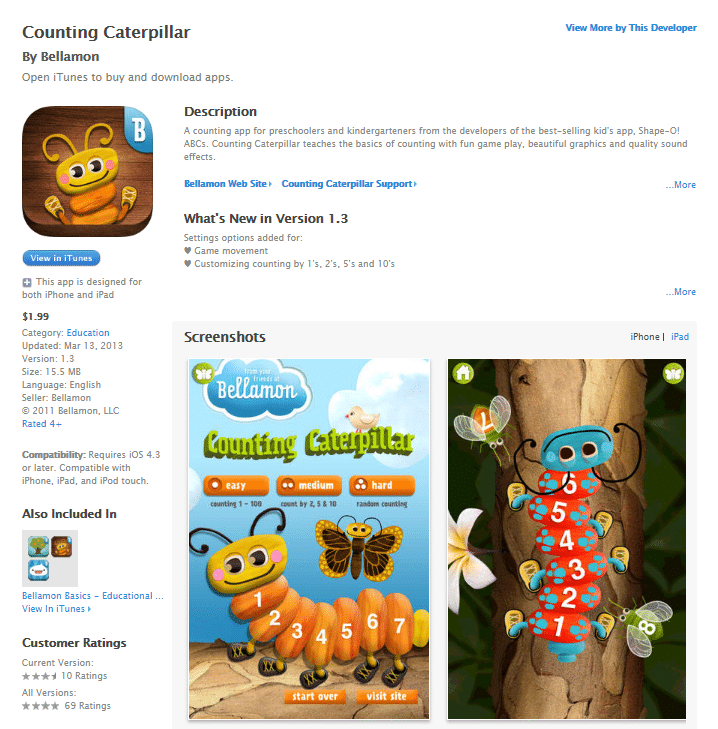
    #6 – Counting Caterpillar

    Counting Caterpillar
    Another colorful and superb app for practicing maths is counting caterpillar. It has gorgeous visual which keep your kids engaged in the concepts. In this app, you have to basically feed the caterpillars by counting and catching apples in the correct order or sequence for which you can even earn some butterflies to reach to the next level.


    #7 – Mental Maths
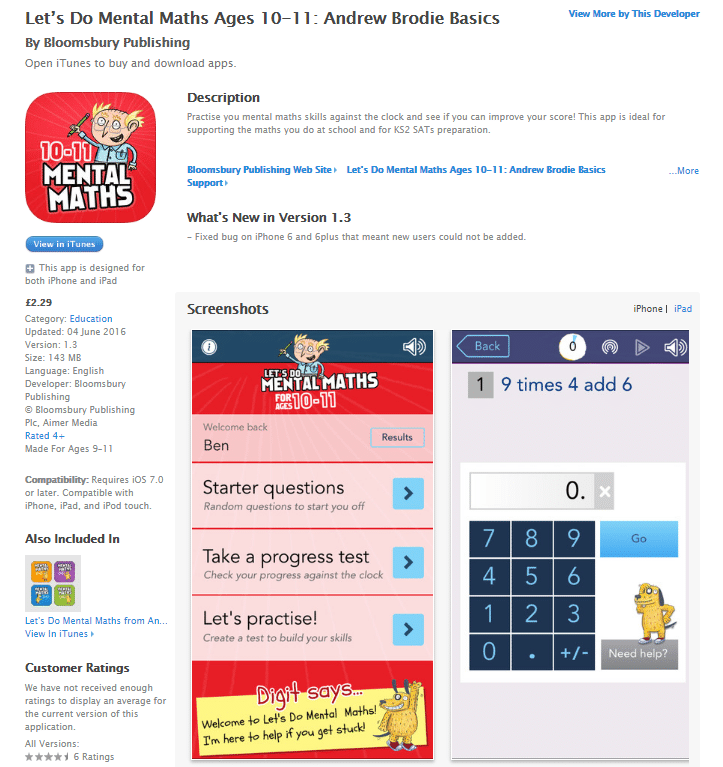
    Mental Maths
    This app is basically designed for iPhones and for the students who are of age between 5-11 years. It basically explains you some basic mental math tricks and which helps you in solving your maths sums and problems very quickly. It also uses an engaging quiz format with some animations who can offer advice when you get stuck at any step of your problem.


    #8 – Sums Stacker

    Sums Stacker
    This is the other most commonly used amazing app which incorporates critical analysis, thinking and problem solving skills while you are playing with math concepts with some innovative gaming options. This app basically helps you believe that math is fun by making its concepts easy for you.

    ‎Sums Stacker
    ‎Sums Stacker
    Price: $1.99


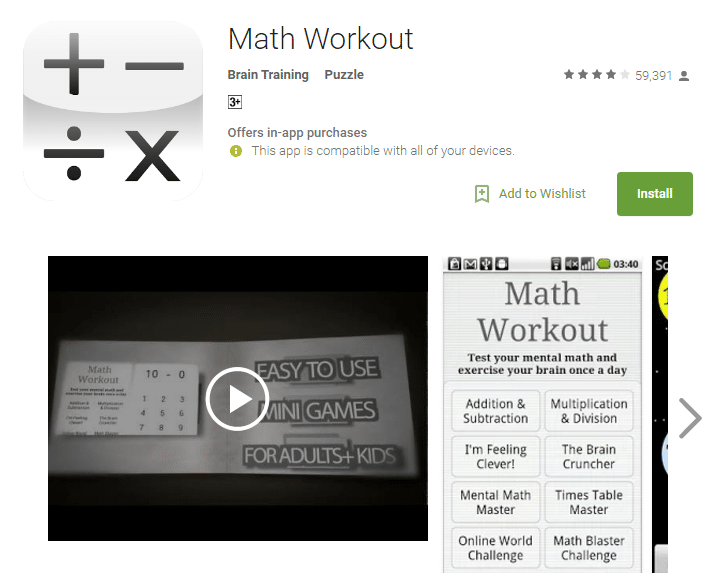
    #9 – Math workout

    Math workout
    This app is a set of daily brain training exercises and drills which are designed to enhance and upgrade your mental arithmetic skills. It has various fun games for all ages, tracks your progress with charts and also helps your brain stay sharp while understanding basic math concepts.

    Math Workout
    Math Workout
    Developer: Brain Training
    Price: Free


    #10 – Let’s Do the Math

    Let's Do the Math
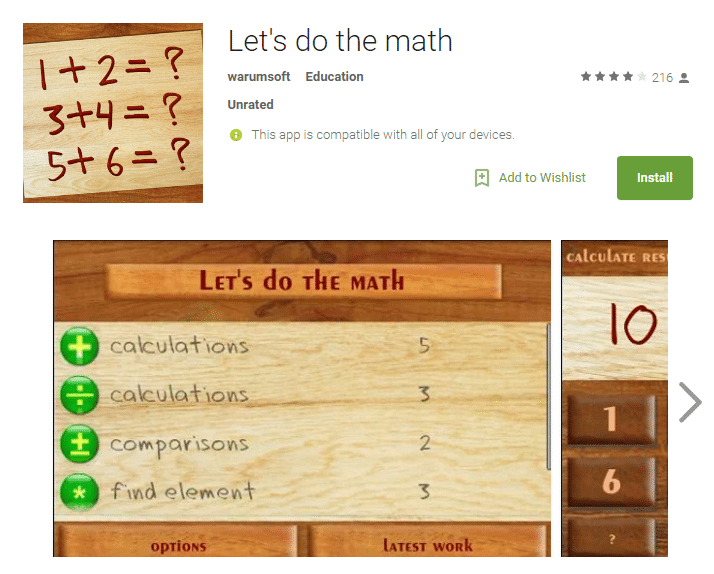
    Last but not the least is this superb app which keeps you and your kids busy for a long time with its 15 different types of exercises which further comes under more than 3 categories and some word problems that focuses on basic concepts like addition and subtraction.

    So, these are some of best and top mobile apps for daily maths practice out of which you can opt for any which suits you best.

    The app was not found in the store. 🙁


    About the Author – 

    Frank is a gadgets freak and love to spend time in mobile application reviews. He is working with an essay writing service and writes for student related apps and technology.


    5 Simple Productivity Hacks to Build Your Blog

    0

    Building a blog should be viewed as a long term commitment. As you develop routines and accomplish tasks you can become bogged down in maintaining rather than growing your blog. But along the way you can find ways to increase the speed that you develop your ideas and your audience. Focusing on becoming more productive is an essential skill to develop. As you increase your work output you can see faster results whatever the goals of your blog. From a beginner to a more advanced blogger there are always large or small productivity shortcuts to finding a way to increase your blog’s presence online.

    A way to focus your efforts is to begin to think of your blog as a business. Your blog might be a passion project with no commercial intent but if you want to reach more people with your ideas it can still help to achieve this mindset. Of course, if you have a financial interest in the growth of your blog than it is a must to visualize it this way.

    Becoming more businesslike doesn’t have to affect your enjoyment of blogging. Ultimately you probably have some interest in the ideas you explain or promote on your blog. Setting up ways to measure productivity can actually make you enjoy your blogging experience more because overtime you can see definitive growth and not feel you are wasting your time. The definition of success can mean different things to every individual. One good example that you may follow is at https://lifehackerguy.com.


    #1 – Goals

    Writing down three realistic goals to achieve in a set time period in definitive sentences can show where your effort needs to be applied first. Place these goals somewhere you will see them every day focus your efforts. You can choose an appropriate time period of three to six months to achieve those goals. By continually checking back as the blog grows you can get a general idea if you are moving in the right direction. If the set time period expires without a certain goal being accomplished take a day to examine what caused the failure and develop appropriate solutions. By focusing on where you would like to end up is a good way to create a mental measuring stick for success.


    #2 – Scheduling

    In the theme of creating a more businesslike mindset an elemental way to increase your blogging productivity is to create a blog posting schedule. While this sounds somewhat easy to do the real test of your commitment will be whether you can stick to that schedule. Blog posting is self-directed work that has many different facets besides just sitting down and writing.

    Put on your editor hat and come up with a list of appropriate topics to write about. The inspiration for these topics will depend on upon what your blog is about. Use various note taking apps to jot down ideas as you are out and about. This can be handy if you think of something that you don’t want to forget. Later at home or in your office you can develop these general ideas into an effective topic heading for a blog post.  Whatever your interests you will still need to schedule research time to find out more in depth information about each post. After creating a list of topics and researching them, schedule set periods to write the posts. Based upon trial and error you need to find the most productive writing method. This might mean you like to write several posts all at once or just one a day. Think about what goals you set to determine how to schedule your writing time. Depending on the blogging platform you can drip your content out over a set posting schedule automatically. This drip method is effective not just for blog posts but also tweets or Facebook postings.


    #3 – Workspace

    Creating an environment conducive to writing is an often overlooked method for productivity. Try and carve out an area where you can act like a professional. Minimizing distractions from electronic devices and people is important for your mental work state. If you share your life with others come to an agreement for set time periods when they cannot disturb you. Also, stock up on things that help you think like paper pads or whiteboards.


    #4 – Analytics

    By utilizing various analytic programs you can get an idea of what content resonates with what visitors. Decide on how many times a week or month you will check this analytics and stick to that. It is easy to obsess over these numbers on a daily basis which can draw your attention away from job number one which is getting out content. An appropriate schedule will give time for your content to be digested online and a better overall analysis can be made about what is going on.


    #5 – Outside Content

    At some point, you might want to grow your blogs content exponentially. This can be started by accepting content from outside writers. If you feel your blogs brand speaks for itself you can begin to introduce new voices that parallel or intersect with your blogs theme. It is a good idea to solicit content that will enhance your reader’s knowledge. By presenting different ideas with new voices you can productively create a more enriching blog experience. Interacting with these outside writers can also be a way to make personal connections with others in your field. For many blogging is a solitary experience and it can be nice to find others to bounce thoughts or strategies off of in a constructive manner.

    Growing your blog productively can be achieved most effectively by getting the basics right. If you are just starting out or have just reached a stall point developing standard repeatable practices will speed up your blogs future growth. Finding the sweet spot of correct goal seeking, efficient scheduling, appropriate analysis, and accepting outside voices will help you accomplish a more productive way to grow your blog.


    6 Reasons Why You Should Go for a Custom Web Design

    Getting a quality web design is pretty much easy nowadays. Many of them are available under free license by various web hosting service providers. These are often known as free website template and easy to use. Templates are simpler to implement and even a normal internet user can easily play around with it and form an attractive web design. Whether you wish to create a blog or a well developed functional web portal for your users, web designs play an important role. Now, the concept of custom web design comes into picture. Custom designs have many benefits and therefore, people prefer them over the free template web designs. Let’s discuss some of them in detail.

    A Custom Web Design

    #1 – Search Engine Ranking

    It is a fact that the premium custom web designs comes with an additional factor called SEO friendliness. The web designers tend to write a clean and SEO friendly code that can be easily crawled by the search engine bots. For all the online marketing purposes, the custom web design in highly recommended to use. Search engine rankings boosts up your audience and users. Custom web designs are created with an approach to abide the search engine guidelines and parameters.

    #2 – Unique Design

    The template design tend to take away the uniqueness since many people use them as it is. Various premium themes and web designs come with the customization options so that you can easily remove unnecessary components and add relevant sections like widgets, edit the borders, color code the specific areas and much more. Some templates don’t come with pre built functions. In such cases, the CSS can be used to code the custom web design.

    #3 – Usefulness

    Popular websites like sports websites, NEWS websites and informational web platforms require a highly customized features which most of the premium templates do not offer. In such cases, hiring a professional web designing services is very useful. Their trained designers can create the advanced codes that can create the useful menus, widgets, spacing, borders and many useful features.

    #4 – Professional Support

    Purchasing a premium web design or hiring a professional web design services comes with the customer service and technical assistance. In the event of complication or when you wish to customize the design, you can easily reach out to your web designing service and ask them to do so for yourself. If you design your own website, they can help you troubleshoot the issues in the emergent situations. Regular backup services are even provided by many of them.

    #5 – Presentable

    Site visitors can judge your intent by simply looking at your website. In this age of modern day technology, users are aware of the good design factors and content quality. A presentable and nicely designed website can even please the visitors and may decrease the bounce rate.  A good bounce rate also contributes to a better search engine ranking.

    #6 – It Is Not Time Bound

    Customized website carry a unique presentation and design value which does not fades with time. Sometimes, your website design can become your web impression and changing it further may not be suitable for your audience. There are various social networking websites whose designs and color scheme have remained same

    #7 – Style and Personalization

    The custom web design offers you to create a website of your own style and let your personalize it the way you want it. Even in a particular niche, you can set up a new web designing trend and stand apart from the other websites. Web design do carry an important role in marking your website as a unique idea and concept.

    Top 10 WhatsApp Tricks & Hacks in 2016 You Must Know

    WhatsApp is to human being what food is to human being. It has been the necessity of communication nowadays. Flurry statistics showed that people would spend at least half an hour on WhatsApp. Nevertheless, not many people are WhatsApp geeks to master all its tricks and some features are never used. In this article let’s discover these tricks together.

    WhatsApp 101 Tricks and Hacks


    #1 – Run two WhatsApp on one phone

    WhatsApp not only incorporates into people’ life but also work. However, if life and work is messed up in one WhatsApp account, we will feel tired. Most people will be eager to have two or more WhatsApp on one phone and change roles casually. There are many ways to run two WhatsApp on one phone. And Dual Whatsapp, Ogwhatsapp, GBWhatsapp are the most popular choices you can find online.


    #2 – WhatsApp enables users to check the message read time

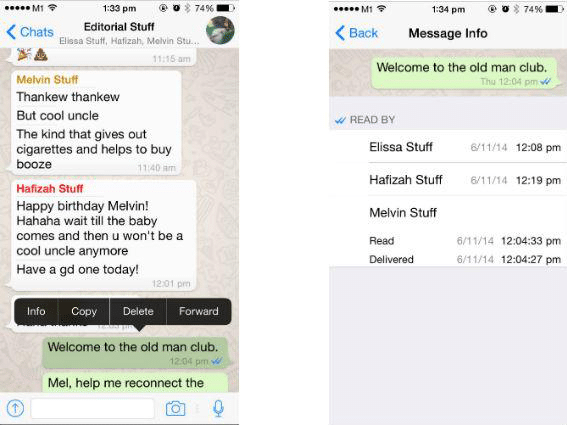
    Sometimes you just send hello messages to our friends or sorry messages for forgiveness. You hope for replies but none.It will make you embarrassed or upset. In fact, it is easy to check if people have read your messages.

    Just go to one of your WhatsApp chats, and hold on one of the messages, then you will see the Info option, tap and a new window will show you the exact time of delivered and read messages. You may also try this trick in your group messages.


    whatsapp read status


    #3 – Mute group chats if you get bored

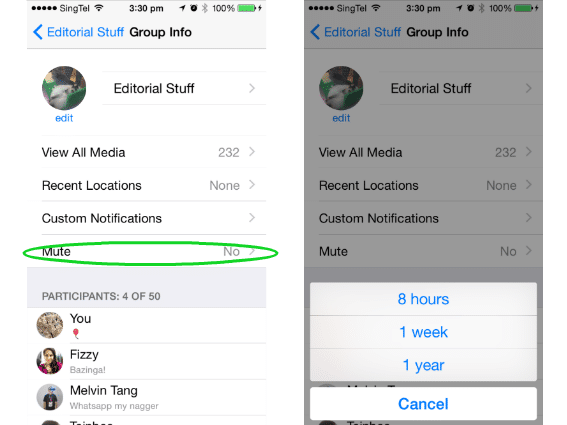
    As more and more friends are listed in WhatsApp contacts, you will be added in new groups at any time and by any friend. Before long, you will get bored with constant message notifications as someone are always active in the group to share something. This case is more serious if you are working on something urgent. In WhatsApp, you can prevent yourself from getting distracted by these messages. Find the group chat, and tap the group name to get the group info and then go to Mute settings to mute group chat. Or you can exit the group as well.


    #4 – Backup messages in WhatsApp

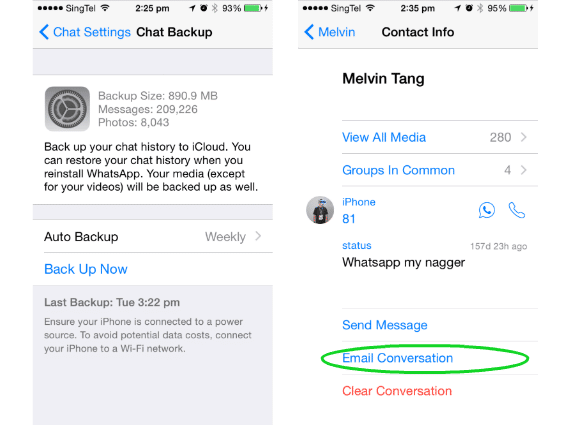
    As WhatsApp has replaced some communications, some important messages are saved in WhatsApp. WhatsApp has backup settings for users to prevent messages from being lost.

    For Android users, go to Settings and then Chats and Calls,select Chat Backup option to set up a Google Drive backup. When you change a new Android device, just restore and copy the Google Drive backup to your new device.

    For iPhone users, go to Settings,Chats and Chat Backup to enable Auto backup with Daily, Weekly, Monthly. And your chats will be back up on iCloud.


    #5 – Tie WhatsApp to your mobile number

    Especially for some businessmen, business travel is often the case. And a new SIM card may be required for communications. Some people may faff about adding contacts one by one. In fact you can make it simple.

    When you changed to the new SIM card and activate WhatsApp, it may ask for registration with the new number. You can ignore this popup and use WhatsApp with the old number while your phone is inserted with the new number.


    #6 – Star your messages for later use

    Most often that you have made an appointment with our friends for dinner in advance. When the dinner time is approaching, you have to confirm the restaurant place in the long chat. It will make you go nuts to scroll those messages for the place. Happily, WhatsApp has such an feature that you can star the specific message for later access.

    Double tap any message and tap the star icon to mark it. To find the star messages, tap the chat name and find Star Messages to check all the star messages.

    If you want to go back to the context of the communication, tap the arrow and you will be brought back to the exact place in the chat.


    #7 – Save mobile flow when making calls

    As we all know, making calls is the most popular feature in WhatsApp. But it will consume much mobile flow. Luckily, there are settings in WhatsApp to help you save it greatly.

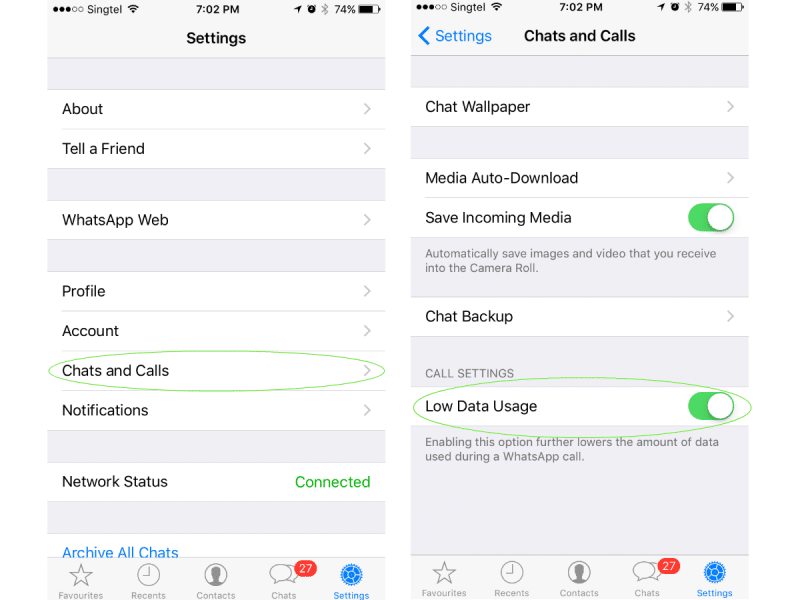
    Go to Settings and find Chats and Calls, on the interface and you will find Low Data Usage. It will help you to save mobile data when making calls with WhatsApp. This is mostly used when you are on a expensive and limited data plan. It is recommended that you only use calls with WiFi connected.


    #8 – Mark messages as unread for later access

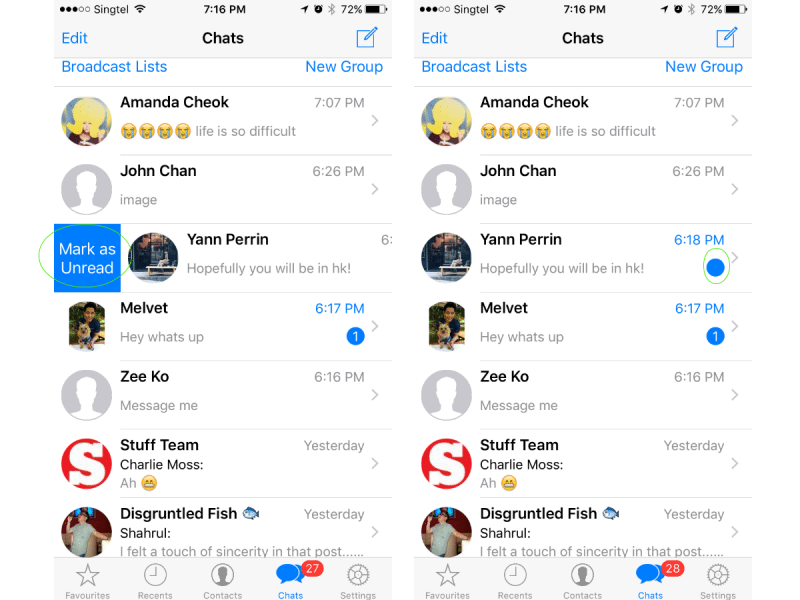
    We hardly miss any message but easily forget to reply the message. With WhatsApp unread feature, you can mark messages as unread with a blue dot and check later.

    Swipe any chat to right and Unread will show on the left. Tap to mark as unread and a blue dot will appear on the right. And once you read the messages, the blue dot will disappear.


    #9 – Protect your privacy by disabling Preview

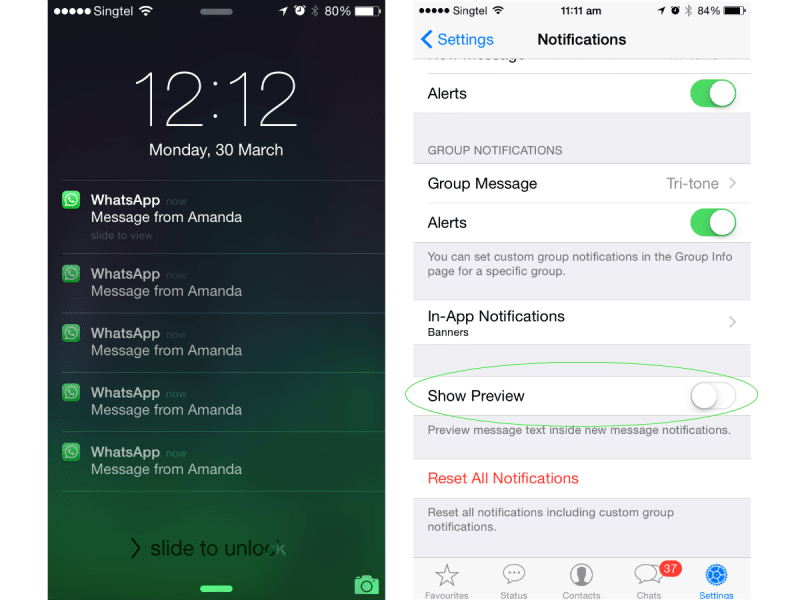
    When we are commuting, our private messages are easily peeped by people around us . In case of privacy leaks, WhatsApp has added the feature of disabling Preview so that your message details will not be disclosed.

    Go to Settings, Notifications and disable Show Preview. Then no one can accidentally read your private messages by glancing on commute.


    #10 – Easy access on desktop

    Compared with desktop computer, mobile phone is not that convenient when referring to typing messages. And some WhatsApp addicts may not want to miss any message even during work. Login WhatsApp on computer will fulfill all the hope.

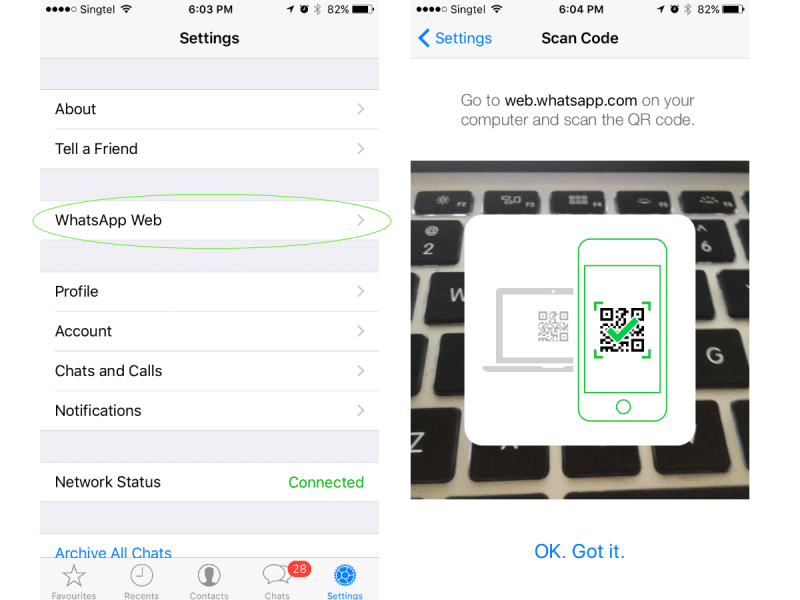
    Just go to Settings, and WhatsApp Web, and visit web.whatsapp.com on your computer. Scan QR code and login.


    Reference – Lifehacking

    With Reliance On Computers Comes Responsibility

    0

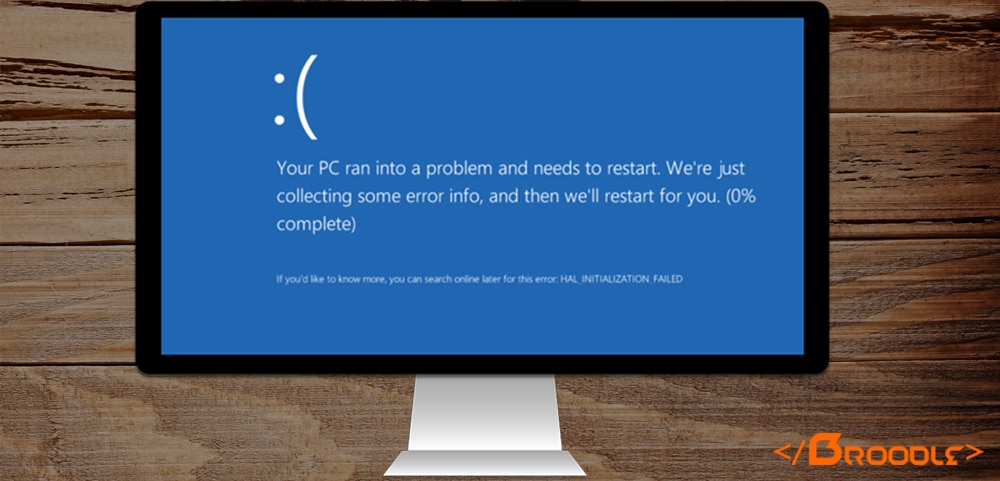
    You store your work, cherished photos, priceless video vacations and talk to loved ones every day. All this from one electronic device called the computer. But, as with almost anything, it does come with an expiration date. What would you do if you woke up, turned it on and saw a blue screen or were unable to boot up? Since you rely on your computer for work and play, you may now risk losing valuable information. The good news is that most times a professional service such as Secure Data Recovery can solve the problem and restore your system without the loss of your files.

    As you rely more on electronic devices like your laptop and cell phone, it makes sense to invest in preventative measures to ensure your personal information stays private and your system doesn’t crash leaving you with countless hours of work to recover. There are several things you should do to protect your information in the event of a hard drive failure.


    Why do Computers Crash?

    Your computer consists of a variety of components carefully put together. In order to function to its full potential, all the parts must co-exist and work together. If one piece begins to falter on your internal hardware, it can create a chain of events that begins the unraveling of the system. Unless you are an expert in the field, you probably won’t be able to identify if it’s the operating system software or the actual hardware.


    Computer Crashes


    Extending the Life of your Computer

    While no computer lasts forever, there are things you can do to get the most time out of it. While your laptop appears well put-together, drops and falls or rough use can cause damage. When you travel, always place it in a protective sleeve or padded bag. Dirt is the enemy. It’s important to keep the chamber and surface clean with a dry cloth and compressed air. This will help prevent unnecessary laboring caused by dust and debris.


    Prepare for a Crash

    The best line of offense is defense. Backing up a computer is a simple and necessary process that many people fail to do. The question you should ask yourself is that if you woke up tomorrow and everything was gone what would you lose. The answer is probably more than you can imagine. Some items would be your work, favorite photos, videos, budgeting and tons of personal information. The number of hours it would take to re-enter the information would consume a lot of your time. You can avoid that by performing a weekly backup. It’s easy to do and can save you time and energy better spent elsewhere. Or, if you prefer there are reputable online services that specialize in backups and storing your information. Either way, you’ll have access to your files if your computer crashes.


    Signs your Computer is going to Crash

    The good news is that in most cases before a computer fails it gives signs that something is wrong. If you start to experience slower than normal startups, freezes, relocated or missing files or a loud grinding noise these could all mean it’s going to crash. The first thing you want to do is back up the system quickly. Once you complete the backup, turn the computer off and contact an expert to assist with the restoring process. Sometimes despite everyone’s best effort you may need to replace your computer. But, the good news is you’ll have your information stored on a backup disk that you simply need to transfer to your new laptop. If you lose your website and didn’t get the chance to complete the backup there are online companies such as A Grande Life that can help you re-create your content.


    Social Media Marketing is not for the Faint of Heart


    The meteoric rise of social media in the last decade has been an unprecedented boon to businesses of all kinds. It’s an incredibly effective way to engage your customers, get their feedback, and encourage them to advertise for you, all at a very low cost.

    The key is to handle it correctly. Doing a good job with your social media management will permit you to capture these advantages, but if you make mistakes with the program, it could destroy you.

    When things are first starting out for your business, you will probably handle all the social media yourself. But just as you will with human resources, office management, and a thousand other tasks, you will one day want to bring in a person or staff to handle these things for you. It’s the surest way to get an effective social media presence, and it helps in several key areas.


    Controlling The Narrative

    One very important aspect of social media that your manager must be able to do is to control the direction of the conversation. If you set them up, people will knock them down. Don’t open the door for a potentially destructive reply, re-tweet, or other response. Bill Cosby’s social media manager found this out the hard way, and the result has been nothing less than a flood of sexual assault claims with charges filed in at least one.


    Social Media Marketing Strategies New


    Similar results can come from needless aggression on social media, such as calling out competitors or politicians. Remember that if you are going to stick your business’ neck out, you had better be at least as well-prepared as those whom you attack.


    Responsiveness

    As websites and blogs became common, one of the cardinal sins was a failure to update regularly. If viewers weren’t regularly seeing new content, they would stop checking.

    Social media is exactly the same, but the pace is even more demanding. If you aren’t posting at least daily, you will quickly fade from people’s consciousness as you get bumped further down the feed.

    In the early days, it may be easy…”4 new contracts today, ready to serve these new customers! #growingbiz” or “Hiring now! Need experienced coders! #ITjobs” will roll right off your phone easily.

    But when there’s a water leak in the warehouse, two employees turning in resignations, and a truck that can’t find you, you will no longer have time for a nonstop stream of social media. And that’s when a staff needs to take over.


    Following Protocol

    While it’s true to some extent that anything goes in social media, there is a certain “hipness” factor that must be maintained. If your posts don’t follow certain unwritten rules, they will be seen as a halfhearted attempt to fit in with more stylish companies.

    Bear in mind that this perception is not generational! There are people of all ages who deftly use social media in a way consistent with other users.

    Your posts should also be standardized so that searchability and trending are fully functional. You need a manager who will spell correctly and be alert to popular topics so that you can capitalize on them. Otherwise, you are just another random poster, lost in the millions.

    Knowing that you need a social media presence is an important first step for your business. Knowing when to bring in a dedicated staff to manage it is another important step. If you make these two realizations before too much time gets past you, you’re a long way down the road toward using these unique tools to build your enterprise.

    6 Types of Blog Posts that Will Grow Your Audience


    Writing for a blog is one of the most pleasant things for those who enjoy writing. There is only so much that you can say to the world, and you don’t need to ask for anybody’s permission to published them anytime you want. You can also decide in which format you prefer to see it, how many words it will have, if there will be any images, etc.

    But blogging isn’t a one-way conversation. You want that your post gets to be read – if you didn’t care about it, you would be journaling, right? So, to accomplish it, you need to find the types of blog posts that will help you to grow your audience – and here are the formats that are currently getting the best traffic results in the web so that you can get inspired.

    # 1 – The “How-to”

    Most of the time when we search for something online, we are looking for a solution for a problem. In many cases, we want to know how to get something done. We might need instructions from scratch or just a way to perfect the way we currently do it. And this is why “how-to” posts are so popular.

    “How-to” posts offer the tips and tricks that we need to make our lives easier. They also increase the blogger’s authority as they show off how they can do their work more efficiently than the majority. So check your content and see if you can come up with any article that will offer this kind of information to your audience.


    # 2 – Curated Content

    There is so much information available online that is just too hard to go through everything. Plus, if you are new in an industry, it can be very difficult to decide who is a trustworthy source and what is reliable content. This way, finding a curated content post in a blog that we already follow is a blessing.

    Many bloggers avoid curated content posts because they think they will look lazy or that they are just copying someone else’s ideas. If you are one of them, you should reevaluate your approach to them. Writing a curated content post is much more complicated than you think as you will need to go through several blogs and find the best ones. Then you will need to say why you chose them in the first place and why your audience should care about them. As you can see, there is a lot of work involved and your audience will appreciate your efforts.


    # 3 – Real-life stories

    We love to hear about other people’s lives and it isn’t only because we have a thing for gossiping. This is just the way we gather precious information so we can avoid making the same mistakes and it is also how we learn to empathise. Anyway, no matter what the reason is, it is clear that real-life stories can grab the attention of any audience, so you should find a way to add them to your blog posts.

    You can either write a post about your experiences as a blogger and your relation to the topic that you are writing. And you don’t need to make the entire post about it. You can simply add from just a few lines to a couple of paragraphs to the posts that you already have done or to the new ones, and you will notice how an appealing writing will bright up your post.


    # 4 – Listicles

    You might think that they are getting outdated but you are reading one of them right now, so you know that they are pretty much alive. Listicles, blog posts writing in the form of lists, are one of the most popular types of online articles, and there is a good reason for it. Their format is the best for reading on a screen in a very short time as it makes it easy to scan.

    And the truth is that not many of us are prepared to spend the same amount of hours going through a text on a mobile, or even a tablet, as we used to do with our newspapers and magazines. So finding a post that allows us to read only what we want is something that we love to find and share.

    # 5 – Reviews

    Same way that your audience will be happy to find curated content ready for them to read on your blog, reviews will be very appreciated. They might be trying to decide if they buy a specific product, and they will be glad to know that you have already tested it and that you will be telling them if it is worthwhile or not. It will save their time, and more important, their money.

    So go ahead and try to find anything that you can write a review about. You might need to buy the product so to test it, but you will see the return of it on your traffic.


    # 6 – Interviews

    Interviews are another kind of post able to grow your audience. Of course, you need to be interviewing someone considered as relevant to your audience, but that is it. As soon as you find this persona and announce what is coming up, you are bound to see the traffic increasing to your blog.

    And this will happen not only because of your own efforts but also because the person that you will interview will probably be sharing it to their own audience. So you are doubling the number of people who will potentially read your post – or even more than that if the person in question is an influencer with a large number of followers.


    The bottom line

    The format of post that will grow your audience will depend on what your audience is looking for at that moment. So the first thing that you will need to do is to get to know them more. Then you can choose from the list above which one would be their favourite and make the most of it.

    Best GPS Navigation Devices and Apps for Accurate Navigation

    Now a days everyone knows the importance of GPS, with the advancement of technology GPS Maps are now launched in 3D manifestation. The 3D GPS maps uses the turn by turn real-time navigation.

    The time left behind when someone ask the way to particular person for his destination when he/she/they are on the unknown and mysterious path/travel/trek. Now in days mobile phones get really smarter. Smartphones becomes the very important as the water one could die without having the mobile phones only for few hours. Mobiles are now able to tell us each and everything. GPS maps on the mobile phones shows our live location along with it guides us with detailed path to reach our destination in minimum time and travelling minimum distance.

    These maps are now become the very high tech , they don’t only shows the way but along with it they also gives us the real time traffic updates. In these days great apps and devices are available which makes our driving very comfortable.


    MapmyIndia Zx350 Navigator with 5-inch touchscreen 

    MapmyIndia Zx350 PND, based on Windows CE 6.0, offers navigation and entertainment features, featuring MapmyIndia’s latest maps, and the ability to access movies, videos, pictures, and ebooks via native apps. It offers built-in storage capacity of 2GB, which can be expanded up to 8GB through a SD card slot. The PND is powered by a 600MHz SIRF V processor, coupled with 128MB of DDR2 of RAM.

    The personal navigation device features a 5-inch (272×480 pixels) LCD touchscreen, sports a black matte finish and built-in audio speakers. The MapmyIndia Zx350 can also be paired with car audio-video system, as per the company.

    According to MapmyIndia, the Zx350 navigator offers house-level maps for 50 cities, 3D landmarks and 2D building footprints across 46 cities, over 10.33 million places, street-level maps for 4787 cities connected via 1.90 million kms of highway and road network.

    The Zx350 navigator offers features like reverse routing, audible lane guidance available without TTS (text to speech), support for Hindi, speed limit warnings and ferry guidance.

    The navigator can also be used as a reverse camera screen. It offers Bluetooth connectivity through which it can be paired with the users’ smartphone allowing them to make and take calls hands-free, or listen to music via the car AV system through the navigator’s built-in FM transmitter.

    “The MapmyIndia navigators are an iconic product series, they are the ones that kick-started the GPS navigation revolution in the country. And these are getting bigger and better. The launch of MapmyIndia Zx 350 navigator is another step towards our ongoing endeavor to delight the consumers by offering them enhanced features, fun and functionality. These ingredients have made our products best-sellers in the Indian market. We would continue to push the envelope by bringing to the Indian consumers products that are best-in-class,” says Rakesh Verma, Managing Director, MapmyIndia.

    A car mount, wall charger, car charger and USB cable is included with the device.

    Buy from Amazon


    Waze – GPS Navigation, Maps & Social Traffic

    Waze is the world’s largest community-based traffic and navigation app. Join drivers in your area who share real-time traffic & road info to save time, gas money, and improve daily commuting for all.

    Just by driving with Waze open, you’re already contributing tons of real-time traffic information to your local community. You can also actively report accidents, police traps and other hazards you see on the road. Get road alerts along your route and find the cheapest gas prices around you shared by the community. Plus, you can add friends, send locations or keep others posted on your arrival time.


    • Live routing based on community driven, real-time traffic & road info
    • Community reported alerts including accidents, hazards, police traps, road closures, and more
    • Turn-by-turn voice guided navigation
    • Live maps, consistently edited and updated by Waze community map editors
    • Automatic rerouting as conditions change on the road
    • Send your ETA & real-time drive to update those you’re meeting
    • Learns your frequent destinations, commuting hours, and preferred routes
    • Find the cheapest gas station on your route
    • Add information on local places and businesses
    • Add Facebook friends and sync Contacts
    • See friends’ ETA when driving to the same destination
    • One tap navigation to Facebook & Calendar events
    • Earn points as you contribute road info and climb the ranks in your community

    Waze is all about contributing to and benefiting from the common good, so hop on board and get involved!

    Note: Continued use of GPS running in the background can dramatically decrease battery life. Waze will automatically shut down if you run it in the background and haven’t driven for a while.


    Google Maps

    The Google Maps app for Android phones and tablets makes navigating your world faster and easier. Find the best spots in town and the information you need to get there.


    • Comprehensive, accurate maps in 220 countries and territories
    • Voice-guided GPS navigation for driving, biking, and walking
    • Transit directions and maps for over 15,000 towns and cities
    • Live traffic conditions, incident reports, and automatic rerouting to find the best route
    • Detailed information on more than 100 million places
    • Street View and indoor imagery for restaurants, museums, and more


    Garmin Nuvi Series

    Guides. Alerts. Records

    On the road, you deserve a co-driver you can rely on for a stress-free driving experience all the way to your destination. That’s what you get with Garmin nüvi.


    Combining innovative routing features, spoken turn-by-turn directions, integrated technologies and big, bright screens, these versatile navigators provide seamless compatibility with apps and other Garmin devices. Plus, our industry-leading nüviCam™ features a built-in dash cam and driver awareness alerts to help you drive, and arrive, with confidence.

    Driver Awareness vs. driver distractions.

    The statistics below, based on a recent driver survey*, shows some of the most commonly admitted ways that drivers lose concentration while driving. Wouldn’t it be great if you could minimize surprises and distractions on the road? Now, the latest in Garmin Driver Awareness features (on select nüvi models) provide alerts to help encourage safer driving. So, you can drive, and arrive, with confidence.

    Tips :-

    • If you are on long trip use GPS maps in offline mode to save the data.
    • Always install the mobile charging port in your car , because these apps or devices consumes the more power which may drain out the battery faster.
    • Shut off GPS when you reaches the destination.
    • The real time traffic shown on GPS is not always 100% accurate always.


    6 Easiest Ways to Be Creative While Writing the Content for Your Blog

    The thing about the proliferation of social media is that everyone has the power to publish at the tips of their finger. That might all seem well and good, but for the fact that the world is not short on people with lofty ambitions and limited capability. Combine that with an overdose of confidence and you get what is evident all over the internet: a sea of unremarkable writing. There isn’t a shortage of talent out there either, as there are many people with genuine talent and bona fide hit blogs. What this means for an aspiring blogger is that there is too much competition. Consequently, in spite of talent, one misstep will see you bundled with the wannabe’s; not a pretty position to be in. You will be surprised to learn that once you have interesting content, the difference between writing an “OK” blog and a writing a “WHOA!!” blog is not as big as the results. In fact, below are some creative tips that you may use to upgrade your blog from regular to remarkable.


    color


    1. Open with your most powerful sentence

    The first line should be the hook that your reader swallows in your reading and it should be strong enough to carry them through the rest of the paragraphs. That aside, the introductory sentence of any paragraph should also serve to inform what the paragraph holds for the reader. Once could take the opening sentence to be a:

    1. Quote
    2. Rhetorical Question
    3. Statistic
    4. Anecdote


    2. Adopt opposing perspectives

    If yours is a blog that you have been online with for any length of time, chances are that you have already established your view on certain issues in your writing and your audience knows this. To keep your work creative and to offer you more to write about in a creative manner, take the opposite perspective the next time you put up a post. Alternatively, you could discuss and examine the two opposing positions to any article and give your views based on research and facts, not our personal views.


    3. Photo stories

    The conventional way of narrating stories usually involves words, words, and more words. However, for people who want to go the extra mile in creativity while writing their blog post contents, it is not enough to merely tell a story. They have to say it in style and they have to tell it differently to others. This is useful for breaking the monotony of reading, but it is especially useful for blogs that discuss sophisticated material. Photographs are more easily understandable as compared to words while describing sophisticated features. You could also incorporate inspirational photographs in the video to keep your readership motivated.


    popular


    4. Tell stories of success

    Everyone likes a happy ending, probably the reason why motivational speaking is such a hit since it is usually a person who perceives themselves as having attained a certain level of success telling their story. You as a blogger could take the same approach and tell stories of people who have surmounted huge odds to achieve success. Tell your audience how the said person went about their journey so that they see that it is truly not beyond them. Every success story has its own unique twists and turns and you do not even have to embellish excessively to make them interesting.


    5. Make your post unique

    The matters that interest humanity are mostly the same in most cases. You will realize that in most cases it is highly likely that there is an online article on the exact same topic that you are pursuing. What actions should one take in such circumstances, you ask? It is simple: own your content. Find a new way of telling the story that has already been told. Apply some tweaks to the story so that it is clearly identifiable to you by your leadership. Alternatively, you could stick with the same topic, but tell your version of the story from a unique angle. This allows you room to explore aspects that are previously unexplored and you are likely to find great success with it since you are setting the bar, anyway.


    write


    6. Focus on feedback from your audience

    Not listening to your audience is more reckless than writing your letter of application for a job and not proofreading it. It is tantamount to setting yourself up for failure by leaving too much to chance. Additionally, paying attention to your audience is the only way you can be sure to write content that is completely relevant. Look at it this way; if one reader has felt strongly enough to write back about an idea, be it a question or comment, they are probably just representative of a bigger percentage of your audience. It is also a sure way never to run out of ideas to write on since the audience will always be there.


    8 Things to Consider Before Launching a Business Website

    Nowadays every business needs a website. Whatever field you are in, you can’t run a business without a website. You need online presence, and that doesn’t mean just posting random posts on your company’s Facebook profile. Businesses that don’t dedicate enough attention to their website lose a lot of potential clients.


    1. What kind of website do you need

    What kind of business are you running? Even before constructing a plan for your website, you need to be sure about what kind of website you actually need. Will it be a community-based website? Is it going to be updated dynamically with new content or is it going to be a static informational website? Based on the field you are in, you’ll easily know what features you’ll want to have, and based on those features you should figure out the functionality of your website.


    2. Drawing a basic sketch for your website

    Jot it down on a piece of paper, open up some drawing software or use whatever gets your creative juices flowing. Start “designing” your website. Where do you want your logo to be? What items of your website will have the most visibility? Will you have a menu? By doing the sketch you will actually find out what features you need and it will be a lot easier to design it later.


    3. Choosing a good hosting

    You’ll probably be getting a lot of visitors and of course, you want the best user experience for your customers. Having a good hosting provider means that you will have your website online 24/7/365 and the time it takes for your website to load will be faster than other competitor websites. The better the hosting is – the better your website is. We recommend getting a hosting plan from RoseHosting, since they offer Linux VPS hosting and 24/7 fully managed hand-holding support.


    4. Know your (target) audience

    You probably already know your target audience, but sometimes your target audience can differ from your actual audience. Always have your audience in mind when developing your website. They can be mostly teenagers or mostly women. You’ll have a lot less problems designing and maintaining your website if you research your audience first.


    5. Properly design your website

    This is one of the key steps. The first thing your visitors will see on your website is the actual design of the website. There are a lot of pre-made templates that you can use, or you can hire a web designer to professionally design a custom solution for your website.

    6. Get your social profiles ready

    Profiles, not profile. Sure, Facebook, Twitter and Instagram can be powerful tools when used properly, but don’t use only one. Based on your target audience and the products you are offering, you’ll know what social websites to pick that best suit you. The more profiles you have – the better. But don’t overdo it, you need to give a lot of attention to each profile. If you can’t do so, don’t even start it. After you’ve decided what social websites to use, create a profile, properly modify it and list it on your website.


    7. You’ll need to maintain and update your website

    Even if it’s a static website, you’ll still need to update your social profiles, you’ll need to update the website based on the new and improved standards. If you have a blog you’ll have to write posts frequently, if you have a community you’ll have to moderate it quite often. The more dynamic your website is, the more you’ll need to update it. But don’t let this discourage you. If you take your business seriously, you’ll need to take your website seriously too.


    8. Get your website ready

    Don’t launch your website until it’s 100% finished. Don’t leave out stuff to do in the future. After you’ve completely finished your website with all external profiles, design, content, plans, then and only then your website is going to be ready for launch. Do a bit of testing – see if you can receive emails, check if your website has any errors by using some testing tools, test all your functions if they are working properly, see how your website looks from different browsers and devices.


    Make a checklist of all the points written about in this article and go through it as you work on your website. Every step and every part is important. Always do your research and don’t be afraid to ask for help. There are a lot of nice people out there who are willing to help. Whatever you consider, whatever business you are in, one thing’s for sure – you need a website.