More
    Home Blog Page 133

    Do You Need A VPN For Your Windows PC?

    The 21st Century is webbed around by the internet. We are more interconnected than ever and spend an enormous amount of time in the digital realm. If you’re not sharing photos of your kids on Facebook, you’re doing your banking, booking a holiday, or buying a pair of shoes on Amazon.

    And of course, there is the always-distracting lure of social media, and too many emails to count. Despite the increasing popularity of mobile devices, the Windows-based PC remains a favored platform for online activities.

    Everything you do online means you send data from your PC to an intermediary, such as an Internet Service Provider (ISP). Their server then directs you to your target website. This would be fine, except it means that the ISP can log and store all that data, mine it for patterns and sell it to third parties.

    This article will briefly explain VPN technology and the reasons you should use one.

    A VPN is an internet security technology that acts as an intermediary between your PC and the Internet. Let’s say you use a VPN and type in the URL for the American Cancer Society (ACS) in your browser.

    Once you hit Enter, the data that leaves your PC gets encrypted, then sent via a ‘secure tunnel’ to a remote server operated by a VPN provider. From there the data is sent to the target website. All incoming data also passes through a remote server and secure tunnel before accessing your system. During this process, your PC’s IP address is masked and shows up as the VPN server’s address, making you hard to trace.


    Here are 5 reasons your Windows PC needs a VPN:


    Privacy

    Imagine your spouse shopping for lingerie online in the privacy of your home and the ISP selling such information to undisclosed third-parties, who are using that data to make profits.


    Censorship

    Quite a few VPN providers offer thousands of remove server worldwide, to which people can connect and conceal their IP address. This can be extraordinarily useful for users in repressive societies as they could circumvent government censorship using the secure tunnel and remote servers.


    No-log policies

    The National Security Agency’s collect-all approach allowed it to accumulate vast quantities of personal data in its secret server networks. Should a government agency be authorized to collect information about every individual? Information that could prove to be compromising (e.g., whether you protested outside the White House about Trump’s immigration ban on Middle Eastern countries)? A reliable VPN provider always has a strict no-log policy to ensure their customers’ privacy and security at all times.


    Geo-blocked content

    Free trade remains a hot topic among private enterprises and governments. While we’re making strides to have a global trade network, big streaming corporations still use geo-blocking. Gaining access to restricted content has been one of the leading reasons to use a VPN. People across the world can enjoy all content at all times, all thanks to VPN services.


    Security in public places

    Public Wi-Fi hotspots are notorious for being a cyber criminal’s preferred hunting ground. VPNs secure encryption algorithms ensure that a malicious third-party can’t intercept your network connection and collect valuable data without your consent. Use a VPN and surf in peace using any public Wi-Fi hotspot you like.

    Top 7 Time Saving Tools For Beginner Writers

    As a beginner writer, you might be working harder then you need to. There are plenty of online tools that help to produce your best work and master the art of a content writing while saving your precious time. They will be especially good for freelancers, as being own boss may be a time management nightmare. The Internet is full of distractions, but you don’t need to worry about them if you know the right tools. There are hundreds of content writing tools that will help to improve your texts and manage your time. Have a look at useful 7 time-saving tools for writers.


    1. Wordcounter

    Most of the assignments come with a predetermined word count. Write an exact amount of words for the post or article. But how can you know how much you have already written? Wordcounter helps you easily count characters, words, sentences, and paragraphs. The online writing editor will help you to improve writing style and word choice, detect mistakes and plagiarism. And that’s not all. It also measures a reading level of your text and can help you to spot overused words.


    1. Cliche Finder

    Whether you are a beginner writer or a professional, it is always better to avoid overused expressions in texts. This online assistant uses an algorithm and a dictionary to find clichés. You need simply to paste your text into the website and find out the results. Make your content stronger and more memorable by cutting out overused phrases.

    Writers 2


    1. Readable

    Is your writing easy to comprehend? This online application analyses your content and tells what should be changed, so the person can read your text easily. Readable helps to write awesome content that everyone can understand. Don’t wait any longer and find out if your readers can clearly read your material. Also, you can check out this editor for free before getting a subscription.


    1. RescueTime

    We all procrastinate from time to time. Sometimes we don’t even realize how much time we spent on social media or browsing the Internet. And how much time we allocate for work? Staying focused can become a real challenge. If you realize that you are not as productive as you could be, then it is time to check a RescueTime website. Their time-saving tool will help you to become more productive by understanding your habits. It gives you daily reports, which are based on your activities. It is one of the best tools that will help you to boost your productivity. But, if you are a student who can’t meet the deadline even when you managed your schedule like a pro, then you can find affordable essay writing service on the Internet.

    Writers 3


    1. Grammarly

    This online writing editor is a perfect device for a content writer. Everyone makes mistakes, especially in their writing. Grammarly makes sure that your text is mistake-free, easy to read and grammatically correct. It highlights the potential errors and provides an explanation if needed. This editor helps to detect plagiarism as it has a huge database of different web pages. We highly recommend Grammarly if you want your material to be more professional. You can try the free version, but it only offers basic spelling and grammar checks.


    1. Hubspot’s blog ideas generator

    Sometimes we just run out of writing ideas. Don’t worry; it happens to everyone. This simple online service will generate ideas for you, and t is very easy to use. You need to fill the form with the terms you want to write about, and they will come up with your future blog post titles. Their suggestions are not half bad!

    4 Things to Consider Before Buying a CMMS Software

    The demands of expanding a business’ operations have necessitated the implementation of Computerized Maintenance Management System. Due to the increased amounts of data being generated in a business, organizations all over the world are finding it almost impossible to exist without the help of CMMS software.

    With that in mind, implementing an effective CMMS facility is not as easy as one would presume. You not only need a proper understanding of the different options available beforehand but also you need to have in-depth knowledge of your industry. For the system to work flawlessly, you need to strike a perfect balance between the aforementioned elements. A good number of businesses have failed to realize the full potential of CMMS simply because they’ve overlooked one of the above elements.

    The process of identifying the right CMMS can be time-consuming but it is worth every minute because it can out to be the determining factor between an excellent system and a mediocre one. This piece examines a number of factors that need to be considered before selecting an ideal CMMS tool for your business.


    • Identify the team to work with

    You need to have a clear knowledge of the team that will be working behind the software before selecting a CMMS facility. This personnel should meet and share ideas of what they really expect the system to offer and these ideas should be compared to what the tool promises to deliver. The persons picked to represent their department should have a good understanding of their department and also be willing to learn from the different aspects of the software. Engineers, technicians, and managers should form top contenders in your list.


    •  Ability to offer customer support services

    Once the system is in place, you need to know a number of things; will the provider train your staff after implementation to ensure that they’re familiarized with the different functionalities of the system and will they continue to offer their support even in future. These are some of the issues you need clarified before selecting a provider. It is also important to know whether the providers will be instrumental in helping your maintenance department with issues related to preventative maintenance which has been identified as a very critical area when it comes to maintenance and management.


    • Cost implications

    It is no secret that CMMS requires dedication and a huge investment of money for it to work seamlessly. It is an investment which if not well taken care of can impact negatively on your profitability. Before selecting a system, make a list of all the features that you deem vital to your business and compare them with what the system intends to offer.

    If in case the system offers more functionalities you can ask the provider to do away with the functions you do not need simply because additional functionality translates to more investment. It is also important for the provider to be very transparent about the costs. Let them come clean if there are any other hidden charges that might come up.


    • Understand which model they’re intending to implement

    Would you prefer a web-based model to a locally hosted model? This is one question you need to be answered before selecting a system. Ideally, the web-based approach taken over the more traditional approach as it has proved to be more affordable and also offers rapid implementation process.

    How To Burn ISO to USB on Windows Computer

    ISO is a well-known file format that is used on DVD, Blu-ray Disc, or CD.  It is mostly used for operating systems such as Linux, Windows, or UNIX. When you burn ISO to an external disk like a USB flash drive so that you can boot it directly on your computer.  It is a perfect option if you are facing several problems with your computer or if you just want to reset your operating system.

    When you want to burn image files to flash drive, then you need to follow some process, you can just copy the image file and put on it on the USB flash drive like you usually do with other files.  If you copy ISO image file to your USB, then you will just copy the same file but not the content included in that image file, and when you boot on your PC, then nothing will be there, and nothing happens.

    Luckily, you can find some free tools that can help you burn ISO image files to USB on Windows 10/8/7. It is an easy process that does not need any professional help, and even novice like you can easily burn ISO file to flash drive and make it bootable for OS installation function.

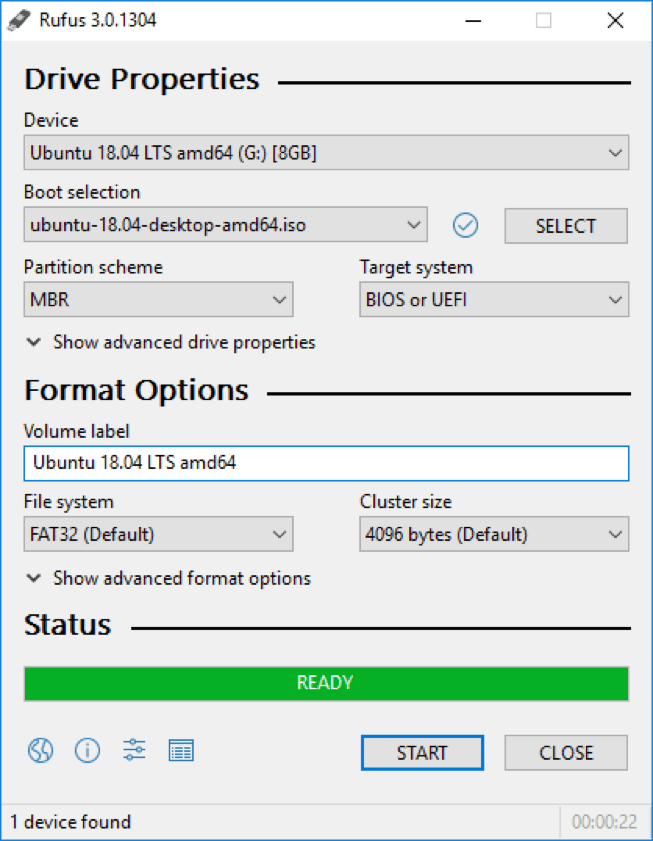
    Method 1: Burn image files to flash drive with Rufus

    Rufus is a free and effective tool that will flawlessly produce a bootable USB drive and remove all the information from the ISO file and copy the details to the USB. To make your computer bootable, you don’t require any separate files as all the important files will be available on the ISO image file.

    Step-1: Download Rufus tool on your computer and you don’t need to install it. It is ready-to-use software, all that you need to do is click twice on rufus.exe and the tool will start immediately.

    Step-2: Now, insert the USB into the computer to burn the ISO file. Press the drop down from the Device option and choose the flash drive name.

    Step-3: Use the default option for division system and target system form, Cluster Size, and File system and do it only if you know how to do, otherwise, just leave them just the way they are.

    Step-4: Enter your name on new VLS (Volume Label Section) and create a bootable disk, and now open ISO file to burn on the USB flash drive.

    Step-5: Press start once the settings are done and wait till the process is finished accurately. Once it is done you will get a “Done” message on the screen.


    Method-2: Burn IOS Image file to USB Drive via iSeepassword WizBurn

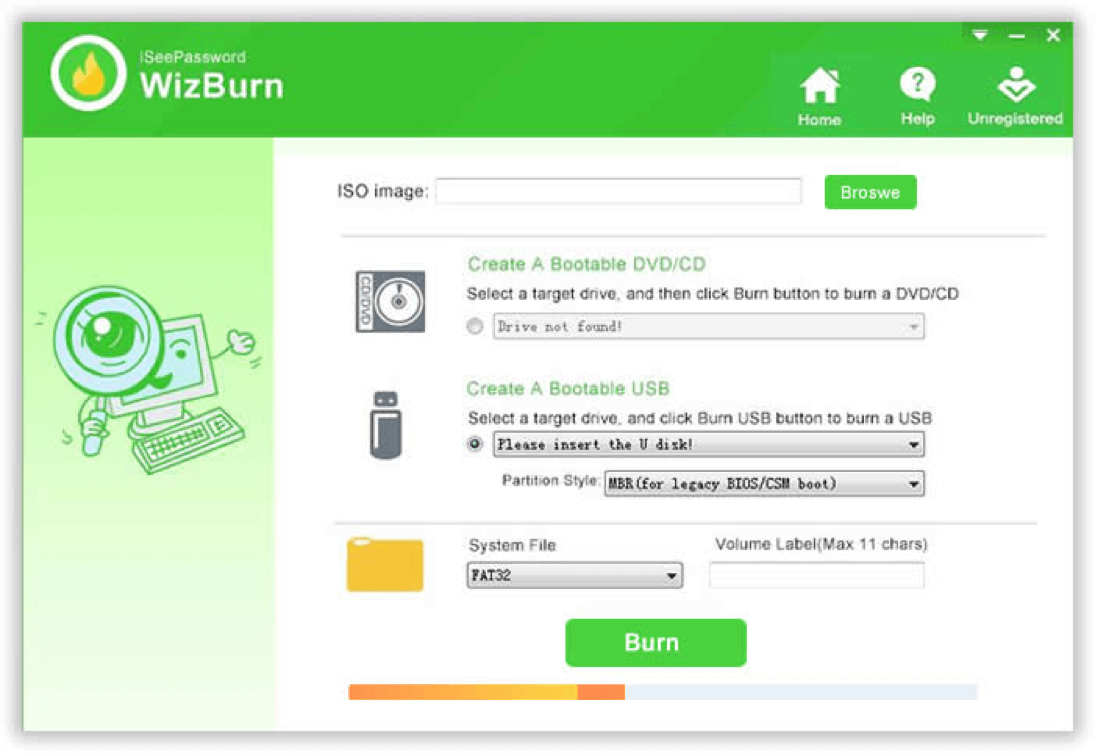
    iSeepassword WizBurn is a perfect tool that helps you to burn ISO image file to USB or DVD/CD with just one click. It’s a very easy program that offers powerful and effective results.  You can as well produce bootable Windows OS disks by burning the ISO image file of Windows using this software. It is considered the fastest program available on the internet and it even allows you to change the drive format to FAT, NTFS, FAT 32 quickly.

    Step-1: Download the soft on your computer and install it by getting the TOS of the program and run the program.

    Step-2: It is a very easy tool to use, just press on “Browse” and bring in your ISO file to program.

    Step-3:  Once you select the ISO image file, press ‘create a bootable disk’ option. Now, insert a USB flash drive into your computer. Press burn button to start the process. It will give you a warning message, and if you press Ok it will start the process.

    Step-4: Press “Burn” and in just a few minutes the process will finish, and your disk will be ready.


    Conclusion:

    ISO image files are significantly used to produce windows bootable disks and using iSeepassword WizBurn can help you do your job easy as the program is designed to burn the ISO image files to USB flash drive.  Also, the software allows you to extract any data from ISO files easily and flawlessly. I tried iSeepassword WizBurn before, it’s an amazing tool.

    Get more detailed information from here: https://www.iseepassword.com/win

    4 Top Reasons Why Clients Ask Web Designers to Revise Their Work

    You just busted your rear end off working on your client’s website. You did the final touches,  finalized the design elements, fixed a few bugs here and there — the whole works.

    You send the finished product to your client, maybe popping a bottle of wine to celebrate the occasion. A few hours later, the client emails you back to ask for a revision.

    Web designers, or at least most of them, are familiar with the above scenario all too well.

    It seems unfair, right? The client hired you, a professional web designer, to do, well, web design. It’s your bread and butter!

    But let’s hold up for a moment and see things from the client’s point of view — at least this once. After all, they should be more in touch with the site’s main objectives than you. It’s their site!

    So, in this blog post, we go over the major reasons why your page layouts and design are being rejected and what you can do to minimize revision requests.

    Are you ready? Dive right in.


    1. Objectives are Not Well-Defined

    There will always be clients who won’t give you a detailed account of how they want their website to look like.

    More often than not, it’s because they aren’t sure themselves, at least the first time around.

    Clients, however, have a habit of magically coming up with design ideas or suggestions while you’re already in the middle — or worse, the tail end — of your process.

    And then they ask you to revise your work, sometimes confronting you for not meeting their expectations, which were not established in the first place.

    It’s not a fun situation to be in.

    The best way to avoid this scenario, of course, is to make sure that the project’s goals and objectives are established and well-defined since day one.

    For instance, is it your client’s goal to get more subscribers? Or does he want to pique the interest of the brand’s target audience?

    Once these objectives are established, you will know which design elements, like CTA buttons, background images, and font styles, should be put on the page.

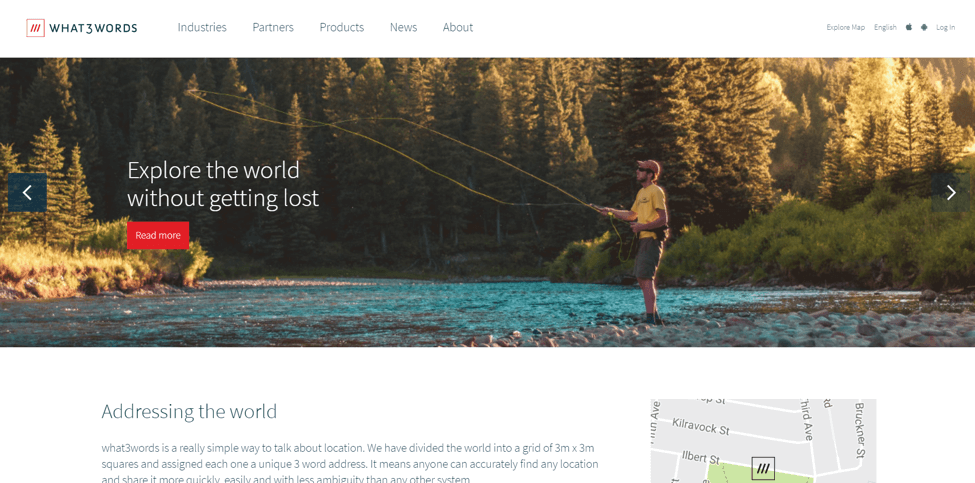
    Take for instance the web design work done on What3Words.com as shown below. The visuals alone make a huge impact, but it also directs your eyes to where they need to go.When your client knows that your creative decisions are aimed towards achieving their website’s goals and objectives, they’ll be predisposed to approve them in the future.
    Web designing 2

    When your client knows that your creative decisions are aimed towards achieving their website’s goals and objectives, they’ll be predisposed to approve them in the future.


    2. Lack of Communication

    If you’ve been doing web design long enough, chances are you’re more than familiar with the amount of work required to finish a full-scale web design project.

    From defining the project’s scope and wireframing to mapping out the site’s architecture and choosing the visual elements that go with it — the entire process can be rigorous and unwieldy.

    But here’s the point: even if the entire design process is going smoothly for you, that is never a guarantee that the client will like the final product.

    To ensure that there won’t be any misunderstandings in the future, you have to communicate with the client during each phase of the design process.

    Did you make a bold design choice that you feel will make the CTA button stand out? Tell your client about it.

    Do you think changing the color of the logo to a darker shade will serve to emphasize the brand’s aesthetic better? Yeah — you should tell your client about it as well.

    Constant communication ensures that you and your client are always on the same page, preventing differences and disagreements that may delay the project’s completion.


    If you and your client are communicating exclusively via email, it’s about time you use an alternative communication tool such as Skype. Using Skype is pretty much standard communication procedure in most client-contractor relationships.


    3. Your web design is not optimized for mobile

    The importance of mobile-friendliness on the web these days can’t be emphasized enough.

    According to Q4 2017 results released by Statista, 51 percent of global web traffic comes from mobile devices. Google also rolled out mobile-first indexing last March 2018.

    The point? If you’re designing web pages without mobile optimization in mind, you’re setting yourself and your client up for failure.

    That said, your client probably already knows that mobile optimization is a must, and will reject your desktop-only design as a result.

    There are two approaches to creating a mobile-friendly website. The first one involves creating a new and unique mobile website from scratch.

    There’s also the more popular option, which is to implement a responsive web design.

    Before picking one over the other, you have to bear in mind that each option has its own set of pros and cons.

    Creating a mobile-friendly design from scratch may offer more flexibility in terms of functionality. On the other hand, responsive design allows your website to scale and adapt accordingly to multiple devices.

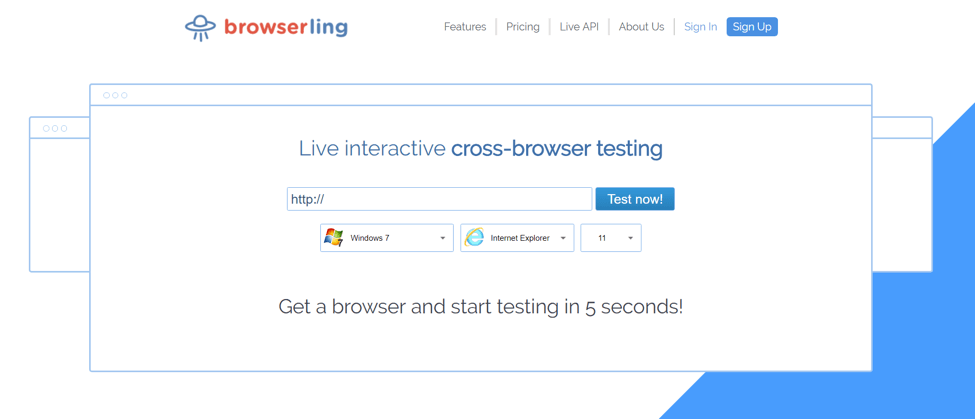
    Either way, using a cross-browser testing tool like Browserling should help you figure out what works or not based on your client’s specifications and project goals.
    Web designing 3


    4. The Design is Getting in the Way of User Experience

    Back in the day, web designers can get away with anything.

    Most clients don’t mind if their web pages are peppered with fancy flash animations or complex designs. If the website looks beautiful, then you have done your job well.

    But again, that was back in the day.

    These days, users prefer simplicity over complexity. Clients are aware of this, and while they do care about the site’s visual appeal, they want to make sure that it doesn’t get in the way of user experience.

    In this brave new world of engagement metrics and conversion funnels, you have to take into account user experience in the design process.

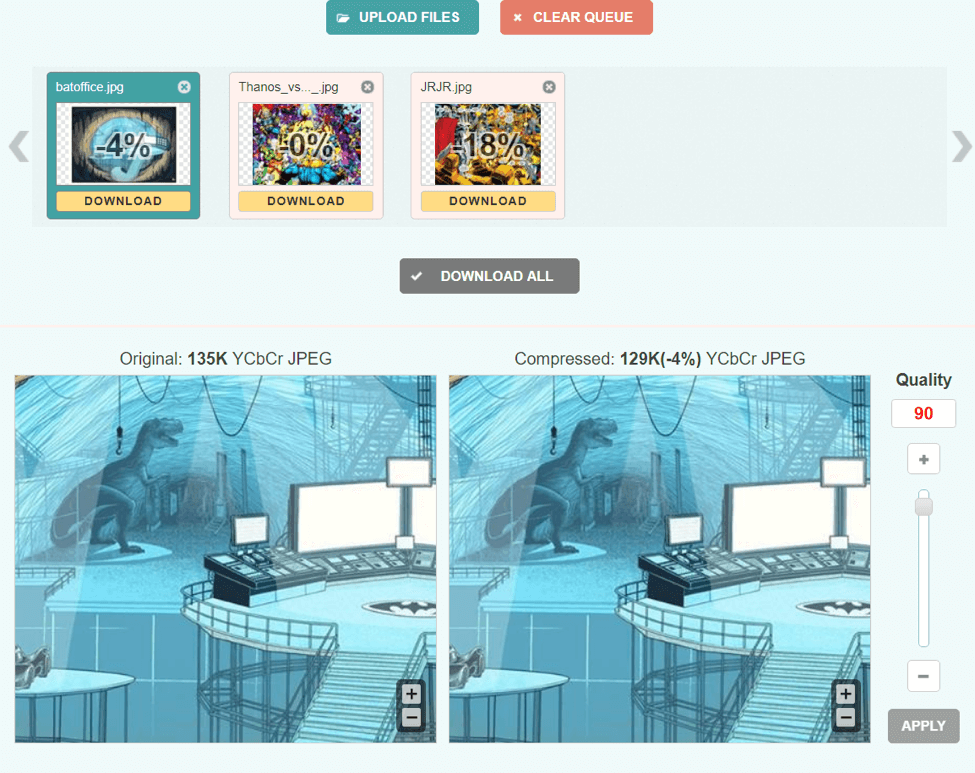
    For starters, it goes without saying that visuals with large files can slow down a website. As such, proper image optimization is in order.

    Using lossless compression tools like Optimizilla or Compressor.io, you can radically reduce the sizes of your image files without diminishing their quality.
    Web designing 4

    And while you’re at it, you’d do well to discuss with the client other factors that may negatively impact website’s performance and loading speed.

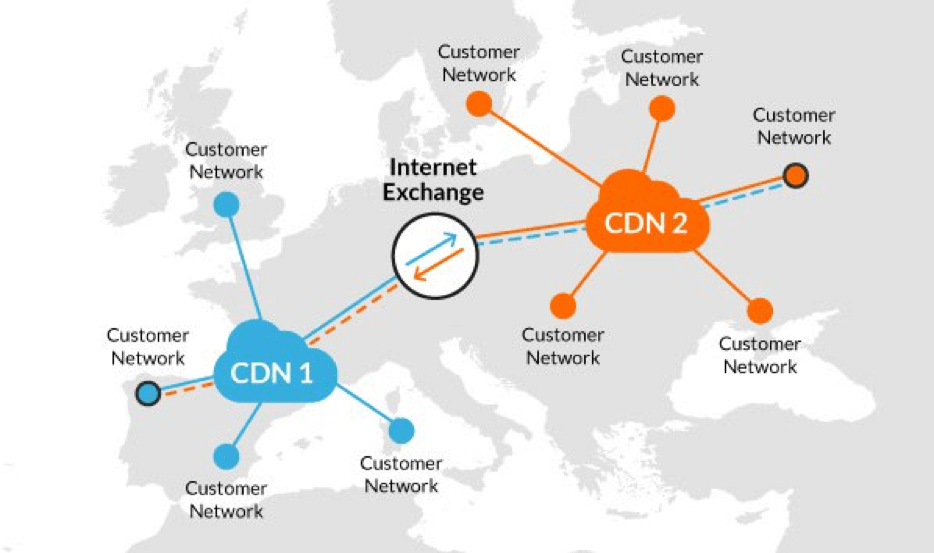
    For instance, if your client is also catering to an international audience, you can suggest that they use a CDN (content delivery network), which is a network of cache proxy servers located in different parts of the world.

    Because they’re widely distributed, these proxy servers store and transfer website data from the host server, reducing the loading time of your website regardless of the user’s location.
    Web designing 5


    Final Word

    Web design requires a lot of hard work, but you’ll find that the job becomes much easier if you and your client are able to see eye to eye in every aspect of the design process.

    Taking into account the problems mentioned above should go a long way to ensuring that your business relationship with your client becomes more productive in the future.

    Have you had your web design work rejected before? If so, how did you go about it? Tell us in the comments section below!


    Top Five Must Have Apps for an E-Biker

    In the past, you required a reserved pedaling computer to monitor your cycling. Currently, all you need is a smartphone and preferably a handlebar mount. Many cycling applications on the market can measure speed, elevation, distance, and also track your way on a map. Many of these apps have some form of shared tie-in, for competing or comparing with your comrades.

    Unlike cycling computers that count the wheel or pedal rotations to monitor the mileage, smartphone applications depend on GPS, which makes them easier to install and use. All you should do is to download the preferred app, and you are ready to start.

    However, they require mounting if you plan to watch your status as you cycle. Again, cell phones tend to have poor battery life, particularly when using turn-by-turn and GPS navigation. Also, these phones are not good at withstanding these elements.

    Nevertheless, if you like carrying your phone while biking, these applications are still the way to go. Here are some of the best biking apps with features that compute your distance, pace, duration and the calories burned to help you track your pedaling fitness.


    CycleMeter

    CycleMeter, presently available for iPad and iPhone, is an all-inclusive workout-monitoring app created for fitness fanatics and cyclists. This GPS-based application allows you to track your fitness movements such as skiing, skating, cycling, running, walking and many others. During your exercises, cycleMeter tracks your movements and progress, evaluating lots of data including distance, speed, elevation, location and time.

    Cyclemeter Cycling Tracker
    Cyclemeter Cycling Tracker
    Developer: Abvio Inc.
    Price: Free

    You can also decide to enable the audio cues through the 70 configurable report settings provided by the app regarding distance traveled, elevation, speed and time. Moreover, CycleMeter also features several customizable training plans for you to ascertain the best target, training, or interval schedule. This app also arranges workout data into various graphs, maps and statistics, allowing you to visualize and evaluate your progress.


    MapMyRide 

    MapMyRide is quite similar to CycleMeter app, but it mostly benefits from the online history of the parent company when it comes to route mapping software. This app is designed not only to track your rides, but it also monitors your weight, nutrition, and other things, but it can also take you wherever you want to go. MapMyRide works with any Bluetooth Smart sensor, and it provides you with a competitive choice for common cycling routes.

    The premium edition of this app offers you training plan, live tracking and more enhanced routing alternatives you can share with your friends and family members. Additionally, this version also channels the adverts you are stuck with on the app.


    Viewranger 

    Whereas Google Maps are essential for locating your way or roadies, this cycling app is reasonably vital for mountain bikers who love adventures. This app is free to download, and it offers you a free and extremely usable OpenCycle base chart of the whole world, to help you free yourself from any form of navigational uncertainty when the need arises.

    Additionally, you can purchase a comprehensive large-scale topographical charting for more than 20 countries across the globe. These maps are saved in your cell phone and it utilizes the GPS of your phone, meaning it doesn’t require a data connection or a signal to work.

    You can also design and share your routes in the application and also download other personalized tracks or explore the cycling around you. This app also comes with Buddy Beacon, a live tracking function that enables you to share your ride with some selected friends or the public, as well as checking who is around you.

    ‎ViewRanger: Hike, Bike or Walk
    ‎ViewRanger: Hike, Bike or Walk
    • ‎ViewRanger: Hike, Bike or Walk Screenshot
    • ‎ViewRanger: Hike, Bike or Walk Screenshot
    • ‎ViewRanger: Hike, Bike or Walk Screenshot
    • ‎ViewRanger: Hike, Bike or Walk Screenshot
    • ‎ViewRanger: Hike, Bike or Walk Screenshot
    • ‎ViewRanger: Hike, Bike or Walk Screenshot
    • ‎ViewRanger: Hike, Bike or Walk Screenshot
    • ‎ViewRanger: Hike, Bike or Walk Screenshot


    BikeBrain

    BikeBrain is probably the most comprehensive cycling app out there. This app is ideal for the habitual bikers who are looking for in-app picture uploads and GPS mapping to sports cyclers who are looking for training mode and heart rate monitoring features. Additionally, this app doesn’t require a reminder to keep at hand your previous cycling routes: it automatically stores your ride details and optimizes your battery’s life so that checking those routes will not drain your battery. This app is free, and it’s only available for iOS devices, and it is known for its consistency and credibility.


    Bike Hub

    This cycling app is a big win for the modern-day world where productivity is critical, and it helps you find the quickest possible cycling route from one point to another using both cycle paths and roads. Besides, to ensure that your safety is a priority, Bike Hub utilizes voice directions to inform you of any sudden shortcuts or upcoming turns.

    The app was not found in the store. 🙁

    4 Ways to Keep To Find Out What Your Blog Audience Want

    Great content converts, sells and also help in search engine optimization (SEO). Does it sound familiar? Well you may spend most of your time brainstorming some of the most irresistible topics for your blog yet the resultant post goes totally ignored or you decided to throw in some random ideas and the comments and shares go wild.

    Well let’s face it, you not a mind reader. If you are wondering on the topics your readers may be longing for you to write about, or what type of freebie will drive more subscribers? There is a way out to keep your audience engaged and always yearn to keep on checking on the new stuff you have posted.

    Luckily, I have to be honest with you. You only have averagely two seconds to convince your readers that your blog contains what they need. Mostly, everyone on the internet is looking for a solution to some particular problem. Once they land on your website or blog post, you need to offer them the content that will help get an answer to the question that they. And how do you ensure that your content if fresh, outstanding, unique and always to the point? Discussed herein are some of the ways that can help you keep your readers engaged and like your content.

    1. Free Surveys.

    Do you want to mine your reader’s minds and get insights on what they like? Well, if this is your strategy then you need to sign up for a free survey service. Listed below are some of the companies that can help get started.

    PollDaddy: They do not limit the number of questions or respondents you can have. However, if you would wish to export your results, then you will have to pay $200 per annum.

    Survey Monkey: This service is free for 10 questions and a maximum of 100 responses. Nonetheless, if you want to receive more response you can sign up a fee of $26 per month.

    KwikSurvey: Pretty cool to work with. They have a free option that does not limit the questions or response you receive. Besides, they allow export of the results.

    Conducting surveys are probably the easiest way to know what your readers are up to and what probably can stir them up.


    2. Answer Peoples Questions

    In marketing, this is one of the toughest things to do. Answering people’s questions through forums and communities allows them to trust your brand and finally, you’re content. If you get to think about it, that’s how most websites survive. If your content solves, helps and answers questions, then you are going to earn peoples trust. The trick here is to find out what your target audience wants. Here are some of the ways you can do this.


    Keyword research

    Performing a keyword research may sound old, wine gets better when it ages. Thus, this is a proven method that yield results. In your niche, you can perform a search for related keywords. As well, Google trends can inform you about the type of interests people have on a particular item. Getting this data is key to identifying what solutions to offer to your readers.


    Social Networks.

    There is nothing that can beat social network signals when it comes to personal expression. If you are not looking at the right places, social media is always diluted. Social networks can be one of the direct indications of user interest on a particular content idea. The only tussle you have as a marketer or blogger is to look for the right places. Most businesses use Facebook pages, Twitter, Google + and LinkedIn to share their content.


    3. Listen More

    Your listening skills are extremely important when it comes to satisfying the needs of your prospective and existing clients. Listening intently to your clients gives you a lot of advantages. Besides listening to the needs and wants of your clients, you can get a lot of potential and valuable information that can help you focus on satisfying your clients’ needs through the content you write.


    4. E-commerce

    Mostly, this method applies product focused markets. If you are running a website for top-notch products for example Knee crutches, Generating content that is unique and interesting and can solve visitor’s problems may be difficult. Nevertheless, to achieve this, you need to head over to places that the associated products are being sold like Amazon or eBay and check on the client’s reviews, general chat about the project and their reviews. Through these reviews, you can find some interesting suggestions and tips that are insightful about the product. This is a highly specific information that you can hardly find for free. After getting the information you can organize it into a great masterpiece of an article which will help your audience out! Bingo! Through this method, you have just scored a point.

     

    To wrap it all, if wear the audience shoes, then you probably understand that people talk about what they require. And when you answer this in your content, no matter the length, then it will have served the purpose of offering solution to your audience; which ultimately is the primary goal of writing content.

    4 Common WordPress Errors and How to Deal with Them

    One of the best things about WordPress is that it’s very easy to use. You don’t need to know any code to create and manage a website using this platform. That’s one of the main reasons why it powers 30% of the Internet. However, even this amazing platform isn’t perfect and an occasional error does happen. This list of most common WordPress errors and solutions will help you deal with these issues fast, regardless of your coding skill level.


    4 Most Common WordPress Errors and Solutions to Them

    1. White Screen of Death

    The white screen can appear as a result of several problems. The most common are:

    • Plugin incompatibility (might appear after a plugin update).
      The simplest solution is to disable all your plugins via Administration Screens. Then turn them on one by one to find the piece of software causing the problem and replace it.
    • Theme issues (including missing or renamed theme directory).
      The theme is most likely the cause if the white screen pops up right after you changed it. To fix this error, set the default WordPress theme using Administrator Screens. If the white screen prevents you from using it, access the website using FTP (/wp-content/theme/folder) and rename the active theme folder to WordPress Twenty Sixteen Theme. The directory issues often appear after you’ve just cloned your database and it’s the original that had the necessary directory missing. You’ll be able to see WordPress error ‘The theme directory (name) does not exist’ if you log in as an admin. Renaming the directory or switching themes should solve the issue.

    The white screen of death can be terrifying, especially for a beginner, but this problem is actually very easy to fix. Doing this is so fast, you won’t have any delays when starting a blog. WordPress allows you to get one up and running within 15 minutes.


    2. Internal Server Error

    Like the majority of the common WordPress Errors, the internal server error can occur for different reasons. Theme and plugin issues might cause it, and you can resolve them in the same way as described above.

    However, this particular problem is more often a result of .htaccess file issues. To fix it you should access the website using FTP and rename the file to .htaccess_old. Reset the permalinks when the website starts working again so the program can generate a new .htaccess file.

    Note that sometimes you might experience this error because of limited PHP Memory. Increase the limit manually to see if it helps.


    3. Connection Timed Out

    The connection timed out error occurs if your hosting can’t handle the load coming from your website. The website itself might be the problem if you have many plugins and ‘heavy’ content. But if you use poor-quality shared hosting, the issue might appear because you’ve been cheated out of the promised server space.

    If disabling plugins and switching to default and minimal graphic settings doesn’t help, contact the host. Be sure to check and if necessary increase your memory limit (wp-config.php) and execution time (php.ini).


    4. Nothing Happens after Changes

    This is one of the most common WordPress errors and it’s not really an error. The issue appears when you make some changes to your website (usually small edits) but can’t see them in the browser.

    You only need to clean out your cache and try again. Sometimes something as simple as closing the website and reopening it again can solve the issue.

    3 Efficient Ways on How To Market Your Business Online

    You may not have lots of cash to spare for your marketing ads, but that doesn’t mean that you have limited ways to promote your brand out there. In fact, there are a lot of ways to make your brand famous or to get it well known. When starting a business, it will always be a struggle on how to cope up with the finances.

    A lot of questions are running through your mind like, how do you get this done? Or Is your business going to be successful when you have a limited budget and doesn’t have enough money to promote your brand?

    Developing a business isn’t as easy as it looks, it’s an ongoing challenge or a test that you always have to maintain and conquer. Whether it’s your first time, or you have been in the business industry for a long time, these online marketing strategies will surely help boost your business.


    Make Use Of the Three Local Listing Services

    Google places, Microsoft’s Bing, and Yahoo! Local are three significant local listing services. Registering in one of these local services will help you and your business become accessible. Using Google places makes your business easy to find as it shows up on Google Maps.

    The only thing you have to do is to register and get your business verified through their confirmation process without any expense. Yahoo! as everybody knows is one of the biggest and most popular search engines online with an extensive database for a business called Yahoo! Local.

    Registration is free and certainly won’t take up much of your time to set it up. Also, Microsoft’s Bing has similar services like Yahoo! and Google.


    Online Reviews

    Promotions of businesses nowadays are usually found in online websites. Business owners are starting to rely on the internet to market their brands. There is a saying that “Word of mouth has gone digital,” this means that online marketing strategies are becoming essential for promoting a business.

    Make your website for your company or brand and market your products online. In this way, people can give reviews about your brand and products. Whether it’s positive or negative, you can always adapt and make your business more noticeable.

    Testimonials and comments on your website make you a better businessman, and if you want to make good use of your site, you can always connect it to Google and other online directories. These directories can help you increase your business’ exposure.

    Still, make sure that you attach a link on your website to let your customers know that their reviews are much appreciated.


    Social Media

    Social media has always been a big help for business owners. In this way, promotion is becoming more efficient. Social media isn’t just a tool for exposure, but it is also a tool for marketing. These websites and applications are necessary for businesses.

    In fact, this is one of the most efficient means for business promotions. In any way, social media will always be one of the keys to your success. It’s an excellent way to start up your business.


    Takeaway

    There are a lot of means for promoting a business. You can have it televised, have it posted using tarpaulins and stickers, or even distributing business cards. If you want it on sticker designs, you can visit sticker printing UK. It’s an online website for sticker printing services.

    If you just started your business, these three online marketing strategy will surely help you gain the exposure you wanted.

    How to Convert Visitors into Clients For Your Magento Store?

    Are you getting enough visitors for your Magento store?

    How many of them are converted into your customers?

    There may be a case that you couldn’t transform those visitors to your clients, just because of improper Magento store development strategies you have used. Only having an adequate number of visitors, would not help you to achieve a considerable success for your business that you want. The essential thing is how many of them tend to become your customers and how much revenue you are getting from your store.

    When you opt for Magento website development there are several important aspects that are needed to be considered so as to get some lucrative results for your Magento store.

    For your better convenience, here I am depicting some most effective strategies that will help you to convert your visitors into customers and get substantial revenue.


    Build Highly Secure Online Store

    Your online store is a center of huge confidential information, such as a customer’s address, credit card number, and lots more personal information. Customers are more likely to purchase from the online stores having more security features. Thus, there should be high-security features to protect all the customer information from hackers or other malicious users.  You must secure your Magento store with SSL certificate, and ensure to have solid backups and updated version of security techniques.

    Create Imposing Call To Actions 

    The design of your Magento store is the foremost thing to drive better sale and visitors. An imposing design makes people stay on your Magento website for a long time and explore different items. If any visitor finds a product matching to his/her requirements, they hardly purchase it immediately. This requires you to have impressive and powerful Call To Actions like “Buy Now” to make customers take a quick decision of purchasing.  This will reduce the difficulty of customers to place their order.


    Offer Loyalty Programs

    For any eCommerce store discounts and offers works best to attract customers and increase the sale, it is the best way to convert your visitors to customers. People love to purchase from stores having interesting offers.

    You can facilitate visitors to earn reward points whenever they log in, register or purchase on your store. After accomplishing any of these actions visitors will get points redeemed into their accounts. This approach will help you to turn visitors into potential customers. Further, you can also offer reward points for different actions like purchasing items in bulk, buying specific products, subscriptions, Google Likes, etc.


    Make The Store Mobile-Friendly

    The number of Smartphone buyers and users is increasing day by day and most of these users prefer shopping from their Smartphones. In order to drive these all mobile shoppers to your Magento store, you must ask your Magento website development team to make your website mobile friendly. Having a mobile responsive site would help you to reach more people and convert them into your potential customers.

    Impressive Product Description

    You must not get confused between the terms like notions of product information and description while adding products to your online store. The product information must be clear and brief since it helps customers to decide whether it is appropriate for them or not. The product description should be creative and include few catchy phrases. Decorating the product information page still, may not be a fine idea. It might work on only some visitor however if you want to increase your profits, only give information that can be confirmed from outside sources as well.


    Create a Blog

    Blog content helps you to impress the visitors and eventually make them purchase your products or services. In order to better fulfill your efforts of Magento store development, you should put some extra efforts to create a blog describing the customer needs and importance of your products. Your content should be creative, original, entertaining, educational, and informative.  You can also attract visitors from blogging websites by placing links to your products.


    Optimize The Checkout Process

    Most of the customers abandon the purchasing due to the lengthy and tedious checkout process. Multiple checkout navigations annoy customers, thus it’s better to have one-page checkout system. In order to design a convenient checkout process, you must add all checkout steps on only one page. For a marketplace, you can utilize the Single Seller Checkout rule for a particular seller.


    Conclusion

    A well-designed Magento store not only drives visitors to your store but also helps to convert them into potential buyers. What you need is converse with your Magento website development company to implement all the above strategies with your Magento store. By following all these tips you can have cost-effective outcomes from your store and achieve huge customer base. If you are about to build your own Magento store with such strategies then contact us, since we have expert Magento developers who will help you out with the best solution.